1
BASIC OPERATION
■ Setting the Beep function
These instructions are for the non-display type transceivers.
The Beep function can be turned ON or OFF. When it is OFF,
the channel announcement is also turned OFF.
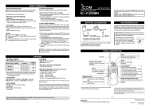
[ROTARY SELECTOR]
[VOL]
NOTE:
You should turn ON the Beep function when you set the
Beep level, the Ringer level, the microphone gain, and the
squelch level.
qqRotate [VOL] to turn the transceiver power OFF.
wwSet [ROTARY SELECTOR] to any channel other than
Channel 16.
eeWhile holding down [Lower], rotate [VOL] to turn ON the
power to enter the Beep level adjustment mode.
rrPush [Lower] to turn the Beep function ON or OFF.
• When a beep sounds after pushing [Lower], the Beep function
is ON. When no beep sounds after pushing [Lower], the Beep
function is OFF.
• The transceiver stores the setting every time you change it.
• If desired, push [Upper] to adjust the Beep level. See page 17
for details.
ttRotate [VOL] to turn OFF the power to exit the Beep level
adjustment mode.
[Upper]
[Lower]
2
1
2
3
4
5
6
7
8
9
10
11
12
13
14
15
16
16