1
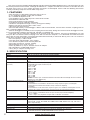
Calibrator
Datalogger Sampling Time Setting
range
Memory Card
Advanced setting
Over Indication
Data Hold
Memory Recall
Sampling Time of Display
Data Output
Power off
Operating Temperature
Operating Humidity
Power Supply
Power Current
Weight
Dimension
Accessories Included
Optional Accessories
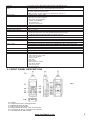
B & K (Bruel & kjaer), MULTIFUNCTION ACOUSTIC CALIBRATOR 4226.
Auto: 1 second to 3600 seconds
@ Sampling time can set to 1 second, but memory data may loss.
Manual: Push the data logger button once will save data one time.
@ Set the sampling time to 0 second.
@ Manual mode, can also select the 1 to 99 position (Location) no.
SD memory card. 1 GB to 16 GB.
* Set clock time (Year/Month/Date, setting Hour/Minute/Second)
* Decimal point of SD card setting
* Auto power OFF management
* Set beep Sound ON/OFF
* Set sampling time
* SD memory card Format
Show « - - - - ".
Freeze the display reading
Maximum & Minimum value
Approx. 1 second.
RS-232/USB PC computer interface.
* Connect the optional RS-232 cable UPCB-02 will get the RS-232 plug.
* Connect the optional USB cable USB-01 will get the USB plug.
Auto shut off saves battery life or manual off by push button.
0 to 50 °С.
Less than 85% R.H.
* Alkaline or heavy duty DC 1.5V battery (UM3, AA) x 6 PCs, or equivalent.
* DC 9V adapter input. ( AC/DC power adapter is optional ).
Normal operation (w/o SD card save data and LCD Backlight is OFF) : Approx. DC 12mA.
When SD card save the data but and LCD Backlight is OFF: Approx. DC 51mA.
* If LCD backlight on, the power consumption will increase approx. 30mA.
489g/1.08lb.
245×68×45mm. ( 9.6×2.7×1.9in).
Instruction manual........................1 PC
* Sound calibrator (94 dB).
* Sound calibrator (94/114 dB).
* Sound wind shield ball,
* SD Card (2 GB)
* USB cable.
* RS232 cable.
* Data Acquisition software.
* AC to DC 9V adapter.
* Soft carrying case.
* Hard carrying case.
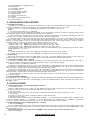
3. FRONT PANEL DESCRIPTION
Fig. 1
3-1
3-2
3-3
3-4
3-5
3-6
3-7
Display.
Power Button (ESC, Backlight Button)
Hold Button (Next Button)
REC Button (Enter Button)
Range Button (▲ Button, Time Check Button)
A/C Button (▼ Button, Sampling check Button)
Fast/Slow Button (SET Button)
www.tmatlantic.com
3