1
FLAT PAR TRI18XS
Operating Instructions
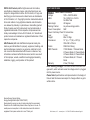
LED Display On/Off:
To set the LED display to turn off after 10 seconds, press the MODE button until “don” is displayed, press the UP button to display “doff”. Now
the display will disappear after 10s. Press any button to turn the display
on again. Be advised though that the display will turn off automatically
after 10 seconds.
To set the display press the MODE button until “dXX” is displayed. Use
the UP or DOWN buttons to select either:
“don” = LED display on at all times.
“doFF” = LED display shuts off after 10 seconds.
LED Display Inversion:
FLAT PAR TRI18XS
Channel
1
2
3
4
5
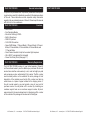
Follow these instructions to flip the display 180° so that the display can
be read upside down.
1. Plug the fixture in and press the MODE button until “dXX” is displayed. “XX” represents either “on” or “oFF”.
2. Press the SET UP button until “Stnd” is displayed.
3. Press the UP or DOWN buttons to reverse the display 180°.
6
Operating Modes:
The FLAT PAR TRI18XS has five operating modes:
• Sound-Active mode - The unit will react to sound, chasing through the
built in programs.
• Static Color Mode - There are 7 colors to choose from.
• Auto Mode - There are 3 Auto Modes to choose from.
• RGB Mode - Choose one of the three colors to remain static or
adjust the intensity of each color to make your desired color.
• DMX control mode - This function will allow you to control each
individual fixtures traits with a standard DMX 512 controller.
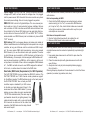
Sound Active Mode:
In this mode the FLAT PAR TRI18XS will react to sound, and chase
through the different colors.
1. Plug the fixture in and press the MODE button until “So-X” is dis-
played. “X” represents the sound active mode (1-8) currently dis-
played.
2. The fixture will now change via sound.
3. Press the SET UP button to adjust the sound sensitivity. “SJ-X” should be displayed. Use the UP or DOWN buttons to adjust the ADJ Products, LLC - www.adj.com - FLAT PAR TRI18XS User Manual Page 7
7
Value
1 - 255
1 - 255
1 - 255
1 - 255
0 - 15
16 - 255
0 - 127
128 - 135
136 - 143
144 - 151
152 - 159
160 - 167
168 - 175
176 - 183
184 - 191
192 - 199
200 - 207
208 - 215
216 - 223
224 - 231
232 - 239
240 - 247
248 - 255
1 - 255
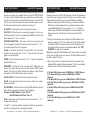
7 Channel - DMX Values & Functions
Function
RED
0% - 100%
GREEN
0% - 100%
BLUE
0% - 100%
COLOR MACROS
(See 1 Channel DMX mode for colors)
STROBING/PROGRAM SPEED
NOTHING
STROBING/SPEED CONTROL
SLOW - FAST
PROGRAMS
OFF
COLOR DREAMING 1
COLOR DREAMING 2
COLOR DREAMING 3
COLOR DREAMING 4
COLOR DREAMING 5
COLOR DREAMING 6
COLOR DREAMING 7
COLOR DREAMING 8
COLOR CHANGE 1
COLOR CHANGE 2
COLOR CHANGE 3
COLOR CHANGE 4
COLOR CHANGE 5
COLOR CHANGE 6
SOUND ACTIVE MODE 1
SOUND ACTIVE MODE 2
MASTER DIMMER
0% - 100%
Channels 1, 2, and 3 will not work, when Channel 4 is being used.
When using Channel 6 values 128-239, Channel 5 will control the speed of the programs.
When using Channel 6 values 240-255, Channel 5 will control the sound sensitivity.
ADJ Products, LLC - www.adj.com - FLAT PAR TRI18XS User Manual Page 16