1
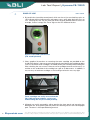
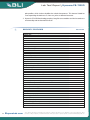
Lab Test Report BUYERS LAB BUYERS LAB Ease of Use Kyocera FS-1120D VERY GOOD BLI technicians found the control panel, which consists of just two hard keys plus an LED indicator dial to indicate toner and paper status, to be quite basic but easy to use. Pressing the “Go” key for more than three seconds provides device status; for example, if toner is empty the “Toner” light on the LED indicator flashes. Kyocera FS-1120D Control Panel (U.S. model pictured) Clear, graphical instructions on removing the toner cartridge are provided on the inside of the device’s front cover and a clear plastic panel above the cartridge enables users to see which toner cartridge is installed (and its part number) without lifting the lid or checking the user manual. However, toner cartridge removal can be messy as residue on the underside of the cartridge can spill on to documents. In addition, it was not easy to load new cartridges as the locking mechanism was very tight. Toner cartridges are easily accessed on the FS-1120D and part numbers can be read without lifting the lid. (U.S. model pictured) Misfeeds are easily removed by either opening the front panel and removing the developer unit, or by opening the rear panel, thus allowing access to the entire paper path. The drum is not exposed during removal. 9 BuyersLab.com © 2010Buyers Buyers Laboratory Inc. Duplication in any manner illegal and forbidden ©2010 Laboratory Inc. Reproduced by permission of Buyers isLaboratory Inc. strictly Any duplication of without this reportwritten withoutpermission the written from Buyers Laboratory. Violators will and be violators prosecuted. purchase reprints, reprints, contactcontact BLI at permission of Buyers Laboratory, is unlawful will be To prosecuted. To purchase [email protected]. at [email protected].