1
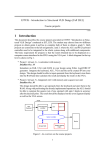
Figure 3: Block diagram of the VGA controller reference design.
FPGAs, which may be generated from Xilinx ISE environment with the use of IP
core generator. The way of generating and properly configuring the Xilinx DCM
core is shown as a video clip, placed under:
“S:\tutorials\ise_clock_rom.wmv”,
B) Picture ROM: This is the place where the welcome message is stored. The message
is saved as a bitmap image and is stored inside FPGA’s data ROMs. Data ROMs
may be generated with the use of Xilinx IP cores, however, the input data files have
to be loaded in a “.coe” file format during the ROM generation. This may be accomplished by using the software provided - “imageConverter”, placed under:
“S:\course_projects\imageConverter\”.
A bitmap image conversion is shown in a video clip “image_converter.wmv”, and
ROM generation is shown in “ise_clock_rom.wmv”, both placed under:
“S:\tutorials\".
C) VGA controller: This module contains two binary counters, used for tracking on
the horizontal video pixels and vertical video lines, respectively. Horizontal and
vertical synchronization pulses for the VGA display are generated based on the
counters, and an additional blank signal is provided as an output to indicate the
VGA blanking time interval.
D) Controller: The system controller keeps tracking on the current VGA pixel position
by using the horizontal and vertical counter values provided from the VGA controller. This module also controls the address of picture ROM, and reads out the
image data at the desired pixel locations. 3-bit color codes with one bit each for
red, green, and blue are sent to the VGA display, resulting in having 8 different
color tones.
Notice that physical pins mappings of the system I/O signals on an FPGA are accom4