1
This document is the property of FABRICOM SYSTEMES D'ASSEMBLAGE and may not
be reproduced or disclosed without their authorisation
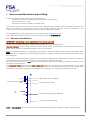
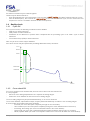
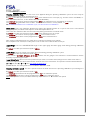
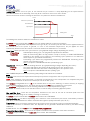
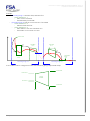
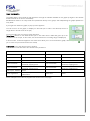
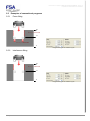
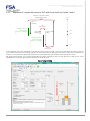
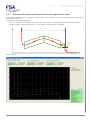
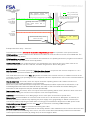
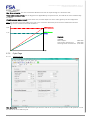
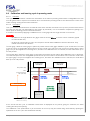
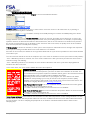
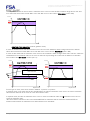
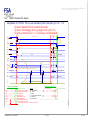
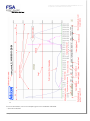
Holding time: At the end of a cycle, at the moment the pin comes to a stop depending on the speed and the
mechanical stiffness of the assembly, there may be an "overshoot" of the force due to inertia.
Two forces are then used for checking the final force: the peak force and the residual force.
Force
Peak force (overshoot)
Residual force
Trip setpoint
Holding time
Time
The holding time therefore allows the mechanics to "relax".
By Default, the pre-entered value is 0.00. 0.5 secs is usually sufficient to relax the mechanics.
The maximum programmable value depends on the type of pin, the overall cycle time and the force applied relative to
the nominal force of the press. In general, 1.5 secs is the maximum. Beyond this, the pin applies the force
continuously and the motor will overheat. Time must therefore be allowed for it to cool down.
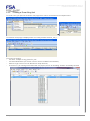
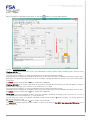
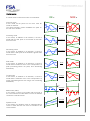
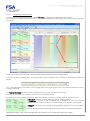
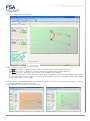
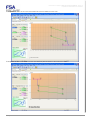
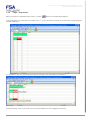
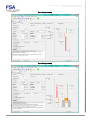
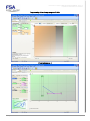
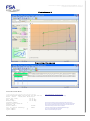
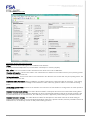
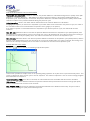
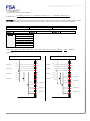
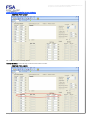
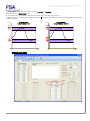
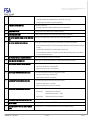
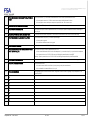
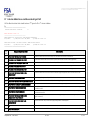
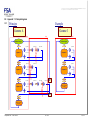
Cycle Type: Allows you select the cycle time from: (the graphical design change depending the choice)
- Press-Fitting:
Standard press-fitting cycle. The programmed positions are absolute.
- Acquisition:
Same as Press-Fitting BUT the trip position is kept in memory to enable DIFFERENTIAL
CHECKS to be carried out on position in the following cycles (whether or not within the
same sequence) (see advanced functions)
- Positioning:
Press-fitting cycle where ALL programmed positions are DISTANCES. Positioning is then
relative to the preceding cycle.
Note: A sequence CAN NEVER start with a positioning cycle.
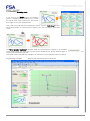
Execution dir.: Allows you select the working direction: (the graphical design change depending the choice)
- Pressing:
The press shaft will exit and views a shaft pressing force as a "positive" force.
- Pulling:
The press shaft will return and views a shaft pulling force as a "positive" force.
Note: A sequence CAN NEVER start with a pulling cycle.
Note: FABRICOM pins work both in pressing and pulling mode without force limitation.
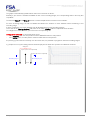
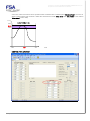
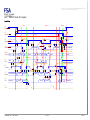
Trip force: This is the Force setpoint which will stop the press if the trip position has not yet been reached.
NEW : If the checkbox « Force Increment » is checked, the entered force here corresponds to a complementary force
that the press will add to the last force reached (the one of the last cycle).
The minimum configurable force is 1% of the nominal force for the press. Warning, to ensure accuracy in stopping
under force and reading the force, this value must be less than 10% of the nominal force of the press.
The maximum configurable force is the Pressing calibration force (see Specifications page).
WARNING :In traction mode, this is that value which is used as safety force during approach phase.
Max. and Min. force: These are the acceptance tolerances of the force at the end of execution (Peak force OR
Residual force depending on the "Quality checking on" selection).
By Default, the pre-entered value is 0.0 daN which means: NO CHECKING
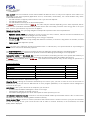
Quality checking on: see above. Depending on the selection. in the results block (see section "Journal 232"), either the
Peak force, or the Residual force will be monitored with regard to quality information (OK, TB, TL).
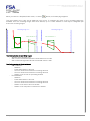
Trip position: This is the Position setpoint which will stop the press if the trip force was not reached beforehand.
There is no minimum or maximum value, this depends on the geometric identification learnt by the MVAT during
calibration.
PLEASE NOTE: The value 0.000 MEANS "Position NOT programmed"
Trip position Max. and Min.: These are the acceptance tolerances for the position at the end of execution.
By Default, the pre-entered value is 0.000 mm which means: NO CHECKING
Rhapsodie.net – User Guide
2013-09
27/130