1
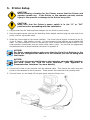
6. Control Panel
General Description and Operation
Feed Key
Pressing the Feed key will cause the Printer to advance the media (according to media type) to a
specified stop position. If the Printer is loaded with continuous media the Printer will feed the media
out a certain length. If the Printer is loaded with labels with gaps or black marks, the Printer will
advance one label at a time. If the label is not sent out in a correct position the sensor must be
calibrated. Follow the instructions for Sensor Calibration in the Maintenance and Adjustment section
of this manual.
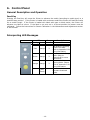
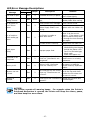
Interpreting LED Messages
LED
Ready Status
Green
Beep
Description
1
Normal
The Printer is printing
a Self-Test Label.
Refer to Appendix B for
more information.
The Printer is in Dump
Mode. Refer to
Appendix B for more
information.
Printer is in AutoSensing Mode. Please
refer to Appendix C for
more information.
The Printer is in
firmware download
mode.
Red
Orange
3
Green
Orange
3
Orange Orange
3
Red
(Flash)
- 10 -