1
Sensaphone® Model 400 User’s Manual
NOTE
The proximity of the audible alarm to the microphone
is extremely important.
Normally, the Model 400 and the audible alarm must be in
the same room. The maximum distance can vary considerably
depending on the alarm, the acoustics, and the size of the room.
During an alarm dial-out, the microphone allows four-second
intervals to listen-in to sounds at the Model 400’s location.
When calling for a Status Report, the microphone permits
listening to on-site sounds for a programmed time interval.
2.9 Alert Zones
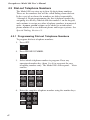
Open the input/output wiring door located above the keypad.
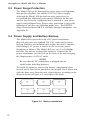
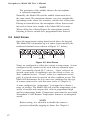
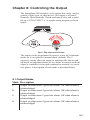
The Model 400 can monitor up to 4 zones (represented by the
numbered terminal screws shown in Figure 2-5, below).
1
C
2
C
3
C
4
C
ZONES
Figure 2-5. Alert Zones
Zones are configured as either dry contact or temperature. A zone
configured as dry contact can be used with any normally open
(N.O.) or normally closed (N.C.) device. “Open” refers to an
opened circuit path; if conditions cause the circuit to close, an
alert condition occurs. “Closed” refers to a continuous circuit
path; if a closed circuit is opened, an alert condition occurs. The
Model 400 determines the way zones are configured by the type
of sensor connected to each alert zone (refer to Chapter 5.)
A zone configured as “temperature” is designed to evaluate a
range of settings. The Model 400 will read the temperature at the
sensor’s location and compare that value to programmed high
and low temperature limits. Temperature zones must be used with
Sensaphone’s 2.8K Remote Temperature Sensor or weatherproof
sensor.
NOTE
Before wiring, it is advisable to disable the zones to
prevent accidentally tripping an alarm. See Chapter 5.
27