1
SECTION 6 - TROUBLE SHOOTING
pickering
SECTION 6 - TROUBLESHOOTING
Installation Problems
The Plug & Play functionality of Pickering switch cards generally ensures trouble-free installation.
If you do experience any installation problems you should first ensure that all cards are properly seated in their slots.
Improperly mated cards may go undetected by the operating system, or may be detected as a card of an unknown
type. They can also cause the computer to freeze at various stages in the boot sequence.
If your system employs MXI-3 you should check the integrity of all MXI-3 links. When the system is powered up, and
during Windows start-up, you should expect to see periodic activity on the MXI-3 RX/TX (yellow) indicators, clearing
to leave only the PWR/LNK (green) LEDs illuminated. The RX/TX indicators should show activity when you attempt
to access a card.
Diagnostic Utility
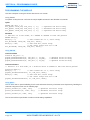
The Pickering Diagnostic Utility (accessible through the Programs>>Pickering>>PXI Utilities menu) generates a
diagnostic report of the system’s PCI configuration, highlighting any potential configuration problems. Specific details
of all installed Pickering switch cards are included. All the installed Pickering switch cards should be listed in the
“Pilpxi information” section - if one or more cards is missing it may be possible to determine the reason by referring to
the PCI configuration dump contained in the report, but interpretation of this information is far from straightforward,
and the best course is to contact Pickering support: [email protected], if possible including a copy of the
diagnostic report.
In the “VISA information” section, if VISA is not installed it’s absence will be reported. This does not affect operation
using the Direct I/O driver, and is not a problem unless you wish to use VISA. VISA is a component of National
Instruments LabWindows/CVI and LabVIEW, or is available as a standalone environment.
If VISA is present and is of a sufficiently recent version, the section “Pipx40 information” should present a listing
similar to “Pilpxi information”.
Please note that the Diagnostic Utility cannot access cards if they are currently opened by some other application,
such as the Test Panels or Terminal Monitor.
HIGH POWER Relay Module 40-170
Page 6.1