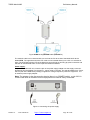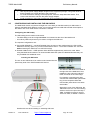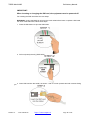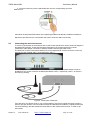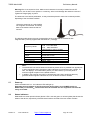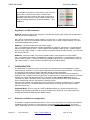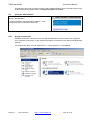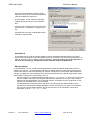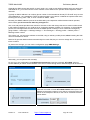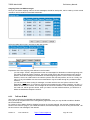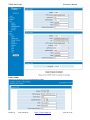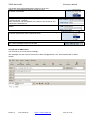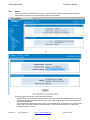
1
TOPEX MobiLinkIP Preliminary Manual TOPEX MobiLink IP 2G/3G+ VoIP-2-Mobile Gateway With Web Interface User Manual Ver. Mobilink-IP-1.1.39-C2O-SFX 2010 TOPEX S.A. +4 021.408.39.00 http://www.topex.ro Page 1 of 106 TOPEX MobiLinkIP Preliminary Manual Thank you for purchasing the TOPEX MobiLinkIP product and congratulation for your wise choice. MobiLinkIP has the following features: • VoIp-2- Mobile interface Interfaces between Voice over IP and two modules for GSM or 3G mobile networks • Dual Mobile for LCR It uses two cellular modems (synchronous) to automatically select the network with the best price for the call coverage in the operating area. • Ease of Use Web based configuration interface. No additional programs are required. • SMS capabilities You may send and receive SMS over the GSM modules from the Web interface. • SMS-2-Mail and Mail-2- SMS Performs conversion from/to e-mail messages into SMS • Dual Flash Memory For enhanced reliability, the embedded system uses a dual Flash memory. One flash circuit is write-protected, being dedicated for the operating system (kernel). The other flash circuit is for the applications, which can be easily updated, upgraded or enhanced. • Easy Firmware Updating Automatic update process using the web configuration interface. • Highly versatile It can be used together with an IP-PBX, for SIP subscribers. It may be also used as standalone, with a soft-phone or hardware IP phone. • Multiple mobile networks and standards supported The embedded modems are multi-mode devices for GSM/3G networks also multi-band. This way one may use any mobile network available in the area: from classic GSM (2G) in the 800/900/1800 MHz frequency bands, up to 3G on 2100 MHz. • Simple installation and operation Its installation is simple; just insert the SIM cards and plug in the cables (Ethernet connection, external antennas, and power adapter). TOPEX S.A. +4 021.408.39.00 http://www.topex.ro Page 2 of 106 TOPEX MobiLinkIP Preliminary Manual WEEE Directive Compliance This symbol applied on the product or on its packaging means that this product fulfils the WEEE Directive. The product shall not be recycled as household waste; it will be disposed separately as sorted waste. At the end of its life it will be given to a specialized recycle firm. ! Please do not dispose of the TOPEX product as unsorted waste (household waste), recycle it to protect the environment. Separate the packages according to waste disposal options and sort it for recycling. WEEE Directive For supplementary information contact us to: Phone: +4021 408.39.00 or www.topex.ro TOPEX S.A. +4 021.408.39.00 http://www.topex.ro Page 3 of 106 TOPEX MobiLinkIP Preliminary Manual Contents 1. INTRODUCTION .................................................................................................................6 2. PACKAGE CONTENT ........................................................................................................9 3. MobiLink IP FEATURES ..................................................................................................10 4. IDENTIFICATION ..............................................................................................................11 4.1 LABELS AND IDENTIFICATORS...................................................................................11 4.2 SIGNIFICANCE OF LABELS ..........................................................................................11 4.3 SOFTWARE INFORMATION ..........................................................................................14 5. INSTALLATION .................................................................................................................15 5.1 ESTABLISHING THE BEST LOCATION ......................................................................15 5.2 MOUNTING (HARDWARE INSTALLATION) ...............................................................16 5.3 IDENTIFICATION OF CONNECTORS..........................................................................17 5.4 CONNECTING THE DATA CABLES .............................................................................17 5.5 CONFIGURING AND INSTALLING THE SIM CARDS...............................................19 5.6 Connecting the external antennas ..................................................................................21 5.7 Power up.............................................................................................................................22 5.8 Status indicators ................................................................................................................22 6. CONFIGURATION ............................................................................................................23 6.1 Required conditions for configuration.............................................................................23 6.2 Using the web interface ....................................................................................................24 6.2.1 Set up a connection......................................................................................................24 Connecting to the MobiLink.........................................................................................26 6.2.2 6.2.3 Log-in ..............................................................................................................................28 6.2.4 Menu Items ....................................................................................................................30 6.3 NETWORK .........................................................................................................................31 6.3.1 Status..............................................................................................................................31 6.3.2 IP Settings......................................................................................................................33 6.3.3 Static Routes .................................................................................................................35 6.3.4 Commit ...........................................................................................................................37 6.3.5 SNTP Client ...................................................................................................................38 6.4 Mobile ..................................................................................................................................40 6.4.1 Status..............................................................................................................................40 6.4.2 Settings...........................................................................................................................44 6.4.3 Operator Selection........................................................................................................48 6.4.6 Edit Operator List..........................................................................................................49 6.4.4 AT Commands ..............................................................................................................50 6.5 SMS .....................................................................................................................................52 6.5.1 Status..............................................................................................................................53 6.5.2 Settings...........................................................................................................................53 6.5.3 To/From E-Mail .............................................................................................................55 6.5.4 Transmit .........................................................................................................................59 6.5.5 Receive...........................................................................................................................60 6.6 VoIP .....................................................................................................................................64 6.6.1 Codec Settings ..............................................................................................................64 6.6.2 DTMF Settings ..............................................................................................................65 5.5.3 Voice Settings .......................................................................................................................67 6.7 PBX......................................................................................................................................68 6.5.1 Status..............................................................................................................................69 TOPEX S.A. +4 021.408.39.00 http://www.topex.ro Page 4 of 106 TOPEX MobiLinkIP Preliminary Manual 6.5.2 6.5.3 6.5.4 6.5.5 6.5.6 6.5.7 6.8 6.8.1 6.8.2 6.8.3 6.8.4 6.8.5 6.8.6 6.8.7 6.8.8 6.8.9 6.8.10 7. 7.1 8. Settings...........................................................................................................................71 Register users ...............................................................................................................72 Incoming calls................................................................................................................73 Outgoing calls................................................................................................................74 PBX Query .....................................................................................................................76 Log Settings...................................................................................................................77 SYSTEM .............................................................................................................................79 Status..............................................................................................................................80 Syslog View ...................................................................................................................82 Syslog Settings .............................................................................................................83 Update ............................................................................................................................84 Password .......................................................................................................................91 Default Configuration ...................................................................................................92 Save ................................................................................................................................93 Load ................................................................................................................................94 Time ................................................................................................................................96 Cron ................................................................................................................................98 TECHNICAL SPECIFICATIONS...................................................................................100 OPERATING ENVIRONMENT......................................................................................101 GLOSSARY......................................................................................................................102 Revision L, firmware Mobilink-IP-1.1.39-C2O-SFX, edition November 2010. TOPEX S.A. +4 021.408.39.00 http://www.topex.ro Page 5 of 106 TOPEX MobiLinkIP Preliminary Manual 1. INTRODUCTION TOPEX S.A. +4 021.408.39.00 http://www.topex.ro Page 6 of 106 TOPEX MobiLinkIP Preliminary Manual REASON FOR THE INTRODUCTION OF THIS PRODUCT: - To complete the line of MobiLink products MobiLinkIP is a new member of the Topex family of gateways and PBXs. It is a compact variant of the classic VoIP to mobile gateway, featuring just two mobile modules and an ETH port. While previous MobiLink devices connected analogue (FXO/FXS) or digital (ISDN NT/TE) phone ports to mobile networks, this one has a Voice over IP port, since it was designed to convert outgoing and incoming calls from VoIP to mobile. The purpose remains the same, cutting down the costs of cellular calls, but the new mobile-2-VoIP interface with LCR capabilities represents a new approach in convergence between VoIP and home or corporate mobile communications. By interfacing between mobile networks and IP it allows end customers to benefit by saving costs, while its two modules design provides scalability and flexibility. Scalability means that one can build up the solution cost effectively, by adding another device for each extra pair of mobile channels required. Flexibility means that, while previous convergence equipment from Topex did provide tens of VoIP and GSM channels on the same location, the new product allows one to build a distributed solution, with individual MobiLinkIP devices located exactly where it is needed in different countries or even continents. - To extend the range While the analogue or digital MobiLink equipment allowed connections to phone terminals or PBX’s located a few meters or up to 1000m away, with MobiLinkIP the length of the connection becomes infinite. The mobile gateway may be located anywhere in the world and still perform an interface task. Support, debugging and firmware upgrading can also be performed faster and from a longer distance. Previous versions of the MobiLink were connected to a local computer via serial RS-232 or USB cable. This allows management of the device, using an OAM program, sending/receiving SMS and diagnostic or update of the firmware. These operations had to be performed from the computer connected to it! With this new MobiLinkIP, the management computer can be in anywhere in the world. The professional who performs debug or update of firmware connects to it remotely, via IP networks. Intended use MobiLinkIP was also intended to be a complimentary product for the line of Class 4 & Class 5 Topex Soft-switches, allowing cost-effective access to mobile networks for the SIP users registered to the Topex IP-PBX. Using the MobiLinkIP can be beneficial for home users too, but it was intended for office use, both for companies that have many foreign affiliates and for small to medium companies that already own an IP infrastructure. Companies with international offices can use one or several MobiLink IP devices at each location - the calls will be routed as VoIP via Internet to the respective locations where they will be terminated as local GSM calls to the respective mobile networks, with minimum costs. TOPEX S.A. +4 021.408.39.00 http://www.topex.ro Page 7 of 106 TOPEX MobiLinkIP Preliminary Manual Enterprises with existing IP infrastructure will use the MobiLink devices to terminate the calls to mobile networks, achieving substantial savings on outgoing and incoming calls from IP to GSM networks and vice versa. It can also be used by providers, ensuring low-cost call termination at different locations throughout the world. VoIP calls originating from anywhere can be sent via Internet to be terminated through MobiLinkIP devices located at the corresponding sites. The respective MobiLinkIP devices will then directs the calls to the required local GSM network, with the minimum possible cost. Flexible Usage MobiLinkIP can be used in several ways: with an IP PBX that has SIP subscribers; with hardware SIP telephones, with soft phones, such as the free application SJ Phone. In order to ensure correct installation/configuration and good operation of the MobiLinkIP device, the manufacturer strongly recommends the study of this manual before attempting operation. TOPEX S.A. +4 021.408.39.00 http://www.topex.ro Page 8 of 106 TOPEX MobiLinkIP Preliminary Manual 2. PACKAGE CONTENT When opening the package, please check the contents against the following: Component Image Component Description MobiLinkIP unit in its plastic case. It is a mobile gateway that terminates VoIP calls, which least call routing for SIP calls. Power supply: switching mains adapter Input: 100-240V A.C Output: 12VD.C. / 2A Max. Power: 25 W Ethernet cable for local network connection A short piece of UTP straight cable, with RJ45 connectors. Antennas for mobile networks Multiband, with magnetic base and 2,5 m long cable - CD with User’s Manual - Quick Install - Warranty Certificate TOPEX S.A. +4 021.408.39.00 http://www.topex.ro Page 9 of 106 TOPEX MobiLinkIP 3. Preliminary Manual MobiLink IP FEATURES The MobiLinkIP device is a versatile VoIP-2-mobile gateway that cuts down interconnection costs and performs convergence between mobile voice networks and SIP calls. MobiLinkIP is fully configurable via Web pages; it does not require installation of drivers or any additional software on a PC. The graphics interface that shows up in the browser allows easy access to all its settings: Since the product is Linux based, applications to enhance MobiLinkIP or to customize it according to the special needs of various clients can be quickly designed by our software developers. If signing up for our technical support offer, our best technical experts are available for technical queries. In addition, the software upgrades can be done remotely via the Internet, and are free of charge. MobiLinkIP is a highly versatile solution, when the customers require special solutions; its embedded firmware can be easily upgraded over the Internet. TOPEX S.A. +4 021.408.39.00 http://www.topex.ro Page 10 of 106 TOPEX MobiLinkIP Preliminary Manual 4. IDENTIFICATION 4.1 LABELS AND IDENTIFICATORS On the bottom of the case of the Topex device there are several labels or tags that indicate the characteristics and compliance. 4.2 SIGNIFICANCE OF LABELS These adhesive labels contain information about the manufacturer, type, model, certification, approval and compliance to UE and international or USA directives such as FCC. The labels may include barcodes and refer to the following data: Manufacturer and product type TOPEX S.A. +4 021.408.39.00 http://www.topex.ro Page 11 of 106 TOPEX MobiLinkIP Preliminary Manual - Full manufacturer identification; Model identification, which allows the network operator to check the terminal as one of its approved models, so no additional certification or approval is required; Description and details of variant, in this case the type of mobile networks it works with, and if it is fitted with one or two mobile modules. Network identification - Identification for the Ethernet network can include MAC for local and remote side, in case of routers. MobiLinkIP features a single MAC; MAC LAN, the Media Access Control address (unique hardware number) on the local network side and MAC WAN, the Media Access Control address on the side of the external network; IMEI code, International Mobile Equipment Identity for SIM based equipments. A unique 15- or 17digit number such as <<269751923786501>> that identifies an individual mobile station to a GSM or UMTS network handset. The IMEI code is on all GSM and UMTS mobile terminals, commonly found in Europe, Asia, Africa and increasingly in America. If the Topex device features several mobile modules – for instance MobiLinkIP has two modules - it will have, correspondingly, more IMEI labels - one for each mobile modem; Default connect Default IP address of the Topex device in the local LAN and type of connection. For MobiLinkIP, the default is https, with IP address 192.168.173.1 Warning! Please read carefully this label, since different Topex equipments may have different default IP addresses, such as 192.168.1.1. or 10.0.0.1. The MobiLink IP gateways have, as shown by the label glued at the bottom, the default address: 192.168.173.1 Also, the label clearly specifies the type of connection, which is HTTPS. Most Topex devices such a secure connection, only a few use the ordinary http link. If you try to use the wrong type of connection, it will not work, so please look at the “Default connect” label before establishing a connection to the Topex box. EMC, Safety, and CE Directive Compliance. The CE label affixed to the device means compliance with the following European Community Directives: Council Directive 89/336/EEC of 3 May 1989 on the approximation of the laws of Member States relating to electromagnetic compatibility; and Council Directive 73/23/EEC of 19 February 1973 on the harmonization of the laws of Member States relating to electrical equipment designed for use TOPEX S.A. +4 021.408.39.00 http://www.topex.ro Page 12 of 106 TOPEX MobiLinkIP Preliminary Manual within certain voltage limits; and Council Directive 1999/5/EC of 9 March on radio equipment and telecommunications terminal equipment and the mutual recognition of their conformity. The WEEE (Waste Electrical and Electronic Equipment Statement) directive places an obligation on EU-based manufacturers, distributors, retailers, and importers to take back electronics products at the end of their useful life. A sister Directive, ROHS (Restriction of Hazardous Substances) complements the WEEE Directive by banning the presence of specific hazardous substances such as lead in the products at the design phase. The “forbidden waste bin” symbol shown on the Topex device or on its packaging indicates that this product must not be disposed of with other waste. Instead, it is the user’s responsibility to dispose of the device by handing it over to a designated collection point for the recycling of electrical and electronic waste. The separate collection and recycling of the device at the time of disposal will help to conserve natural resources and ensure that it is recycled in a manner that protects human health and the environment. By means of the RoHS (Restriction of the Use of Hazardous Substances) tag, Topex SA. confirms that its products comply with the chemical concentration limitations set forth in the directive 2002/95/EC of the European Parliament (Restriction Of the use of certain Hazardous Substances in electrical and electronic equipment - RoHS) Product version The label indicates exactly what type of product it is. You must mention this code when you call Support for upgrade and for repairs. Also, when you perform software upgrade, you must check that the firmware version you want to load is adequate for your model of equipment. For this, the first letters must be the same – if you own a MobiLink with the label “MOBIPCM2P” as shown above, you should look for firmware images with names like “M2P”, and not “M1P” or “M2J”: Likewise, if your device is type C2O, you should look only for C2 firmware versions, and not for C1 or M, as shown below: The rest of the letters (SAX, SFX, SDX) describe the software version, and of course you can load a firmware image with more features, or an updated version, but the letters describing the hardware model must correspond. The hardware information is important, but the adhesive tab cannot ensure the precise type and version of firmware, because the application software can very easily be updated or upgraded by the user. After such a firmware update, the application program running on the Topex device may no longer be the same that was TOPEX S.A. +4 021.408.39.00 http://www.topex.ro Page 13 of 106 TOPEX MobiLinkIP Preliminary Manual described by the label on the bottom of the case of the device. To learn about the current firmware, please use the Web interface of the device. 4.3 SOFTWARE INFORMATION The Web interface displays some of the information described above, but also important additional information, which is NOT available through the adhesive tags. Such information is related to the serial of the motherboard of the device, or the software version actually running on it. For this you must access the System> Status page. Just enter into the browser the URL for the page: https://192.168.173.1/ System Status The information about serial number, current firmware and kernel can be found in the option Status – System Information of the menu page SYSTEM, as shown below: Two categories of information are displayed here: - System info, with temporary (current) data, such as uptime, load, Ethernet link status, name of the network, etc; or - Device info, permanent data, which is important for this chapter – serial number, firmware and kernel versions, etc. TOPEX S.A. +4 021.408.39.00 http://www.topex.ro Page 14 of 106 TOPEX MobiLinkIP Preliminary Manual and respectively: The permanent identification info shown refers to the following elements: - Serial Number: each MobiLinkIP device from Topex has a unique identification number, such as 2709052 or 2810234 in the above examples, etc. This is the serial number of the main board of the Topex gateway. According to the requirements of the users, a certain MobiLinkIP motherboard may be factory-fitted with one or two modems of different types, or other hardware features, but the serial numbers remain the same; - Firmware version: version of the application firmware running on MobiLinkIP: you may see “mobililik-ip-1.1.3-C2O-SFX. The firmware can be easily updated (a new version) or upgraded (new software features added); - Kernel version (Operating system version), such as system-1.0.8-MXX-SAX or “topex-kernel1.0.5.-MXX-SZW” in the examples above. The application firmware and the operating system (root or kernel) may be updated separately, according to the requirements of the users. The operating system memory is write-protected, thus in case of problems, accidental erasing or power failure during updating, there is still a functional “system” allowing loading of a new software image; To be able to see this Status page, one must be logged-on to the MobiLinkIP device. 5. INSTALLATION In order to ensure the proper operation of the MobiLinkIP equipment you must follow the set-up steps shown below: • Determine the exact type and model of Topex equipment • Establish the best location • Mounting (Hardware installation) • Identification of connectors • Connecting the Ethernet cable • Disable PIN code request for the SIM to be used • Configuring and installing the SIM cards • Connecting the external antennas for the mobile networks • Power up Important note: Before starting installation, it is necessary to know exactly what type of equipment it is (several different versions or sub-types come in the same case, plastic or metal). In order to determine the exact type and model of Topex MobiLink equipment, look at all the labels or indicators for the specific device. Most of this information is found on the labels that are on the bottom of the case. Note that some of these indicators can only be seen in the administration programs (Web interface or OAM software). For instance, in case of firmware upgrade performed by the customer, the label on the product remains the same, although the application program is different. 5.1 ESTABLISHING THE BEST LOCATION In order to determine the best location for the TOPEX mobile router, consider the following: • The length of the Ethernet cables that connect the MobiLinkIP gateway to the PC or the network switch must not exceed 100 meters. • MobiLinkIP should be placed on a flat, sturdy surface located as far from the ground as possible. A high location, on the wall or on top of a desk or a shelf is best for the mobile connections, be it with UMTS or GSM networks. Also, MobiLinkIP should be kept clear of obstructions and away from heat sources, direct sunlight and heavy-duty electrical equipment. TOPEX S.A. +4 021.408.39.00 http://www.topex.ro Page 15 of 106 TOPEX MobiLinkIP Preliminary Manual • To ensure good coverage of the entire wireless mobile network in the area, MobiLinkIP should be installed in a central place in the building. Normally the antenna should be in a vertical position, but if reflections occur, better results may be achieved by changing the orientation. • For power supply, use only the adapter shipped with MobiLinkIP. The jacks of different power supplies may fit but the polarity, current, voltage or regulation factor may not be compatible. • 5.2 While the device is in operation, the antennas of the MobiLinkIP unit should be at least 30 centimeters away from any human being. MOUNTING (HARDWARE INSTALLATION) The Topex MobiLinkIP gateway may be mounted either horizontally, by means of simply placing it on a flat surface, or vertically on a wall (using the mounting kit). Horizontal mounting The surface must be level and strong enough to hold the weight of MobiLinkIP together with all its cables (power supply and wired LAN connection). A desk, table or shelf is good place for the installation of MobiLinkIP. Wall mounting The equipment may also be mounted on a wall, by means of the kit included in the package. It is recommended secure the device to the wall. Use professional installation to reduce the risk of injury and damage. The mobile antenna must be in an upright vertical position, but it will be parallel to the equipment’s box. For mounting MobiLinkIP onto a wall, use the mounting kit (plastic dowels, woodscrews, etc) provided by Topex. On the back there are two pairs of mounting holes, 160 mm apart. The two pairs are located 100 mm from another, to secure the MobiLinkIP to the wall with either connectors up or indicators up. Perform the following steps: - - - mark the position of a pair of holes on the wall, spaced at 55 mm apart drill the holes in the wall insert the plastic dowels into the holes thread the metallic woodscrews into the plastic dowels leaving the end to protrude outside for some 5 mm hang the case of the MobiLinkIP in the two metallic woodscrews and push it down a little to get it fixed if it does not lock properly, adjust the screws Figure 1. Mounting MobiLinkIP on a wall No matter if it is installed horizontally or vertically, the best location for MobiLinkIP is in the middle of the location where wireless coverage is needed. TOPEX S.A. +4 021.408.39.00 http://www.topex.ro Page 16 of 106 TOPEX MobiLinkIP Preliminary Manual Installing MobiLinkIP on a shelf higher up, with no obstructions around, ensures the best performance embedded GSM or 3G modems. Take care to ensure adequate cooling of the MobiLinkIP terminal. 5.3 IDENTIFICATION OF CONNECTORS Topex MobiLinkIP features only two external connectors, as described below. On the bottom panel of the equipment they are, from left to right: Figure 2: Connectors of MobiLinkIP Towards the left edge, the round connector is for the power supply jack, (labeled DC) (12VDC) The black Reset button, recessed (labeled RST) To the right, one female RJ45 connector for the local network connections (labeled ETH 5.4 CONNECTING THE DATA CABLES To ensure the proper functioning of the Topex MobiLinkIP unit, make the right cable connections, as described below. Figure 3: Connecting the cables For Ethernet network connection: Use standard UTP network cable (CUT 5) fitted with RJ45 connectors at both ends. The cable can be either straight-through or crossover, since the MobiLinkIP is auto-crossover. One short length of RJ-45 cable is supplied with the TOPEX MobiLinkIP interface. Use either a 10Base-T or a 100Base-T connection. TOPEX S.A. +4 021.408.39.00 http://www.topex.ro Page 17 of 106 TOPEX MobiLinkIP Preliminary Manual Figure 4: Connecting the LAN cable (UTP- CAT5) The network cable is to be inserted with one end into the RJ-45 socket of the MobiLinkIP device labeled ETH. The opposite end of the UTP cable can be inserted directly into a PC or in switches or hubs. The STATUS indicator LED of the MobiLink case will light up showing physical connection and will blink to indicate data traffic on the respective Ethernet interface. Power supply: To power the MobiLinkIP unit, insert the jack of the power supply adapter into the supply connector. Do not yet plug the adapter into the 230VA.C. mains outlet on the wall. The special adapter from Topex, which is part of the MobiLinkIP package, supplies the voltage required to power the equipment. It is an external power supply adapter. Note: The adapter is the disconnection device (there is no POWER switch), so the 230 VAC socket-outlet shall be installed near the equipment and shall be easily accessible. Figure 5: Connecting the power supply TOPEX S.A. +4 021.408.39.00 http://www.topex.ro Page 18 of 106 TOPEX MobiLinkIP Preliminary Manual Warning! Use only the power supply adapter shipped in the equipment package. Using other kinds of power supplies may cause damage to the equipment. To avoid accidents or damage to the equipment, follow the steps described earlier. First, connect the antennas, and then the power supply adapter. Avoid connecting or removing the antennas while the MobiLinkIP device is powered. 5.5 CONFIGURING AND INSTALLING THE SIM CARDS The MobiLinkIP device may feature a single slot or two slots (in dual SIM version) for SIM cards. In order for the MobiLinkIP gateway to work, it must have at least one valid SIM card with subscription to the GSM or 3G voice carrier where connection is needed. Configuring the SIM card(s) The SIM card(s) that is used must be active. - The SIM card(s) must be configured before it is inserted into the slot of the MobiLinkIP . - An ordinary GSM cell phone may be used to configure the SIM card The required configurations are: PIN CODE REQUEST – you MUST disable (from the menu of the mobile phone) the PIN CODE REQUEST security option, so you will not be asked to enter it. Take care to disable the PIN code before inserting the SIM card, to avoid PUK locking! Disable GSM services – GSM operator offers different supplementary services for calls. When using the MobiLinkIP interface it is recommended that these options be disabled because they are only available with additional costs. Inserting the SIM cards The one or two SIM cards to be used must be inserted into the special tray slots of the TOPEX MobiLinkIP device. The slots for SIM cards are located on the right side of the MobiLink IP box, towards the top, below the indicator LEDs, as shown in the next image. For inserting or extracting the SIM card use the mobile holder (removable tray) for the respective SIM card. Use the little yellow button to actuate each holder Note that in case of two SIM slots, the SIM holders are in a row one following another: the first one (from the left) is SIM2, fro Mobile 2 network, and the second is SIM1, for Mobile 1 network. Handle with care when inserting or extracting SIM card. TOPEX S.A. +4 021.408.39.00 http://www.topex.ro Page 19 of 106 TOPEX MobiLinkIP Preliminary Manual IMPORTANT: When inserting or changing the SIM card, the equipment must be powered off. For inserting the SIM card follow the next steps: WARNING! Unplug the MobiLink unit from the main outlet before insert or replace a SIM card! For each of the SIM cards, follow these steps: 1. Press the little button to eject the SIM holder. 2. Pull out (extract) the tray (SIM holder) 3. Insert SIM card into the holder, as shown – with cut corner upwards and with contacts facing you TOPEX S.A. +4 021.408.39.00 http://www.topex.ro Page 20 of 106 TOPEX MobiLinkIP Preliminary Manual 4. Push the holder tray with the SIM inside back into the corresponding slot of the MobiLink unit Also follow the steps described above when replacing the SIM cards already installed into MobiLink. Repeat this procedure for the second SIM, take care to insert the SIM card correctly. 5.6 Connecting the external antennas To ensure a good quality of transmission and to reduce radio interference use the antennas shipped in the MobiLinkIP package. These antennas were designed for the respective frequency bands (multiband to allow proper connection to different mobile networks type GSM or 3G). The antennas must be connected to MobiLinkIP via the respective RF circular connectors on the top panel of the case, labeled “ANT.1” and respectively “ANT.1”. These correspond to networks Mobile 1 and Mobile 2. The cable for each Mobile antenna must be threaded into the circular connector of MobiLinkIP labeled “ANT1”, respectively “ANT2”, as shown in the following drawing. Figure 6: Attachment of antennas If the site has a low cellular signal, it may not be possible to use the full mobile technology without a special, high gain antenna. Such an antenna should be obtained and installed in a higher position (the roof of the building), directed towards the base station of the mobile network carrier, in order to get best results. TOPEX S.A. +4 021.408.39.00 http://www.topex.ro Page 21 of 106 TOPEX MobiLinkIP Preliminary Manual Warning! Don’t use excessive force. Make sure the antenna is securely screwed into the RF connectors, but do NOT use a spanner or screw key, which could damage the antenna connector! Tighten the flange lightly, by hand. The antennas have vertical polarization, so they should be placed in vertical or horizontal position, depending of the local field condition. ! Place the antennas on a safe (stable) non-magnetic and flat area. The heavy base of the antenna ensures that it is secured. The following table shows the main characteristics of the multi-band stick antennas with magnetic base (currently supplied with the MobiLink package). Frequency bands Gain Polarization Height Base Cable End Connector 5.7 GSM 890-960 MHz PCN 1710-1880 MHz PCS 1850-1990 MHz UMTS/HDSPA 1920-2170 MHz 2 dBi Vertical Total 73 mm Active stick 43 mm Magnetic, diameter 2,8cm Type RG174, length 2,5 m Nipple, male Note: The MobiLinkIP unit and its antennas should be placed as far as possible from appliances or office equipment that is sensitive to radio interference (microwave ovens, copiers, TV sets, PC displays, and multimedia systems). For best results, try to find a place of maximum signal reception for the Mobile antenna In addition, the antenna must NOT be located near heavy-duty equipment that may generate electromagnetic interferences, such as electric motors or heaters. Power up Switch the MobiLinkIP on - the indicator LEDs will light up. Remember that the adapter is the disconnection device (there is no POWER switch on MobiLinkIP), so the 230 VAC socket-outlet must be installed near the equipment and must be easily accessible. 5.8 Status indicators MobiLinkIP has three optical indicator (bicolor LEDs - red and green or red and yellow) that shows the status of the device, respectively of the Ethernet interface and that of the two mobile modules. TOPEX S.A. +4 021.408.39.00 http://www.topex.ro Page 22 of 106 TOPEX MobiLinkIP Preliminary Manual The indicators may light up continuously in red, orange or green color, or flash to show status and data traffic. The three LEDs are located on the upper right corner of the MobiLinkIP case, above the two slots for SIM cards. They are labeled respectively STATUS, MOBILE1 1 and MOBILE 2. Figure 7: LEDs location Significance of LED indicators: STATUS: Shows the state of the equipment. Indicates the proper power supply and the state of the Ethernet interface of MobiLinkIP. Off = device not powered (no supply voltage), On, Red color = no ETH network is connected, On, Orange color = ETH port connected to the local network, but no traffic, Orange blinking = ETH port connected and data traffic present. MOBILE 1: Shows the state of the first mobile module. Off = not installed (the respective module is disabled from software), red blinking = not registered or SIM not present, lights up green = mobile module1 free (available), lights up red = mobile module1 busy (in a call), blinks orange = mobile module1 is blocked because of PIN mismatch, you must enter the correct PIN code. MOBILE 2: Shows the state of the second mobile module, same significance as first mobile. Off = not installed (the module 2 is disabled from software), red blinking = not registered or SIM not present, lights up green = mobile module2 free (available), lights up red = mobile module 2 busy (in a call), blinks orange = mobile module2 is blocked because of PIN mismatch.. 6. CONFIGURATION The MobiLinkIP can properly perform its functions of high-speed VoIP-2-mobile gateway with the default settings. However, it can be easily configured to meet various usage scenarios. “Configuring” or programming the equipment means adequate setting of all the parameters. The embedded Linux firmware allows configuring the MobiLinkIP without the need of additional software on the computer used for programming. A web browser as configuration terminal is all that is needed. This means that the MobiLinkIP may be used on any computer platform and is not restricted to a certain operating system! The examples in this manual are form using Windows XP SP3, but MobiLinkIP may be used with any operating system. Using the web browser, the configuration can be performed remotely: the desktop PC or notebook may be connected to the TOPEX IP gateway either directly or through a hub by means of wired (Ethernet) connection. Important Note: Prior to using this VoIP to Mobile device you should check the basic settings to guarantee it will work in your environment (for instance, it may be required to change the default IP address and subnet mask). 6.1 Required conditions for configuration To be able to configure the MobiLinkIP device, one must be connected to a LAN (Ethernet 10Mb/s or 100 Mb/s) and have access to a computer that is connected to the same network, via router or switch. Alternately, one may connect the MobiLinkIP directly to the PC or notebook that is used for TOPEX S.A. +4 021.408.39.00 http://www.topex.ro Page 23 of 106 TOPEX MobiLinkIP Preliminary Manual programming, either with a crossover cable or with a straight Ethernet cable. The Web interface may be accessed with any Web browser, no additional software is needed. 6.2 Using the web interface The default address of the webpage of the TOPEX MobiLinkIP device is 192.168.173.1. It is recommended to use the default IP address - if the configuration of the local network allows this 6.2.1 Set up a connection Establish an Ethernet connection to be used with the MobiLinkIP unit that needs to be configured. Go to “Network Connections” on the computer and define a connection to be used for the MobiLinkIP gateway. Use a significant name, such as “MobiLinkIP” or ”Topex Gateway” or “VoIP2Mobile” TOPEX S.A. +4 021.408.39.00 http://www.topex.ro Page 24 of 106 TOPEX MobiLinkIP Preliminary Manual From the network adapters (network cards), select the one which is connected via Ethernet cable to the MobiLink equipment. In this example, it is the network board type “Realtek RTL8139 Family PCI Fast Ethernet NIC” Check the box “Internet Protocol (TCP/IP) and click the button “Properties” to configure your PC. Configure the connection to MobiLinkIP either manually or automatically. Automatic IP The simplest way is to set the network adapter to get its IP address automatically from the DHCP server of the local network, where the MobiLinkIP unit is connected. The server will provide the PC or netbook with the correct IP address, DNS and Gateway. This only works if you local network is of the class 192.168.xxx.yyy, compatible with the default IP address of MobiLink IP. Manual settings As an alternative, you can set the network parameters manually. By default, MobiLinkIP has the IP address 192.168.173.1 and the Netmask 255.255.0.0, settings which are used in the example below. It does make sense to use manual settings for network configurations incompatible with the default IP settings; you must use manual settings when the local network has some special requirements, which the automatic configuration cannot satisfy, such as: - different range of non-routable addresses used, like 10.*.*.* or 172.16.*.*; In this case you must first set you computer manually to the range of addresses that MobiLink IP can “see”, then configure MobiLink for the requirements of your particular network, and finally revert to using DHCP in your network, but with MobiLink IP now accessible. - several MobiLinkIP equipment used in the same LAN. More than two GSM modules may be required, thus several VoIP-2-Mobile gateways must be connected in your LAN. In this case the first unit can have the default address, but for the next ones you should assign consecutive addresses, such as *.*.*.2, *.*.*.3, *.*.*.4 etc. TOPEX S.A. +4 021.408.39.00 http://www.topex.ro Page 25 of 106 TOPEX MobiLinkIP Preliminary Manual In case of manual settings, in “Internet Protocol Properties” fill in the corresponding values: - the IP address could be from 192.168.173.2 up to 192.168.173.254 the Subnet mask could be the standard 255.255.255.0, or wider 255.255.0.0 the Default gateway and “Preferred DNS server” fields may be lefty empty! - In the status bar at the bottom of the screen the link icon should be blinking, and a message will show up: “MobiLinkIP is now connected” Note: When a Proxy Server is used for the local network, set an exception for the Topex VoIP2Mobile, because access to the MobiLink will not be possible. 6.2.2 Connecting to the MobiLink Enter the IP address of the MobiLinkIP device (by default 192.168.173.1) in the list of exceptions for the Proxy server: “Do not use proxy server for addresses beginning with …” To configure the MobiLinkIP product using the web interface, just open a favorite web browser and type the default IP address as the URL: https://192.168.173.1 If connecting to the MobiLinkIP equipment is not possible because of problems in the settings of the IP address, go back to the factory default settings. Press the “RESET” button for at least three seconds. The equipment reboots and starts operating with the factory default settings. These include the IP address 192.168.173.1, allowing you to connect to the Topex VoIP2Mobile in order to configure it. After reaching the configuration web pages, one may change the IP address of the device according to personal requirements. For instance, you can use addresses in the range https://172.27.168.xxx/ or https://10.0.0.1, as shown in this example: Hardware Reset To perform a reset, you must follow the procedure described next, simply pressing the recessed RST button won’t work. So you must follow these steps: - shut down the MobiLinkIP device (unplug the power jack) - press the RST button and keep it pressed - power up MobiLinkIP - wait until all three LEDs light up in red, and then leave the RST button. Now the equipment performs a reset with return to factory default settings. This does NOT happed if you don’t follow exactly the procedure described above – for instance, if you continue to press RST after the three indicators have turned on in red color! TOPEX S.A. +4 021.408.39.00 http://www.topex.ro Page 26 of 106 TOPEX MobiLinkIP Preliminary Manual Note that the MobiLinkIP uses a secure web connection (https instead of the usual http) so one may get several warning messages for example: or similar warnings mentioning “Website Certified by an Unknown Authority”: Click „Yes”, „OK” or „Accept” to continue. Type “OK” to accept the certificate for the MobiLink website. Other “Security Error” messages may warn about “Domain Name Mismatch”, referring to the security certificate. Again click “OK” to continue. TOPEX S.A. +4 021.408.39.00 http://www.topex.ro Page 27 of 106 TOPEX MobiLinkIP Preliminary Manual One may receive the warning “You have requested an encrypted page” or “You are about to view pages over a secure connection”. This is normal; it shows connection to MobiLinkIP over a secure, encrypted link - HTTPS. The secure connection is confirmed by the “padlock” symbol that shows up in the status bar at the bottom of the screen, indicating a secure (encrypted) connection. MobiLinkIP uses 128-bit SSL encryption to prevent hackers from capturing passwords and sensitive data which is the same security used by banks and the military. or Internet Explorer shows the padlock icon only when everything on the entire webpage is encrypted. But even when the browser doesn't show a padlock, the "https://" address means the data is still encrypted. Other browsers, such as Mozilla Firefox, will also show a lock icon near the MobiLink connection, together with a message that says: “Authenticated by topex”. From the fist configuration screen you may select either: - Administration (configuration pages) Topex webpage Click the link of interest . 6.2.3 Log-in Now the user will be asked to enter a user name and a password to access the configuration page of Topex MobiLink. You must type the name “admin” and associated password “99admin11”, as was done previously: Correspondingly, after successful log-in you may change the password for each user (you should do this, to prevent unauthorized access!). TOPEX S.A. +4 021.408.39.00 http://www.topex.ro Page 28 of 106 TOPEX MobiLinkIP Preliminary Manual For the administrator of the system network, the default user name is admin and the password is 99admin11. Later, this password may be changed using the web configuration page, as described in the paragraph about Password. For security reasons, it is strongly recommended to change the default password with one of own choice as soon as possible Also, do NOT mark the checkbox “Remember my password” in the browser The log-in name is shown in the “Remote User” field, below the “Location” information: When typing a different user name, or if entering an incorrect password more than three times consecutively, the following error message will be displayed: “401 Unauthorized”! Connect again and be careful to enter the correct name and password. Following successful log-in, the main administration page for the TOPEX MobiLinkIP VoIP gateway should be shown on screen. TOPEX S.A. +4 021.408.39.00 http://www.topex.ro Page 29 of 106 TOPEX MobiLinkIP Preliminary Manual 6.2.4 Menu Items There are several sections (Menu items) on the configuration page of MobiLinkIP, allowing modifying the settings for: - NETWORK: settings for the local wired (Ethernet) network - MOBILE: parameters for the 2G or 3G mobile voice / data networks, AT commands - SMS: send and receive messages from web interface, performs SMS-2-email and e-mail to SMS conversions - VoIP: parameters related to the Voice over IP functions; - PBX: Settings for the private phone exchange features; - SYSTEM: Performs operating system functions (update, change of password, logs) and Shows current status. Depending upon the actual firmware version running on the MobiLinkIP gateway, one may or may not have access to all these configuration sections or sub-sections (features, services). The Menu bar is located to the left, and features the button Commit at the bottom. On top of the web page, next to the Topex logo, is a “Location” indication, which reminds the user exactly where he is on the Web interface. In this example, the section is Network and the subsection IP settings (IP Settings for the Ethernet connection). Under the Location information is “Remote User”, which shows the name that was used for log-in, User or respectively Admin. Note: - There are two types of pages, ‘Status’ and ‘Settings’. The Status pages only display the state of different items of MobiLink IP, while the Settings pages allow you to modify (change) various parameters and settings. - At the bottom of every ‘Settings’ page you can see these three buttons: The button Save is used to save the changes performed, the Cancel button aborts the changes (closes the window without modifying the current settings), and the Default button will reset the values in the current page to the default (initial) configuration. When changing the settings in any page, press the “Save” button keep these settings. Otherwise, clicking any other link, reaching another configuration page, the modifications performed will be lost. TOPEX S.A. +4 021.408.39.00 http://www.topex.ro Page 30 of 106 TOPEX MobiLinkIP Preliminary Manual 6.3 NETWORK This group features the pages of settings related to the local wired Ethernet network, for IP, routes, and respectively for the NTP Client: 6.3.1 Status Each configuration submenu begins with a “Status” page that shows the current state for the respective group of parameters. It this case, it shows info about the state of the Ethernet interface and the current static routes: TOPEX S.A. +4 021.408.39.00 http://www.topex.ro Page 31 of 106 TOPEX MobiLinkIP Preliminary Manual Network Interface This is the detailed information about the Ethernet network interface of the MobiLinkIP. It contains two similar groups of network parameters: Adm0 Details about the real Ethernet interface, including MAC (physical address), Internet address (logical address), Broadcast, subnet mask, MTU value, metric, statistics (packets, errors, collisions, mega bytes transferred) for the reception (RX) and respectively transmission (RX). lo Local Loopback interface The same parameters are shown for the virtual, local loopback interface, at the standard address for loopback, “127.0.0.1”. Since it is a loopback interface, the number of bytes sent out will always be identical to the number of bytes received. Routes Shows the current routes, taking the information from the Kernel routing table for IP Or: TOPEX S.A. +4 021.408.39.00 http://www.topex.ro Page 32 of 106 TOPEX MobiLinkIP Preliminary Manual The Static Route Display shows the current routing table of the MobiLinkIP Note that this is the Status page for network - the existing static routes for the MobiLinkIP (default routes, gateway, masquerading if used, flags, metric, interface used, etc) can be seen and changes cannot be performed. If needing to change the routes, go to the section ‘Routes’ of this page, for defining and modifying routes. The routes are shown from the top downwards from the most specific to the least specific. Destination - the destination network or host system. Declaring a default route means adding a route with 0.0.0.0 as its destination. In case of networks, the last two groups of figures contain only the digit zero. Gateway - the access gateway the respective routing entry points to. If this field has only zeroes (0.0.0.0) or an asterisk (*), this means no gateway is used, the destination network is connected directly to the computer. Genmask - the bit mask applied to the destination. It shows the “generality” of the route. Flags - indicator flags that describe some characteristics of the route. Such flags are: U - the route is active and operating, the interface to be used is up; G - the route uses an external gateway ( the network interfaces of the system supply routes to the networks which are directly connected, all other routes use external gateways. Thus, the networks which are directly connected don’t have the G flag, but it is activated for all other routes). H – it is a route towards a single host instead of a network. D - the table entry has been generated dynamically, either by a routing protocol or by an ICMP redirect message (see section 3.5). M – this route was modified by a dynamic routing protocol; R - the route was re-activated following update by dynamic routing protocol. Routes may be configured as passive or static even when a protocol for dynamic routing is used. Other fields refer to the Metric (routing cost), the number of references to this route, etc, Finally, Iface is the name of the network interface used for this route. For the Ethernet interfaces there is currently a single name, respectively adm0. 6.3.2 IP Settings Here one can set up the parameters for the equipment in the local network. Settings for the LAN IP of the MobiLinkIP gateway are the standard ones: IP Address and Netmask, Gateway (if used), Preferred and Alternate server for DNS. TOPEX S.A. +4 021.408.39.00 http://www.topex.ro Page 33 of 106 TOPEX MobiLinkIP Preliminary Manual These settings control how the Topex equipment connects into the local wired (Ethernet) computer network. IP settings for network The default address value is 192.168.1.1 and the netmask is 255.255.255.0. One may change these default settings, if the configuration of the network requires this, for instance to 10.0.0.1 in this example: Usually the IP address allocated for MobiLinkIP on the LAN side is a non-routable (internal) address, as the ones shown here, in the range 192.168.xxx.yyy: When changing this IP address, MobiLinkIP tries to redirect the web browser to the new address automatically. If it does not succeed, update the configuration page by entering the new IP address in the browser, such as https://192.168.173.4 in the above example and pressing the Reload button of the browser. DNS Servers: Select which primary and secondary servers for DNS (Domain Name Service) will be used. The Name Servers may be from the local network (address 192.168.x.y) as the second entry in the following example or from the public network, the great Internet, such as 208.67.220.220 in the example below: TOPEX S.A. +4 021.408.39.00 http://www.topex.ro Page 34 of 106 TOPEX MobiLinkIP Preliminary Manual Other name-server examples Saving Use the “Save” button to save the settings, then “Commit” (down on the column to the left of the screen) to make permanent the IP settings. 6.3.3 Static Routes Routing means determining and prescribing the path or method used for forwarding data packets. This option page is concerned with defining fixed (static) routes. It shows the current routing table for MobiLinkIP and allows defining several static routes. The routes established here will be shown in the page Network ->Status-> Routes. “Set IP Routes” lets one edit, remove or add routes in the table shown below: Static Route Definition Such a static route is a possible path from a device to its destination or to another host. One must insert predefined rules of routing for the MobiLinkIP in case of appending one or several network devices such as routers behind the MobiLinkIP device, to share the same connection to the mobile Internet. This way the MobiLinkIP gateway will be able to know where it may deliver the data packets coming from the Internet with different destination IP addresses. TOPEX S.A. +4 021.408.39.00 http://www.topex.ro Page 35 of 106 TOPEX MobiLinkIP Preliminary Manual Buttons Use New to create a new row (route definition), Edit to edit an existing definition, Exit get out of the table, and Save to save the changes. Del erases from the table an existing route. Defining a route Net: Address of the remote network or host to which you want to assign a static route. Notice that it is not an IP address, like the one for the Topex MobiLink device, but the address of a network, so that the last two groups of figures will always be zero. Netmask: the subnet mask determines which portion of the destination IP address is the network part and which is the host part. Gateway: the gateway to be used, enter here the IP address of the router which allows for contact between MobiLinkIP and the remote host or network. Enable: Each of the routes defined or edited can be individually enabled or disabled. By default, this field is set to Disabled, meaning that the routes are saved, but they are not active. This is especially useful when configuring several MobiLinkIP devices one after another, or when the configuration and requirements of the local network change frequently. TOPEX S.A. +4 021.408.39.00 http://www.topex.ro Page 36 of 106 TOPEX MobiLinkIP Preliminary Manual In this case you can pre-define several routes, even if they are not currently in use, and leave enabled only the ones strictly necessary for the current configuration. The other routes are available, they may be edited and enabled as the need arises. 6.3.4 Commit The “Commit” option described here is not specific to the Network, but it is rather a general option for Topex devices. If configuration changes were performed, using the “Save” button is not enough since it saves the modifications only into the temporary memory of the MobiLinkIP. Always press the “Commit” button if these changes need to be permanent. This button is located at the bottom of the Menu list, to the left side of the screen. There is a “Commit Settings” message and, underneath it, a red progress bar over black or grey background which says: “Saving changes, please wait …” Saving will take some time, because the changed settings are saved into permanent (Flash) memory of the equipment. The MobiLinkIP resets, and when it starts again, the new set of parameters will be active. Warning: While committing changes, when resetting the MobiLinkIP or while loading a new program image, the equipment will cease operation for a few seconds. This means all connections: voice, local network etc. will be interrupted, but will resume when the MobiLinkIP starts again. TOPEX S.A. +4 021.408.39.00 http://www.topex.ro Page 37 of 106 TOPEX MobiLinkIP Preliminary Manual 6.3.5 SNTP Client Enables and configures the NTP Client application of MobiLinkIP. The Simple Network Time Protocol is used to update the real-time clock in a computer, over Internet. It uses one or several remote dedicated Time servers on the Internet that accurately synchronizes the system date and time. Status of NTP Service: Enabled or Disabled; by default it is disabled Server: enter the full name of the NTP server in need to use, such as “utcnist.colorado.edu” or “ro.pool.ntp.org”. The “Current time” indicator shows the current UTC time (Universal Coordinated Time) of the system, with millisecond precision. Notice there are two fields, for Time Server 1 and 2. You may use severs from different classes, for instance one in the local network, such as 192.168.168.168 in the examples below, and the other on the public Internet, like utcnist.colorado.edu . If the NTP feature of MobiLink IP is not active (it is disabled, the selected server is not online, or there is no connection to the Internet) it will display the default UTC date/time, which is begins at date Jan 1, 2000 and time 0:00:00. When the NTP Client becomes active, it shows the current UTC time : TOPEX S.A. +4 021.408.39.00 http://www.topex.ro Page 38 of 106 TOPEX MobiLinkIP Preliminary Manual This UTC time may be different from the local time of your computer! To adjust this difference, go to the configuration page SYSTEM>Time. When the NTP feature is enabled, one can see in the system logs the moment when the application running on MobiLinkIP connects to the Internet and synchronizes the time. At that moment, the date and time jumps from the default one beginning at “Jan 1 2000” to the actual date/time supplied by the NTP server selected by the user: Or: Don’t forget to click the Save button and then “Commit” to make the changes you performed permanent. TOPEX S.A. +4 021.408.39.00 http://www.topex.ro Page 39 of 106 TOPEX MobiLinkIP Preliminary Manual 6.4 Mobile The “Mobile” section is for viewing and configuring the two mobile interfaces of the equipment. It has four sections, one for displaying the current state, another for configuring the mobile modules, the third for locking the module to a certain mobile operator and the last one for sending AT commands directly to the mobile modules: 6.4.1 Status Displays the state of the selected mobile interface: First, select the Mobile interface whose state will be shown – select 1 or 2 , then press “Load” to see the current state (below for Mobile 1): TOPEX S.A. +4 021.408.39.00 http://www.topex.ro Page 40 of 106 TOPEX MobiLinkIP Preliminary Manual In case of 3G modules, an additional field show up, indicating the technology of the mobile network, 2 for GSM or 3G for UMTS/HSPA: Likewise, should “Mobile2” be selected, the Topex device will show the state of the other GSM module, in this examples registered to a different carrier: Or: TOPEX S.A. +4 021.408.39.00 http://www.topex.ro Page 41 of 106 TOPEX MobiLinkIP Preliminary Manual PIN – state of the PIN code. Ready or OK is the normal state, which means the SIM is active (unlocked) and the equipment may be used. It happens when the PIN is not requested, or that it is asked for, the correct value has been entered, so the Sim can operate. If it shows ERROR, it means the respective SIM is blocked because of a missing or incorrect PIN code. You must disable PIN request for the subscriber card! Network – when the respective Sim is properly registered, this field shows the name of the mobile network where the equipment is registered, as transmitted by the mobile carrier and understood by the mobile. Thus, it can be either the commercial name of the carrier, such as “RO Orange”, “RO Vodafone RO”, “COSMOROM”, “RO Digi.Mobil “ and so on, or a code like <<0,2, “22601”,2>>. If the Sim is missing or not properly registered, this field may display “Limited service” 2G/3G – for equipments fitted with 3G modules, it shows the type of network: either 2G or 3G (second or third generation). This is the technology (GSM/GPRS or UMTS/HSDPA) of the mobile network where the module is actually connected, provided that the network allows this information; Sim card ID – it shows in fact the IMSI (International Mobile Subscriber Identity) code, that is specific to the subscriber, therefore to the Sim card used in the Topex equipment. See below a few IMSI codes, from different SIM cards used in the modules of MobiLinkIP: 22601965134273 22601853012194 22610574108729 When the Mobile module of MobiLink detects an active SIM card, it will query (and display) the IMSI code. Since the IMSI code is related to the SIM, when changing the SIM card used with the respective GSM module, the user will have another IMSI code. IMEI - the International Mobile Equipment Identifier is a 15-digit number that uniquely identifies an individual mobile terminal wireless device. While IMSI is specific to the subscriber (SIM card), IMEI is specific to the equipment (cellular modem of MobiLinkIP) If the SIM card is missing, the SIM Status window will show “error” in the fields PIN, IMSI, Signal Level, Network and respectively Registration. But the user will still see the IMEI code, since it is equipment-dependent, and not related to the SIM card. Signal Quality - The level of the signal received from the mobile network. TOPEX S.A. +4 021.408.39.00 http://www.topex.ro Page 42 of 106 TOPEX MobiLinkIP Preliminary Manual This level may display as a relative or absolute value. Older firmware versions did show only the relative level, on a scale from 0 (minimum) up to 99 (the maximum). The relative scale of signal quality is especially useful for making comparisons between different types of external antennas, their locations or the orientation, if directional aerials are used. In this example, moving the Omni directional stick antenna slightly has increased the signal level on interface Mobile 2 from 9/99 to 11/99: The newer firmware versions show the level directly in dBb, as shown in this example. Signal level is shown with a minus sign, this means that a smaller figure corresponds to a higher signal level. For instance, -85 dBm corresponds to a better signal quality than -101 dBm!!! At the bottom there is a “Load” button again - click it to refresh the display of module’s status. This way one is sure to see the current state of the mobile module and subscriber information! Notes: 1. To be able to display the current state, the respective mobile module must NOT be in a call! When the GSM module is routing a VoIP call, or transmitting an SMS message, it will no longer be available for status interrogation, so it will display “Busy”: This does not mean something is wrong, simply that the module is unavailable for status interrogation. Try again (click “Load”) later, when finished with the voice call or the transmission of SMS messages. 2. Likewise, the value “zero” for the signal quality does not mean <<no signal at all>>, it is simply the lowest value indicated by the equipment. In this case one may have a “Limited service” warning - the Sim is still registered to the network, but cannot be used for ordinary voice calls, it is only good for the emergency services! TOPEX S.A. +4 021.408.39.00 http://www.topex.ro Page 43 of 106 TOPEX MobiLinkIP Preliminary Manual 3 . The “Mobile” information available depends upon the actual type of the cellular module used in MobiLinkIP and upon the service provider. Thus it is possible that you get less detailed information, as in the following example: 6.4.2 Settings The settings for the two Mobile interfaces: here you may edit the parameters for each of the two cellular interfaces of the MobiLinkIP. There are some differences, according to the type of modules in your actual equipment. If the mobile modules are for 3G+ network, and additional configuration field, “Network type”, will show up in this configuration page. Click “Edit” of the Mobile Interface where you want to change the parameters: Network Type - option concerning registering with the mobile network. Here one can establish the selection of the type of network to which the module will connect. This option is available only in case of 3G modules! The default is Auto, for automatic search, but one can make the module connect either only to 2G networks (GSM, GPRS, and EDGE) or only to 3G networks (UMTS/HSDPA). TOPEX S.A. +4 021.408.39.00 http://www.topex.ro Page 44 of 106 TOPEX MobiLinkIP Preliminary Manual Volume When the feature is active, one can modify the sound level both for the output – TX and input – RX of the voice channel. Note that this feature is not available for all types of modules; some GSM modules do not support this. Select Volume to change the audio level for input and output. The default is -12 dB, you can select to change the volume in 1 dB increments ( from -20 dB up to an amplification of 6 dB). One may use the "Default" button located at the bottom of the page to restore the default level for both input and/or output. Definition of RX and TX In this page for Mobile Settings, RX is the voice path coming form the mobile network towards VoIP, while TX is the reciprocal voice path, which comes form VoIP towards the mobile network. Note1: Don’t forget to use the button “Save” to store the changes performed over the audio volume. Note2: The audio volume can be set up only when the State of the Mobile module is “ready”, which means registered but not busy. If the module was busy dialing a number, or sending / receiving SMS messages, it will not be available for interrogation, so the request to set a different audio level will not be applied. Note3: Some type of GSM modules provide an additional volume control, CALIBRATE. The values typed into the “Calibrate” field affect the default volume setting, you can make the default (0 dB) level louder or weaker, if needed. The initial (factory default) value for Calibrate is 8192, you can increase it up to 32768, or diminish it down to 1024. You can set up the Calibrate field independently for each module, and for transmission and reception. Note4: Do not change the audio level parameters unless necessary, as this may affect the voice quality. TOPEX S.A. +4 021.408.39.00 http://www.topex.ro Page 45 of 106 TOPEX MobiLinkIP Preliminary Manual Send CLIP – one may select to send out or not the Caller ID (presentation). If choosing No, then it will perform CLIR - the identity of the call will not be sent (identity restricted). The default value is Yes. Several services, including routing of calls, rely on the ID of the caller, if selecting No, these services may no longer be accessed. Receive CLIP – the same applies for receiving the calling line identification presentation. Note – the options concerning CLIP enable or disable sending or receiving of ID for all the calls performed over the respective Mobile module PIN – for each mobile interface, you can enter a PIN code. If you leave this field empty, or if you type a value of “0000”, no PIN will be taken into account. Of course, this feature is active only when “PIN REQUEST” has been enabled for the respective SIM card! If you enable the request for PIN code, but you enter a value different from the real PIN of the SIM card, the module will be blocked and the corresponding Mobile indicator LED will light up orange, to show the PIN blockage. So you must either enter the correct value, or disable the request for PIN on the SIM card! Warning – you could reset the MobiLinkIP device after you see the orange LED. But if you reset the equipment three times in a row, the limit for PIN request will be reached, the SIM will become permanently blocked, requiring the PUK code to work again! Reset – for each module, you can set up a time interval following which the respective module will be resetted. Form the drop list that shows up, you can select None (default, no resetting), 5 minutes, 10 minutes, and so on, up to three days. This is an easy to use mean of programming a reset, if you need more advanced timing options you can use the option “Cron”, which is implemented in the System configuration pages. Action The last field, Action, selects the action to be performed upon that row. First, “Edit”, to choose the row (Mobile module) where settings needs to be changed. Now the field name changes to “Exit”, which should be clicked to leave the respective row of settings. When finished configuring, don not forget to press Save before leaving the page. More The button to the end of each row shows besides two complementary options, Exit or Edit , More to go to the following page for configuring the parameters of the mobile interface. Press More to continue editing: TOPEX S.A. +4 021.408.39.00 http://www.topex.ro Page 46 of 106 TOPEX MobiLinkIP Preliminary Manual The window which shows up includes all the settings, for the respective module (mobile2 in this example). There was no room to display all the settings in the previous table, which included all the modules, so if you need to edit all l the settings, you must use this kind of window, for each module. Status, Volume for Rx and TX, CLIP and CLIR have been explained previously, here are also other parameters: progress tone, PIN, etc. All these additional settings are explained below: Progress Tone Enables or disables (default is No) the generation of audio tones that indicates the progress of establishing a call. PIN – for each mobile interface, you can enter a PIN code. If you leave this field empty, or if you type a value of “0000”, no PIN will be taken into account. Of course, this feature is active only when “PIN REQUEST” has been enabled for the respective SIM card! If you enable the request for PIN code, but you enter a value different from the real PIN of the SIM card, the module will be. So you must either enter the correct value, or disable the request for PIN on the SIM card! TOPEX S.A. +4 021.408.39.00 http://www.topex.ro Page 47 of 106 TOPEX MobiLinkIP Preliminary Manual Warning – you could reset the MobiLink IP device after you see that a SIM is locked by PIN (the orange LED lights up). But if you reset the equipment three times in a row, the limit for PIN request will be reached, the SIM will become permanently blocked, requiring the PUK code to work again! Reset Timer – for each module, you can set up a time interval following which the respective module will be resetted. Form the drop list that shows up, you can select None (default, no resetting), 5 minutes, 10 minutes, and so on, up to three days. This is an easy to use mean of programming a reset, if you need more advanced timing options you can use the option “Cron”, which is implemented in the System configuration pages. The field Audio/AMR can be present or not, depending upon the actual type of mobile module used. It selects to Enable or Disable the usage of AMR coding for GSM calls. AMR coding is typically used for mobile calls with very good results, but, since it is optimized for voice calls, when you disable it, it favors receiving of DTMF over GSM. The last field shows up only for certain equipments (fitted with 3G modules) is Network. You can choose the technology of the mobile network to be used – either 2G (GSM/GPRS) or 3G (UMTS/HDSPA/HSUPA). The default is Auto, meaning the equipment looks first for 3G networks, and if they are not available, it will connect to 2G networks. Before leaving this section, choose one of the buttons at the bottom, Save, Cancel or Default. 6.4.3 Operator Selection This allows you to lock each mobile module of the equipment to a specified network operator: By default, both modules are set to Automatic, which means there is no locking, each module searches and finds its network carrier, according to the SIM used. You can Edit the line for each of the two interfaces: If you select Manual, then you must also choose a certain operator from the drop list. When Operator is left to the default “any”, no locking is performed. TOPEX S.A. +4 021.408.39.00 http://www.topex.ro Page 48 of 106 TOPEX MobiLinkIP Preliminary Manual The “Operator” drop list shows the 5-digit code (22601, 22602 and so on) followed by the name of the respective network operator. This list is country- and area- specific, so you should use a list corresponding to the mobile carriers which are active in your territory. To define / modify this list, use the link “Edit Operator List” that is located at the bottom of the page: 6.4.6 Edit Operator List At first, this list is empty. You may create new records in the list, edit them, save or delete each line of the table. In the column “Operator” you enter the name of the mobile provider, while in the filed “Code” you type the corresponding international code. The list in this example has been edited for Romania, and includes all mobile operators registered in our country. For instance, in the case of Australia, the Operator List will look like this One.Tel Telstra Mnet VODAFONE AUS YES OPTUS While for Spain, the corresponding table with operator and network codes is E AIRTEL the following: E AMENA MOVISTAR MOVISTAR TOPEX S.A. +4 021.408.39.00 http://www.topex.ro Page 49 of 106 505 08 505 01 505 03 505 02 214 01 214 03 214 07 214 02 TOPEX MobiLinkIP Preliminary Manual You can Edit the existing records, or add New ones to the list. Save the new Operator List, then use the link “Back” located at the bottom to return to the page for “Operator Selection”. 6.4.4 AT Commands The late page of the Mobile section allows you to send AT commands directly to the GSM modules and see the respective results: First select the GSM module to be queried, choose mobile Interface 1 or 2. Then type in the field “Command” the AT command that you want to issue to the module, such as “ATI” which displays the type of mobile module, in the above example, or “AT+cpin?”, and press the button “Execute” to execute the command. The command and the result (the response from the module to the query) will be displayed in the upper field, named “Response”, as you can see in the examples below for “AT+cops?”: TOPEX S.A. +4 021.408.39.00 http://www.topex.ro Page 50 of 106 TOPEX MobiLinkIP Preliminary Manual The Response field in the upper part of the screen shows: - which mobile interface has been queried, by displaying a number above the command and the answer to the command, respectively 0 (for mobile 1) or 1 (for mobile 2) - the command issued - the response - the result, either “OK” or “ERROR”. AT Commands AT commands are instructions used to control a modem. Many of them, initially used to control wired dial-up modems, are also supported by 2G/3G modems and mobile phones. Besides this common (basic) AT command set, GSM/GPRS modems and mobile terminals support an extended AT command set, which is specific to the GSM technology. MobiLink currently uses internally such extended commands for voice, data and SMS, but with this configuration page, you can send commands directly to the wireless modems of the MobiLink IP equipment. Some examples of such commands are shown below: • Get basic information about the mobile modem. Such information may be the name of manufacturer (AT+CGMI), model number (AT+CGMM), IMEI number (International Mobile Equipment Identity) (AT+CGSN) and software version (AT+CGMR). TOPEX S.A. +4 021.408.39.00 http://www.topex.ro Page 51 of 106 TOPEX MobiLinkIP Preliminary Manual • Get basic information about the subscriber. To find out MSISDN use AT+CNUM and for the IMSI code (International Mobile Subscriber Identity) use AT+CIMI. Get the current status of the mobile phone or GSM/GPRS modem. For example, mobile phone activity status (AT+CPAS), mobile network registration status (AT+CREG), radio signal strength (AT+CSQ). 6.5 • Establish a data connection or voice connection to a remote modem (ATD, ATA, etc). • Send (AT+CMGS, AT+CMSS), read (AT+CMGR, AT+CMGL), write (AT+CMGW) or delete (AT+CMGD) SMS messages and obtain notifications of newly received SMS messages (AT+CNMI). • Control the presentation of result codes / error messages of AT commands. For example, you can control whether to enable certain error messages (AT+CMEE) and whether error messages should be displayed in numeric format or verbose format (AT+CMEE=1 or AT+CMEE=2). • Get or change the configurations of the mobile modem. For example, change the GSM network (AT+COPS), bearer service type (AT+CBST), radio link protocol parameters (AT+CRLP), SMS center address (AT+CSCA) and storage of SMS messages (AT+CPMS). • Save and restore configurations of the mobile modem. For example, save (AT+CSAS) and restore (AT+CRES) settings related to SMS messaging such as the SMS center address. SMS Here are located all the settings for SMS functions: display status, establish configuration, set up parameters for SMS to email and e-mail to SMS conversion, send or receive messages from the Web interface,. TOPEX S.A. +4 021.408.39.00 http://www.topex.ro Page 52 of 106 TOPEX MobiLinkIP Preliminary Manual 6.5.1 Status Of course, Status shows the current STATE of the e-mail to SMS and SMS to e-mail features, and the addresses of the service centers for the two SIM cards. Here you can only see information, you cannot change the settings. 6.5.2 Settings The SMS settings include the SCA numbers and the SMS outgoing rules: SCA – SMS Service Center Addresses The phone number of the service center is very important for sending out SMS messages, no matter if you send them from your cell phone, from the Web interface of MobiLink or from the E-mail-2-SMS program. The SMSC (SMS center) is responsible for handling the SMS operations of a mobile network. It routes SMS messages sent from a mobile phones or terminals. When the recipient is not available (out of the coverage area, cell phone switched off), the SMSC will store the SMS messages. Later, when the recipient is available, the SMSC will forward the messages. TOPEX S.A. +4 021.408.39.00 http://www.topex.ro Page 53 of 106 TOPEX MobiLinkIP Preliminary Manual Generally the SMS centers are specific to each carrier, so in order to use SMS messaging with your terminal or with MobiLink IP, you must know the correct “address” of the SMSC for the operator of the respective mobile networks. Typically an SMSC address is an ordinary phone number in the international format (ITU E.164/E.163), such as +20122000020 or +49-1715990000. There are also exceptions, for instance in Albania the operator AMC uses, following the country prefix +355, a “short” number for SMSC, “3820”. Normally, the SMSC address is pre-set in the SIM card by the respective mobile wireless network operator, which means you do not need to make any changes to it. Also, most cell phones provide some means for the user to view and change the service center number saved in the profiles of settings, so you could set up or change the address of SMSC. For example, on several Nokia phones, the message center number saved in the default profile of settings can be viewed and changed by going to Menu -> Messages -> Message settings -> Text messages -> Sending profile -> Default profile -> Message centre number. This means you can set up the address on the SIM, using an ordinary mobile phone, before inserting the SIM card into the MobiLink device. MobiLink IP gets the SMSC address automatically from each SIM, but you can also change the SC numbers, if there is need to. To perform this change, you can use the configuration page SMS>Settings: Alternately, you can perform this manually! For this, go to the configuration page Mobile>At Command and use the command “AT+CSCA” (Service Centre Address) to read or set the address of the service center through which SMS messages will be sent out: The command AT+CSCA? asks for the current SMSC address, while the command in format AT+CSCA=number sets up the new address to the phone number of your choice, such as the fictive one shown in the example to the left, or the one for Vodafone Romania, shown below: TOPEX S.A. +4 021.408.39.00 http://www.topex.ro Page 54 of 106 TOPEX MobiLinkIP Preliminary Manual Outgoing Rules for SMS messages Here you can define outgoing rules for the text messages, decide for each prefix, real or made up, which mobile module to use for sending out the SMS messages: At first the table has no rules, use New to add new records: Then edit the new rule; Explanation of the five outgoing rules defined in the first table: - - you can assign “normal’, straightforward routes: text messages for destination numbers beginning with 072 will be routed via mobile1 interface, which has a SIM card for the network operator who has 072 prefixes, while text messages for destination numbers beginning with 077 will be routed via mobile2 interface, which has a SIM card for the network operator who has 076 prefixes, and so on. Finally, the rule no. 3 says that SMSs with 074xxxxxxx destinations may be routed through any available mobile interface! you can also force direct routing of messages, no matter which is the “real’ phone number of the destination. For instance, if you want to output a text message through mobile1 interface, you dial a “1” before the destination number. The message will be routed via interface1, and the fist digit, which was not a real one, will be ignored. Similar, when you want to use the mobile2 interface, you will dial a “2” before the destination telephone number. 6.5.3 To/From E-Mail This page controls the E-mail2SMS and SMS2E-mail features. First, you set up the parameters for the mail gateway application, then you may decide to enable or disable each of the features. For instance, when SMS to Email is disabled, as shown in the next example, the received messages will be shown in the “Receive” page. If you enable this feature, the SMS messages, as soon as they are received, will be sent out as e-mail messages, then erased. TOPEX S.A. +4 021.408.39.00 http://www.topex.ro Page 55 of 106 TOPEX MobiLinkIP Preliminary Manual E-mail to SMS Settings for sending out of e-mail messages as SMS: TOPEX S.A. +4 021.408.39.00 http://www.topex.ro Page 56 of 106 TOPEX MobiLinkIP Preliminary Manual You should use a special (dedicated) e-mail account for this. Status: you must Enable this feature, in order to use it. By default it is disabled. Settings for the incoming mail server (POP3), the address and the port to be used for the “customer”. Some mail server may use different port numbers, such as 465 or 991, instead of the standard one. User name and associated password for the mail account “SMS Outbox”. Authentication – method used for authentication, must be set according to the actual requirements of the POP3 mail server. Check interval – you set the value, in seconds, when MobiLink IP checks for new e-mail messages to send out as SMS Using E-mail to SMS feature You must set up your mail client accordingly. The messages are sent out from the account called “[email protected]“ and the destination is “SMS Outbox”. TOPEX S.A. +4 021.408.39.00 http://www.topex.ro Page 57 of 106 TOPEX MobiLinkIP Preliminary Manual The message must be sent as Plain Text, not HTML, and will be cut (truncated) at 160 characters. Also, you should use either ASCII or Unicode (UTF-8) encoding. In the “Subject” field, enter the phone numbers(s) as destination for the SMS. You may type a single mobile number, or several phone numbers, using blank space as a delimiter, as you can see in this example. The respective e-mail message will be sent out as a SMS to all the mobile phone numbers you have entered in “Subject”. SMS to E-mail Settings for the reciprocal feature, which converts received SMS into e-mail messages Status: you must Enable this feature, in order to use it. By default it is also disabled. When you Enable SMS-to-Email, the received messages will no longer be seen in Receive, because they are deleted as soon as they are sent out as E-mail messages. From/To mail settings. In the FROM field you can enter any address, it is not a “real” e-mail sender. However, you should use a meaningful name. In the above example, the secretaries at “office” will know that the e-mails coming from the sender “SMS Inbox” are in fact converted SMS messages, and may set up their mail client to process these messages accordingly. Settings for the incoming mail server (SMTP), the address and the port to be used for the “customer”. Some mail server may use different port numbers, such as 3535, instead of 25 which is the standard one. TOPEX S.A. +4 021.408.39.00 http://www.topex.ro Page 58 of 106 TOPEX MobiLinkIP Preliminary Manual User name and associated password for the mail account SMS inbox. Authentication – method used for authentication, must be set according to the requirements of the SMTP mail server. You may choose either no authentication, plain text password, or with log-in. Check interval – you set the value, in seconds, when MobiLink IP checks for new SMS to send out as e-mail messages Mailagent log Here you can set the log for the Mail Agent, the application which performs conversion between e-mail messages and SMS. The operation of this program will be logged into the Syslog file. You can choose the level of details, from Error (only the errors are recorded) up to Verbose (the most detailed, everything is recorded). 6.5.4 Transmit Use this page to send out SMS messages form the Web interface of MobiLink. Fist, type the phone number where the SMS will be sent. Then, write the text to be sent. You may type it from the keyboard, or use Copy and Paste to import text from other applications (mail, word processing, etc) For ASCII characters, the maximum length is the standard one for SMS, 160 characters. The window “Characters” show you how may characters you have already typed, 91 out of 160 in the above example. TOPEX S.A. +4 021.408.39.00 http://www.topex.ro Page 59 of 106 TOPEX MobiLinkIP Preliminary Manual If you continue to type letters after you have reached the limit of 160 characters, you will see this warning, telling you that the outgoing SMS will be truncated at 160 chars. MobiLink IP allow you to send also non-ASCII characters, for alternate character sets such as Cyrillic, Greek, Hebrew or central European, but in this case the maximum length is only 70 characters, as shown in the next example: Finally, you should see a confirmation message on the screen: 6.5.5 Receive Here you can see the SMS messages received over the mobile modules of the MobiLink IP equipment. Click the “Read SMS” button to refresh the list of messages. TOPEX S.A. +4 021.408.39.00 http://www.topex.ro Page 60 of 106 TOPEX MobiLinkIP Preliminary Manual The received messages are shown in this page only when the feature “SMS to E-mail” is disabled. If it is enabled, the received SMS are sent out as e-mail, and then erased, so you won’t be able to see them in the Receive list! The last column, the field “Action”, allows you to individually delete or save the SMS messages. Use “Save” to save the respective SMS in a folder of your choice, in format csv. TOPEX S.A. +4 021.408.39.00 http://www.topex.ro Page 61 of 106 TOPEX MobiLinkIP Preliminary Manual Select “Save File” and go to the foldere where you want to store the saved text messages: Afterwards, you can go to the respective folder and open up the saved SMS. TOPEX S.A. +4 021.408.39.00 http://www.topex.ro Page 62 of 106 TOPEX MobiLinkIP Preliminary Manual The “Comma Separated Values” format is understood by many applications, for instance if you have Office applications installed, it will be opened up as an Excel spreadsheet: Even if you do not have a spreadsheet application, the CSV files can be read by all text editors: TOPEX S.A. +4 021.408.39.00 http://www.topex.ro Page 63 of 106 TOPEX MobiLinkIP Preliminary Manual 6.6 VoIP Allows one to configure the settings for Voice over IP aspect of the calls, related to the codecs used and transmission of DTMF signaling. Currently there are three sub-pages of settings, respectively Codec, DTMF and Voice: 6.6.1 Codec Settings Settings for the codecs used by the Voice over IP calls: For each of the codecs used, you may set up its priority, and the duration of the RTP packets. TOPEX S.A. +4 021.408.39.00 http://www.topex.ro Page 64 of 106 TOPEX MobiLinkIP Preliminary Manual Codec priority MobiLinkIP supports several audio codecs, currently G.711 (both A-law and u-law), 723 and 729. There are four boxes, with decreasing priorities, from 1 down to 4. For each one, one may assign a codec, or select “none”. Generally one should enter the codec G.711 on the first place, either with A-Law for Europe or u-law for North America, followed by G.729. G.711 provides good voice quality and works well with in-band DTMF. If the IP-PBX or the SIP-telephones that will be connected with MobiLinkIP make use of different codecs, one should set the “Codec Propriety” field accordingly. RTP Packet Length It lets you establish the value for packetization time (in milliseconds) for each codec. It is usually set to 20, but it may be as long as 30 msec or as short as 5 msec. Increasing the packetization time reduces the packetization overhead, but increases the latency. Click Save to save the changes, Cancel to abort, or Default to return to the default settings in the Codecs page. 6.6.2 DTMF Settings Settings for sending out DTMF in VoIP calls: This configuration area establishes the means of sending out DTMF into the VoIP calls. There are three methods available, which may be used at the same time. Transmission of DTMF signaling can be done in band, out of band in RTP packets, or sending out INFO messages (as digital telephoneevents). TOPEX S.A. +4 021.408.39.00 http://www.topex.ro Page 65 of 106 TOPEX MobiLinkIP Preliminary Manual Under the SIP protocol, the INFO method would be used for carrying of mid-call signaling information along the session signaling path (for example to send the DTMF digits generated during a SIP session). Check the box “SIP Info” for this way of transmitting DTMF. When checking this “RFC 2833” options, also complete the next Parameters fields to the right - payload type for DTMF in RTP (according to RFC 2833) - redundancy payload type - redundancy scheme: either IETF or AAL2. When you use H323 protocol for VoIP instead of SIP, you can select the option “H.245 alphanumeric”. The ITU-T H.245 standard specifies several ways of sending out DTMF for the H323 protocol. Tones are sent out over the H.245 signaling channel, rather than in-band with voice traffic via RTP channel. Topex has implemented the alphanumeric version of the H.245 signal protocol for better compatibility - all H.323 version 2 compliant systems are required to support the "h245-alphanumeric" method, while the support for the "h245-signal" method only optional. TOPEX S.A. +4 021.408.39.00 http://www.topex.ro Page 66 of 106 TOPEX MobiLinkIP Preliminary Manual 5.5.3 Voice Settings Adjust the parameters on the VoIP side of the MobiLink IP equipment - gain (amplification), echo cancellation and respectively VAD: Gain In the same way as for the mobile modules, but for the Voice over IP section, here you can adjust the audio gain for reception and transmission. Choose Rx or Tx, and form the drop list, select the attenuation you want, from zero dB down to -12dB, in 3 dB increments. Definition of RX and TX In this page for VoIP voice Settings, RX is the voice path going out from VoIP towards the mobile network, while TX is the reciprocal voice path, which comes from the mobile network towards VoIP. The meaning of Tx and respectively Rx are reversed compared to the page “Mobile Settings”! Echo In telephony, “echo cancellation” means reducing or removing echo from a voice communication in order to improve voice quality of the calls. Why the Echo Canceller of MobiLink may be enabled or disabled: TOPEX S.A. +4 021.408.39.00 http://www.topex.ro Page 67 of 106 TOPEX MobiLinkIP Preliminary Manual Echo cancellation may be too powerful, or incorrectly applied. In echo cancellation, complex algorithmic procedures are used for computing models of speech. The actual format of the prediction of echoes must be learned by the echo canceller in a process known as adaptation. You must ensure that only one unit in the voice chain performs echo cancellation. If two echo-cancellation systems work in the same voice path, negative effects may arise, such as speech cutting in and out in both directions, and even increased echoes! Voice VAD Enables or disables the "Voice Activity Detection", by default this feature is disabled. Typical voice conversations can contain up to 35 to 50 percent silence. On VoIP networks, both conversation and silence is packetized. If VAD is enabled, the equipment sends out RTP packets only when voice is detected, thus decreasing bandwidth by 30-50 %. This way the MobiLinkIP will send voice packets only when it has voice input. When it detects silence on RTP, it will send a “silence packet” to the other side which uses less bandwidth and allows to be interpreted for generating comfort noise. This “Comfort noise” is locally generated during the time than no voice RTP packets are sent. Without the comfort noise, the customer will hear only silence on the line, so he may believe that the connection is broken! VAD may be used advantageously together with echo cancellation - by preventing echo from traveling across a network, the capacity achieved through silence suppression is increased. 6.7 PBX Controls the settings related to the “telephone exchange” features of the MobiLinkIP. This application runs on the MobiLinkIP equipment and performs all the tasks of call-control (management, routing). TOPEX S.A. +4 021.408.39.00 http://www.topex.ro Page 68 of 106 TOPEX MobiLinkIP Preliminary Manual 6.5.1 Status Displays the current state of the ports of the embedded “phone exchange” as well as the states of the calls: There are two sections, PBX Ports and respectively Calls. In the stand-by state shown above, both ports are “free” and no info about calls is displayed, since there are currently no conversations going through the MobiLinkIP. PBX ports Shows the state of the two mobile (GSM) interfaces of the equipment, from the point of view of the call control application. They may be FREE (available), BLOCK (blocked for calls) or BUSY (in a call). Note: The display “BLOCK” means that NOW the respective Mobile interface is not available, but it may have several different reasons: The module was disabled from the Web interface, it does not have a good SIM, or simply the device has been rebooted and the respective module is in the initialization or searching phase, and after a delay it may become again available, such as shown below! Calls Displays info about the calls routed through the MobiLinkIP. The example above shows a single VoIP call coming from a Soft-phone application running on computer with the IP address “192.168.144.151” in the local network and getting out of the MobiLinkIP TOPEX S.A. +4 021.408.39.00 http://www.topex.ro Page 69 of 106 TOPEX MobiLinkIP Preliminary Manual through the GSM interface Mobile2. The mobile number called is 0724 …, while the SIP user who calls in “bogdan”. Ports – 1, 2 are the two Mobile ports, while 261, 262 are VoIP ports Direction – the calls may belong to one of the directions MYVOIP, SIP, mobile1, mobile1, Type – type of the call, it may be “in” for incoming or “out” for outgoing. State – current status of the call, “alerting”, “proceed” or “connected” Protocol – SIP for VoIP, CAS for the mobile networks, or “Unknown” ANI – identity of the calling party, received by the SIP user. Generally, Automatic Number Identification is a service that provides the receiver of a telephone call with the number of the calling phone. DNIS – destination number, dialed by the SIP user. Dialed number identification service, also used for the routing of calls based upon the phone number of the destination. Ips – IP address used for Signaling, SIP, such as 192.168.144.151 in the above example. Iprtps – IP address for RTP may be the same as the signaling address, or it may be two different addresses. There are examples of both cases. Duration - total duration of the call, in seconds, starting from the moment the called party answers. SID –Session ID, each session for every call has a unique ID In the following PBX Status example, a call from “0727…” is getting in through the cellular interface Mobile 1 and goes out as an SIP call through VoIP port 261. Note that in this case the IP destination addresses for signaling and RTP are different! The SIP call goes to the extension 241 of the IP PBX. Starting one a half minute later, another mobile call comes in via cellular interface Mobile 2 from the mobile number “0724” and goes out as an SIP call, via VoIP port 262, to the extension 284. Now both mobile interfaces and both SIP ports of the MobiLinkIP are busy. TOPEX S.A. +4 021.408.39.00 http://www.topex.ro Page 70 of 106 TOPEX MobiLinkIP Preliminary Manual Next the user sees a cellular call routed with DISA function instead of “Target” number, as was done previously. A single incoming call gets in through interface Mobile 1, from the phone number “07245…”. It is routed as an intermediate (internal) call with protocol “unknown” on port 262 and gets out as an SIP call on port 261 to the extension that is dialed in DISA mode. Notice that the identity of the caller, ANI, which is here the cellular number, is transmitted all along: 6.5.2 Settings Configure the settings for the IP phone exchange that will work with the MobiLink. Select the parameters for the IP phone exchange where the Topex VoIP-2-mobile interface is connected: IP address, subnetmask, and SIP port. Subnet mask – establishes the sub-network of the PABX, calls will be accepted from all the SIP phones from the same sub-network: 0– calls are accepted form any address 8– from 192.168.yyy.xxx 16 – from 192.168. 244. xxx 32 – only form a single address, 192.168.244.239 in example above. TOPEX S.A. +4 021.408.39.00 http://www.topex.ro Page 71 of 106 TOPEX MobiLinkIP Preliminary Manual SIP Port – number of the port used for SIP calls. Here the port used for SIP is the standard 5060, but the user may change this value if the SIP PBX operates differently. 6.5.3 Register users Register the SIP Users who will be able to use the MobiLinkIP equipment for calls: The list is empty at first - click the button New to create a new (empty) record. Then use Edit to enter the data for the specific SIP user: For each user, fill in the local extension number, such as “346”, a password, used together with SIP username for SIP user registration the settings for expiration tine and NAT refresh. Notice that each entry in the list of registered SIP users may be individually enabled or disabled, so there can be a list with several users, out of which only some are currently enabled (active). TOPEX S.A. +4 021.408.39.00 http://www.topex.ro Page 72 of 106 TOPEX MobiLinkIP Preliminary Manual 6.5.4 Incoming calls Settings for the incoming calls, that means calls which come in through the mobile interfaces of the equipment: Here there are only two rows that can be edited - it cannot be deleted or more rows added to it. Each row sets the rules for one GMS module – interfaces Mobile 1 and respectively Mobile 2: Define the rules for calls coming in from the mobile networks. For each of the two Mobile interfaces one can choose Enable or Disable and select the Target (destination) and Action to be taken. First click Edit to start editing the specific row, then Exit and save the settings: Target – the number of the local extension where the calls will be routed which are coming in through the respective Mobile interface (196, 241, 283, etc in the examples used). DISA – select No (default) or Yes from the drop list. TOPEX S.A. +4 021.408.39.00 http://www.topex.ro Page 73 of 106 TOPEX MobiLinkIP Preliminary Manual If choosing YES, the value in the field Target doesn’t matter any longer, the caller will receive a DISA tone allowing him to dial the number of the local extension he wants to reach. See below the routing of such a call, coming in through interface Mobile1 and being connected to destination by means of DISA dialing: Ignore You may set MobiLink to ignore any number of digits out of the numbering (Caller ID) coming in through each mobile module. From the drop list, select the number of digits to be ignored, from “00” (no digits are ignored) up to “15” . Limit You may impose a time limit upon individual calls made over each mobile module. Setting “limit” to 1599 for example means that no call can have a duration of 1600 seconds – the calls will be disconnected when they reach 1599 seconds. 6.5.5 Outgoing calls Establishes the rules for outgoing calls, which are calls coming from SIP and directed to mobile networks: TOPEX S.A. +4 021.408.39.00 http://www.topex.ro Page 74 of 106 TOPEX MobiLinkIP Preliminary Manual One can define a table with several rules for calls coming in from SIP and going out through the mobile interfaces. Each rule may be individually enabled or disabled. The program analyses the numbering (the prefix) of the phone number called and routes them accordingly through one of the mobile interfaces. If one of the mobile ports is disabled, the respective GSM module will NOT be used for outgoing calls. Use the New button to create a new rule, Edit to fill the parameters for it, Exit to get out of the respective row, and Save to save the rules created. The button Del is to erase an existing rule from the table. Example: If the call has the prefix 072, it will go out through the interface Mobile2, if it has the prefix 079, it will go out through the interface Mobile1, and so on. The prefix “0ff” means zero followed by two digits (no matter which ones), one must use this format for compatibility – all the prefixes in the table must have the same number of digits. The value “any” in the field “Interface” means that the respective call can be routed via any of the two modules. TOPEX S.A. +4 021.408.39.00 http://www.topex.ro Page 75 of 106 TOPEX MobiLinkIP Preliminary Manual Ignore and Limit The field Ignore and respectively Limit have exactly the same significance as for the incoming calls You can set the device to ignore the first 00 … 15 digits out of the phone number. You can establish a time limit (in seconds) for the duration of outgoing calls, such as 3200 seconds in this example. 6.5.6 PBX Query Allows the sending of text commands to the phone exchange application which runs on the MobiLinkIP equipment. When you press Execute, the PBX application executes the command and displays the answer below, as shown in this example TOPEX S.A. +4 021.408.39.00 http://www.topex.ro Page 76 of 106 TOPEX MobiLinkIP Preliminary Manual The command “help” shows you all available commands: 6.5.7 Log Settings Here one can set up for each section of the log how much information will be stored. TOPEX S.A. +4 021.408.39.00 http://www.topex.ro Page 77 of 106 TOPEX MobiLinkIP Preliminary Manual Currently, the sections available for the log are: Voice over IP (a single item), SIP and respectively PBX. In each section there are one or several items, and for each of these items you may choose the level of details of the log form the drop list that shows up: None, Error, Info, Warning, Debug, Devel, Verbose and so on. Some items have only on/off setting –you may only enable or disable logging, but fir other you can choose exactly the level of details recorded into the log of the MobiLink IP equipment. “None” or “Disable” means no log at all is created for the respective element, “Error” is the minimal level (only errors will be logged), while “Devel” is the maximum details setting – everything is logged, for the usage of developers. These settings generate correspondingly more or less detailed log files, from this minimal system log: Up to the very detailed one shown below: TOPEX S.A. +4 021.408.39.00 http://www.topex.ro Page 78 of 106 TOPEX MobiLinkIP Preliminary Manual 6.8 SYSTEM It shows the current state of the MobiLink IP equipment and the logs also allows performing several system-related operations. The system configuration pages include these settings: Status, displays the current status of the MobiLinkIP equipment Syslog View, shows the log file and allows you to save it Syslog Settings, settings for the remote log Update, you may perform firmware update or upgrade Password, allows modification of the password Defaults, restores the factory default settings Save, saves the current configuration of MobiLinkIP Load, loads a configuration previously stored Time, performs settings for the local time Cron, programs a time-based job scheduler. TOPEX S.A. +4 021.408.39.00 http://www.topex.ro Page 79 of 106 TOPEX MobiLinkIP Preliminary Manual 6.8.1 Status Shows the status of the MobiLinkIP system. In some firmware versions, System Status and other special Admin functions may be protected by additional passwords. Or: This page displays information about the following items: - Serial Number: each MobiLinkIP device from Topex has a unique identification number, such as 2709058 in the above example, 2810234, etc. This is the serial number of the main board of the Topex mobile gateway. According to the requirements of the users, a certain MobiLinkIP motherboard may be fitted from factory with one of two modems of different types, or other hardware features, but the serial numbers remain the same; TOPEX S.A. +4 021.408.39.00 http://www.topex.ro Page 80 of 106 TOPEX MobiLinkIP Preliminary Manual - Firmware version: version of the application firmware running on MobiLinkIP: you may see topexmobililik-ip-1.1.9-M2P- or “MobiLink-IP-1.1.39-C2O-xyz”. The firmware can be easily updated (a new version) or upgraded (new software features added) - Kernel version (Operating system version), such as “system-1.0.8.-MXX” in the example above. The application firmware and the operating system (root or kernel) may be updated separately, according to the requirements of the users. The operating system memory is write-protected, thus in case of problems, accidental erasure or power failure during updating, you still have a functional “kernel” allowing you to load a new software image; System uptime: time since the last restart of the MobiLinkIP, both in full format (hours:minutes:seconds) and short format (up 1 minute) “System uptime: 11:41:59 up 4:50”; - Load average: “0.06, 0.04, 0.01” or “load average: 1.50, 1.67, 1.71 “ - info about system loading (maximum value / average value / number of active processes) , Or lke this: Click the Reload button located at the bottom of the page to refresh the display – this way you will be sure to see the most recent values! TOPEX S.A. +4 021.408.39.00 http://www.topex.ro Page 81 of 106 TOPEX MobiLinkIP Preliminary Manual 6.8.2 Syslog View Shows the system log: The log is a place where all the applications running on the MobiLinkIP store their output messages: status reports, confirmation or error messages, activity, etc. It is a plain text (thus easy to interpret) record of actions taken by the software as it runs on MobiLinkIP: changes made, devices and drivers detected, files added or deleted, communication with the modem, network settings, etc. Correspondingly, records of the kernel or of the user info, debug messages, info or warnings can be seen in the log: TOPEX S.A. +4 021.408.39.00 http://www.topex.ro Page 82 of 106 TOPEX MobiLinkIP Preliminary Manual The log is very helpful when troubleshooting. It may be saved on a PC (simply use “Save As” option of your browser) for further examination. Use the button “Save and reload” at the bottom of the Syslog window to save the current log and refresh the display: 6.8.3 Syslog Settings Settings for the remote system log: By default, the remote log is disabled. If you select Enable and enter a valid IP, instead of showing the log file locally, MobiLink IP will send it to the remote machine. TOPEX S.A. +4 021.408.39.00 http://www.topex.ro Page 83 of 106 TOPEX MobiLinkIP Preliminary Manual You can also establish the size of the circular buffer that temporary stores the log. 6.8.4 Update Allows one to perform an update or upgrade of the firmware running on the MobiLinkIP. The webpage displays a single field, “Enter in Upgrading Mode No/Yes”. As you can see, the default is No, to prevent accidentally going to the mode of operation “Upgrade”. If you do want to perform a software upgrade, select YES from the drop list, then click the button “Reboot”. The screen will display the message “Restart in Upgrading Mode, Please wait!” and below it you will se a progress bar: TOPEX S.A. +4 021.408.39.00 http://www.topex.ro Page 84 of 106 TOPEX MobiLinkIP Preliminary Manual MobiLinkIP will shut down and restart in Upgrading Mode. This special mode of operation frees up the memory of the equipment for the new firmware, allowing you to perform software upgrade easily and safely. The system displays information about each step of the updating process, as shown here: During the updating process, MobiLink IP is not available for routing VoIP and mobile calls. Also, if an error occurs during software update and the image file gets corrupted, the equipment will restart in System mode, allowing you to load a The Upgrade configuration page is simplified, containing just a few elements – MobiLinkIP is operating in System (Kernel) mode only. There are only two pages available, NETWORK and SYSTEM. Network shows the state of the network, you can’t perform changes. In System, you can both see the state of the equipment, or look at the logs, as shown below in the page “Syslog View”: TOPEX S.A. +4 021.408.39.00 http://www.topex.ro Page 85 of 106 TOPEX MobiLinkIP Preliminary Manual But you can also perform a firmware update! Other options in the kernel (system) mode include “Audio profile”; For each of the mobile modules, you can load a new “audio profile” file. This is an expert-only feature, do not try to use it unless absolutely required! To perform a firmware update, go to SYSTEM>Update as shown in the next image: The update (firmware image) must be on your desktop PC or notebook. The image files are binaries that have the extension “trx”. TOPEX S.A. +4 021.408.39.00 http://www.topex.ro Page 86 of 106 TOPEX MobiLinkIP Preliminary Manual One may download the image files from the TOPEX website. The update files are called “topexequipment-1.2.3- x.y.z-abc.trx”, where “equipment” is the name of the device, such as <<mobilinkip>>, in the case of MobiLink IP, and 1.2.3. is the version number, for instance 1.1.39 or 1.27. The next three letters indicate the hardware model, such as M1P or M2P: These are very important, because you must always load a firmware image which corresponds to the type of your equipment – when you have a “C2O” box, you must update with an image type C2O, and not C1O or M2J! The three letters at the end, such as SAX or SFX define the software sub-version. Enter the name of the update or click Browse to search for it on the system. In the example below, the image files are located in the folder “Updates” on the system partition of the hard disk drive, C: Select the sub-folder for MobiLink IP, choose the file needed and click Open. TOPEX S.A. +4 021.408.39.00 http://www.topex.ro Page 87 of 106 TOPEX MobiLinkIP Preliminary Manual Note: Each firmware file has an associated Control Sum. The control sum is a string of hexadecimal figures, such as “f2209c63972be34f55d4e69d90042d93” and it is stored in a text file (with .txt or .md5 extension), with the same name as the firmware image. Using a control sum prevents the user from loading a corrupted image. Open the associated text file with the control sum, as shown below: f70166c35f9ac9652583acaaaf7a2d87 Open it with a text editor, such as Notepad: copy the string of checksum from this file and paste it in the MobiLink IP web-page in the field named “Control Sum: Finally, click the “Send” button to perform the update A “Firmware Update” window shows up, where progress can be seen with a progress indicator under the message “Updating firmware, please wait!” TOPEX S.A. +4 021.408.39.00 http://www.topex.ro Page 88 of 106 TOPEX MobiLinkIP Preliminary Manual Note that there are two distinct, successive phases of updating the firmware image: in the first one, while the message “Updating firmware” is blinking, the equipment just checks the program image to be loaded against its checksum. if the result of the verification is OK, the MobiLinkIP device goes to the second phase where it actually loads the new firmware into its Flash memory. The update log shows every step of the update process. Among other information, it displays the previous firmware version and the new one, such as 1.1.39 and respectively 1.1.40 in this case: After the loading of the new firmware is completed, you can restart the MobiLink IP equipment to start it operating with the new software. TOPEX S.A. +4 021.408.39.00 http://www.topex.ro Page 89 of 106 TOPEX MobiLinkIP Preliminary Manual For this, you may use the “StartApp” button located at the button of the system menu, at the left of the web page. As an alternative, you can perform a hardware “Return to factory defaults” by keeping the RST button pressed when you power up the equipment. The StartApp button will start up the main application software running on MobiLink IP, which allows it to perform as a VoIP to Mobile gateway: To verify the updating of the firmware, you can compare the System Status screen before and after loading the software image: Before: After successful update: TOPEX S.A. +4 021.408.39.00 http://www.topex.ro Page 90 of 106 TOPEX MobiLinkIP Preliminary Manual Warning: Do not update the firmware unless there are problems with the MobiLinkIP gateway or the new firmware has a feature that you need. Remember to backup the current configuration first. Be careful when loading an update file. If selecting a wrong file, or if for different reasons firmware upgrading fails, the equipment may no longer operate correctly. A special firmware restore will have to be performed. To avoid this, follow the rules carefully: - don’t turn off the MobiLinkIP equipment or the computer while the firmware is being overwritten; - remember the equipment does not work while firmware update is in progress; - after successful updating, verify the upgraded firmware; - remember that updating the firmware on the MobiLinkIP could cause some or all of the configuration settings to be lost, depending on the degree of change in the firmware. Therefore it is highly recommended to save the current configuration before updating, and then restore it. To backup the settings, perform a Save, update the firmware, and then load the saved settings, after having the equipment operating with the updated firmware. 6.8.5 Password Allows the modification of passwords for the log-in accounts, in this case “admin”. For changing the “admin” account password, the user must be logged in as admin. Type the new password and enter it again on the second row to confirm it. TOPEX S.A. +4 021.408.39.00 http://www.topex.ro Page 91 of 106 TOPEX MobiLinkIP Preliminary Manual “Save” saves the new password. Replace the default password (99admin11) with one of your own as soon as possible. Please choose a password with a minimum of six characters. In order to effectively prevent unauthorized access, the password must be long enough and include both letters and numbers. Note that the password is case-sensitive. 6.8.6 Default Configuration This option restores all the system settings to factory defaults. One can also click Default on each page to reset the respective parameters to default, but this function restores the whole device to factory default at once. When selecting “Defaults”, a confirmation window shows up, asking you “Are you sure?” If wanting to proceed, click the YES button and the equipment will revert to the factory default settings. Following a reset, it will start operating with the factory default values for all parameters. During the process, “Updating settings, please wait!” and a red progress bar, can be seen as shown below: CAUTION! Use this option carefully. During the process, the MobiLinkIP will not be available for VoIP, call routing and connecting to the mobile network. For a few moments, the LAN icon in the status bar will be barred with a red “x” and the message “A network cable is unplugged” will show up, indicating that MobiLinkIP is unavailable. TOPEX S.A. +4 021.408.39.00 http://www.topex.ro Page 92 of 106 TOPEX MobiLinkIP Preliminary Manual Network Default Settings This area is not editable, it just shows you the default network parameters (IP address, net mask and gateway). Thus you will know the parameters required for connection, after restoring the equipment to factory defaults. Hardware factory defaults “Return to Defaults” can also be performed via hardware. This means the Web interface doesn’t have to be used. For this, perform the Hardware reset described previously: Remember, you must follow the procedure described next, simply pressing the recessed RST button won’t work. So you must follow these steps: - shut down the MobiLinkIP device (unplug the power jack) - press the RST button and keep it pressed - power up MobiLinkIP - wait until all three LEDs light up in red color , then leave the RST button. Now the equipment performs a reset with return to factory default settings. This does NOT happed if you don’t follow exactly the procedure described above – for instance, if you continue to press RST after the three indicators have turned on in red color! This way of restoring the factory default settings is faster than using the web interface, but the same care should be exercised. Note: The “Return to Defaults” option is quite useful when incorrect settings have been performed or when the IP of the MobiLinkIP device are forgotten. If not having the IP address or if having incorrect settings for iptables, one won’t be able to connect to the VoIP2Mobile to administer it. Perform a hardware “factory defaults”, and MobiLinkIP will revert to its original settings, including the IP address of 192.168.173.1 6.8.7 Save The “Save” option makes a backup copy of the current configuration (all the settings made) of the MobiLinkIP equipment. The configuration file is called “CONF.tar” by default A message similar to this will be shown: Note: As shown in the example above, the Windows operating system may see this configuration file as a kind of archive and issue a warning, but it does not matter. Click “Save” or select “Save it to disk” to save the file with the current configuration of the MobiLinkIP. TOPEX S.A. +4 021.408.39.00 http://www.topex.ro Page 93 of 106 TOPEX MobiLinkIP Preliminary Manual One may select the folder where the configuration will be saved; also, one should change the default name “conf.tar” into a name meaningful for the actual configuration. Note: It is highly recommended to backup the configuration from time to time. This way the user can always load the saved configuration, if there is need. For instance, when performing a “Restore to factory defaults”, all previous settings are lost. If the configuration was saved, it can be loaded back to perform changes. Also, one should perform a “Save” before using “Update” to load a new software image, since the new firmware could erase some of the settings. This is especially useful when having configured many particular settings, for example related to routing rules or to IP SEC tunnels – it will take a long time to edit these specific settings by hand. 6.8.8 Load It loads a configuration file that has been saved previously or restores a backup. It is the operation complimentary to “Save”: TOPEX S.A. +4 021.408.39.00 http://www.topex.ro Page 94 of 106 TOPEX MobiLinkIP Preliminary Manual Use “Browse” or “Choose” button to navigate to the location where the configuration file was saved. Press Open, then click “Send” to send the file to the MobiLinkIP. TOPEX S.A. +4 021.408.39.00 http://www.topex.ro Page 95 of 106 TOPEX MobiLinkIP Preliminary Manual First the message “Updating settings, please wait” will start to blink, and then a red progress, below the blinking message: “ 6.8.9 Time The ‘time settings” page allows you to see and set up the Local Time of the MobiLink IP equipment The RTC time, kept by the Real Time Clock of the equipment, is the one synchronized form the distant NTP server, which provides UTC time (universal time, formerly called GMT ). TOPEX S.A. +4 021.408.39.00 http://www.topex.ro Page 96 of 106 TOPEX MobiLinkIP Preliminary Manual But you must adjust this universal time to the actual time / date, taking into account the local time zone, which can be before or behind the UTC time (for instance in Romania the official time is set at two hours after UTC) To adjust this, you have the “Time Zone” field. It activates a drop list, you can choose instead of the default UTC-00:00 the value corresponding to your time zone, from UTC-12.00 up to UTC+14.00! All time zones of the are available, including those with half hour or quarter hour increment! The new value will be active only after you press Commit and MobiLink IP restarts with the new settings! In the example below you can see that, following the setting of time Zone to UTC + 02 : 00 and the reboot-ing of the equipment, now the value shown by ”Local time” is identical to the one displayed by the RTC Time: Set time The “set Time” link at the bottom of the Time page gets you to a sub-page where you can manually set up any date and time you want, no matter which is the real time, provided by NTP servers of kept by the Real Time Clock of the equipment. Here you can manually set any time (year-month-date, hours-minutesseconds) that you want: Immediately after pressing the Set button, the MobiLink IP equipment is already operating with the new time/date, there is no need to use Commit. TOPEX S.A. +4 021.408.39.00 http://www.topex.ro Page 97 of 106 TOPEX MobiLinkIP Preliminary Manual 6.8.10 Cron Allows you to set up entries in the CronTab table. “Cron” is an Unix utility (Unix daemon) that executes at a specified time and date commands from a crontab file. Cron is used to schedule some functions to be performed periodically, in this case to reset one or both Mobile modules. At first, all rows of the CronTab table are empty, you must use New and Save to create a new entry: And then Edit to change it: TOPEX S.A. +4 021.408.39.00 http://www.topex.ro Page 98 of 106 TOPEX MobiLinkIP Preliminary Manual Status – Enable or Disable. If an entry is set as Disable, it will not be active. You can define and save several entries, but activate them only when they are need. Minutes This field controls what minute of the hour the command will run on, values are between '0' and '59' Hours This controls what hour the command will run on, and is specified in the 24 hour clock format, values must be between 0 and 23 (0 is midnight) dom This is the Day of Month, that you want the command run on, values from 1 up to 31. When you need to run a command on the 4th of each month, you should enter in this field the value 04. month This is the month a specified command will run on, it may be specified numerically (0-12). dow This is the Day of Week that you want a command to be run on, it must also be numeric (0-7) Run This is the command that you want run at the respective moments. Default is None, which does … nothing!; Currently you can use these commands: - CleanOut, deletes the content of the OUT directory of the device (where there are stored the log files generated by the Capture option) - Reset Module 1 or Reset Module 2, to reset a certain mobile module - Reboot, to restart the equipment, or - CleanSMS, deletes all received SMS to free the storage memory for new text messages. You may enter several values, delimited by semicolon ; By default, all fields are filled with a star, * , which means “any”. A few examples:. 19 * * * * ResetModule1 - The command to reset module 1 will be run at the 19th minute past every hour 00 5 * * 5 ResetModule2 The command to reset module 2 will be run at 5 in the morning every Saturday 01 * 25 10 * ResetModule1 The command to reset module 1 will be run hourly on the 15th of October. Notes: - Under dow 0 and 7 are both Sunday. - If both the dom and dow are specified, the command will be executed when either of the events happen. For instance: * 10 22 * 1 Run Will run the command at ten o’clock in the morning Monday and every 22nd, and will produce the same result as both of these two entries put together would: * 10 22 * * Run * 10 * * Run -The Cron of MobiLink IP also accepts numeric lists in the fields. Lists can be in the form: 1;3;4 (meaning 1 and 3 and 4). Notice that the delimiter is a semicolon “;”. For instance 33 10 * * 1;2;3;4;5 Run Will run the respective command at 10:33 every Monday, Tuesday, Wednesday, Thursday and Friday, While 0 0 1;10;15 * * Run Will run the respective command at midnight on the 1st ,10th & 15th of each month. TOPEX S.A. +4 021.408.39.00 http://www.topex.ro Page 99 of 106 TOPEX MobiLinkIP Preliminary Manual 7. TECHNICAL SPECIFICATIONS TITLE DESCRIPTION Mobile networks supported GSM /GPRS and respectively UMTS for the 3G modules Frequency bands GSM/GPRS/EDGE: Tri-band, 800/900/1800 MHz UMTS 2100MHz: 2100 MHz (Band Class 1) Supported protocols VoIP Features Wired Network interface RTC Max. transmitter power TCP/IP, PPP, CHAP, PAP, ARP, UDP, RIP v.2, NTP and others Two channels, H323 and SIP protocols supported Web page configuration, by means of a browser, no additional software is required for administration and management One LAN port, Ethernet 10/100 base-T Connector type: female RJ45 Transfer speed: 10/100 Mbps Real Time Clock with holding Li-ion battery, keeps accurate time even when the equipment is powered off. GSM/GPRS/EDGE 800/900MHz: +32dBm (Power Class 4) GSM/GPRS/EDGE 1800MHz: +29 dBm (Power Class 1) UMTS/HSDPA 2100MHz: +23dBm (Power Class 3. 8PSK mode Class E2) , only for devices fitted with 3G modules GSM/GPRS/EDGE 800/900: 1800 MHz: Receiver static sensitivity - 107 dBm -105 dBm Compliant with TS 05.05 (R99) UMTS/HSDPA 2100MHz: Compliant with 3GPP TS 25.101(R5) only for devices fitted with 3G modules GSM: FR, EFR, HR, AMR Voice service UMTS: AMR(12.2kbps/10.2kbps/7.95kbps/7.4kbps/6.7kbps/5.9kbps /5.15kbps/4.75kbps) Concurrent service (Based on UMTS) 1 UMTS CS voice + 1 UMTS PS data, only for devices fitted with 3G modules SMS Supporting SMS based on CS domain of GSM or UMTS Supporting SMS based on PS domain of UMTS Mobile antennas External quad-band antennas with magnetic base and cable Supply voltage 12 VD.C. (+ centre wire, - external conductor) Supply adapter Power consumption Status indicators Temp. range Special adapter, Dee Van Enterprises Ltd. Type: DVE DSA-30PF-12 output : 12 V D.C. / 2 A Input: from 100 to 240 V A.C. / 0,3 A / 50 Hz Less than 20 W Three bicolor LEDs, for Status, Mobile 1, Mobile 2 Operating: 50 .... 500 C Storage: 00.... 600 C TOPEX S.A. +4 021.408.39.00 http://www.topex.ro Page 100 of 106 TOPEX MobiLinkIP Preliminary Manual TITLE 7.1 DESCRIPTION Dimensions (L x W x H) 222 x 115 x 32 (mm) except protrusions Weight 500 g – MobiLinkIP unit 1 kg – the whole package OPERATING ENVIRONMENT MobiLinkIP was designed for indoor use only, so you should NOT operate it outdoors. Install the MobiLinkIP in closed rooms or enclosures, where the environmental conditions should be: operating temperature range: from 5 to 50 degrees C relative humidity: from 10 to 85 %, non-condensing Avoid dust and prolonged exposure to sun. In addition, The MobiLinkIP must NOT be used in a flammable or explosive environment, or in locations where toxic or flammable gases may accumulate. The equipment must be handled with care, to avoid mechanical shocks and blows. The MobiLinkIP should not be used in an environment with high level of EMI (electromagnetic interferences) that is in close proximity to high power equipment such as electric motors or heaters. In addition, it should not be placed near copiers, PC monitors, TV sets or other audio-video appliances. In order to ensure adequate working temperature, the MobiLinkIP interface must not be used too close to heat sources or in direct sunlight. Also, it must not be overcrowded: leave free space around, below and above the MobiLinkIP router. This is needed both for connecting Ethernet and antennas cables, and also for ventilation (natural air cooling to dissipate the heat generated during operation). When allowed operating temperature is exceeded this may not have an immediate, visible effect on the MobiLinkIP unit, but it can result in unreliable operation, accelerated ageing and hence diminishing of lifetime. When selecting the location for installing the external antennas of the MobiLinkIP, refer to the recommendations described in the chapter about mounting the equipment. The TOPEX MobiLinkIP does not include materials or components that are harmful to the environment. When the life cycle of this device has expired and it cannot be repaired or re-used, dispose of it in accordance with applicable laws and legal regulations. TOPEX S.A. +4 021.408.39.00 http://www.topex.ro Page 101 of 106 TOPEX MobiLinkIP Preliminary Manual 8. GLOSSARY 3G – “Third generation” mobile networks, specially designed for high speed data services. The classic definition of wireless networks that following the 2G systems (GSM) and they offer high speed data services in addition to the basic voice capability. These 3G mobile communications systems provide an enhanced range of multimedia services (high speed Internet access, video streaming, etc.). The high data transfer speed specific to the third generation communications network leads to an increased efficiency of information transmission, while the real time access to data and information means important savings of time and money. UMTS is the best known of the 3Gnetworks, while HSDPA is a 3,5G development. ANI – Acronym for Automatic Number Identification - a feature of telephony intelligent network services which allows subscribers to display or capture the telephone numbers of calling parties. The service is often provided by sending the digital tone multi frequency (DTMF) tones along with the call. Home users of ANI can screen callers. ANI is commonly used by emergency centre dispatchers to save the caller having to report the information and, when necessary, to help locate callers. A telephone company's 9-1-1 service to a public safety point usually includes the ANI feature. For instance, in a call centre, ANI displays the number of the calling party to the call centre agent in real time. Among other things, the call center can use the information to forward calls to different people for different geographic areas. DHCP (Dynamic Host Configuration Protocol) - This protocol allows a computer (or many computers on your network) to be automatically assigned a single IP address from a DHCP server. DHCP is available on MobiLinkIP number that the caller dialed. DNIS works by passing the touch tone digits (dual tone multi frequency or MF digits) to the destination where a special facility can read and display them or make them available for call center programming. For example, a company may have a different toll free number for each product line it sells. If a call center is handling calls for multiple product lines, the switch that receives the call can examine the DNIS, and then play the appropriate recorded greeting. Another example of multiple toll free numbers might be used for multi-lingual identification. A dedicated toll free number might be set up for Spanish or Chinese speaking customers. DNS – Acronym for Domain Name System (or Service), an Internet service that translates domain names into IP addresses. This allows the Internet hosts to use both addresses type domain name (such as topex.ro or linux.org), and addresses type IP numbers (for instance 192.17.3.4). The domain name addresses are intended for human users and are automatically converted into IP (numeric) addresses. Because domain names are alphabetic, they are much easier to remember. The Internet however, is really based on IP addresses. Every time you use a domain name, therefore, a DNS service must translate the name into the corresponding IP address. DNS Server – computer able to answer to the interrogations in a DNS system. The DNS server maintains a database that includes the host computers with their domain names and the corresponding IP addresses. For instance, if you ask the DNS server for the domain name apex.com, it will return the IP address of the hypothetical company called Apex. DNS servers are linked in their network, so if one DNS server doesn't know how to translate a particular domain name, it asks another one, and so on, until the correct IP address is found. When a user enters a domain name into the Internet browser, the user is sent by the DNS Server to the proper IP address. The DNS server address used by the computers on your home network is the location of the DNS DNS Server Address (Domain Name System) - DNS allows Internet host computers to have a domain name and one or more IP addresses. A DNS server keeps a database of host computers and their respective domain names and IP addresses, so that server your ISP has assigned. Dynamic DNS - service that allows clients connecting to the Internet with a dynamic IP address to be able to use applications that require a static IP address. The Internet Service Provider changes the IP address of the users, but there are applications that work only with static (fixed) IP addresses. Dynamic DNS makes it possible for sites on the Internet to establish connections to you computer without need for tracking the IP address themselves. DDNS is useful both for wired or wireless (such as 3G) dialup connection where at each connection a new address is assigned, and for DSL services where the address is changed occasionally by the ISP. Domain Name Resolution - The resolving of a domain name. Internet applications don’t communicate with domain names such as google.com or topex.ro, instead they use IP addresses (for example 193.226.61.95 or 216.239.39.99). Domain Name Resolution is the process (transparent for TOPEX S.A. +4 021.408.39.00 http://www.topex.ro Page 102 of 106 TOPEX MobiLinkIP Preliminary Manual the user) of converting domain names into corresponding IP addresses. Every operating system has routines that deal with resolution of domain names. Encryption - This provides wireless data transmissions with a level of security. Ethernet - Standard for wired computer networks. Ethernet networks are connected by cables and hubs, and move data around. For wired connections, MobiLinkIP provides Ethernet 10/100 ports, four for the local LAN and one for WAN. Firewall - System designed to prevent unauthorized access to or from a private network. The firewall determines which information passes in and out of and prevents anyone outside of your network from accessing your computer without authorization and possibly damaging or viewing your files. Any company with an intranet that allows its workers access to the wider Internet must use a software or hardware firewall to prevent outsiders from accessing its own private data resources and for controlling what outside resources its own users have access to. Here the firewall is software a set of related programs (residing on the gateway server) that protect the resources of the local (internal) network. Gateway - A network point that manages all the data traffic of your network, as well as to the Internet and connects one network to another. MobiLinkIP is also gateway, since it interfaces between VoIP calls form the local network and the voice mobile networks. IP Address – Short from Internet Protocol address. The numerical address of a network device or resource as expressed in the format specified in the Internet Protocol (IP). In the current addressing format, IP version 4, the IP address is a 32-bit (4 bytes) sequence divided into four groups of decimal numbers separated by periods ("dots"). Each number can be zero to 255. These four groups of numbers look like “127.0.0.1” or „213.154.120.170”. The four numbers in an IP address are used in different ways to identify a particular network and a host on that network. IP – Acronym for Internet Protocol. It is the protocol from TCP/IP that directs the way data is sent from one computer to another on the Internet. The messages are divided into data packets, routed from the sender network to the receiver network and there re-assembled in the right order to re-create the original message. Because a message is divided into a number of packets, each packet can, if necessary, be sent by a different route across the Internet. These data packets can arrive in a different order than the order they were sent in. The Internet Protocol just delivers them. It's up to TCP protocol (Transmission Control Protocol) to put the packets back in the right order. Note that IP is a connectionless protocol, which means that there is no continuing connection between the end points that are communicating. IP corresponds to the layer 3, the Networking Layer from the Open Systems Interconnection (OSI) communication model. . ISP (Internet Service Provider) - An ISP is a business that allows individuals or businesses to connect to the Internet. Users log on to the Internet using an account with an ISP or Internet Service Provider. ISPs can serve IP addresses dynamically, or assign static (fixed) IP addresses to individual computers. LAN - Acronym for local area network (computer network that spans a relatively small area). A group of computers, workstations and associated devices that share a common communications line or wireless link and are located in a relatively limited area, typically inside the same office building. The communications link that interconnects these computers allows any device of the network to interact with any other from the same network. The devices that compose a local network (workstations, personal computers and peripherals) are called nodes and typically share the resources of a single processor or server. This server has resources (applications, processing and data storage capabilities) that are shared in common by multiple computer users. The LAN can be connected to other local networks over any distance via phone lines, wireless links or other connections, and the system of LANs connected in this way is called a wide-area network (WAN). The LAN may also be connected to the Internet through a gateway. MobiLinkIP equipment is connected in a local network through its Ethernet port. LCR – Acronym for Least Cost Routing - Refers to the method for delivering calls according to the lowest cost carrier. Often more than one carrier can compete to deliver a call and depending on their relative charges, the LCR Switch (which contains a database of our carriers, destinations and charges) will connect the call via the cheapest carrier. This process means searching for the optimum traffic routes via one or several traffic routings enabling a cost reduction. MobiLinkIP implements LCR functions, since it analyze incoming calls and sends them to the established route or towards the GSM module which assures the minimum costs. TOPEX S.A. +4 021.408.39.00 http://www.topex.ro Page 103 of 106 TOPEX MobiLinkIP Preliminary Manual MAC Address (Media Access Control) - A MAC address is the hardware (physical) address of a device connected to a network. All network interface controllers must have a hard-coded and unique MAC address. The MAC address is applied at the factory and uniquely identifies network hardware, such as an Ethernet cards, modems or wireless adaptors on a LAN or WAN. The first part of the address is unique to the company that produced the device, and beyond that it is a sequence of digits unique to a single device manufactured by a company. MobiLink IP features a single Ethernet port, so it will have one MAC. SNTP - Acronym for Simple Network Time Protocol. Simplified version of NTP, Internet standard protocol used to update the real-time clock in a computer. It assures accurate synchronization to the millisecond of computer clock times in a network of computers. NTP is very useful in packet-switched, variable-latency data networks. In case of MobiLinkIP, if you want to measure the performances of the network, you need accurate, universal time-stamps for the data packets. NTP runs as a continuous background client program on a computer and it sends periodic time requests to servers, obtaining server time stamps and using them to adjust the client's clock. NTP uses UDP port 123 as its transport layer. It is designed particularly to resist the effects of variable latency. There are numerous primary and secondary servers in the Internet that are synchronized to the Coordinated Universal Time (UTC) via radio, satellite or modem. For more information, visit www.ntp.org. Routing -The process of determining and prescribing the path or method to be used for establishing connections and forwarding data packets. In a network, a 'routing switch' is a device that combines the functions of a switch, which forwards data by looking at a physical device address, and a router, which forwards packets by locating a next hop address. Each host with a router in the network uses the routing table information to determine the next host to route a packet to for a specified destination. S-HTTP - Acronym for SECURE HYPERTEXT TRANSFER PROTOCOL. A secure way of transferring information over the Web, by using an application-level encryption scheme. S-HTTP is an extension of the normal HTTP with security enhancements for WWW-based commerce. Web pages that use S-HTTP have a URL starting with https://. Typically HTTP data is sent over TCP/IP port 80, but HTTPS data is sent over port 443. The standard was developed for secure transactions, and uses 40-bit encryption ("weak" encryption) or 128-bit ("strong" encryption). The HTTPS standard supports certificates and allows encryption, digital signatures, authentication, or any combination of these. The S-HTTP type of transaction security is more secure than a user ID and password, thus it is mostly used by financial institutions (for example for credit-card purchases over the Web). Since MobiLinkIP provides S-HTTP connection to its pages of configuration, this means a higher degree of security for you. SMS - Acronym for Short Message Service; means the transmission of short text messages to and from cellular phones. The messages must be text only (no images or graphics) and not longer than 160 alpha-numeric characters. Operators of Mobile Phone Networks use a spare data channel to send SMS messages. You may send SMS messages to another mobile subscriber, the mobile operator can send you phone settings over-the-air or commercial companies may send dedicated content to your mobile terminal. The embedded firmware allows MobiLinkIP to send and receive SMS (via mobile network) from the computer connected to it. SIP – Acronym for Session Initiation Protocol - a protocol proposed standard for initiating, modifying, and terminating an interactive user session that involves multimedia elements such as video, voice, instant messaging, online games, and virtual reality. It is one of the leading signaling protocols for Voice over IP, along with H.323. MobiLinkIP is used for VoIP calls that use the SIP protocol. SIP clients traditionally use TCP and UDP port 5060 to connect to SIP servers and other SIP endpoints. SIP is primarily used in setting up and tearing down voice or video calls. However, it can be used in any application where session initiation is a requirement. These include Event Subscription and Notification, Terminal mobility and so on. There are a large number of SIP-related RFCs that define behavior for such applications. All voice/video communications are done over separate transport protocols, typically RTP. TCP/IP – Acronym for Transmission Control Protocol / Internet Protocol. It was established by the Defense Department of the USA for communications between computers. It has been at first TOPEX S.A. +4 021.408.39.00 http://www.topex.ro Page 104 of 106 TOPEX MobiLinkIP Preliminary Manual incorporated in UNIX operating system but has become the de facto standard for data transmission via networks, including for Internet. Currently TCP/IP is the basic communication language or protocol of the Internet, but it can also be used as a communications protocol in private network. TCP/IP uses the client/server model of communication in which a computer user (a client) requests and is provided a service (such as sending a Web page) by another computer (a server) in the network. TCP/IP is a two-layer program. The higher layer, Transmission Control Protocol, manages the assembling of a message or file into smaller packets that are transmitted over the Internet and received by a TCP layer that reassembles the packets into the original message. The lower layer, Internet Protocol, handles the address part of each packet so that it gets to the right destination. For details see the definitions of those protocols that Access -LAN supports. TCP – Acronym for Transmission Control Protocol. In TCP/IP, the TCP part is the one that takes care of keeping track of the individual units of data (packets) that a message was divided into for efficient routing through the Internet. TCP is known as a connection-oriented protocol, which means that a connection is established and maintained until the message or messages to be exchanged by the application programs at each end have been exchanged. TCP is responsible for ensuring that a message is divided into the packets that IP manages and for reassembling the packets back into the complete message at the other end. At the destination, TCP reassembles the individual packets and waits until they have all arrived to forward them to you as a single file. It also checks the received packets. TCP acts at the transport level (level 4) of the ISO/OSI model. See also ISO/OSI model, packet, TCP/IP. TDM – Acronym for Time Division Multiplexing - is a type of digital multiplexing in which two or more apparently simultaneous channels are derived from a given frequency spectrum by interleaving pulses representing bits from different channels. In some TDM systems, successive pulses represent bits from successive channels. In other systems different channels take turns using the channels for a group of successive pulse-times (a so-called "time slot"), such as voice channels in E1/T1 landline systems or wireless GSM systems. What distinguishes coarse time-division multiplexing from packet switching is that the time-slots are pre-allocated to the channels, rather than arbitrated on a per-time slot basis. Since it interfaces between VoIP and GSM networks, MobiLinkIP also performs conversion between TDM and packet-switching! UDP – Acronym for User Datagram Protocol. It is a simpler protocol than TCP/IP that corresponds to the transport layer of the ISO/OSI model. UDP converts the messages generated by the application into data packets to be sent through IP, but does not check if the messages have been transmitted correctly or not. UDP allows individual packets to be dropped (with no retries) and UDP packets to be received in a different order than they were sent. Consequently UDP is more efficient but less reliable than TCP and is used to different purposes - primarily for broadcasting messages over a network. With UDP, reliability is wholly in charge of the application that generates the message. UDP is used often in applications such as videoconferencing or games where optimal performance is preferred over guaranteed message delivery. VoIP - Acronym for Voice over IP. It describes the hardware or software category which allows humans to make phone calls over the Internet. The voice signals are converted in data packets and these are sent on the public telephonic lines, avoiding the costs of the PSTN network. The VoIP applications can be used with a regular microphone and computer speakers, but also can be used IP phones or VoIP speakers, providing an identical experience like the regular telephony. In the last time, the quality and the reliability of the VoIP technology improved so much that many users renounced completely at the standard telephony contracts for VoIP technology. TOPEX S.A. +4 021.408.39.00 http://www.topex.ro Page 105 of 106 TOPEX MobiLinkIP Preliminary Manual The manufacturer reserves the right to modify the product and manual for the purpose of technical improvement without prior notice. The manufacturer guarantees the good functioning of the product provided that it has been correctly installed and the directives for storage and usage have been respected. The warranty implies exclusively repairing or replacing the defective unit. The warranty does not include any indirect losses or loss of profit. The manufacturer is not liable for any damage, whether direct, indirect, special, incidental, or consequential, as a result of using Topex MobiLinkIP . No part of this manual may be reproduced, stored in a retrieval system, or transmitted, in any form or by any means, electronic, mechanical, recording, or otherwise, without the prior written permission of the company TOPEX S.A. It is certified hereby that the Topex MobiLinkIP unit is manufactured in concordance with the legal provisions concerning responsibility towards the quality of delivered products, fulfils the quality parameters specified in its “User’s manual” and is fit for the purpose for which it has been designed. It also warrants that the equipment will perform substantially in accordance with the accompanying documentation. Any comments, suggestions and proposals of yours concerning our products are welcome and we are gladly waiting for your feedback: TOPEX S.A. Feleacu street, no. 10, sector 1 Bucharest 014186 ROMANIA Tel: +4021 408.39.00 Fax: +4021 408.39.09 E-mail: topex@ topex.ro Web: http://www.topex.ro TOPEX S.A. +4 021.408.39.00 http://www.topex.ro Page 106 of 106