1
Operating Instructions UVD 170S/340S
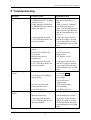
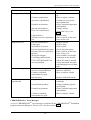
Problem
Strong baseline drift
Probable cause
Insufficient warm-up time
Column contaminated
System not equilibrated
Unstable environment
Solvent contaminated
Flow cell contaminated
High noise level
Peak broadening
Analysis is not
reproducible
Lamp defective
Solvent reservoir is placed too
low
Solvent contaminated
Lamp aged
Gas bubbles in system
Pressure pulsation from pump
Solvent reservoir is placed on
the floor
Wrong wavelength
Connecting cable between
UVD 170S/340S and PC not
correctly installed
Capillaries too long or has
excessive internal diameter
Column overloaded,
contaminated or aged
Solvent aging
Sample is unstable
Irreproducible gradient
Unstable environment
Column overloaded,
contaminated or aged
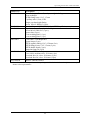
Remedial action
Allow min. 30 min. warmup
Rinse or replace column
Continue to rinse system
until equilibrated
Ensure constant temperature
and humidity
Change solvent
Clean flow cell (→ sec.
6.3.4)
Replace lamp
Place reservoir on the same
level as flow cell
Replace solvent
Replace lamp
Prime system
Check and prime pump
Place reservoir on the same
level as flow cell
Select suitable wavelength
Connectors on the detector
and the PC must be inserted
evenly and locked into place
with latching devices on both
sides.
Shorten or replace for
narrower capillaries
Rinse or replace column
Replace with fresh solvent
Use fresh sample or alter
conditions
Change gradient program /
check pump
Ensure constant temperature
and humidity
Rinse or replace column
CHROMELEONTM Error Messages
A list of CHROMELEONTM error messages is included in the CHROMELEONTM Installation
program on the tab dialog box "Error Levels". See also section 4.3.3.
14