1
Siren / Strobe Sensor Manual
Adjusting the volume or disabling the Siren
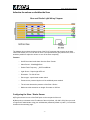
The diagram above shows the bottom view of the RJ-45 connector that connects to the base
units RJ-45 sensor port. You can wire in line a 5 ohm potentiometer (pot) with the siren, then it
would be possible to adjust the volume or turn off the siren completely.
Features:
o
On/Off visual and audio alarm from the Siren / Strobe
o
Alarm Sound : 100±3db@100cm
o
Strobe Flash Frequency : _400 Times/Minute
o
Light Source : Super bright LEDs x8
o
Dimension : 72×123×45 mm
o
Sensor type - open/closed contact switch
o
Power source: powered by the unit. No additional power needed.
o
The unit auto detects the presence of the Siren / Strobe
o
Maximum cable extension run length: 30 meters or 100 feet.
Configuring the Siren / Strobe Sensor
a) Plug the sensor into one of the RJ45 ports on the rear panel of the unit.
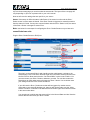
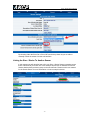
b) Now point your browser to the IP address of the unit (default, 192.168.0.100). Next you need
to login as the administrator using your administrator password (default is “public”). You will then
be taken to the summary page.
-3-