1
Inserting your Bell SIM card
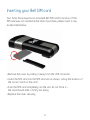
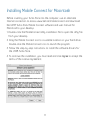
Your Turbo Stick requires an activated Bell SIM card to function. If the
SIM card was not inserted at the time of purchase, please insert it now,
as described below.
• Remove the cover by sliding it away from the USB connector.
• Insert the SIM card into the SIM card slot as shown, noting the location of
the corner notch on the card.
•P
ush the SIM card completely into the slot, do not force it –
the card should slide in firmly but easily.
• Replace the cover securely.
4