1
SCADAPack 50
Appendices
Setting up the infrared/USB interface
The procedure is the same for all Windows versions.
You need the following file which contains the drivers Windows :
CP210x_VCP_Windows.ZIP
The file should be on the CD-ROM supplied with the SCADAPack 50.
If not, you can download it with the following link :
http://www.silabs.com/products/mcu/Pages/USBtoUARTBridgeVCPDrivers.aspx
This file contains 2 self-extracting executables files which will install the drivers:
bb For Windows XP, Windows 7 or others Windows 32 bits system:
CP210xVCPInstaller_x86.exe
bb For Windows 64 bits system :
CP210xVCPInstaller_x64.exe
Stage 1
Install interface driver
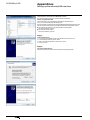
1 -Launch the executable file in ZIP for the Windows version of your PC
2 -In the displayed Window, click on “Next”
3 -Select “I accept this agreement” then click on “Next”
4 -Click on “Finish”.
Stage 2
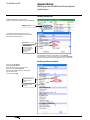
Connect the IrDA interface.
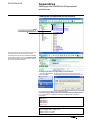
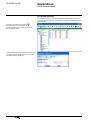
Windows will detect the interface then install the corresponding driver.
34
NT00341-EN-03-SE-SCADAPack50-User-Manual