1
CHAPTER 4
Fixture Programming
Dim Parameter
In Studio Command 1200/700 fixtures, the Dim parameter provides full dimming capability
without changing the color temperature or the beam shape. The dim values range from closed
(DMX value of 0) to fully open (DMX value of 255).
MSpeed (Motor Speed) Parameter
The MSpeed parameter controls the time required for a motor to complete movement when
changing from one position to another. MSpeed provides a means for all motors to reach their
target position at the same time, even though each motor may have different distances to
travel. MSpeed movement is extremely smooth because the fixture controls its own movements
and is not dependent on DMX refresh rates.
MSpeed times vary from 0.15 seconds to 252.7 seconds. However, if you apply MSpeed to a
parameter, be sure that the delay value (length of time allowed for the entire scene) is longer
than the MSpeed value to allow the motors to complete their movement before the end of the
cue. An MSpeed value that is longer than the delay value could produce an undesirable result;
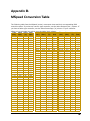
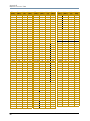
for example, no light output during the scene. For a listing of exact MSpeed times, see Appendix
B: MSpeed Conversion Table.
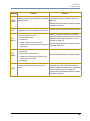
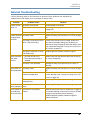
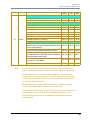
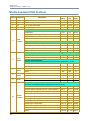
By default, MSpeed is applied to Pan and Tilt positioning. However, you can disable MSpeed for
pan and tilt with the Control parameter. You can also apply MSpeed times to the Color Function
settings, see Color Function Parameter on page 49.
Macro Parameter
The Macro parameter controls Internal Effects™ macros. These are factory-programmed
sequences that allow you to quickly program complicated looks in one scene (cue). Each
Internal Effect™ macro modifies a specific set of parameters, while allowing user control of all
other parameters in the scene. The amplitude of the position macro movement is determined by
the Pan Coarse channel and Tilt Coarse channel, respectively. The MSpeed channel controls the
speed of the macros.
With the MSpeed set at the default value of DMX 0-4, an Internal Effects macro completes its
movement in approximately 2.5 seconds. This provides a pleasing look when the additional
variation given by using the MSpeed channel is not required. With the MSpeed set between DMX
5-255, Internal Effects macros complete movement at the selected MSpeed time (up to 25
seconds).
Those fixture types that support On Board Programming also support the Internal Effects
macros as part of the On Board programming features. The Internal Effects macros operate as
an additional programming parameter labeled MACR.
The four Internal Effect available on a standard configuration Studio Command fixture are Pan
Sweep, Tilt Sweep, Clockwise Circle and Counterclockwise Circle.
52
Studio Command Series User Manual