1
These safety instructions provided here are meant to guard your safety and prevent any possible damage or loss of property.
Please carefully read these and keep them in mind when you use Suprema’s product.
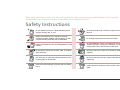
Safety Instructions Do not install the terminal in a place affected by direct
sunlight, humidity, dust, or soot.
Do not drop the terminal or cause any impact on the
terminal.
Keep the terminal away from magnets or anything
containing magnetic material, such as magnet, TV sets,
computer monitor (especially CRT) and speakers.
Do not apply heavy pressure to the touch screen.
Keep the terminal away from any heating devices or heat
sources.
Do not disassemble, repair, or reconstruct the terminal
without any direction of Suprema. Otherwise, you cannot
receive proper A/S for the terminal from Suprema.
Do not spill any liquids such as soda, water, or solutions
into the terminal.
Keep the product out of reach from children for safety
purposes.
Use a soft cloth or towel when cleaning the terminal. Do
not spray water on the terminal.
Do not use the terminal for any other purpose than its
original use.
Clean the terminal regularly to prevent dust from settling
onto it.
In case of product malfunction or problems, please
contact Suprema’s Customer Service Center or the sales
agent.
2