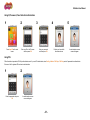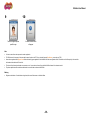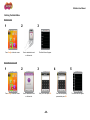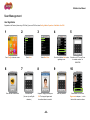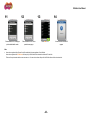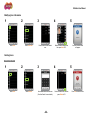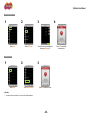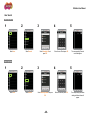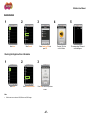
1
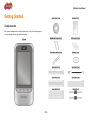
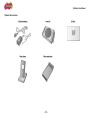
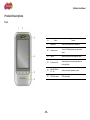
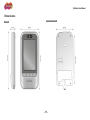
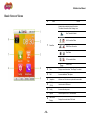
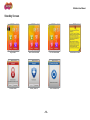
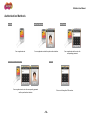
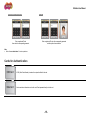
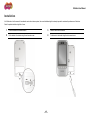
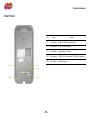
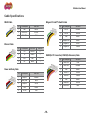
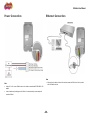
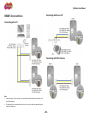
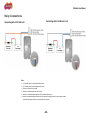
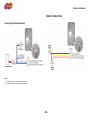
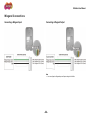
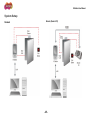
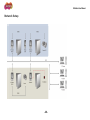
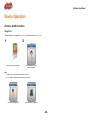
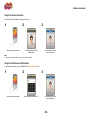
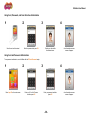
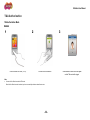
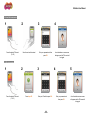
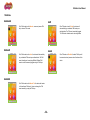
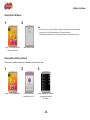
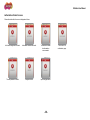
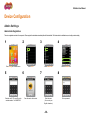
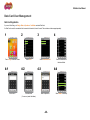
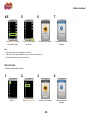
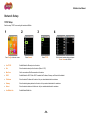
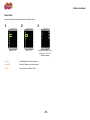
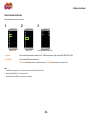
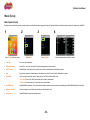
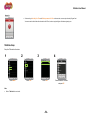
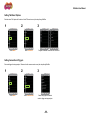
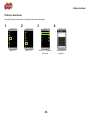
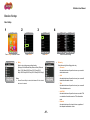
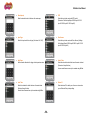
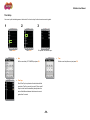
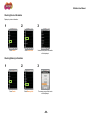
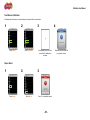
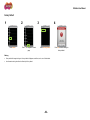
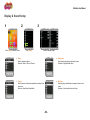
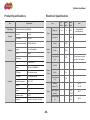
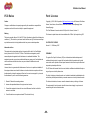
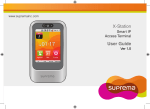
X-Station User Manual EN 102.00.XST V1.21 www.supremainc.com X-Station User Manual Features X-Station uses RFID card scanner to provide more access control and T&A options. 3.5" color touchscreen LCD provides the X-Station with a powerful and initiative user interface. The built-in camera provides X-Station the ability to store image logs, perform face detection and feature video intercom capabilities. X-Station can be directly connected to a PC or server via various interfaces such as an Ethernet or RS485 interface. X-Station supports up to 16 T&A events and various authentication modes. X-Station is capable of storing up to 200,000 users, 1,000,000 logs and 5,000 image logs. -2- X-Station User Manual Important Safety Instructions Carefully review the information within the user manual before installing/operating the device. Pay careful attention to the warning and cautions below as they are here to prevent any risk/damage to any person(s) or property associated with the device. Warning Failure to heed these warnings may lead to serious injury or even death! Installation Do not install the device near areas with direct sunlight, high humidity, soot or dust. Do not install the device near heat sources such as radiators, heat registers, and stoves. Do not install the device near areas of large electromagnetic interference. Usage Do not disassemble, repair or reconstruct the device. Contact your nearest Suprema dealer for technical support. Do not obstruct or place wet objects near or on the vent. Do not place liquids such as water, beverages and other solutions near/on the device. Only use the device its intended use. Caution Failure to heed these cautions may lead to minor injury or damage the device. Installation Do not leave cables (especially power cables) exposed to the outer environment. Do not install the device near objects with a strong magnetic field such as magnets, computer monitors (especially CRT), TV screens and speakers. Usage Do not apply heavy pressure to or use sharp objects with the touchscreen LCD. Do not drop or apply any physical shock or impact to the device. Regularly clean the product with a soft dry cloth; avoid benzene or alcohol. -3- X-Station User Manual Contents 2 Connection................................................................. 16 Installation ............................................................................................17 Features ........................................................................... 2 Rear Panel ...........................................................................................18 Important Safety Instructions ......................................... 3 Cable Specifications .............................................................................19 RS485 Cable .............................................................................................................19 1 Getting Started ............................................................. 7 Ethernet Cable ..........................................................................................................19 Components .......................................................................................... 8 Power and Relay Cable.............................................................................................19 Optional Accessories .................................................................................................. 9 Wiegand I/O and/TTL Switch Cable ..........................................................................19 Product Description.............................................................................. 10 RS485(for PC Connection)/ RS232(for Extension) Cable .........................................19 Front ......................................................................................................................... 10 Power Connection ................................................................................20 Dimensions .......................................................................................... 11 Ethernet Connection.............................................................................20 Basic Screen Views ............................................................................. 12 RS485 Connections .............................................................................21 Standby Screen ................................................................................... 13 Connecting with a PC ................................................................................................21 Connecting with Secure I/O.......................................................................................21 Authorization Methods ......................................................................... 14 Connecting with Other Devices .................................................................................21 Cards for Authentication ....................................................................... 15 Relay Connections ...............................................................................22 Connecting with a Fail Safe Lock ..............................................................................22 Connecting with a Fail Secure Lock ..........................................................................22 Connecting with Automatic Doors .............................................................................23 Input Connection ..................................................................................23 -4- X-Station User Manual Wiegand Connections .......................................................................... 24 4 Device Configuration ................................................ 37 Connecting a Wiegand Input .................................................................................... 24 Admin Settings .....................................................................................38 Connecting a Wiegand Output.................................................................................. 24 Administrator Registration .........................................................................................38 System Setup ...................................................................................... 25 Entering the Admin Menu ..........................................................................................40 Standard ................................................................................................................... 25 X-Station Menu Tree .................................................................................................41 Secure (Secure I/O).................................................................................................. 25 User Management ................................................................................42 Network Setup ..................................................................................... 26 User Registration ......................................................................................................42 3 Device Operation ....................................................... 27 Modifying User Information .......................................................................................44 Deleting Users...........................................................................................................44 Access Authorization............................................................................ 28 User Search ..............................................................................................................46 Using Card................................................................................................................ 28 Checking the Registered User Information................................................................47 Using Card and Face Detection................................................................................ 29 Using Card and Password Authorization .................................................................. 29 Data Card User Management...............................................................48 Using Card, Password, and Face Detection Authorization ....................................... 30 Data Card Registration ..............................................................................................48 Using Card and Password Authorization .................................................................. 30 Data Card Format .....................................................................................................49 Using ID, Password, Face Detection Authorization .................................................. 31 Network Setup......................................................................................50 Using PIN ................................................................................................................. 31 TCP/IP Setup ............................................................................................................50 T&A Authorization ................................................................................ 32 Server Setup .............................................................................................................51 T&A Authorization Mode ........................................................................................... 32 Serial Communication Setup .....................................................................................52 T&A Mode ................................................................................................................. 34 Checking Extra T&A Events...................................................................................... 35 Checking T&A and Entrance Records ...................................................................... 35 Authorization Failure Screens................................................................................... 36 -5- X-Station User Manual Mode Setup ......................................................................................... 53 Appendix ....................................................................... 67 Mode Operation Setup ............................................................................................. 53 Product Specifications ..........................................................................68 T&A Mode Setup ...................................................................................................... 54 Electrical Specification .........................................................................68 Setting T&A Event Options ....................................................................................... 55 FCC Rules ...........................................................................................69 Setting Camera Event Triggers................................................................................. 55 Font License ........................................................................................69 PIN Setup for Authentication..................................................................................... 56 Device Setup ....................................................................................... 57 Door Setup ............................................................................................................... 57 Time Setup ............................................................................................................... 59 Checking Device Information .................................................................................... 60 Checking Memory Information .................................................................................. 60 TouchScreen Calibration .......................................................................................... 61 Device Reset ............................................................................................................ 61 Factory Default ......................................................................................................... 62 Display & Sound Setup ........................................................................ 63 Log Management ................................................................................. 65 Checking the Log List ............................................................................................... 65 Deleting All Logs ....................................................................................................... 66 Checking Log Information ......................................................................................... 66 -6- 1 Getting Started Components Product Description Dimensions Basic Screen Views Standby Screen Authorization Methods Cards for Authentication X-Station User Manual Getting Started Ferrite Core (1 ea) Bracket (1 ea) Wall Mount Screws (2 ea) PVC Anchors (2 ea) Termination resistor (2 ea) Software (1 ea) 3 pin cable (1 ea) 4 pin cable (1 ea) 5 pin cable (1 ea) 6 pin cable (1 ea) 8 pin cable (1 ea) Diodes (2 ea) Components Each product package should contain the following items. If any of the following items is missing or damage, contact your retailer immediately. X-Station -8- X-Station User Manual Optional Accessories 12V Power Adapter Secure I/O Plastic Stand Mifare reader/writer -9- RF Card X-Station User Manual Product Description Front No Name Function 1 Microphone Used to communicate with the interphone. 2 Proximity Sensor Turns on LCD backlight when user gets close to sensor. 3 Camera Detects and captures face images and videos. 4 Touchscreen LCD Used to display the device operating status and device operations. 5 Basic T&A Buttons (F1 ~ F4) Used to select time & attendance events. 6 RFID Card Scanner RFID card interface. - 10 - X-Station User Manual Dimensions X-Station Wall Mounting Bracket - 11 - X-Station User Manual Basic Screen Views No Name Function Indicates the operational status of the device. The status bar consists of the following icons; Face Detection Enabled LAN Connection Status 1 Status Bar RS485 Slave Connection Door Status PC Connection Status Current Time 2 Time Displays current time when "Time Display" is enabled. 3 T&A Accesses additional T&A options. 4 Interphone Initiates a call if an intercom system has been enabled. 5 T&A Keys (F1~F4) Used to select a T&A event. 6 Config Accesses the setup menu. 7 Input ID Used to input an ID for 1:1 authentication. 8 Date or T&A Display Displays the current date or T&A event. - 12 - X-Station User Manual Standby Screen Logo Screen Auto T&A mode Screen Fix T&A mode Screen Terminal Locked Security mode On Data Transfer mode - 13 - Announcement Screen X-Station User Manual Authorization Methods Card Only Card+Face Detection Scan a registered card. Card+Pasword Scan a registered card and then perform face detection. Card+Password+Face Detection Scan a registered card then enter the corresponding password. PIN Only Scan a registered card, enter the corresponding password and then perform face detection. Enter one of three global PIN numbers. - 14 - X-Station User Manual Card+Password+Face Detection Enter a registered ID and then enter the corresponding password. PIN Only Enter a registered ID, enter the corresponding password and then perform face detection. Note Refer to 'Access Authorization' for further explanations. Cards for Authentication CSN Card A CSN (Card Serial Number) is used as the unique identifier for the card. Data Card A data card stores information such as the user ID and password directly onto the card. - 15 - 2 Connection Installation Relay Connections Rear Panel Input Connection Cable Specifications Wiegand Connections Power Connection System Setup Ethernet Connection Network Setup RS485 Connections X-Station User Manual Installation As X-Station has a built-in camera for face detection and a video intercom system, the correct installation height is extremely important to maximize the performance of the device. Select the optimal installation height for all users. 1 Place the bracket on the desired location. 3 Mount the device onto the bracket. 2 Fix the bracket to the location using the anchors and screws. 4 Fix the device to the bracket using the device mount screw. - 17 - X-Station User Manual Rear Panel No Name Function 1 3 pin connector RS485 Port 2 (Slave device connection) 2 5 pin connector Power and relay connection 3 6 pin connector Wiegand I/O and TTL Inputs 4 8 pin connector RS485 Port 1 (Connection with PC) / RS232 Port (Extension) 5 4 pin connector Ethernet connection - 18 - X-Station User Manual Cable Specifications RS485 Cable Wiegand I/O and/TTL Switch Cable Pin Pin Description Wire Color Pin Pin Description Wire Color 1 GND BLACK 1 SW IN1 ORANGE 2 RS485 TRX- YELLOW 2 SW IN0 YELLOW 3 RS485 TRX+ BLUE 3 GND BLACK 4 Wiegand GND BLACK 5 Wiegand D1 WHITE 6 Wiegand D0 GREEN Ethernet Cable Pin Pin Description Wire Color RJ45 PIN 1 TX+ YELLOW 6 2 TX- GREEN 3 3 RX+ RED 2 4 RX- BLACK 1 RS485(for PC Connection)/ RS232(for Extension) Cable Power and Relay Cable Pin Pin Description Wire Color 1 Relay NC ORANGE 2 Relay COM BLUE 3 Relay NO WHITE 4 GND BLACK 5 12V DC RED - 19 - Pin Pin Description Wire Color 1 RS232 CTS PINK 2 RS232 RTS ORANGE 3 GND BLACK 4 RS232 TX PUPPLE 5 RS232 RX GREEN 6 GND BLACK 7 RS485TRX- YELLOW 8 RS485TRX+ BLUE X-Station User Manual Power Connection Ethernet Connection Note Note Voltage 12V ±10%, current 1500mA or above. You should use an authorized IEC/EN 60950-1 12V After plug the 4 pin cable to the back of the terminal, connect the RJ45 socket of the 4 pin cable with a LAN cable to the hub. adapter. In case of another unit providing power for X-Station, it is recommended you use an adapter for more than 1500mA. - 20 - X-Station User Manual RS485 Connections Connecting with Secure I/O Connecting with a PC Connecting with Other Devices Note In case the signal is not sent correctly, you should install a terminal resistance at both ends of the bus. (120Ω resistance) The signal quality can vary depending on the route, so you need to adjust the transmission speed or lower the transfer rate. - 21 - X-Station User Manual Relay Connections Connecting with a Fail Secure Lock Connecting with a Fail Safe Lock Note N.O. (Normally Open): A control signal closes the circuit. N.C. (Normally Closed): A control signal opens the circuit. Take care of the direction of the diode. Make sure to install the diode near to the door lock. Make sure to use different power supplies for the X-Station and the door lock. Make sure to install the diode at both ends of the circuit as shown in the figures above in order to protect the relay contact from the reverse current that occurs when the door lock works. - 22 - X-Station User Manual Input Connection Connecting with Automatic Doors Note N.O. (Normally Open): A control signal closes the circuit. N.C. (Normally Closed): A control signal opens the circuit. - 23 - X-Station User Manual Wiegand Connections Connecting a Wiegand Input Connecting a Wiegand Output Note You can configure the Wiegand Input and Output settings in the BioStar. - 24 - X-Station User Manual System Setup Standard Secure (Secure I/O) - 25 - X-Station User Manual Network Setup - 26 - 3 Device Operation Access Authorization T&A Authorization X-Station User Manual Device Operation Access Authorization Using Card Card authorization is only operated in Card Only authentication mode or Bypass Card. 1 2 Scan the card on the terminal. An authorization success screen will appear. Note The default screen will appear when authorization success. If no user image is registered, the recorded image will be shown. When an image is registered When an image is not registered - 28 - X-Station User Manual Using Card and Face Detection To use this feature, Face Detection mode must be set to Use. 1 2 Scan the card on the terminal. 3 Position your face within the window shown. An authorization success screen will appear. Note When the face detection mode is on, please fit your face in the frame. Using Card and Password Authorization To use password authorization, use Auth Mode with the ID/Card+Password setup. 1 2 Scan the card on the terminal. 3 Enter the password and press OK. An authorization success screen will appear. - 29 - X-Station User Manual Using Card, Password, and Face Detection Authorization 1 2 3 Enter the password and press OK. Scan the card on the terminal. 4 Position your face within the window shown. An authorization success screen will appear. Using Card and Password Authorization To use password authorization, use Auth Mode with the ID/Card+Password setup. 1 Press Input ID on the main screen. 2 3 Enter your ID on the ID screen and then press OK. 4 Enter your password and then press OK. - 30 - An authorization success screen will appear. X-Station User Manual Using ID, Password, Face Detection Authorization 1 2 Press Input ID on the main screen. 3 Enter your ID on the ID screen and then press OK. 4 Enter your password and then press OK. 5 Position your face within the window shown. An authorization success screen will appear. Using PIN PIN authorization is operated in PIN Only authentication mode. If you use PIN authorization, select Config > Mode > PIN Only > PIN Only and set 3 passwords for authentication. Enter one of the 3 registered PIN numbers in authentication. 1 Enter the password and press OK. 2 An authorization success screen will appear. - 31 - X-Station User Manual T&A Authorization T&A Authorization Mode Card Only 1 2 Press the desired T&A event. (F1~F4) 3 Scan the card on the terminal. Note You can use Face Detection mode with T&A mode. When the Face Detection mode is activated, you have to successfully authorize card and face to enter. - 32 - An authorization success screen will appear and the T&A event will be logged. X-Station User Manual ID/Card+PIN Authorization 1 2 Press the desired T&A event. (F1~F4) 3 Scan the card on the terminal. 4 Enter your password and then press OK. An authorization success screen will appear and the T&A event will be logged. ID+PIN Authorization 1 2 Press the desired T&A event. (F1~F4) 3 Press Input ID. 4 Enter your ID and then press OK. - 33 - 5 Enter your password and then press OK. An authorization success screen will appear and the T&A event will be logged. X-Station User Manual T&A Mode Manual Mode Fixed If the T&A mode is set to Manual, users must press a T&A key to leave a T&A record. If the T&A mode is set to Fixed, the device will automatically log a scheduled T&A event upon authentication. The T&A event cannot be changed. The T&A event schedule can be set using BioStar. Auto Mode Disabled If the T&A mode is set to Auto, the device will automatically log a scheduled T&A event upon authentication. The T&A event schedule can be set using BioStar. Different T&A events can still be manually logged using the T&A keys. Manual Fix If the T&A mode is set to Manual Fix, the device will remain in the last known T&A event. Users can change the T&A event manually by using the T&A keys. - 34 - If the T&A mode is Disabled, the basic T&A keys will be removed and only access control functions will be active. X-Station User Manual Checking Extra T&A Events 1 2 Note 4 basic events (In, Out, In Duty, and Out Duty,) are displayed on the standby screen, which can be changed. You can set up to 12 extra T&A events besides of basic T&A events in the BioStar. Example) Arriving at work after offsite work, leaving work after offsite work, returning after offsite work, etc. Press T&A on the main screen to select extra T&A events. Extra T&A events screen. Checking T&A and Entrance Records This feature is only available for standard users. Administrators will access the Admin Menu. 1 Select Config on the main screen. 2 3 Scan your card on the terminal or press Input ID. If the authorization was successful, you can check your access/ T&A records. - 35 - X-Station User Manual Authorization Failure Screens When authorization fails, the screen is displayed as follows. Auth Mode setting does not match. Authorization interval was invalid. The maximum number of authorizations was exceeded. The anti-passback is limited. Unregistered user. Input wrong password. - 36 - User is not in the authorization group. 4 Device Configuration Admin Settings User Management Data Card User Management Network Setup Mode Setup Device Setup Display & Sound Setup Log Management X-Station User Manual Device Configuration Admin Settings Administrator Registration There is no registered user data in the new product. Please register the administrator immediately after the first installation. The Admin enables to add/delete user, and configure device setting. 1 2 Press Config on the main screen. 5 Enter the user ID. The user ID can be created numbers 1 to 4294967295. 3 Select User. 6 4 Select Enroll User. 7 Scan the card on the terminal. Check the Admin box. 8 Enter the name. (You can only use English characters.) - 38 - Enter a password. X-Station User Manual 9 10 Touch the image to capture a profile image. An enroll success screen will appear. Note You have to enter either card or password to make a registration. The T&A button on the lower part of the screen has the same function as the F1~F4 keys. Instead of pressing Prev/Home, you can also use F3/F4. Users who are registered with a Bypass Card will be authorized by bypass regardless of the Auth Mode.Users who are registered with the ‘Private Auth mode’ will have priority in the terminal’s Auth mode and be authorized in Private Auth. The ‘Access Group’ determines whether a user can enter or not. You can select an Access Group within the BioStar software for the relevant terminal. The picture capture data will be used when authorization is successful and can be saved with BioStar. Warning Register an administrator. If no administrator is registered, all users will have access to the Admin Menu. - 39 - X-Station User Manual Entering the Admin Menu Card Only Mode 1 2 Press Config on the main screen. 3 Scan an administrator card on the terminal. The Admin Menu will appear. Card/ID + Password Mode 1 Press Config on the main screen. 2 3 Scan an administrator card on the terminal. 4 Enter your ID and press OK. - 40 - 5 Enter the corresponding password and press OK. The Admin Menu will appear. X-Station User Manual X-Station Menu Tree 1. User 2. Network Enroll User Edit User Search Enrolled user Info Delete All Users TCP/IP 3. Mode Operation IP Address Gateway Subnet Use BioStar Lite Server Server Relay 5. Display Theme Background Face Detection Duration(sec) Timeout Dual RTE Msg Time Card Mode Input Type Backlight Timeout Server Matching Door Sensor Volume Matching timeout Input Type Language Private Auth Held Open Time T&A Unlock Time Date Display T&A Event Lock Time Camera Event PIN Only Time Date 6. Log Log List PIN Only Time Delete All Log PIN 1 Time Sync Log Info PIN 2 Device Info PIN 3 Calibration Server IP Memory Info Port Serial Door Driven By Port DHCP 4. Device ID/Card+PIN Use TCP/IP Max Conn Card Only Reset Baudrate Factory Default Serial Mode Interphone Interphone VoIP Server IP VoIP Phone Number VoIP Server ID VoIP Server Password VoIP Mic Gain VoIP Speaker Gain VoIP Display Name BSVidePhone Mode BSVideoPhone Password BSVideoPhone DoorControl - 41 - X-Station User Manual User Management User Registration Registration at the Terminal (when using a CSN Card) If you use a CSN Card, select Config > Mode > Operation > Card Mode > Use CSN. 1 2 Press Config on the main screen. 6 Scan the card on the terminal. 3 Select User. 7 Select Enroll User. 8 Enter the name. (You can only use English characters) Capture an image profile and press OK. The image will appear each time authorization is successful. - 42 - 4 5 Do not check the box Admin when registering a user. Enter the user ID. The user ID can be created numbers 1 to 4294967295. 9 10 Enter the password. Select whether or not to use a Bypass card and press ↓ on the bottom of the screen to continue. X-Station User Manual 11 Select whether or not to assign a private authentication mode. 12 Select whether or not to use a special access group. 13 14 Press Add or F4. An enroll success screen will appear. Note Users who are registered with a Bypass Card will be authorized by bypass regardless of the Auth Mode. Users who are registered with Private Auth will have priority in the terminal’s Auth mode and be authorized in Private Auth. The Access Group determines whether a user can enter or not. You can select an Access Group within the BioStar software for the relevant terminal. - 43 - X-Station User Manual Modifying User Information 1 2 Select User. 3 Select Edit User. 4 Press the name of the desired user. 5 Make the desired changes and then press Add or F4. An enroll success screen will appear. Deleting Users Deleting Using Search 1 2 Select User. 3 Select Search. 4 Use a search method to find the user. (See User Search for more details) - 44 - Check the desired user and then press Delete of F4. 5 Press OK to delete the user. X-Station User Manual Deleting Multiple Users 1 2 Select User. 3 Select Edit User. 4 Check the users to be deleted and then press Delete or F4. Delete All Users 1 2 Select User. 3 Click Delete All Users. Press OK to delete all users. Attention You cannot restore user data that is not stored in the BioStar database. - 45 - Press OK to delete the selected users. X-Station User Manual User Search Search by User ID 1 2 Select User. 3 Select Search. 4 Select Search by ID and press OK. 5 Enter the user ID and press OK. The corresponding ID search results will appear. Search by Name 1 2 Select User. 3 Select Search. 4 Select Search by Name and press OK. - 46 - Enter the name and press OK. 5 The corresponding usernames starting with those letters will appear. X-Station User Manual Search by CSN Card 1 2 Select User. 3 Select Search. 4 Select Search by CSN and press OK. Checking the Registered User Information 1 2 Select User. 3 Select Enrolled user Info. Press OK to return to the previous screen. Note X-Station can store a maximum of 200,000 users and 5,000 images. - 47 - 5 Place the CSN Card on the X-Station. The corresponding CSN search results will appear. X-Station User Manual Data Card User Management Data Card Registration If you use a Data Card, go to Config > Mode > Operation > Card Mode and select Data Card. If a Data Card is used, the user data will not be saved on the terminal, but on to the card. The user data must be managed separately. 1 2 Press Config on the main screen. 4-1 3 Select User. 4-2 Enter user ID. Enter the name. (You can only enter Latin letters.) 4 Select Enroll Data Card. 4-3 Enter the information for the desired fields. 4-4 Enter the password. - 48 - Select Admin if necessary. X-Station User Manual 4-5 5 Set up a Bypass Card and an Access Group if needed. 6 Press Add to enroll the data into the card. 7 Scan the card on the terminal. A enrollment success screen will appear. Note Bypass cards provide authorization independent of the Auth Mode. Access Groups can be configured using BioStar and is used to restrict access to certain devices. CSN Cards and Data Cards cannot be used at the same time. Data Card Format All saved data on Data Cards will be deleted. 1 2 Select User. 3 Select Format Data Card. 4 Scan the card on the terminal. - 49 - A format success screen will appear. X-Station User Manual Network Setup TCP/IP Setup Enable to setup TCP/IP for connecting the terminal and BioStar. 1 2 Press Config on the main screen. 3 Select Network. 4 Select TCP/IP. Set the desired network settings and press Prev or Home when finished. Use TCP/IP Enable/Disable the Ethernet port on the device. Port Enter the desired network port for the device. (Default: '1470') Max Conn. Set the max number of BioStar connections to the device. DHCP Enable/Disable the DHCP. When DHCP is enabled the IP address, Gateway, and Subnet will be disabled. IP Address Enter the desired IP address for the device. Ask your network administrator for assistance. Gateway Enter the desired gateway address for the device. Ask your network administrator for assistance. Subnet Enter the desired subnet mask of the device. Ask your network administrator for assistance. Use BioStar Lite Enable/Disable BioStar Lite. - 50 - X-Station User Manual Server Setup Server mode will create a link between the device and a BioStar server. 1 2 Select Network. 3 Select Server. Setup the use of server, IP, and port press Prev or Home to activate the settings. Server Enable/Disable Server Mode for the device. Server IP Enter the IP address of the connected server. Port Enter the server port. (Default: '1480') - 51 - X-Station User Manual Serial Communication Setup Serial communication is used in various ways. 1 2 Select Network. 3 Select Serial. Set the Baudrate and Serial Mode. Baudrate Set the network speed between the terminal and a PC in RS485 communication. (Setting values: 9600/19200/57600/115200) Serial Mode Set the desired RS485 communication mode. NET-HOST allows slave devices to be connect to the device; NET-SLAVE allows the device to connect to a host. Note The RS485 network supports up to 1 host devices and 7 slave devices (including up to 4 Secure I/O). Baudrate only affects RS485 Port 1. (Connection to a PC) Serial Mode only affects RS485 Port 2. (Connection to other devices) - 52 - X-Station User Manual Mode Setup Mode Operation Setup Setup the various authentication modes, operation modes, and/or time & attendance triggers for the device. The authentication modes will operate according to the timezone set via BioStar. 1 2 Press Config on the main screen. 3 Select Mode. 4 Press Operation. Set the desired operation mode of the device. Card Only Scan a card for authentication. ID/Card+Password Input an ID or scan a card then enter the corresponding password for authentication. Face Detection Enable/Disable Face Detection. When enabled, a face must be detected before authorization is granted. Dual Requires two consecutive authentications of two different users within 15 seconds before authorization is granted. Card Mode Set the card type used on the terminal. (Setting values: Use CSN/Use Data Card/Not Use) - CSN Card: The card CSN (Card Serial Number) will be used for authentication. - Data Card: The data stored on the card will be used for authentication. Server Matching Enable/Disable Server Matching. To use server matching, the device must be set to server mode. Server matching will use the BioStar DB to perform the matching. Matching Timeout Select the duration for which the device will attempt to authenticate the user. Private Auth Enables/Disables the private authentication mode. - 53 - X-Station User Manual If device setting is Card Only - No Time and ID/Card+ password - No Time at the same time, users can only authorize by Bypass Card. You cannot enter the Admin Menu with authorization with ID/Card, so have to register a Bypass Card when registering user. T&A Mode Setup Set up the T&A mode for the device. 1 2 Select Mode. 3 Select T&A. 4 Select T&A. Note Refer to 'T&A Mode' for more details. - 54 - Select the desired T&A mode and press OK. X-Station User Manual Setting T&A Event Options Sets the various T&A options for the device. Actual T&A events can only be setup through BioStar. 1 2 Select Mode. 3 Select T&A event. Program the desired location for each T&A event. Setting Camera Event Triggers Sets event triggers for image capture. Timezones for the camera events can only be setup through BioStar. 1 2 Select Mode. 3 Select Camera Event. Select and program the desired events to trigger an image capture. - 55 - X-Station User Manual PIN Setup for Authentication Sets a global PIN for general authentication. Up to three global PIN numbers can be registered. 1 2 Select Mode. 3 Select PIN Only. 4 Check PIN Only and select a PIN to create. - 56 - Enter the desired PIN and press OK. X-Station User Manual Device Setup Door Setup 1 2 Press Config on the main screen. 3 Press Device. 4 Press Door. Relay Select a relay to trigger upon authentication. (Settings: Not Use/Internal Relay/External Relay 0/External Relay 1/SIO0 Relay0/SIO0 Relay1/SIO1 Relay0/SIO1 Relay1/SIO2 Relay0/SIO2 Relay1/SIO3 Relay0/SIO3 Relay1) Note Enter the desired settings. When an External Relay is selected, the hardware ID of the selected device must be entered. - 57 - Driven by Select the event(s) that will trigger the relay. - All events Associated devices will open the door on any successful authorization events. - Auth Associated devices will open the door only on successful credential authorization events. - T&A Associated devices will open the door only on successful T&A authorization events. - Auth+T&A Associated devices will open the door on successful T&A or credential authorization events or T&A authorization event. - Disabled Associated devices will not open the door, regardless of the attempted authorization events. X-Station User Manual Duration(sec) Enter the duration for which the door will remain open. RTE Select the input to be used as the RTE switch. (Set values: Not Use/Input0/Input1/SIO0 Input0-3/ SIO1 Input0-3/ SIO2 Input0-3/ SIO3 Input0-3) Input Type Select the input switch's circuit type. (Set values: N/O, N/C) Door Sensor Select the input to be used as the Door Sensor. (Settings: Not Use/Input0/Input1/SIO0 Input0-3/SIO1 Input0-3/ SIO2 Input0-3/ SIO3 Input0-3) Held Open Set the duration after which to trigger a held open door alarm. Unlock Time Select the schedule for which the door will remain unlocked. (Set values: Always/No time) Access control timezone can only be created using BioStar. Lock Time Select the schedule for which the door will remain locked. (Settings: Always/No time) Access control timezone can only be created using BioStar. Device ID Enter the device ID for which you will use as a slave when you set External Relay in relay setting. - 58 - X-Station User Manual Time Setup You can set up the time that appears on the terminal. You have to set up the time to receive accurate log data. 1 2 Press Device. 3 Press Time. Set up data, time, and time sync. Date Set the current date (YYYY/MM/DD) and press OK. Time Sync Check Time Sync to synchronize the device time with the server time. Time Sync can only be used in "Server mode". Every hour the time will automatically be adjusted on the device if the difference between the device and server is greater than 5 seconds. - 59 - Time Set the current time (hh:mm:ss) and press OK. X-Station User Manual Checking Device Information Displays key device information. 1 2 Press Device. 3 Select Device Info. Various device specific information will be displayed. Checking Memory Information 1 2 Press Device. 3 Select Memory Info.. The memory usage of the device will be displayed. - 60 - X-Station User Manual TouchScreen Calibration Recalibrates the touchscreen to coordinate the point of contact with the user interface. 1 2 Press Device. 3 Select Calibration. 4 Keep pressing the cross on the screen until the calibration is complete. Device Reset 1 2 Press Device. 3 Select Reset. Press OK to restart the terminal. - 61 - Calibration success screen will pop up on the screen. X-Station User Manual Factory Default 1 2 Press Device. Press ↓ to navigate to the next page. 3 4 Select Factory Default. Warning Factory default will change all settings to its factory defaults. Wallpapers, sound effects, notice, etc. will all be deleted. User information and Log data will not be affected by a Factory default. - 62 - Press OK to reset all settings to factory default. X-Station User Manual Display & Sound Setup 1 2 Press Config on the main screen. 3 Click Display. Select the desired settings. Theme Select a background theme. (Selection: Theme 1/Theme 2/Theme 3) Background Select a background style for the standby screen. (Selection: Logo/Notice/Slide Show) Timeout Select the amount of idle time required before returning to the home menu. (Selection: 10sec/20sec/30sec/Infinite) Msg Time Select how long a authentication message will remain on the screen. (Selection: 0.5sec/1sec/2sec/3sec/4sec/5sec) - 63 - X-Station User Manual Backlight Timeout Select the amount of idle time required for the LCD backlight to turn off. (Selection: 10sec/20sec/30sec /40sec/50sec/60sec/Infinite) Volume Select volume of the sound effects. (Selection: 0~100) Language Select the language displayed on the terminal. You have to reboot the terminal to activate language changes. (Selection: Korean/English/Custom) Time Select whether the time and date will be displayed on the standby screen. Date Display Select the date format. Note Notice or Slide Show backgrounds will appear after authentication attempts, menu timeouts, and LCD backlight activation. - 64 - X-Station User Manual Log Management Checking the Log List Log records can be viewed directly from the terminal. 1 2 Click Log. 3 Select Log List. 4-1 Click on a log record to view details. - 65 - Displays detailed information of the log event. 4-2 Log items with will display the captured image. X-Station User Manual Deleting All Logs 1 2 Click Log. 3 Select Delete. 4 Click OK to delete all logs. Checking Log Information 1 2 Click Log. 3 Select Log Info.. Displays the number of logs stored on the terminal. Click OK to return to the previous screen. Note X-Station stores up to a maximum of 1,000,000 normal logs and 5,000 video logs. - 66 - Delete success screen will pop up on the screen. Appendix Product Specifications Electrical Specification FCC Rules Font License X-Station User Manual Product Specifications Item Card Options Electrical Specification Specifications 13.56 MHz ISO 14443 A/B (MIFARE) Max. User 200,000 Log Capacity 1,000,000 Communication Interfaces TCP/IP RS485 x 2ch Hardware Wiegand In or Out (Switchable) TTL I/O 2 inputs Built-in Relay 1 CPU 667MHz RISC x 1 Memory 1GB flash + 256MB RAM LCD Display 3.5” color touch screen LCD Display 3.5” color touch screen Operating Temperature -10°C ~ 50°C Humidity 90% Tamper Switch Operating Voltage 12V DC Dimensions 79mm(W) x 135mm(H) x 21mm(D) Mean Value Max. Value Note Voltage (V) 10.8 12 13.2 Use regulated DC power adaptor only. Current (mA) - VIH (V) - TBD VIL (V) - TBD Pull-up resistance (Ω) - 4.7K - VOH (V) - 5 - VOL (V) - 0.8 - Pull-up resistance (Ω) - 4.7K - Switching capacity (A) - - 2 0.3 30V DC 125V AC Switching power (resistive) - - 30W 37.5VA DC AC Switching voltage (V) - - 220 250 DC AC Power Capacity Interfaces Min. Value Item Switch Input Wiegand Output Relay - 68 - 1500 - The input ports are pulled up with 4.7 KΩ resistors. X-Station User Manual FCC Rules Font License Caution Copyright (c) 2010, NHN Corporation (http://www.nhncorp.com), with Reserved Font Name Nanum, Naver Nanum, NanumGothic, Naver NanumGothic, NanumMyeongjo, Naver NanumMyeongjo Changes or modifications not expressly approved by the manufacturer responsible for compliance could void the user’s authority to operate the equipment. This Font Software is licensed under the SIL Open Font License, Version 1.1. Warning This device complies with part 15 of the FCC Rules. Operation is subject to the following two conditions: (1) This device may not cause harmful interface, and (2) this device must accept any interface received, including interference that may cause undesired operation. Information to User This equipment has been tested and found to comply with the limit of a Class B digital device, pursuant to Part 15 of the FCC Rules. These limits are designed to provide reasonable protection against harmful interference in a residential installation. This equipment generates, user and can radiate radio frequency energy and, if not installed and used in accordance with the instructions, may cause harmful interference to radio communications. However, there is no guarantee that interference will not occur in a particular installation; if this equipment does cause harmful interference to radio or television reception, which can be determined by turning the equipment off and on, the user is encouraged to try to correct the interference by one or more the following measures: This license is copied below, and is also available with a FAQ at: http://scripts.sil.org/OFL SIL OPEN FONT LICENSE Version 1.1 - 26 February 2007 PREAMBLE The goals of the Open Font License (OFL) are to stimulate worldwide development of collaborative font projects, to support the font creation efforts of academic and linguistic communities, and to provide a free and open framework in which fonts may be shared and improved in partnership with others. The OFL allows the licensed fonts to be used, studied, modified and redistributed freely as long as they are not sold by themselves. The fonts, including any derivative works, can be bundled, embedded, redistributed and/or sold with any software provided that any reserved names are not used by derivative works. 1. Reorient / Relocate the receiving antenna. The fonts and derivatives, however, cannot be released under any other type of license. 2. Increase the separation between the eq uipment and receiver. The requirement for fonts to remain under this license does not apply to any document created using the fonts or their derivatives. 3. Connect the equipment into an outlet on a circuit difference from that to which the receiver is connected. 4. Consult the dealer or an experienced radio/TV technician for help - 69 - X-Station User Manual DEFINITIONS “Font Software” refers to the set of files released by the Copyright Holder(s) under this license and clearly marked as such. This may include source files, build scripts and documentation. “Reserved Font Name” refers to any names specified as such after the copyright statement(s). “Original Version” refers to the collection of Font Software components as distributed by the Copyright Holder(s). “Modified Version” refers to any derivative made by adding to, deleting, or substituting? in part or in whole? any of the components of the Original Version, by changing formats or by porting the Font Software to a new environment. “Author” refers to any designer, engineer, programmer, technical writer or other person who contributed to the Font Software. PERMISSION & CONDITIONS Permission is hereby granted, free of charge, to any person obtaining a copy of the Font Software, to use, study, copy, merge, embed, modify, redistribute, and sell modified and unmodified copies of the Font Software, subject to the following conditions: 1) Neither the Font Software nor any of its individual components, in Original or Modified Versions, may be sold by itself. 2) Original or Modified Versions of the Font Software may be bundled, redistributed and/or sold with any software, provided that each copy contains the above copyright notice and this license. These can be included either as stand-alone text files, human-readable headers or in the appropriate machine-readable metadata fields within text or binary files as long as those fields can be easily viewed by the user. 4) The name(s) of the Copyright Holder(s) or the Author(s) of the Font Software shall not be used to promote, endorse or advertise any Modified Version, except to acknowledge the contribution(s) of the Copyright Holder(s) and the Author(s) or with their explicit written permission. 5) The Font Software, modified or unmodified, in part or in whole, must be distributed entirely under this license, and must not be distributed under any other license. The requirement for fonts to remain under this license does not apply to any document created using the Font Software. TERMINATION This license becomes null and void if any of the above conditions are not met. DISCLAIMER THE FONT SOFTWARE IS PROVIDED “AS IS”, WITHOUT WARRANTY OF ANY KIND, EXPRESS OR IMPLIED, INCLUDING BUT NOT LIMITED TO ANY WARRANTIES OF MERCHANTABILITY, FITNESS FOR A PARTICULAR PURPOSE AND NONINFRINGEMENT OF COPYRIGHT, PATENT, TRADEMARK, OR OTHER RIGHT. IN NO EVENT SHALL THE COPYRIGHT HOLDER BE LIABLE FOR ANY CLAIM, DAMAGES OR OTHER LIABILITY, INCLUDING ANY GENERAL, SPECIAL, INDIRECT, INCIDENTAL, OR CONSEQUENTIAL DAMAGES, WHETHER IN AN ACTION OF CONTRACT, TORT OR OTHERWISE, ARISING FROM, OUT OF THE USE OR INABILITY TO USE THE FONT SOFTWARE OR FROM OTHER DEALINGS IN THE FONT SOFTWARE. 3) No Modified Version of the Font Software may use the Reserved Font Name(s) unless explicit written permission is granted by the corresponding Copyright Holder. This restriction only applies to the primary font name as presented to the users. - 70 - Suprema Inc. 16F Parkview Tower, 6 Jeongja, Bundang, Seongnam, Gyeonggi, 463-863 Korea Tel: +82-31-783-4502 | Fax: +82-31-710-4503 Email: [email protected] | Homepage: www.supremainc.com