1
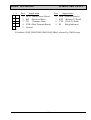
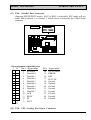
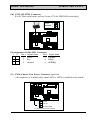
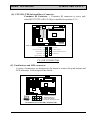
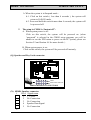
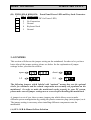
440BX HARDWARE SETUP MAINBOARD 1. RS Reset Button Connector Pin1&2 Function Pin # Signal name 1 Reset Control Open No action 2 Ground Short System Reset 2. HL IDE HDD LED Connector Pin # Signal name 1 + 5V DC Pull-up 2 HDD Active Signal 3. SL Sleep LED Connector This LED will be lightened when the AC power is connected and the system is power off, darkened when the AC power is disconnected or the system is powered on. Pin # Signal name 1 Signal Pin 2 Ground 4. PW Power On / Off and External Suspend Switch Connector According to the setup in CMOS, the PW connector has two functions. It can be the Power Switch or Suspend Switch of your PC system. (please refer to Section- 4.7 and section 4.8 for BIOS setup) If the setup in CMOS is “Delay 4 Sec.”, the function of “PW” will be: A. When system is power off : Press this switch, the system will power on. (when “password” is selected in the CMOS setup program, you will be unable to use the PW button to turn on the power of the PC system, please see Section 2.2 and Section 4.8 for more details. ) B. When system power is on : a. The system is in Full-ON mode : a-1. Click on this switch ( less than 4 seconds ), the system will be turned into Suspend mode. (turn into the GREEN mode) a-2. Press and hold this switch for more than 4 seconds, the system will be powered off. 3-14