1
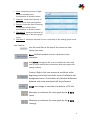
 1. Area: shows the amount of light
photons emitted from
environment to Sputnik sensor.
2. Intensity: shows the intensity of
the emission from each photon.
3. Energy: shows the level of energy
of the light emitted from
environment to Sputnik sensor.
4. Deviation E: measures the level of
non-uniformity of the area graph
curve.
5. Deviation S: measures the level of non-uniformity of the energy graph curve.
View Features
Use the scroll bar at the top of the screen to view
entire scan time.
Save the Environment scan as a picture to your
computer.
Add labels throughout the scan to indicate the start and
end of events within the environment that may impact the
energy reading.
Control+Right-click your mouse to put labels at the
beginning and at the end of the areas of influence and
background areas. A calculation of statistical difference
between each area mentioned will be performed.
Print scan image or save the scan data to a CSV file.
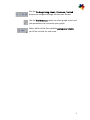
Maximize or minimize the scan graph by the X axis
(time).
Maximize or minimize the scan graph by the Y axis
(energy).
4