1
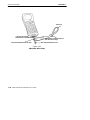
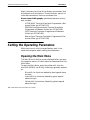
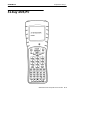
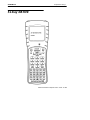
6400 Hand-Held Computer
USER’S GUIDE
"
"
"
"
"
"
"
"
"
"
"
"
"
"
"
"
"
"
"
"
"
"
"
"
"
"
"
"
PN: 961-047-093
Revision D
May 2000
" NOTICE
The information contained herein is proprietary and is provided solely for the
purpose of allowing customers to operate and service Intermec manufactured
equipment and is not to be released, reproduced, or used for any other purpose
without written permission of Intermec.
Disclaimer of Warranties. The sample source code included in this document is
presented for reference only. The code does not necessarily represent complete,
tested programs. The code is provided “AS IS WITH ALL FAULTS.” ALL
WARRANTIES ARE EXPRESSLY DISCLAIMED, INCLUDING THE
IMPLIED WARRANTIES OF MERCHANTABILITY AND FITNESS FOR A
PARTICULAR PURPOSE.
We welcome your comments concerning this publication. Although every effort has
been made to keep it free of errors, some may occur. When reporting a specific
problem, please describe it briefly and include the book title and part number, as
well as the paragraph or figure number and the page number.
Send your comments to:
Intermec Technologies Corporation
Publications Department
550 Second Street SE
Cedar Rapids, IA 52401
ANTARES, INTERMEC, NORAND, NOR*WARE, PEN*KEY, ROUTEPOWER,
TRAKKER, and TRAKKER ANTARES are registered trademarks and
ENTERPRISE WIRELESS LAN, INCA, TE 2000, UAP, and UNIVERSAL ACCESS
POINT are trademarks of Intermec Technologies Corporation.
Ó
1996 Intermec Technologies Corporation. All rights reserved.
This publication printed on recycled paper.
Acknowledgments
DEC, VAX, VMS, VT, and VT220 are registered trademarks of Digital Equipment
Corporation.
Microclean II is a registered trademark of Foresight International.
CONTENTS
"
"
"
"
"
"
"
"
"
"
"
"
"
"
"
"
"
"
"
"
"
"
"
"
"
"
"
"
SECTION 1
General Information
About this User’s Guide . . . . . . . . . . . . . . . . . . . . . . . . . . . . . .
Summary of Sections . . . . . . . . . . . . . . . . . . . . . . . . . . . . .
Unpacking and Inspecting . . . . . . . . . . . . . . . . . . . . . . . . . . . .
Hand-Held Computer Main Components . . . . . . . . . . . . . . .
Hand-Held Computer Keyboard . . . . . . . . . . . . . . . . . . . . . . .
41-Key Keyboard . . . . . . . . . . . . . . . . . . . . . . . . . . . . . . . . .
51-Key Keyboard . . . . . . . . . . . . . . . . . . . . . . . . . . . . . . . . .
Key Descriptions . . . . . . . . . . . . . . . . . . . . . . . . . . . . . . . . . . . .
ENT (Enter) Key . . . . . . . . . . . . . . . . . . . . . . . . . . . . . . . . .
SCAN Key . . . . . . . . . . . . . . . . . . . . . . . . . . . . . . . . . . . . . . .
Period [.] Key . . . . . . . . . . . . . . . . . . . . . . . . . . . . . . . . . . . .
Minus [--] Key . . . . . . . . . . . . . . . . . . . . . . . . . . . . . . . . . . .
Numeric Keys . . . . . . . . . . . . . . . . . . . . . . . . . . . . . . . . . . .
Alphabetic Keys . . . . . . . . . . . . . . . . . . . . . . . . . . . . . . . . . .
Backspace Key . . . . . . . . . . . . . . . . . . . . . . . . . . . . . . . . . . .
Shift Keys . . . . . . . . . . . . . . . . . . . . . . . . . . . . . . . . . . . . . . .
Using Shifted Functions . . . . . . . . . . . . . . . . . . . . . . . . . .
Display Annunciator Locations on Display Window . . . . .
Annunciator Descriptions . . . . . . . . . . . . . . . . . . . . . . . . .
Display Annunciators (Messages) . . . . . . . . . . . . . . . . . .
Display Contrast . . . . . . . . . . . . . . . . . . . . . . . . . . . . . . . . .
Backlight . . . . . . . . . . . . . . . . . . . . . . . . . . . . . . . . . . . . . . . .
Window Scrolling Arrows . . . . . . . . . . . . . . . . . . . . . . . . .
[l/O] Suspend or Resume . . . . . . . . . . . . . . . . . . . . . . . . . .
Handstrap . . . . . . . . . . . . . . . . . . . . . . . . . . . . . . . . . . . . . . . . . .
Buzzer . . . . . . . . . . . . . . . . . . . . . . . . . . . . . . . . . . . . . . . . . . . . . .
Infrared (IrDA) Port . . . . . . . . . . . . . . . . . . . . . . . . . . . . . . . . .
Battery Management . . . . . . . . . . . . . . . . . . . . . . . . . . . . . . . .
Battery . . . . . . . . . . . . . . . . . . . . . . . . . . . . . . . . . . . . . . . . . . . . .
Main Battery Pack . . . . . . . . . . . . . . . . . . . . . . . . . . . . . . .
1-1
1-1
1-2
1-3
1-6
1-6
1-7
1-8
1-8
1-8
1-8
1-8
1-9
1-9
1-9
1-9
1-11
1-13
1-14
1-14
1-17
1-17
1-17
1-18
1-18
1-20
1-20
1-20
1-21
1-21
6400 Hand-Held Computer User’s Guide
i
CONTENTS
Backup Battery . . . . . . . . . . . . . . . . . . . . . . . . . . . . . . . . . .
Memory . . . . . . . . . . . . . . . . . . . . . . . . . . . . . . . . . . . . . . . . . . . .
Main Memory . . . . . . . . . . . . . . . . . . . . . . . . . . . . . . . . . . .
Flash . . . . . . . . . . . . . . . . . . . . . . . . . . . . . . . . . . . . . . . . . . .
Diagnostic EEPROM . . . . . . . . . . . . . . . . . . . . . . . . . . . . . . . . .
Resetting . . . . . . . . . . . . . . . . . . . . . . . . . . . . . . . . . . . . . . . . . . .
Batch Terminal Operation . . . . . . . . . . . . . . . . . . . . . . . . . . . .
Terminal Emulation . . . . . . . . . . . . . . . . . . . . . . . . . . . . . .
Accessories and Options . . . . . . . . . . . . . . . . . . . . . . . . . . . . . .
Internal Scanner . . . . . . . . . . . . . . . . . . . . . . . . . . . . . . . . .
Internal Radio . . . . . . . . . . . . . . . . . . . . . . . . . . . . . . . . . . .
Communication Adapter . . . . . . . . . . . . . . . . . . . . . . . . . .
Scanner Handle . . . . . . . . . . . . . . . . . . . . . . . . . . . . . . . . . .
Adjustable Handstrap and Adjustable Wriststrap . . .
Hand-Held Computer Specifications . . . . . . . . . . . . . . . . . . .
Configuring Terminal Emulation over IP . . . . . . . . . . . . . .
1-23
1-23
1-23
1-24
1-24
1-24
1-25
1-25
1-25
1-25
1-25
1-26
1-27
1-29
1-31
1-34
SECTION 2
Operation
Introduction . . . . . . . . . . . . . . . . . . . . . . . . . . . . . . . . . . . . . . . . .
Before Using Your Hand-Held Computer for the
First Time . . . . . . . . . . . . . . . . . . . . . . . . . . . . . . . . . . . . . . .
Rechargeable Battery Labelling . . . . . . . . . . . . . . . . . . . . . . .
Installing the Main Battery . . . . . . . . . . . . . . . . . . . . . . . . . . .
Removing the Main Battery . . . . . . . . . . . . . . . . . . . . . . . . . .
Measuring Battery Pack Charge Level . . . . . . . . . . . . . . . .
Charging Your Battery Pack . . . . . . . . . . . . . . . . . . . . . . . . . .
In Your Hand-Held Computer . . . . . . . . . . . . . . . . . . . . .
In An External Source . . . . . . . . . . . . . . . . . . . . . . . . . . . .
Battery Charger LED and Error Codes . . . . . . . . . . . . . . . .
Charging Indicator Error Codes . . . . . . . . . . . . . . . . . . . . . . .
Backup Battery . . . . . . . . . . . . . . . . . . . . . . . . . . . . . . . . . . . . . .
Downloading Programs To Your Hand-Held Computer . .
Programming the Flash . . . . . . . . . . . . . . . . . . . . . . . . . . . . . .
Turning Your Hand-Held Computer On and Off
(Suspending) . . . . . . . . . . . . . . . . . . . . . . . . . . . . . . . . . . . .
Turning On Your Computer . . . . . . . . . . . . . . . . . . . . . . .
Suspending Your Hand-Held Computer . . . . . . . . . . . .
Understanding the Key Clicks . . . . . . . . . . . . . . . . . . . . . . . .
Scanning . . . . . . . . . . . . . . . . . . . . . . . . . . . . . . . . . . . . . . . . . . .
ii
6400 Hand-Held Computer User’s Guide
2-1
2-2
2-4
2-5
2-6
2-7
2-8
2-8
2-9
2-10
2-10
2-11
2-12
2-12
2-13
2-13
2-13
2-14
2-15
CONTENTS
Using an Integrated Scanner . . . . . . . . . . . . . . . . . . . . . .
Installing the Optional Scanning Handle . . . . . . . . . . .
Installing the Optional Scanning Handle with
Battery Pack . . . . . . . . . . . . . . . . . . . . . . . . . . . . . . . . .
Charging the Scanner Handle Batteries . . . . . . . . . . . .
Using a Tethered Bar Code Scanner . . . . . . . . . . . . . . . . . . .
Tethered Scanner Supported . . . . . . . . . . . . . . . . . . . . . .
Software . . . . . . . . . . . . . . . . . . . . . . . . . . . . . . . . . . . . . . . .
Setting Terminal Emulation to Accept Tethered
Laser Scanners . . . . . . . . . . . . . . . . . . . . . . . . . . . . . . .
Setting Your DOS Application to Accept Tethered
Laser Scanners . . . . . . . . . . . . . . . . . . . . . . . . . . . . . . .
Setting Up Your LS3203 or LS3603 RS-232 Serial
Scanner Parameters . . . . . . . . . . . . . . . . . . . . . . . . . .
Setting Up Your Intermec 1551 Series RS-232 Serial
Scanner Parameters . . . . . . . . . . . . . . . . . . . . . . . . . .
2-15
2-17
2-18
2-19
2-20
2-20
2-21
2-22
2-23
2-23
2-28
SECTION 3
Terminal Emulation Menu Screens
Introduction . . . . . . . . . . . . . . . . . . . . . . . . . . . . . . . . . . . . . . . . .
Keyboard Functions . . . . . . . . . . . . . . . . . . . . . . . . . . . . . . . . .
Yellow and Blue Shift Keys . . . . . . . . . . . . . . . . . . . . . . .
Enter [ENT] Keys . . . . . . . . . . . . . . . . . . . . . . . . . . . . . . . .
Number Keys [0] Through [9] . . . . . . . . . . . . . . . . . . . . .
Up and Down Arrows . . . . . . . . . . . . . . . . . . . . . . . . . . . . .
Display Annunciators . . . . . . . . . . . . . . . . . . . . . . . . . . . . . . . .
Display Position 0 . . . . . . . . . . . . . . . . . . . . . . . . . . . . . . . .
Display Position 1 . . . . . . . . . . . . . . . . . . . . . . . . . . . . . . . .
Display Position 2 . . . . . . . . . . . . . . . . . . . . . . . . . . . . . . . .
Display Position 3 . . . . . . . . . . . . . . . . . . . . . . . . . . . . . . . .
Display Position 4 . . . . . . . . . . . . . . . . . . . . . . . . . . . . . . . .
Display Positions 5--8 . . . . . . . . . . . . . . . . . . . . . . . . . . . . .
Setting the Operating Parameters . . . . . . . . . . . . . . . . . . . . .
Opening the Main Menu . . . . . . . . . . . . . . . . . . . . . . . . . .
Opening the Set-Up Parms Menu . . . . . . . . . . . . . . . . . .
Protocol Options . . . . . . . . . . . . . . . . . . . . . . . . . . . . . . . . .
Display Options . . . . . . . . . . . . . . . . . . . . . . . . . . . . . . . . . .
Radio Comm . . . . . . . . . . . . . . . . . . . . . . . . . . . . . . . . . . . . .
Cold Start . . . . . . . . . . . . . . . . . . . . . . . . . . . . . . . . . . . . . . .
More . . . . . . . . . . . . . . . . . . . . . . . . . . . . . . . . . . . . . . . . . . . .
3-1
3-1
3-1
3-2
3-2
3-3
3-3
3-3
3-3
3-4
3-4
3-4
3-5
3-6
3-6
3-11
3-26
3-36
3-37
3-39
3-39
6400 Hand-Held Computer User’s Guide
iii
CONTENTS
Print Device . . . . . . . . . . . . . . . . . . . . . . . . . . . . . . . . . . . . .
LCD Parms . . . . . . . . . . . . . . . . . . . . . . . . . . . . . . . . . . . . . . . . .
Screen Size . . . . . . . . . . . . . . . . . . . . . . . . . . . . . . . . . . . . . .
Screen Mode . . . . . . . . . . . . . . . . . . . . . . . . . . . . . . . . . . . . .
Annunciators . . . . . . . . . . . . . . . . . . . . . . . . . . . . . . . . . . . .
Key Uppercase . . . . . . . . . . . . . . . . . . . . . . . . . . . . . . . . . . .
Scroll Window . . . . . . . . . . . . . . . . . . . . . . . . . . . . . . . . . . .
Beeper Setup . . . . . . . . . . . . . . . . . . . . . . . . . . . . . . . . . . . . . . . .
Key Click . . . . . . . . . . . . . . . . . . . . . . . . . . . . . . . . . . . . . . . .
Error Tone . . . . . . . . . . . . . . . . . . . . . . . . . . . . . . . . . . . . . .
Beeper Select . . . . . . . . . . . . . . . . . . . . . . . . . . . . . . . . . . . .
Tests . . . . . . . . . . . . . . . . . . . . . . . . . . . . . . . . . . . . . . . . . . . . . . .
Peripherals . . . . . . . . . . . . . . . . . . . . . . . . . . . . . . . . . . . . . .
Memory View . . . . . . . . . . . . . . . . . . . . . . . . . . . . . . . . . . . .
Packet Driver Test . . . . . . . . . . . . . . . . . . . . . . . . . . . . . . .
Histogram Opts . . . . . . . . . . . . . . . . . . . . . . . . . . . . . . . . . .
Numbers . . . . . . . . . . . . . . . . . . . . . . . . . . . . . . . . . . . . . . . .
Timed Numbers . . . . . . . . . . . . . . . . . . . . . . . . . . . . . . . . . .
Version Info (Information) . . . . . . . . . . . . . . . . . . . . . . . . . . . .
Exit Menus . . . . . . . . . . . . . . . . . . . . . . . . . . . . . . . . . . . . . . . . .
More . . . . . . . . . . . . . . . . . . . . . . . . . . . . . . . . . . . . . . . . . . . . . . .
Keyboard Opts . . . . . . . . . . . . . . . . . . . . . . . . . . . . . . . . . . .
Save Parms . . . . . . . . . . . . . . . . . . . . . . . . . . . . . . . . . . . . . .
Session Menu . . . . . . . . . . . . . . . . . . . . . . . . . . . . . . . . . . . .
To Exit Emulation Mode and Return to DOS . . . . . . . . . . .
3-40
3-40
3-41
3-42
3-44
3-45
3-45
3-46
3-46
3-47
3-47
3-48
3-48
3-56
3-56
3-58
3-59
3-59
3-59
3-60
3-60
3-60
3-61
3-61
3-63
SECTION 4
Maintenance and Troubleshooting
Introduction . . . . . . . . . . . . . . . . . . . . . . . . . . . . . . . . . . . . . . . . .
Low Battery Indication . . . . . . . . . . . . . . . . . . . . . . . . . . . . . . .
Cleaning Your Hand-Held Computer . . . . . . . . . . . . . . . . . .
Case and Display . . . . . . . . . . . . . . . . . . . . . . . . . . . . . . . .
Docking Connectors . . . . . . . . . . . . . . . . . . . . . . . . . . . . . .
Troubleshooting . . . . . . . . . . . . . . . . . . . . . . . . . . . . . . . . . . . . .
Troubleshooting Table . . . . . . . . . . . . . . . . . . . . . . . . . . . . . . . .
Diagnostic Information . . . . . . . . . . . . . . . . . . . . . . . . . . .
Repair Service . . . . . . . . . . . . . . . . . . . . . . . . . . . . . . . . . . . . . . .
iv
6400 Hand-Held Computer User’s Guide
4-1
4-1
4-3
4-3
4-3
4-4
4-4
4-10
4-11
CONTENTS
APPENDIX A
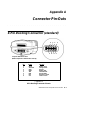
Connector Pin-Outs
8-Pin Docking Connector (standard) . . . . . . . . . . . . . . . . . . .
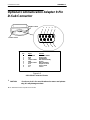
Optional Communication Adapter 9-Pin D-Sub Connector
A-1
A-2
APPENDIX B
Utilities Program
Entry Point . . . . . . . . . . . . . . . . . . . . . . . . . . . . . . . . . . . . . . . . .
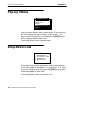
Pop-Up Menus . . . . . . . . . . . . . . . . . . . . . . . . . . . . . . . . . . . . . .
Drop-Down Lists . . . . . . . . . . . . . . . . . . . . . . . . . . . . . . . . . . . .
Alphanumeric Fields . . . . . . . . . . . . . . . . . . . . . . . . . . . . . . . . .
Title Screen . . . . . . . . . . . . . . . . . . . . . . . . . . . . . . . . . . . . . . . . .
Language Selection . . . . . . . . . . . . . . . . . . . . . . . . . . . . . . . . . .
Communications Menu . . . . . . . . . . . . . . . . . . . . . . . . . . . . . . .
Option 1 BEGIN COMM SESSION . . . . . . . . . . . . . . . .
Option 2 COMM SETTING . . . . . . . . . . . . . . . . . . . . . . .
Option 3 UNIT ID . . . . . . . . . . . . . . . . . . . . . . . . . . . . . . . .
Option 4 NETWORK PARAMETERS . . . . . . . . . . . . . .
Option 4 MODEM PARAMETERS . . . . . . . . . . . . . . . . .
Option 5 PHONE NUMBER . . . . . . . . . . . . . . . . . . . . . .
Option 6 ADVANCED UTILITIES . . . . . . . . . . . . . . . . .
B-1
B-2
B-2
B-3
B-4
B-5
B-6
B-7
B-15
B-18
B-18
B-20
B-24
B-25
APPENDIX C
Keyboard Overlays
41-Key
51-Key
41-Key
51-Key
41-Key
51-Key
41-Key
51-Key
41-Key
51-Key
DOS/PC . . . . . . . . . . . . . . . . . . . . . . . . . . . . . . . . . . . . .
DOS/PC . . . . . . . . . . . . . . . . . . . . . . . . . . . . . . . . . . . . .
5250 . . . . . . . . . . . . . . . . . . . . . . . . . . . . . . . . . . . . . . . . .
5250 . . . . . . . . . . . . . . . . . . . . . . . . . . . . . . . . . . . . . . . . .
3270 . . . . . . . . . . . . . . . . . . . . . . . . . . . . . . . . . . . . . . . . .
3270 . . . . . . . . . . . . . . . . . . . . . . . . . . . . . . . . . . . . . . . . .
VT/ANSI . . . . . . . . . . . . . . . . . . . . . . . . . . . . . . . . . . . . .
VT/ANSI . . . . . . . . . . . . . . . . . . . . . . . . . . . . . . . . . . . . .
NATIVE . . . . . . . . . . . . . . . . . . . . . . . . . . . . . . . . . . . . .
NATIVE . . . . . . . . . . . . . . . . . . . . . . . . . . . . . . . . . . . . .
C-2
C-3
C-4
C-5
C-6
C-7
C-8
C-9
C-10
C-11
6400 Hand-Held Computer User’s Guide
v
CONTENTS
FIGURES
Figure 1-1 Computer Front View . . . . . . . . . . . . . . . . . . . . .
Figure 1-2 Computer Back View . . . . . . . . . . . . . . . . . . . . . .
Figure 1-3 Top End View . . . . . . . . . . . . . . . . . . . . . . . . . . . .
Figure 1-4 Bottom End View . . . . . . . . . . . . . . . . . . . . . . . . . .
Figure 1-5 41--Key Keyboard . . . . . . . . . . . . . . . . . . . . . . . . . .
Figure 1-6 51--Key Keyboard . . . . . . . . . . . . . . . . . . . . . . . . . .
Figure 1-7 Annunciator Locations On Display . . . . . . . . . .
Figure 1-8 Bottom End Handstrap Attachment . . . . . . . .
Figure 1-9 Top End Handstrap Attachment . . . . . . . . . . . .
Figure 1-10 Communication Adapter Scanner Connector
Figure 1-11 Communication Adapter Charger Connector
Figure 1-12 Scanner Handle . . . . . . . . . . . . . . . . . . . . . . . . . .
Figure 1-13 Scanner Handle with Optional Battery . . . . .
Figure 1-14 Adjustable Handstrap . . . . . . . . . . . . . . . . . . . .
Figure 1-15 Adjustable Wrist Strap . . . . . . . . . . . . . . . . . . . .
Figure 2-1 Resetting Your Computer . . . . . . . . . . . . . . . . . .
Figure 2-2 Installing Main Battery Pack . . . . . . . . . . . . . . .
Figure 2-3 Removing Main Battery Pack . . . . . . . . . . . . . .
Figure 2-4 Main Battery Pack Capacity Contacts . . . . . .
Figure 2-5 Multipack Charger . . . . . . . . . . . . . . . . . . . . . . . .
Figure 2-6 Single Pack Charger . . . . . . . . . . . . . . . . . . . . . . .
Figure 2-7 Optional Scanner Handle . . . . . . . . . . . . . . . . . .
Figure 2-8 Optional Handle with Battery Pack . . . . . . . . .
Figure 2-9 Inserting Scanner Handle Into Charger . . . . .
Figure 2-10 Connecting a Tethered Scanner . . . . . . . . . . . .
Figure A-1 8-Pin Docking Connector Pinouts . . . . . . . . . . .
Figure A-2 9-Pin D-Sub Connector Pinouts . . . . . . . . . . . . .
TABLES
Table 2-1 Charging Indicator Error Codes . . . . . . . . . . . . . .
Table 2-2 Solution Notes . . . . . . . . . . . . . . . . . . . . . . . . . . . . . .
Table 3-1 Possible RF Link Descriptions . . . . . . . . . . . . . . .
Table 3-2 Supported Transmission Rates for the High
Speed Lucent Radio’s . . . . . . . . . . . . . . . . . . . . . . . . . . . . .
Table 4-1 Basic Troubleshooting . . . . . . . . . . . . . . . . . . . . . . .
vi
6400 Hand-Held Computer User’s Guide
1-3
1-4
1-5
1-5
1-6
1-7
1-13
1-19
1-19
1-26
1-27
1-28
1-28
1-29
1-30
2-3
2-5
2-6
2-7
2-9
2-9
2-17
2-18
2-19
2-21
A-1
A-2
2-10
2-11
3-49
3-51
4-4
Section 1
General Information
"
"
"
"
"
"
"
"
"
"
"
"
"
"
"
"
"
"
"
"
"
"
"
"
"
"
"
"
About this User’s Guide
This user’s guide is divided into four sections and three appendixes.
Summary of Sections
Section 1
Contains general information about your computer.
Section 2
Describes how to prepare for using.
Section 3
Shows the terminal emulation menu screens for setting
parameters. This section only applies if you are running
terminal emulation software.
Section 4
Steps you through some procedures to use when troubleshooting. This section also includes information for routine
maintenance. Routine maintenance includes recharging the
main battery pack; replacing the handstrap; and cleaning
various components.
Appendix A
Pin-outs for the external connectors.
6400 Hand-Held Computer User’s Guide
1-1
Plugging in the Chips
SECTION 1
Appendix B
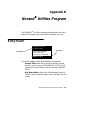
Norand RROM Utilities Programs are intended for your system administrator for setting parameters to support your
application.
Appendix C
Contains terminal emulation overlays offered for your computer.
Unpacking and Inspecting
1. Remove the hand-held computer from its shipping container and inspect for any visible damage.
2. If your hand-held computer was damaged in shipping,
record the model number, part number, and serial
number. These numbers can be found on the back side
of the computer.
3. Save all paperwork pertaining to shipment, and immediately notify the transport company of the damaged item(s). Follow their instructions for filing a
claim on the damaged items.
Authorized repair of products is available only at Intermec
Service Centers. Unauthorized repair voids any and all
warranties.
1-2
6400 Hand-Held Computer User’s Guide
General Information
SECTION 1
Hand-Held Computer Main Components
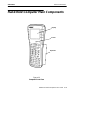
Display
Buzzer
Keyboard
Figure 1-1
Computer Front View
6400 Hand-Held Computer User’s Guide
1-3
General Information
SECTION 1
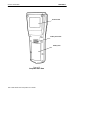
Product Label
Battery Pack Latch
Battery Pack
Figure 1-2
Computer Back View
1-4
6400 Hand-Held Computer User’s Guide
General Information
SECTION 1
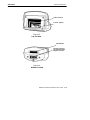
Radio Card Slot
Scanner (option)
Figure 1-3
Top End View
IrDA Interface
Docking Connector
and Communication
Adapter Connector
Figure 1-4
Bottom End View
6400 Hand-Held Computer User’s Guide
1-5
General Information
SECTION 1
Hand-Held Computer Keyboard
41-Key Keyboard
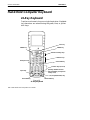
Function and numeric keys are single keystrokes. Alphabetical characters are entered using the green, blue, or yellow
shift keys.
Scan Key
ENTER Key
ENTER Key
Window Scrolling Keys
Numeric Keys
Backspace Key
Green Shift Key
Function Keys (F1--F12)
Specially Defined Function
Keys (depending on keyboard
overlay used)
Space Key
I/O (Suspend/Resume) Key
Blue Shift Key
Yellow Shift Key
Figure 1-5
41- Key Keyboard
1-6
6400 Hand-Held Computer User’s Guide
General Information
SECTION 1
51-Key Keyboard
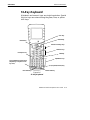
Alphabetic and numeric keys are single keystrokes. Special
function keys are entered using the green, blue, or yellow
shift keys.
Scan Key
ENTER Key
ENTER Key
Window Scrolling Keys
Numeric Keys
Backspace Key
Shift Key
Alphabetic Keys
Special Defined Function Keys
(depending on keyboard overlay used)
I/O (Suspend/Resume) Key
Blue Shift Key
Yellow Shift Key
Figure 1-6
51- Key Keyboard
6400 Hand-Held Computer User’s Guide
1-7
General Information
SECTION 1
Key Descriptions
This section includes a description of how the shift keys
work and the differences between a 41-key and 51-key keyboard. Your particular keyboard may have an overlay that
has additional keys other than those described in this section. Refer to your application operation manual for descriptions of those keys. The following descriptions cover both
the 41-key and 51-key computers using a DOS/PC overlay.
ENT (Enter) Key
Two Enter keys are provided for the convenience of both left
and right handed users. These keys are the same as an ¿
(Enter) key on a PC. You use them to enter data, or as a
“Yes” response to display prompts.
SCAN Key
This key is used with an integrated scanner to read bar
code labels. If your application does not use a scanner or if
you are using an optional tethered scanner, you probably
will not use this key. Pressing this key also resumes operation (awaken your computer) if it is in the suspend mode.
Period [.] Key
Use the period [.] key as a period or a decimal point.
Minus [- ] Key
Use the minus [--] key to enter negative values or dashes in
character fields. The minus key is also used for “No” responses to display prompts.
1-8
6400 Hand-Held Computer User’s Guide
General Information
SECTION 1
Numeric Keys
Use the numeric keys as you would those on a calculator.
Numeric values are single keystroke operations.
Alphabetic Keys
Your computer provides the full alphabet on both the 41and 51-key keyboards. Alphabetic characters are single
keystroke operations with the 51-key keyboard but are two
keystrokes on a 41-key keyboard. Alphabetic characters can
be entered on the 41-key keyboard by using the blue shift
key.
Backspace [ ] Key
Use the backspace key to back the cursor up one character
at a time. Holding this key down causes the cursor to continuously move backwards until you stop or you run out of
space to move.
Shift Keys
Your computer has three different “shift” function keys.
These keys temporarily shift the function of the keyboard.
Your keyboard has a green [SHFT] key, a blue key and a
yellow key. The green shift key is a standard shift key. Both
the blue and yellow keys work just like the shift key, and
allow access to different alternate functions. Your keyboard
may have up to three color-coded legends (words or characters) above some of the keys. The green, blue, or yellow
“shift” keys correspond to those options.
6400 Hand-Held Computer User’s Guide
1-9
General Information
SECTION 1
Green [SHFT] Key
Pressing the green [SHFT] key shifts the keyboard between
uppercase and lowercase for a single keystroke entry. If the
keyboard is set for uppercase character entry, pressing
green [SHFT] followed by a character key enters a single
lowercase character.
Blue Key
Use the blue shift key to enter single keystroke entries of
that shifted option. The blue shifted function relates to the
blue legends located above the keys.
Using a 41-Key Keyboard
On the 41-key keyboard, above the yellow shift key is Alphabetic Lock, illustrated by the symbol ALPHA . This
locks the keyboard so only the alphabetical characters are
entered. Press the blue key and then the yellow key.
The blue padlock is CAPS LOCK. This causes alphabetic
characters to be capitalized. Press the blue key and then
the space key.
ALPHABETIC or CAPS lock continues until the blue then
yellow shift keys are pressed again.
Using a 51-Key Keyboard
On the 51-key keyboard, there is no ALPHA Lock key because the alphabetical letters are not shifted functions.
Yellow Key
Use the yellow shift key to enter single keystroke entries of
that shifted option. The yellow shift functions relates to the
yellow legends on your keyboard.
1-10
6400 Hand-Held Computer User’s Guide
General Information
SECTION 1
Using Shifted Functions
This section explains the use of the shift keys.
The Rules
The green [SHFT] key is the same as the SHIFT key on a
PC except that the green shift key also relates to those
characters where green legends appear above the keys.
EXAMPLE:
On a PC, SHIFT [3] produces the # character, and that is the same
on the hand-held computer.
Contrast and backlighting are on the window scrolling arrow keys. The contrast control and backlight control are not
the same as the PC shift. This hand-held computer uses
shift left, shift right and shift up for contrast and backlight
control. On a PC these key strokes produce a 4, 6, and 8.
Numeric values 0--9 are available on all the 6400 HandHeld Computer versions, those keys are used for special
controls without causing compatibility issues.
Using the Shifted Functions
If the function you want is printed on the keyboard overlay
(in blue, yellow, or green) then you must first press that
colored shift key immediately before the desired color function. That two-key combination always defines that key.
EXAMPLE:
A 41-key DOS/PC keyboard has the letter S in blue over the [F9]
key. Therefore, to produce a lowercase ’s’, press blue shift then the
[F9] key.
To produce an uppercase S, press the green [SHFT] key, then blue
shift, then the [F9] key.
‘S’ is always produced by pressing blue shift, then the [F9] key; if
you want to modify this, you press a modifier first.
EXAMPLE:
To produce CTRL-S, press the [CTRL] key, then blue shift, then the
[F9] key for ‘S’.
To produce ALT-F9, press the [ALT] key, then the [F9] key.
6400 Hand-Held Computer User’s Guide
1-11
General Information
EXAMPLE:
SECTION 1
Pressing the green [SHFT] key and then the [DEL] key produces a
dot instead of deleting the character at the cursor. The nearby keys
on that row [CTRL], [ALT], and [ESC] still behave normally when the
green [SHFT] is pressed first.
This is why annunciators are absolutely crucial, since you
must only press one key at a time. The annunciators tell
you which shift key you are pressing and holding down. Refer to page 1-14 for locations and meanings of display annunciators.
Pressing more than one shift key along with another key
may not always produce the result you expected. This happens as a result:
Of the sequence of keys pressed, and
" The mode your computer is in at the time the key is
pressed.
There is no problem when you press the green [SHFT] and
the yellow key. But if you press the [SHFT] and either the
blue or yellow shift key, you usually experience different
results than you expect.
"
Summary of Shift Key Combinations
"
"
Green [SHFT] and either blue or yellow shift key and
another keystroke, no confusion
Green [SHFT] and blue and yellow shift key along
with another key, confusion can occur
This is similar to your PC, if the NUM LOCK or CAPS
LOCK is engaged then pressing shift and a key usually produces something other than what you want. Therefore, just
like with a PC, to get the result you want you have to
change a mode or the sequence you press the keys.
1-12
6400 Hand-Held Computer User’s Guide
General Information
SECTION 1
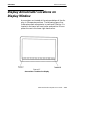
Display Annunciator Locations on
Display Window
Annunciators are located at the extreme bottom of the display, in 20 separate positions. The following figure illustrates where each annunciator is positioned. Position 1 is
located in the lower left hand corner and position 20 completes the row in the lower right hand corner.
Figure 1-7
Annunciator Locations On Display
6400 Hand-Held Computer User’s Guide
1-13
General Information
SECTION 1
Annunciator Descriptions
Annunciators appear on the bottom line of the display.
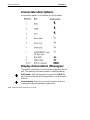
Display Annunciators (Messages)
The symbols contained in this section are larger than actual
size. The meaning of the annunciators is described below:
S
C
1-14
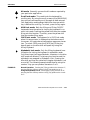
Shift mode: After holding down the green Shift [SHFT]
key, the next character will be uppercase or the alternative
function.
Control mode: Generally you use the Control mode as it
is designed in by your particular application.
6400 Hand-Held Computer User’s Guide
General Information
SECTION 1
A
S
N
C
A
EXAMPLE:
Alt mode: Generally you use the Alt mode as required by
your particular application.
Scroll lock mode: This mode locks the keyboard for
scrolling only. By using the scroll arrows on the [WINDOW]
keys you can continuously scroll through all data entered.
Your application and keyboard definition show you which
key is defined for scrolling. To unlock, press the key again.
NUM lock mode: Both the 41-key and 51-key DOS/PC
keyboards have the option for locking the keyboard in numeric lock mode. Pressing the yellow shift then the number
8 key sets this function. To unlock, press the yellow shift
then the number 8 key again.
CAPS lock mode: The keyboard is in CAPS lock mode
when this annunciator is displayed on the bottom row of
the screen. All keystrokes are entered as uppercase characters. To unlock CAPS press the [CAPS] key (51-key keyboard) again or the blue shift and space key using the
41-key keyboard.
Alphabetic lock mode: Only the 41-key keyboards have
the option for locking the keyboard in alphabetic mode.
Only those keys that have alphabetic characters in the blue
shift mode are affected. The primary key function and the
alphabetic are swapped in Alphabetic Lock. Pressing the
blue shift and then the yellow shift toggles Alphabetic Lock
on and off. The following example shows how by using the
number 1 key you can produce characters 1 or A.
Normal Operation: Pressing the [1] key produces the character ‘1’;
pressing the blue shift key and then the [1] key produces an ‘A’.
Using the Alphabetic Lock: Pressing the [1] key produces an ‘A’;
pressing the blue shift key and then the [1] key produces the character ‘1’.
6400 Hand-Held Computer User’s Guide
1-15
General Information
SECTION 1
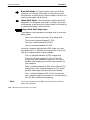
Blue Shift Mode: This annunciator shows you that the
keyboard is in the blue shift mode. Pressing a key enters
the character or performs the function shown in blue on the
overlay to the upper left of the key.
Yellow Shift Mode: This annunciator displays when the
keyboard is in the yellow shift mode. Pressing a key enters
the character or performs the function shown on the overlay
in yellow to the upper right of the key.
Battery Pack Gas Gauge Icons:
These battery icons represent the charge level in your main
battery pack.
"
Four icons indicates more than 76 % charge level
"
Three icons indicates between 51--75%
"
Two icons indicates between 26--50%
"
One icon indicates between 21--25%
Once your computer gets below the 20% range, the icons
are replaced by “Ls” and after the charge level is less than
10% your computer emits a series of beeps.
"
"
"
"
" NOTE:
1-16
Four Ls indicates between 16--20% charge level
Three Ls indicates between 11--15%. At the 15%
charge level, your computer beeps once. The sound
duration and frequency are at levels you have set for
your computer.
Two Ls indicates between 6--10%. At the 10% and 7%
charge levels, your computer beeps once. The sound
duration and frequency are at levels you have set.
One L indicates between 0--5%. At this charge level,
your computer beeps three times at its current setting
level for both duration and frequency.
If you have the beeper turned off, you will not hear any of the low
battery beep warnings.
6400 Hand-Held Computer User’s Guide
General Information
SECTION 1
The battery pack icons on your computer display reflect the
same status as the LEDs on the battery pack. However,
there may be a one minute delay for updating the icons on
the display when the battery pack is replaced.
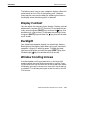
Display Contrast
You can adjust the contrast of your display. Display contrast
adjustment is a green [SHFT] function. To increase the contrast, press the green [SHFT] key and then the [ ] key (the
window scroll-right arrow). To decrease the contrast, press
the green [SHFT] key and then the [ ] key (the left window
scroll arrow).
Backlight
Your hand-held computer display has a backlight feature.
Backlighting the display helps when using your hand-held
computer in poorly lit working areas. To toggle the backlight on and off press and hold the green [SHFT] key then
the backlight [ ] key (the window scroll-up arrow).
Window Scrolling Arrows
Use the window scrolling arrows while in the blue shift
mode to adjust the area of the screen that is visible. Pressing the blue shift key and then one of the arrow keys moves
the display one row or column at a time until the arrow key
is released. This allows you to pan across the entire virtual
CGA screen.
6400 Hand-Held Computer User’s Guide
1-17
General Information
SECTION 1
[l/O] Suspend or Resume
Pressing the [I/O] key does not turn the computer off completely, but instead puts it into a suspend mode. Suspend
mode enables the computer to conserve power but also enables it to respond quickly to data entry. Your hand-held
computer responds to the scan key, the trigger on the scanner handle, or the [I/O] key. To force your computer into
suspend, press the [I/O] key. Opening the battery pack door
latch also puts your computer into suspend.
Thecomputer puts itself into suspend mode if no activity
has occurred for a set period of time. The time that elapses
before it suspends is determined by the parameters you set
using your application software, AUTOEXEC.BAT or CONFIG.SYS files.
Handstrap
An elastic handstrap is included for your hand-held computer. Using the handstrap provides comfort to you and also
helps prevent you from accidentally dropping your computer.
Whether you are left or right handed, the handstrap can be
secured to accommodate your need. Figure 1-8 and
Figure 1-9 on page 1-19 show how to fasten the handstrap
to the top and bottom of your computer.
Available as options and accessories are an adjustable
handstrap and an adjustable wriststrap. These are shown
in NO TAG and NO TAG on pages 1-29 and NO TAG and
can be attached for either left or right handed use.
1-18
6400 Hand-Held Computer User’s Guide
General Information
SECTION 1
Handstrap Attachment Hole
Handstrap Attaching Hole
Handstrap Screw
Figure 1-8
Bottom End Handstrap Attachment
1
Handstrap Clip Fastner
Handstrap Attachment Bushings
2
3
Figure 1-9
Top End Handstrap Attachment
6400 Hand-Held Computer User’s Guide
1-19
General Information
SECTION 1
Buzzer
The buzzer sounds when you press a key (the “key click”) or
make a good scan, or when certain error conditions occur.
Refer to Figure 1-1 on page 1-3 for the location of the
buzzer.
B CAUTION:
Keep all foreign material out of the buzzer opening. The buzzer
opening is not a pencil or pen holder. The buzzer is sealed but
could be punctured by sharp objects which harm the buzzer
and allow rain, dirt, or other materials to get inside your
hand-held computer.
You can adjust the frequency and length of time of the buzzer tones through your parameter settings. The parameter
settings are detailed in Section 3.
Infrared (IrDA) Port
The IrDA port provides for the transmitting of an infrared
signal to:
"
"
"
A printer equipped with an IrDA adapter
A personal computer with IrDA serial adapter
Any other IrDA compatible device
Battery Management
The normal charge time for the main battery pack is 1.5
hours for a 2 cell pack and 3 hours for a 4 cell pack.
You should charge the battery pack until the green LED on
the charger comes on, indicating a fully charged pack.
1-20
6400 Hand-Held Computer User’s Guide
General Information
SECTION 1
A fully charged battery pack, left outside of a charger or
your computer, self discharges in about 20 days. It is best to
take batteries directly from the charging device and install
them into your computer.
Your battery packs are rated for 500 full charge/discharge
cycles after which they have 50% of their original capacity.
The main and backup batteries will not charge below 32_F
(0_C) and above 104_F(40_C). The battery life of the cells is
reduced when running in cold temperatures.
EXAMPLE:
Your computer should be used only two shifts a day in a below 0_C
environment to allow eight hours for the internal backup battery to
recharge in room temperature.
It is always a good idea to check the capacity of your battery pack before inserting it into your computer, and charge
accordingly. Refer to Measuring Battery Pack Charge
Level on page 2-7 for instructions.
Battery
Main Battery Pack
There are this options for rechargeable lithium ion main
battery packs:
"
"
"
Two cell
Four cell
Four cell in optional scanner handle
6400 Hand-Held Computer User’s Guide
1-21
General Information
SECTION 1
9
WARNING:
The battery can explode if it is incorrectly replaced. Replace
only with the same or equivalent kind.
AVERTISSEMENT: La batterie au lithium peut exploser si elle est replacée de
manière incorrecte. Elle ne doit être remplacée que par une
batterie identique ou similaire.
WARNING:
The lithium battery can explode if placed incorrectly in the
charger.
AVERTISSEMENT: Les batteries au lithium peuvent exploser ou prendre feu si
elles sont trop chargées à cause d’une mauvaise
installation de la station d’accueil.
When your computer goes into suspend mode because of low
main battery condition, the data is protected by the backup
battery. Your computer will not accept data or process
transactions until you deal with the low battery condition.
The backup battery protects the data that you have entered
for at least 100 hours.
1-22
6400 Hand-Held Computer User’s Guide
General Information
SECTION 1
Backup Battery
Your hand-held computer contains a rechargeable nickelmetal hydride backup battery. This backup battery recharges when needed from either an external charging
source (like a printer or dock) or from the main battery
pack. If the backup battery is completely run down it takes
a minimum of 8 hours to completely recharge but it is better to recharge it for a full 12 hours.
The backup battery remains ready to protect the computers
data whenever the main battery pack is removed or needs
recharging. The backup battery should last about 500
cycles (discharge and recharge equals a cycle). This battery
should last for about 5 years before it needs to be replaced.
If your computer fails to hold data for at least 100 hours in
the suspend mode, send your computer to the Intermec
Customer Support Center for replacement.
Memory
This hand-held computer design uses these types of
memory:
"
"
Main Memory DRAM
Flash
Main Memory
Your main memory DRAM options available are 2, 4 or 8
Megabytes. The main memory was ordered at the time
your unit was purchased. To add additional memory, send
your computer into your Intermec Customer Support Center.
The main memory is protected by the backup battery during low or dead main battery conditions or when the main
battery pack is removed.
6400 Hand-Held Computer User’s Guide
1-23
General Information
SECTION 1
Flash
Flash memory is available in 2 or 4 Megabytes. Flash
stores the BIOS and DOS. Software stored in flash is copied
into DRAM for execution. Your application may also store
information in flash memory. Flash memory retains data
even if all power sources are depleted.
Diagnostic EEPROM
The hand-held computer collects and stores diagnostics.
They can provide useful information to an Intermec Customer Support Specialist, should your computer fail to operate. You will be instructed by Intermec service personnel to
complete the necessary steps while they are troubleshooting
your system with you.
Resetting
In the rare event that your hand-held computer fails to respond to your input, it may be necessary to “reset.” A
“hard” reset of your computer is done by holding down the
Blue, Yellow and both ENT (Enter) keys all at the same
time, until your computer starts beeping. This usually
takes about 1--2 seconds. This method is equivalent to powering off and on with a PC. Resetting (also called rebooting)
can up to 45 seconds.
Depending on the type of overlay your computer is programmed for, usually a “soft” reset is done by pressing Ctrl,
Alt, and Delete.
1-24
6400 Hand-Held Computer User’s Guide
General Information
SECTION 1
Batch Terminal Operation
Your hand-held computer contains internal memory so it
can collect and store data and then at the end of a day or
shift, transmit (send) it to a centrally located host computer. Many applications do this upload and download of information daily, but sometimes this may happen several
times a day, or only occur weekly.
Terminal Emulation
In Terminal Emulation you are using your hand-held
computer to imitate the appearance and operation of
another terminal (usually a particular IBM or DEC display
monitor). The keyboard overlays for the emulated terminals
supported by this computer are contained in Appendix B.
Accessories and Options
Internal Scanner
Your hand-held computer can be ordered with an internal
integrated scanner. An integrated scanner provides the convenience of having a computer and scanner in one, for the
freedom of one handed operation.
Internal Radio
Your hand-held computer can be factory equipped with either a 902 MHz or 2.4 GHz spread spectrum radio. This
computer with a radio provides for both batch (store and
forward data transfer later) and real-time (right now) interaction with your host computer or network for flexibility of
operation.
6400 Hand-Held Computer User’s Guide
1-25
General Information
SECTION 1
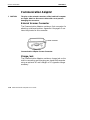
Communication Adapter
B CAUTION:
The pins on the external connectors of the hand-held computer
are fragile. Attach or disconnect cables with care to prevent
damaging the connectors.
External Scanner Connector
The Communication Adapter contains a 9-pin connector for
attaching a tethered scanner. Appendix A on page A-2 contains the pinouts for this connector.
Scanner Connector
Figure 1-10
Communication Adapter Scanner Connector
Charge Jack
The Communication Adapter contains a charge jack on the
side for connecting and charging your hand-held computer
using an optional AC wall charger or DC cigarette charger
accessory.
1-26
6400 Hand-Held Computer User’s Guide
General Information
SECTION 1
Infrared Transceiver Lens
External Charge Jack
Communication Adapter Attachment Screws
Figure 1-11
Communication Adapter Charger Connector
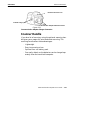
Scanner Handle
If you do a lot of scanning, using the optional scanning handle gives you a means for point and shoot scanning. The
scanning handle offers these advantages:
"
"
"
"
Lightweight
Easy to connect and use
Optional four cell battery pack
Can easily detach so the batteries can be charged separately from the hand-held computer.
6400 Hand-Held Computer User’s Guide
1-27
General Information
SECTION 1
Scanning Trigger
Two Cell Battery Pack in HandHeld Computer
Figure 1-12
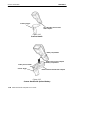
Scanner Handle
Battery Compartment
Battery Pack to Fit in Computer
Battery Compartment
Battery Pack in Handle
Scanner Trigger
Button to Release Handle from Computer
Figure 1-13
Scanner Handle with Optional Battery
1-28
6400 Hand-Held Computer User’s Guide
General Information
SECTION 1
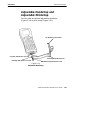
Adjustable Handstrap and
Adjustable Wriststrap
You can order an optional adjustable handstrap
(Figure 1-14) or wrist strap (Figure 1-15).
Top Handstrap Clip Fastener
Computer Attachment Screw Hole
Handstrap Adjustment Buckle
Handstrap Attachment Screw Hole
Bottom Handstrap Attachment Screw
Figure 1-14
Adjustable Handstrap
6400 Hand-Held Computer User’s Guide
1-29
General Information
SECTION 1
Wrist loop
Computer Wrist Strap
Attachment Screw Hole
Adjustable Knob (push button in,
slide knob down strap)
Wrist Strap Attachment Screw Hole
Wrist Strap Attachment Screw
Figure 1-15
Adjustable Wrist Strap
1-30
6400 Hand-Held Computer User’s Guide
General Information
SECTION 1
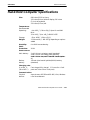
Hand-Held Computer Specifications
Size:
8.8 inches (22.35 cm) long
3.3 inches (8.4 cm) wide at display; 2.9 inches
(7.4 cm) at keyboard
2.2 inches (5.6 cm) tall
Temperature:
Recommended
Operating:
--4 to +122_F (--20 to +50_C) Open Air and 900
MHz
32 to +113_F (0 to +45_C) 800.11 DSSS
Storage:
--22 to +158_F (--30 to +70_C)
Weight:
17--20 ounces (¶ 481--567 g) depending on options
added
Humidity:
0 to 100% noncondensing
Static
Protection:
20 kV
Power source:
Main battery:
2 cell Lithium Ion battery pack (standard)
4 cell Lithium Ion battery pack (optional)
4 cell Lithium Ion pack in scanner handle (optional)
Backup
battery:
150 mA nickel-metal hydride (NiMH) battery
(standard)
Charging rate:
0 to +40 _C:
(32 to 104 °F)
Fast charge (fully charge ¶ 1.5 hours for a 2 cell
pack and 3 hours for a 4 cell pack)
Communication:
Physical
devices:
Asynchronous RS-232 and RS-485, IrDA, Wireless
Local Area Network
6400 Hand-Held Computer User’s Guide
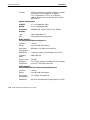
1-31
General Information
Protocol:
SECTION 1
RS-232 protocols like xmodem, ymodem, zmodem,
and Kermit; IrDA through an IR adapter.
For RF applications: TCP/IP, any Ethernet
network protocol that can operate with the ODI
specification
System Components:
FLASH:
1, 2, or 4 megabytes (MB)
DRAM:
2, 4 or 8 megabytes (MB)
Processor:
AM386SC300, mixed 3.3 and 5 volt, 33 MHz.
Display:
Type:
CGA compatible LCD
Size:
160 (wide) by 128 (long) pixels;
Radio Module:
2.4 GHz Spread Spectrum Open Air
Interface:
Internal
Range:
Up to 500 feet (152 meters)
Data Rates
(throughput):
800 kbps or 1.6 Mbps, auto selecting
Modulation:
Frequency Hopping Spread Spectrum (FHSS)
Frequency
Band:
2400-2483 GHz
Output Power
100 mW
Regulatory
Compliance
FCC 15.247; Industry Canada RSS 210; European
Union ETS 300--328; Japan MPT
Radio Module:
2.4 GHz 802.11 Direct Sequence Spread Spectrum
1-32
Interface:
Internal
Range:
Up to 800 feet (244 meters)
Data Rates
(throughput):
1 or 2 Mbps, auto selecting
Modulation:
802.11 Direct Sequence Spread Spectrum (FHSS)
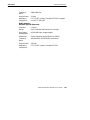
6400 Hand-Held Computer User’s Guide
General Information
SECTION 1
Frequency
Band:
2400-2483 GHz
Output Power
32 mW
Regulatory
Compliance
FCC 15.247; Industry Canada RSS 210; European
Union ETS 300--328
Radio Module:
902 mHz Spread Spectrum
Interface:
Internal
Range:
Up to 1200 feet (366 meters) line of sight
Data Rates
(throughput):
90,225,450 kbps, programmable
Modulation:
Direct Sequence Spread Spectrum (DSSS)
Frequency
Band:
902--928 MHz, 915--928 MHz (Australia)
Output Power
250 mW
Regulatory
Compliance
FCC 15.247; Industry Canada RSS 210
6400 Hand-Held Computer User’s Guide
1-33
General Information
SECTION 1
Configuring Terminal Emulation over IP
For TE/IP, the host is usually specified by an IP address
(unless you are using a domain name server). This can
cause a problem because often the 6400 computer needs to
know which port the host application is residing on. The
default port number (23) is automatically assumed in TE/
IP. Therefore, if the default port is where the application is
residing, only the host IP address needs to be entered for
the TE program’s Host Name parameter.
If your application resides on a port other than 23, you
must configure the 6400 computer’s PCTCP.INI file and
host table file, and then configure the TE program’s Host
Name parameter.
1. Open the PCTCP.INI file and enter:
host--table = c:\<pathname>\<host table filename>
2. Open the host table file and enter:
127.0.0.1
LOCALHOST
<host IP address>
<variable>
EXAMPLE:
127.0.0.1
192.168.5.40
LOCALHOST
X
3. Enter the Terminal Emulation menus and go to the
Host Name parameter. Enter the variable located in
the host table file followed by a space and then the
port number to which the terminal connects to the
host. For example x 15
" NOTE:
You cannot enter the host IP address, a space, and then the port
number for the Host Name parameter, because the length of the
Host Name field is not long enough.
If you are using Dynamic Host Configuration Protocol
(DHCP) and TE/IP, you do not need to specify a host IP address and a port number for the Host Name parameter in
the terminal emulation menus.
1-34
6400 Hand-Held Computer User’s Guide
Section 2
Operation
"
"
"
"
"
"
"
"
"
"
"
"
"
"
"
"
"
"
"
"
"
"
"
"
"
"
"
"
Introduction
This section tells you how to:
"
"
"
"
"
"
"
Install and remove the main battery pack
Charge the battery pack
Download applications and parameters
Program the Flash memory
“Power-up” your hand-held computer
Understand the key clicks
Scan using integrated (internal) or tethered (external)
scanners
6400 Hand-Held Computer User’s Guide
2-1
Operation
SECTION 2
Before Using Your Hand-Held Computer
for the First Time
Your hand-held computer is shipped with uncharged batteries for safety reasons. Charge your computer for 12 hours
before using it the first time. This ensures that both the
main and backup batteries are fully charged. For complete
charging instructions refer to Charging Your Battery
Pack beginning on page 2-8.
" NOTE:
After the initial charging of 12 hours, the normal charge time for the
main battery pack is 1.5 hours for a 2 cell pack and 3 hours for a
optional scanner handle with 4 cell pack.
If you use batteries and external battery pack chargers but
do not use docks to charge the batteries, you need to fully
charge your backup battery. To ensure the backup battery
is fully charged:
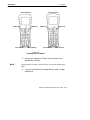
1. Insert a fully charged main battery into your computer.
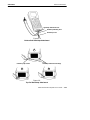
2. Perform the four finger reset (both Enter keys, blue
shift, and yellow shift keys) simultaneously. See
Figure 2-1 (page 2-3) for location of keys.
2-2
6400 Hand-Held Computer User’s Guide
Operation
SECTION 2
41-Key Keyboard
ENTER Key
51-Key Keyboard
ENTER Key
Blue Shift Key
Yellow Shift Key
ENTER Key
Blue Shift Key
ENTER Key
Yellow Shift Key
Figure 2-1
Resetting Your Computer
3. Allow your computer to “boot” up and leave it suspended for 10 hours.
" NOTE:
Suspend means to press and hold the I/O key until the display goes
blank.
4. Insert a new and fully charged battery pack to begin
operations.
6400 Hand-Held Computer User’s Guide
2-3
Operation
SECTION 2
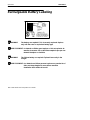
Rechargeable Battery Labelling
9
WARNING:
The battery can explode if it is incorrectly replaced. Replace
only with the same or equivalent battery type.
AVERTISSEMENT: La batterie au lithium peut exploser si elle est replacée de
manière incorrecte. Elle ne doit être remplacée que par une
batterie identique ou similaire.
WARNING:
The lithium battery can explode if placed incorrectly in the
charger.
AVERTISSEMENT: Les batteries au lithium peuvent exploser ou prendre feu si
elles sont trop chargées à cause d’une mauvaise
installation de la station d’accueil.
2-4
6400 Hand-Held Computer User’s Guide
Operation
SECTION 2
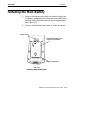
Installing the Main Battery
1. Position the battery pack with the contacts facing into
the battery compartment and the four protruding keys
hooking under the bottom end lip of the compartment
(see Figure 2-2).
2. Press in on the battery pack until it snaps into place.
Release Latch
Rechargeable Battery Pack
(contacts on underside)
2
1
Battery Compartment
Figure 2-2
Installing Main Battery Pack
6400 Hand-Held Computer User’s Guide
2-5
Operation
SECTION 2
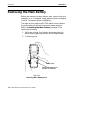
Removing the Main Battery
Before you remove the main battery pack, ensure that your
computer is in a “Suspend” mode, meaning that the display
is blank. To suspend press the [I/O] key.
The steps on this page and NO TAG detail how to remove
the main battery and check how much power remains.
Refer to Installing the Main Battery on page 2-5 for
replacing the battery.
1. With your thumb, firmly push the release latch forward. Battery pops up and out of the compartment.
2. Lift battery out.
Release Latch
Rechargeable Battery Pack
(contacts on underside)
Figure 2-3
Removing Main Battery Pack
2-6
6400 Hand-Held Computer User’s Guide
Operation
SECTION 2
Measuring Battery Pack Charge Level
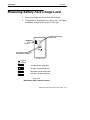
1. Touch your finger across the first two contacts.
2. Charge level is displayed from right to left. The higher
the battery charge level the more LEDs light.
Contacts For Measuring
Charge Level
LEDs Display Charge Level
(see below for meaning)
= LED on
= LED off
one LED = 21--25% charge level;
two LEDs = 26--50% charge level;
three LEDs = 51--75% charge level;
four LEDs = 76--100% charge level
Figure 2-4
Main Battery Pack Capacity Contacts
6400 Hand-Held Computer User’s Guide
2-7
Operation
SECTION 2
3. Once your computer gets below the 20% range, the
icons are replaced on the display with Ls and after the
level is less than 10% your computer emits a series of
beeps. Refer to Section 1 page 1-16 for the explanation
of these Ls and beeps.
Charging Your Battery Pack
Charging your battery pack can be done either in your
hand-held computer or in a charger. The following devices
provide charging while your computer is inserted into them:
In Your Hand-Held Computer
6400 Series multidock
" 6400 Series single dock
" 6400 Series vehicle dock
The multidock, single dock, and vehicle dock installation
and instructions are contained in a separate publication
6400 Series Docks Installation Instructions NPN:
962-020-004.
"
Using the optional Communication Adapter allows you access to charging your computer by using:
"
"
2-8
An ac wall charger
A cigarette lighter adapter
6400 Hand-Held Computer User’s Guide
Operation
SECTION 2
In An External Source
Figure 2-5 shows a multipack charger and Figure 2-6 shows
a single pack charger.
Fuse Holder
Battery Pack Compartments (eight)
Power Cord Connector
Charge Indicator LED
Figure 2-5
Multipack Charger
Battery Pack Compartment
Power Cord
Charger Contacts
Charging Indicator LED
Figure 2-6
Single Pack Charger
6400 Hand-Held Computer User’s Guide
2-9
Operation
SECTION 2
Battery Charger LED and Error Codes
When your battery pack is placed in a multipack or single
pack charger, the charger ’s LED indicates the battery pack
charging status:
"
Red indicates that the battery is charging.
"
Green indicates the battery pack is fully charged.
"
A combination of a blinking red and orange LED can
indicate one of two basic conditions: Either a bad connection, in which case you need to remove and reinsert
the battery pack into the charger, or there is a faulty
battery that needs to be replaced. However, the indicator can also alert you of a more serious charging or
product error. Table 2-1 and Table 2-2 on page 2-10
show you this more extensive list of error codes and
the solution notes.
Charging Indicator Error Codes
Table 2-1
Charging Indicator Error Codes
First
Blink
Second Third
Blink
Blink
Pause Description
Solution Notes
Orange Orange
Orange Off
High Voltage Fault
1 and 2
Red
Red
Off
No Communication
1
Orange Red
Red
Off
Checksum Error
1
Red
Red
Red
Off
Upper Cell Mismatch
1 and 3
Red
Red
Orange Off
Lower Cell Mismatch
1 and 3
Red
Orange
Orange Off
5 Bad Packets Received
1
Orange Off
Wrong Battery Type
1
Orange
Orange Red
2-10
6400 Hand-Held Computer User’s Guide
Operation
SECTION 2
Table 2-2
Solution Notes
Note
Solution
1
To isolate the issue to the battery pack itself, put the “suspected” battery
pack into a computer and operate for a few minutes. Then, try the
battery pack in different charger cups to see if this error still occurs. If
it does occur, send the battery pack to your service center for
replacement.
2
This situation could be caused by a bad charger cup or a computer.
Insert different batteries into this same charger cup. If the cup produces
this same error with the other batteries, this indicates that the cup on
the charger is bad. To get the battery back into a good state, put the
battery pack back in the computer and operate for a few minutes. Then
place the battery pack into a different charger cup and recharge. Send
the charger to your service center.
3
Leave the battery pack in the charger for a minimum of 16 hours. If the
error condition still exists, send the battery pack to your service center.
Backup Battery
A fully charged backup battery provides protection for
maintaining data approximately 100 hours with the main
battery removed or completely run down. The backup
battery is charged from the main battery pack and every
time your hand-held computer is placed in a dock or
charging source.
" NOTE:
Your computer should be placed on a charging source for 12 hours
before using the first time to fully charge the backup battery.
The backup battery is not user-replaceable. To have your
backup battery replaced, send it in to the Intermec
Customer Service Center nearest to you. Whenever you
send in your computer for service, include a description of
what you would like to have done to it.
6400 Hand-Held Computer User’s Guide
2-11
Operation
SECTION 2
Downloading Programs To Your
Hand-Held Computer
Downloading parameters, program data, or inventory is
done by placing your hand-held computer into a dock,
through the IrDA port, or through the connector on the optional Communication Adapter endcap. The docking devices
not only transmit data between your computer and the
host, but also provide charging.
Programming the Flash
The flash drive (c:\) is readable and writeable; therefore,
you can modify, create and delete files, etc. as your needs
demand. The PEN*KEY R Model 6400 Programmer ’s
Reference Guide NPN: 977-054-004 contains the complete
details for programming flash. The upper 256 KB of flash is
reserved for the BIOS and DOS files. If this area ever needs
updating you will be furnished with complete instructions
along with the updated files.
2-12
6400 Hand-Held Computer User’s Guide
Operation
SECTION 2
Turning Your Hand-Held Computer On
and Off (Suspending)
Turning On Your Computer
Turn your hand-held computer on by pressing and releasing
the [I/O] key. When your computer is cold booted (turning
on the first time or after resetting), it displays several messages in rapid succession. The first message shows the firmware version and its release date (DD/MMM/YY). If you are
just resuming, the display is restored to its previous state.
The screens that follow depend on your application. The
documentation that addresses using this computer as a
batch (store now and send later) unit instruct you about all
remaining operations.
Suspending Your Hand-Held
Computer
To suspend operation, press and release the [I/O] key once.
Suspending operation works only if your computer is not
plugged into a charging source. The memory contents are
protected when the power is suspended.
Automatic Suspend
Your computer automatically puts itself into the suspend
mode after a period of inactivity. However, waiting to suspend uses battery energy. Therefore it is best to manually
suspend it by pressing the [I/O] key when not entering data. The memory contents are protected when the power is
suspended.
Terminal Emulation programs do not automatically suspend. When lying idle but not manually suspended, the integrated radio module is still active and will drain battery
6400 Hand-Held Computer User’s Guide
2-13
Operation
SECTION 2
much as if it is actively being used. Therefore, it is necessary to manually suspend your computer by pressing the
[I/O] key.
Understanding the Key Clicks
You communicate your intended action to your hand-held
computer through pressing a key on the keyboard. Your
computer communicates back to you through an audible
response, a “key click.”
Each time you press a key, your computer lets you know
with a single audible key click. Pressing certain keys causes
two consecutive key clicks that occur one after another so
quickly that they almost sound like a single beep. These
two consecutive key clicks occur because your computer automatically “presses” the shift key for you in these cases.
EXAMPLE:
An example of consecutive key clicks is the same as what happens
when you use the “shift” key on a PC. These keys include a colon(:),
double quote(”), and percent sign(%).
If you enter an incorrect action or keystroke, you hear a
“beep.” An error “beep” is longer than a key click. An error
“beep” is intended to get your attention and let you know
an error occurred.
2-14
6400 Hand-Held Computer User’s Guide
Operation
SECTION 2
Scanning
You can order an integrated scanner as part of your handheld computer or you can attach a tethered 5-volt serial,
decoded out bar code scanner to your computer. Scanners
allow the computer to read and interpret bar codes.
Using an Integrated Scanner
CAUTION
LASER LIGHT
DO NOT STARE INTO BEAM
670 nm LASER DIODE
1.0 MILLIWATT MAX OUTPUT
CLASS II LASER PRODUCT
Label located on laser scanner lens
WARNING:
Class II Label
Do not point the scanner at someone’s eyes or look directly
into it when scanning.
AVERTISSEMENT: Ne regardez pas la fenêtre du scanner lorsque vous
effectuez une scannérisation. Ne pointez jamais le rayon
laser vers les yeux de quelqu’un.
If your computer has been ordered with an internal integrated scanner, you can scan and key data on your computer. Complete details for setting up the parameters and operating the integrated scanner are contained in the
PEN*KEY R Model 6400 Programmer ’s Reference Guide
NPN: 977-054-004.
6400 Hand-Held Computer User’s Guide
2-15
Operation
SECTION 2
To use the integrated scanner, simply point the top of your
unit at the bar code, press the [SCAN] key and listen for
the beep acknowledging a good scan. A short high-tone beep
indicates a good scan. If you hear no beep, scan the bar code
again. If you are still not getting a “good scan” beep, follow
these instructions.
1. Ensure you are positioning the scan lens properly
across the bar code.
2. The scan beam must cross every bar and space on the
symbol.
3. Hold the scanner farther away for larger symbols.
4. Hold the scanner closer for symbols with bars that are
close together.
" NOTE:
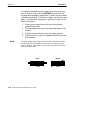
2-16
Tip: After reading a bar code, aim the lens away from the bar codes
and press the SCAN key within 1/2 second, to get the laser beam
back on. With the laser beam on, you have five seconds to find and
scan the next bar code.
RIGHT
WRONG
012345
012345
6400 Hand-Held Computer User’s Guide
Operation
SECTION 2
Installing the Optional Scanning
Handle
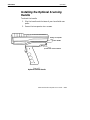
To attach the handle:
1. Slip the handle onto the base of your hand-held computer.
2. Secure the two quarter-turn screws.
Bottom of Computer
Scanner Handle
Quarter-turn Screw Fasteners
Figure 2-7
Optional Scanner Handle
6400 Hand-Held Computer User’s Guide
2-17
Operation
SECTION 2
Installing the Optional Scanning
Handle with Battery Pack
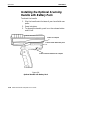
To attach the handle:
1. Slip the handle onto the base of your hand-held computer.
2. Snap into place.
3. To remove the handle, push in on the release button
and lift off.
Bottom of Computer
Scanner Handle with Battery Pack
Button to Release Handle from Computer
Figure 2-8
Optional Handle with Battery Pack
2-18
6400 Hand-Held Computer User’s Guide
Operation
SECTION 2
Charging the Scanner Handle
Batteries
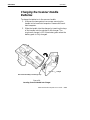
To charge the batteries in the scanner handle:
1. Unscrew the two quarter-turn screws securing the
handle to the hand-held computer. Remove the handheld computer.
2. Slide the handle into the charger by inserting the keys
of the handle into the notches in the charger. The
single unit charger ’s LED illuminates green when the
battery pack is fully charged.
Charger
Notch Outs in Battery Pack Charger Cup
Figure 2-9
Inserting Scanner Handle Into Charger
6400 Hand-Held Computer User’s Guide
2-19
Operation
SECTION 2
Using a Tethered Bar Code Scanner
The tethered bar code scanner attaches to your hand-held
computer at the 9-pin D-sub connector located on the bottom of the optional Communication Adapter. The computer
provides the power to run the scanner.
Your computer supports the serial, decoded tethered scanners in the product line, these include:
Tethered Scanner Supported
Symbol Scanners
"
"
LS-3203ER-I200A, Extended Range part number
858-042-800
LS-3603-I200A Fuzzy Logic part number 858-079-901
Cable:
"
Straight screw on connector serial cable 321-518-001
PSC Scanners
"
"
"
"
"
"
"
2-20
PSC5300 IP Series Standard Range part number
858-065-012
PSC5300 IP Series VIN part number 858-065-022
PSC5300 IP Series Long Range part number
858-065-052
PSC5300 IP Series Extra Long Range part number
858-065-072
PSC5300 IP Series Ultra Long Range part number
858-065-092
PSC5300 IP Series Long Range High Power part
number 858-065-152
PSC5300 IP Series Extra Long Range High Power
part number 858-065-172
6400 Hand-Held Computer User’s Guide
Operation
SECTION 2
Cable:
"
Straight screw on connector serial cable 321-476-082
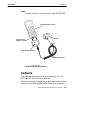
6400 Hand-Held Computer
Scanner
Communication
Adapter Connector
Communication Adapter
RS-232 Scanner Cable
Figure 2-10
Connecting a Tethered Scanner
Software
The software that supports tethered scanning is V1.15+
BIOS and V5.10+ terminal emulations.
Tethered scanning is supported for any external device that
sends its serial data at 9600 baud, 8 data bits, no parity, 1
6400 Hand-Held Computer User’s Guide
2-21
Operation
SECTION 2
stop bit with an ASCII STX (hex 02) before the data and an
ASCII ETX (hex 03) after the data. No protocols, such as
ACK/NAK, RTS/CTS, or XON/XOFF, are supported. All
8-bit characters between the STX and ETX will be stuffed
in the PC BIOS key buffer.
Setting Terminal Emulation to
Accept Tethered Laser Scanners
1. In AUTOEXEC.BAT, ensure the scanner driver is
loaded with 64SCN7B --T1 --I0
2. From the Terminal Emulation mode, press the yellow
and then the blue keys to enter the Terminal Emulation Main Menu.
3. Select option 1) Set-up Parms.
4. Enter password CR52401.
5. Select option 2) Barcode Parms.
6. At Scanner Type menu select 3) Laser and press
[ENT] five times.
7. At Main Menu select 4) Tests
8. At Tests menu select 1) Peripherals
9. At Peripherals menu select 5) Scanner Test
If you experience problems with using your laser scanner
with terminal emulation try these steps:
1. Reboot to the DOS prompt ([YELLOW] [BLUE]
[ENT] [ENT]) press 0 at pause.
2. Type DEL CONFIG.DAT press [ENT].
3. Press [CTRL] [ALT] [DEL] to reboot.
2-22
6400 Hand-Held Computer User’s Guide
Operation
SECTION 2
Setting Your DOS Application to
Accept Tethered Laser Scanners
In AUTOEXEC.BAT, ensure the scanner driver is loaded in
the PS/DOS section with 64SCN7B --E --W --T1 I0 (this is
for wedge scanning).
Setting Up Your LS3203 or LS3603
RS-232 Serial Scanner Parameters
Tethered laser power is always on, so a tethered laser can
scan, decode, and send the data as soon as it is connected,
even when it is not properly configured. Therefore, proper
operation of the tethered laser is no indication that the laser is correctly configured for the scanner driver 64SCN7B.
Scan the following bar codes to set up your LS3203ERI200A or LS3603-I200A scanner so it will work with your
hand-held computer. You need to scan all the bar codes (except for the Host Transmit Code ID Character and Host Decode Options) to enable your laser scanner to work with the
64SCN7B scanner driver on your computer.
Set All Defaults
Scan the Set All Defaults bar code to set up your scanner
for RS-232 serial communication.
6400 Hand-Held Computer User’s Guide
2-23
Operation
SECTION 2
Data Transmission Format
1. Scan the <PREFIX><DATA><SUFFIX> bar code.
<PREFIX><DATA><SUFFIX>
2. Scan the PREFIX bar code.
3. Scan the PREFIX values 1,0,0,2 bar codes from page
2-25. If you make a change or wish to change your
selection, scan CANCEL.
PREFIX
4. Scan the SUFFIX bar code.
5. Scan the SUFFIX values 1,0,0,3 bar codes from page
2-25. If you make a change or wish to change your
selection, scan CANCEL.
SUFFIX
2-24
6400 Hand-Held Computer User’s Guide
Operation
SECTION 2
RS-232 Host Prefix/Suffix Values
0
6
1
7
2
8
3
9
4
CANCEL
5
6400 Hand-Held Computer User’s Guide
2-25
Operation
SECTION 2
RS-232 Host Parity
NONE
RS-232 Host Stop Bit Select
1 STOP BIT
RS-232 Host ASCII Format
8-BIT
2-26
6400 Hand-Held Computer User’s Guide
Operation
SECTION 2
RS-232 Host Transmit Code ID Character
(Optional)
Select to enable or disable this setting. The default is
Transmit Code ID Character. The Transmit Code ID Character must be enabled if you are using FWP640H0 or
FWP640H4 terminal emulation software in your computer.
TRANSMIT CODE ID CHARACTER
DO NOT TRANSMIT
CODE ID CHARACTER
RS-232 Host Decode Options (Optional)
Scan one of these bar codes to enable or disable the laser
beep after a good scan. If your computer application beeps
when it gets scanner data then you would probably want to
disable the laser beep.
DO NOT BEEP AFTER
GOOD DECODE
BEEP AFTER
GOOD DECODE
6400 Hand-Held Computer User’s Guide
2-27
Operation
SECTION 2
Setting Up Your Intermec 1551
Series RS-232 Serial Scanner
Parameters
To allow the Intermec 1551 Series Tethered Scanners to interface with your computer you need to follow these steps:
Scan the bar codes in the following order:
1. Reset to Factory Defaults
2. 8 Data Bits, 1 Stop Bit
3. Set Prefix
2-28
6400 Hand-Held Computer User’s Guide
Operation
SECTION 2
4. Number 9
5. Number 9
6. Number 0
7. Number 2
8. Save Prefix
6400 Hand-Held Computer User’s Guide
2-29
Operation
SECTION 2
9. No Parity
10. Enable Code Id Character
11. Set Suffix
12. Number 9
13. Number 9
2-30
6400 Hand-Held Computer User’s Guide
Operation
SECTION 2
14. Number 0
15. Number 3
16. Save Suffix
Problems with Your Scanner
If you are having problems with your scanner:
1. Refer to the user guide for your scanner.
2. Refer to the PEN*KEY R Model 6400 Programmer ’s
Reference Guide NPN: 977-054-004
3. Call your Intermec Technologies Corportation technical support center 1--800--755--5505 (USA or Canada)
or 1--425--356--1799 (elsewhere).
6400 Hand-Held Computer User’s Guide
2-31
Operation
2-32
6400 Hand-Held Computer User’s Guide
SECTION 2
Section 3
Terminal Emulation Menu Screens
"
"
"
"
"
"
"
"
"
"
"
"
"
"
"
"
"
"
"
"
"
"
"
"
"
"
"
"
Introduction
The Terminal Emulation Menu Screens are provided to support terminals running Intermec Terminal Emulation or
6400 TCP/IP software. This section describes the menus
used to set operating and scanning parameters for the
hand-held computer. Additional information can be found in
the programmer ’s guide or technical overview for your particular emulation program.
Keyboard Functions
Some keys on the hand-held computer have special functions, which can vary depending upon the application software. General function keys (keys that perform the same
task, regardless of the application) are described in the following paragraphs.
Yellow and Blue Shift Keys
Use the yellow and blue shift keys to put the keyboard in
the desired (yellow or blue) shift mode. These shifted key
functions are shown on the keyboard overlays in Appendix
C.
6400 Hand-Held Computer User’s Guide
3-1
Terminal Emulation Menu Screens
SECTION 3
ENTER [ENT] Keys
Press either [ENT] key to select the option that is highlighted in the menu shown on the display. After selecting an
option [ENT] either restores the display to the previous
menu or advances to the next menu.
Number Keys [0] Through [9]
Many menus have numbered options. To choose a particular option, press the numeric key that corresponds to that
option.
Once you make a selection and you remain at that menu
screen, the option is highlighted, but you can select additional options. To deselect an enabled option, press the
number corresponding to that option.
In some cases, pressing a number brings up a different
menu (submenu). This allows you to further modify the
choice made in the parent menu. Press the [ENT] key to
confirm the settings and exit this menu.
After the modification(s), you may (depending on the menu
and function) be permitted to return to the parent menu to
make additional selections. There are also situations where
pressing [6] causes your computer to exit from a submenu
or reboot.
Various menus require entering a number, but do not necessarily have simple choices such as 1, 2, 3, 4, etc. Instead,
you may have to enter a number from a range (example:
0--32). You may have to press [ENT] after these.
These instances are detailed in the text that applies to
those menus, or in the menu displays.
3-2
6400 Hand-Held Computer User’s Guide
Terminal Emulation Menu Screens
SECTION 3
Y Up and B Down Arrows
These keys are defined by the host computer. Use these
keys to:
"
"
Adjust the length and frequency of the key click and
error buzzers.
Set the display size (the number of rows displayed
and characters per row) of the display.
Display Annunciators
Annunciators show the current status or operation in progress. The following lists some of the annunciators common
to all emulations. These annunciators occupy positions 0
through 8 of the display. A bibliography follows that tells
where more information can be found.
Display Position 0
Radio computer. The radio is transmitting data to the
base station.
Display Position 1
If the radio icon is displayed in position 0 then position 1
shows the status of the radio transmission (either receiving,
sending, communication loss, or message waiting). If there
is no radio icon shown in position 0 then this position is
blank and position 1 shows the active session number 1 or
2.
Sending. Radio is sending data to the base station.
Receiving. Radio is receiving data from the base station.
This annunciator appears only when the information is for
this particular computer’s address.
6400 Hand-Held Computer User’s Guide
3-3
Terminal Emulation Menu Screens
SECTION 3
Communications loss. No communication with the host
computer has occurred for at least 60 seconds. The radio
computer may be out of radio range, the base station may
not have power, or communications from the host computer
to the base station may not be properly set up.
Message. You have received a message and it has not been
read.
Display Position 2
Input Inhibited. The keyboard has accepted enough information for the current input field. If the “key ahead” feature is on, the terminal stores the keystrokes made after
“input inhibited” appears. The host may also inhibit (lockout) the keyboard upon certain errors or when sending
additional information to your computer.
X
^
Insert Mode. Characters are inserted, not overwritten.
Display Position 3
Y
Alphabet Character (green) Shift Mode. The keyboard is
in the alphabet character shift mode—any alphabet character keystrokes are entered as uppercase characters.
A
(blue) Shift Mode. The keyboard is in a colored shift
mode—keystrokes enter the symbol or perform the function
shown on the overlay just to the upper left of the key.
"
(yellow) Shift Mode. The keyboard is in a colored shift
mode—keystrokes enter the symbol or perform the function
shown on the overlay just to the upper right of the key.
Display Position 4
A
3-4
Alpha Lock. This Alpha Lock symbol is used only for the
41-key keyboard model.
6400 Hand-Held Computer User’s Guide
SECTION 3
Terminal Emulation Menu Screens
Display Positions 5- 8
Battery Pack Gas Gauge Icons:
These battery icons represent the charge level in your main
battery pack.
" Four icons (positions 5--8) indicates more than 76%
charge level
" Three icons (positions 5, 6, and 7) indicates between
51--75%
" Two icons (positions 5 and 6) indicates between
26--50%
" One icon (position 5) indicates between 21--25%
Once your computer gets below the 20% range, the icons
are replaced by “Ls” and after the charge level is less than
10% your computer emits a series of beeps.
" Four Ls indicates between 16--20% charge level
" Three Ls indicates between 11--15%.
" Three Ls indicates between 11--15%. At the 15%
charge level, your computer beeps once. The sound
duration and frequency are at levels you have set for
your computer.
" Two Ls indicates between 6--10%. At the 10% and 7%
charge levels, your computer beeps once. The sound
duration and frequency are at levels you have set for
your computer.
" One L indicates between 0--5%. At this charge level,
your computer beeps three times at its current setting
level for both duration and frequency.
" NOTE:
If you have the beeper turned off, you will not hear any of the low
battery beep warnings.
The battery pack icons on your computer display reflect the
same status as the LEDs on the battery pack. However,
there may be a one minute delay for updating the icons on
the display when the battery pack is replaced.
6400 Hand-Held Computer User’s Guide
3-5
Terminal Emulation Menu Screens
SECTION 3
Again, these are just a few of the display annunciators that
are common to all emulations. There are others, specific to
individual emulations, that are not shown here.
Annunciator bibliography (emulation/reference source/
part number):
"
"
"
"
VT220/ANSI Terminal Emulation Programmer ’s Reference Guide. (p/n 977-047-037)
5250 SNA and Asynchronous Terminal Emulation
Programmer ’s Reference Guide. (p/n 977-047-039)
3270 Terminal Emulation Programmer ’s Reference
Guide. (p/n 977-047-040)
Native Async Terminal Emulation Programmer ’s Reference Guide. (p/n 977-047-038)
Setting the Operating Parameters
Make sure there is a fully-charged battery pack in the
hand-held computer before setting the parameters.
Opening the Main Menu
The Main Menu is the first screen displayed when you open
the computer menus. All other menus are accessed from the
Main Menu.
To open the Main Menu, press the yellow shift, then the
blue shift (MENU) key. Briefly, these keys generally operate
as:
"
"
"
3-6
Blue shift, for functions labeled by blue legends above
the keys.
Green shift, for functions labeled by green legends
above the keys.
Yellow shift, for functions labeled by yellow legends
above the keys.
6400 Hand-Held Computer User’s Guide
Terminal Emulation Menu Screens
SECTION 3
Blue then Green shift is CAPS LOCK.
" Blue then Yellow shift is Alphabetic Lock (41-key units
only).
" Yellow then Blue shift is Terminal Emulation menus;
your particular emulation software probably treat the
keys for contrast control, backlighting and other functions differently.
After the Main Menu appears, enter a number (1 through
7) to make a selection. The Main Menu is shown below:
"
Main Menu
1)
2)
3)
4)
5)
6)
7)
Set-up Parms
LCD Parms
Beeper Setup
Tests
Version Info
Exit Menus
More
6400 Hand-Held Computer User’s Guide
3-7
Terminal Emulation Menu Screens
SECTION 3
Main Menu
1)
2)
3)
4)
5)
6)
7)
Set-up Parms
LCD Parms
Beeper Setup
Tests
Version Info
Exit Menus
More
Set-Up Parms
1)
2)
3)
4)
5)
6)
7)
Communication
Barcode Parms
Protocol Opts
Display Opts
Radio Comm
Cold Start
More
LCD Parms
1
2
1)
2)
3)
4)
5)
6)
7)
Beeper Setup
1) Key Click
2) Error Tone
3) Beeper Select
Key Uppercase
Scroll Window
Tests
3
4
Version Info
1)
2)
3)
4)
5)
6)
Peripherals
Memory View
Packet Driver
Numbers
Timed Numbers
Main Menu 2
Firmware name
Version
number
Date
ddmmmmyy
MLID ver
xx.xx
(mac address)
Screen Size
Screen Mode
Annunciators
5
7
1) Keyboard Opts
2) Save Parms
3)
4) Session Menu
To return to the Main Menu from the computer menus program, simply press the [ENT] key several times. You can
then select 6) Exit Menus, to return to the operating system.
3-8
6400 Hand-Held Computer User’s Guide
Terminal Emulation Menu Screens
SECTION 3
The following paragraphs describe options available from
the Main Menu.
Set-Up Parms
The Set-up Parms (parameters) menu is password protected to guard against unwanted changes or loss of data.
In this menu you can change the following:
Communication
" Bar code parameters
" Host and emulation mode options
" Display options
" Radio Comm
" Enable system security with a global password
Or, you can reboot your hand-held computer.
"
LCD Parms
LCD Parms (parameters) menu adjusts the following display (Liquid Crystal Display) parameters:
"
"
"
"
"
Screen size (number of lines displayed and characters
per line)
Cursor position (Screen Mode)
Annunciators
Uppercase display
Scrolling window parameters
Beeper Setup
Beeper Setup lets you adjust the frequency and the length
(duration) of the buzzer. Different buzzer tones can be programmed, and you can select the buzzer output for the:
"
"
Key click (indicating that a valid key has been pressed
or a good scan occurred)
Error tone (indicating some error condition occurred;
for example, an unacceptable keystroke.)
6400 Hand-Held Computer User’s Guide
3-9
Terminal Emulation Menu Screens
SECTION 3
Tests
The Tests menu allows you to perform the following tests:
"
"
"
"
"
Peripherals
Memory View
Packet Driver
Numbers
Timed Numbers
Version Info
You can use the UP and DOWN arrow keys in the Version
Info menu to display:
"
"
The type of program in FLASH ROM
The release date of the program in FLASH ROM
Exit Menus
The Exit Menus option exits from the hand-held computer
menus and returns to the “initial” screen. If you changed
any parameters the following screens will appear:
Save Parms
Enter ’Y’
to save parms
If you enter ’y’ or ’Y’ this screen will appear:
Save Parms
Enter
Password
> .......
3-10
6400 Hand-Held Computer User’s Guide
password is
cr52401
Terminal Emulation Menu Screens
SECTION 3
More
The More option opens a menu called Main Menu 2, which
lets you (1) set a keyboard “type-ahead” option, (2) save parameter settings as the new computer default parameters,
and (3) designate session switching parameters.
Opening the Set-Up Parms Menu
The Set-Up Parms (parameters) menu is password protected to prevent unauthorized persons from changing
hand-held computer parameters.
The parameters you set only apply to the current session. If
more than one session is available to you, use the Session
Menu (#4 in Main Menu 2) to verify or change the current
session before changing parameter settings.
To open the Set-Up Parms menu:
1. Press the [1] key.
2. Press the [ENT] key.
3. At the prompt, enter the password CR52401.
The Set-Up Parms menu, and the menus you can access
from it, are shown on the following page.
6400 Hand-Held Computer User’s Guide
3-11
Terminal Emulation Menu Screens
SECTION 3
Set-up Parms
1)
2)
3)
4)
5)
6)
7)
Communication
Barcode Parms
Protocol Opts
Display Opts
Radio Comm
Cold Start
More
FWP64TH0
FWP64TH3
TCP/IP Stack
OR
WTP Terminals
Controller Type
1)
2) RTC/WTP
3)
Controller Type
1
1
Protocol Opts
1)
2)
3)
4)
5)
6)
7)
Host View Size
Data Stream
Extended Cmds
5250
3270
VT220
Native
Scanner Type
3
2
Protocol
Firmware name
1) SST
2) SST-Diag Mode
3-12
6400 Hand-Held Computer User’s Guide
1) No Scanner
2)
3) Laser
4)
5)
Display Opts
5
4
1) Backlight
2) Cursor Mode
Cold Start
Set-up Parms
1) Menu Password
2) Print Device
3)
1)
2)
3) Direct
7
6
Enter “Y”
To Cold Start
terminal:
Terminal Emulation Menu Screens
SECTION 3
Communication
Use the Communication menu to set, view, or change the
hand-held computer identification number. This number
allows the host computer to identify individual hand-held
computer in the radio data network. Each hand-held computer must have a unique number in the same network.
The Radio Setup and the Host/Cntl menus, are shown on
the following pages. Depending on which option you are exercising you will either advance to the WTP Stack settings
or the TCP/IP Stack settings.
WTP Settings
To set or change the hand-held computer identification
number, use the numeric keys on the computer keyboard.
After entering a number (between 0 and 126), press the
[ENT] key to go to the Host/Cntl Setup menus.
The LAN ID number can be 0--255 depending on the radio
you are using. With the RM60/70 radio the number can be
0--255 and with the RM80/90 radio the range is 0--15. Your
computer only communicates with equipment using the
same ID number that you assigned to your LAN.
If you enter a LAN ID number that is different from what is
configured in your NET.CFG file you get this message.
LAN ID changed
Need to reboot
to take effect.
If this happens the system modifies your net.cfg file which
is used by the WTPPKT.EXE program on initialization of
your computer.
6400 Hand-Held Computer User’s Guide
3-13
Terminal Emulation Menu Screens
SECTION 3
WTP Stack
Options
Host/Cntl
1) Radio Setup
2) Host/Cntl
For 802.11 Radio’s Only
Radio Setup
Network Name
1
xxxx
2
Go to Host/Cntl
on the next page
Enter up to 34 characters for a name
For Non 802.11 Radio’s
Radio Setup
LAN
xx
ENTER
Radio Setup
Radio Config#
Only if a
’radio
cfg’ file
is present
on the
terminal.
ENTER
Set Mode/Channel
Use Cursor Up
and Down Keys
To Adjust
DS xxxx
channel xx
Set Mode/Channel
Use Cursor Up
and Down Keys
To Adjust
xxxxxxxxx
ENTER (continue to Host/Cntl setups)
3-14
6400 Hand-Held Computer User’s Guide
Terminal Emulation Menu Screens
SECTION 3
ENTER
Host/CNTL
Settings
Host/CNTL
1) CNTL A
2) CNTL B
3) CNTL C
ENTER
DONE
ENTER
Controller (X)
Enter Unit
Number
xxx
ENTER
Controller (X)
(cust emulation)
unit # xxx
Host Name
Enter up to 16 characters/Numbers for a
name.
ENTER
Emulation (X)
1)
2)
3)
4)
Enter Unit
Native
3270
5250
VT/ANSI
ENTER
Telenet (x)
1) Enabled
2) Disabled
ENTER
6400 Hand-Held Computer User’s Guide
3-15
Terminal Emulation Menu Screens
SECTION 3
TCP/IP Settings
The first opiton if exercising TCP/IP stack is the Radio Setup. Once selected you will enter your network name or LAN
ID.
If your using a 902 MHz or 2.4 GHz radio module use the
up and down arrows to pick the Direct Sequence (DS) and
Channel configuration. If your using an Synthesized UHF
radio you select from the list the possible frequencies for
your radio module.
The second option, in the Host Setup menu allows you to
change the host setting. This allows you to designate up to
three host computers for each hand-held computer. Each
host is assigned a separate priority level (1, 2, or 3). When
powered on, the hand-held computer seeks host A. If host A
is not available, the hand-held computer seeks host B; if
host B is not available, the hand-held computer attempts to
log onto host C.
When designating additional hosts, you must:
"
"
" NOTE:
3-16
Tell the hand-held computer the host type of each host
computer (3270, 5250, or VT/ANSI).
Tell the hand-held computer the name of each host.
Selections in these menus apply only to the current session. Use the
Session Menu to verify or change the current session.
6400 Hand-Held Computer User’s Guide
Terminal Emulation Menu Screens
SECTION 3
TCP/IP Stack
Options
Direct
1) Radio Setup
2) Host Setup
For 802.11 Radio’s Only
Radio Setup
Host
Network Name
1
xxxx
2
1) Host A
2) Host B
3) Host C
Enter up to 34 characters for a name
ENTER
For Non 802.11 Radio’s
Radio Setup
Host Name (x)
LAN
Host emulation
Host Name
Enter up to 16 character/numbers for a
name
xx
ENTER
ENTER
Radio Setup
Radio Config#
Only if a
’radio
cfg’ file
is present
on the
terminal.
Emulation (X)
1)
2) 3270
3) 5250
4) VT/ANSI
ENTER
Set Mode/Channel
Use Cursor Up
and Down Keys
To Adjust
DS xxxx
channel xx
Set Mode/Channel
Use Cursor Up
and Down Keys
To Adjust
xxxxxxxxx
ENTER (continue to Host/Cntl setups)
6400 Hand-Held Computer User’s Guide
3-17
Terminal Emulation Menu Screens
SECTION 3
Bar Code Parms
The Bar Code Parms (parameters) menus designate:
If you are using a bar code scanner
" Scan options
" The bar code symbologies to use (the computer can
only decode the bar code symbologies you enable)
" Options for each enabled bar code symbology (e.g.,
minimum and maximum bar code lengths)
The Scanner Type menu is the first Bar Code Parms menu.
Choose the desired option from this menu and press the
[ENT] key. The next Bar Code Parms menu appears on the
display.
"
Scanner Type
Use the Scanner Type menu to designate the type of bar
code scanner.
Scanner Type
1) No Scanner
2)
3) Laser
4)
5)
To make a selection, press the numeric key corresponding to
the desired option, then press the [ENT] key. This takes you
to the Scan Options menu.
" NOTE:
You can choose option 1, “No Scanner,” and still set the remaining
scanner and bar code options. Then, if you use a scanner at a later
time, all parameters are set and it is only necessary to designate the
scanner type.
" NOTE:
Selected options are highlighted on the display. To deselect a selected option, press the key that corresponds to that option.
3-18
6400 Hand-Held Computer User’s Guide
Terminal Emulation Menu Screens
SECTION 3
Scan Options
Use the Scan Options menu to designate how the hand-held
computer handles scanned bar codes. The Scan Options
menu is shown below. Descriptions of the options follow.
Scan Options
1)
2)
3)
4)
5)
6)
7)
Redundancy
MOD 10 Check
Concatenate
BC Type Char
Stream Scan
Scan All Flds
More
Redundancy: This option requires two identical scans of a
bar code, one right after another, before the hand-held computer accepts the scan as valid.
Mod 10 Check: When you select this option, a check digit
is added at the end of the bar code after a good read. This is
a variation of the modulus 10 formula and is used infrequently.
For additional information on Mod10, refer to the book
PEN*KEY R 6400 Programmers Reference Guide p/n:
977-054-004.
Concatenate: Each bar code read is added to the end of
the previous bar code read until the computer meets a
condition that forces transmission to the host.
When this option is OFF, each bar code read is placed at the
beginning of the current input field. After a bar code is
placed in a field, any subsequent read replaces the first
read.
BC Type Char: This option adds a character associated
with the bar code type at the beginning of the scanned bar
code.
Stream Scan: If the scanned bar code is too big for the
input field, the overflow information appears in the next
field. This continues until the entire bar code is entered.
6400 Hand-Held Computer User’s Guide
3-19
Terminal Emulation Menu Screens
SECTION 3
When this option is OFF, and the scanned bar code is too
big for the input field, the overflow information is dropped.
Scan All Fields: When you select this option the scanner
is enabled whenever the cursor is in an input field. When
this option is OFF, the host computer must enable the scanner for each input field that requires scanned data.
After you press the [ENT] key, the display advances to
additional Scan Options menus.
To enable the scan options, press the numeric key(s) corresponding to the options you want, then press [ENT]. You
can enable more than one Scan Option at a time.
Scan PreChar and Scan PostChar: Enter a hexadecimal value from 00--FF for the character to be sent preceding the scanned data or after the scanned data. The value
of 20h means that pre or post characters are not sent.
Scan Options
1)
2) Scan PreChar
3) Scan PostChar
Scan Options To Enable Bar Codes
There are menus of options to enable (or disable) various
bar code symbologies. To enable a bar code, press the numeric key corresponding to the number of the bar code
symbology (as shown on the menu), then press the [ENT]
key.
After enabling a particular bar code you may have to select
various options for the bar code. After selecting the desired
options, you are prompted to set length requirements (such
as minimum and maximum length, fixed lengths, leading
and trailing character options, etc.).
Once the length requirements have been set, the computer
returns to the same Scan Options menu. You may then
3-20
6400 Hand-Held Computer User’s Guide
Terminal Emulation Menu Screens
SECTION 3
choose to enable another bar code symbology from that
menu, or you can advance to the next Scan Options menu
by pressing the [ENT] key.
The Scan Options menu, and the bar code symbologies you
can enable from it, are shown here.
Scan Options
1)
2)
3)
4)
5)
UPC
EAN
Code 39
Code 128
Codabar
UPC
1)
2)
3)
4)
5)
6)
Enabled
Add-On 2
Add-On 5
Sys 1 UPCE
Sys 0 UPCE
Expand E To A
1)
2)
3)
4)
5)
6)
7)
Enabled
Chk Digit
Extended
Encoded
Auto-Encoded
EAN
1
2
1)
2)
3)
4)
Enabled
Add-On 2
Add-On 5
Expand 8 To 13
4
1)
2)
3)
4)
Enabled
UCC/EAN
No UCC Type
UCC F1 Value
Code 39
Code 128
3
Full ASCII
Codabar
1) Codabar
5
6400 Hand-Held Computer User’s Guide
3-21
Terminal Emulation Menu Screens
SECTION 3
Scan Options of Additional Bar Codes
This menu offers additional bar code selections. After enabling a bar code symbology, you can set various options for
the bar code, then set length options for the bar code.
When all options have been set, the display returns to the
Scan Options (2) menu. The Scan Options (2) menu and the
bar code symbologies you can enable from it are shown below.
When you have enabled all needed bar code symbologies,
press the [ENT] key. You return to the first Scan Options
menu. Press the [ENT] key again to back out and return to
the Set-Up Parms menu.
3-22
6400 Hand-Held Computer User’s Guide
Terminal Emulation Menu Screens
SECTION 3
Scan Options 2
1)
2)
3)
4)
5)
6)
Plessey
Str 2 of 5
Int 2 of 5
CI 2 of 5
Code 93
Str 2 Of 5
Plessey
1) Enabled
2) MOD10 Chk
3) MOD11 Chk
1
2
Int 2 Of 5
1) Enabled
2) Chk Digit
1) Enabled
2) Disabled
CI 2 Of 5
3
4
1) Enabled
2) Disabled
Code 93
6
1) Enabled
2) Disabled
Lengths Options
The Lengths Options menus determine the maximum and
minimum length for a specific bar code symbology. Setting
the length of enabled bar codes helps the hand-held computer determine if a scanned bar code is valid and improves
response time.
6400 Hand-Held Computer User’s Guide
3-23
Terminal Emulation Menu Screens
SECTION 3
The length options must be set for each enabled bar code.
Instructions for setting the length options follow on the
next page.
(bar code type)
Max Length
xx
(bar code type)
Max Length
Min Length
xx
xx
(bar code type)
Max Length
Min Length
Fix Length 1
xx
xx
xx
(bar code type)
Max
Min
Fix
Fix
3-24
Length
Length
Length 1
Length 2
xx
xx
xx
xx
6400 Hand-Held Computer User’s Guide
(bar code type)
Max
Min
Fix
Fix
Fix
Length
Length
Length 1
Length 2
Length 3
xx
xx
xx
xx
xx
(bar code type)
Max
Min
Fix
Fix
Fix
Fix
Length
Length
Length
Length
Length
Length
1
2
3
4
xx
xx
xx
xx
xx
xx
(bar code type)
Drop Leading
xx
(bar code type)
Drop Leading
Drop Trailing
xx
xx
SECTION 3
Terminal Emulation Menu Screens
1. Key in the maximum length (0--99) for the selected
bar code, then press [ENT].
2. Key in the minimum length (0--99) for the bar code,
then press [ENT].
" NOTE:
I 2 of 5 only supports fixed lengths 1 and 2. Entries in fixed lengths 3
and 4 are ignored as well as minimum and maximum lengths.
" NOTE:
The next prompts set fixed bar code lengths (the enabled bar code
must be of a certain length—determined by your entry). Fixed-length
entries override the maximum and minimum length entries (minimum
and maximum are used for chosen codes). If you do not want fixed
lengths for the enabled bar code, enter zero (0).
3. Enter the fixed length (0--99) for the defined bar code,
then press [ENT]. Each time you set a fixed length,
(then press the [ENT] key) you are prompted to set
another fixed length—up to four. To set fewer than
four fixed lengths, enter zero (0) for the unused fixed
lengths. (For example, if you only require 2 fixed
lengths, enter zero when the Fixed Length 3 and 4
prompts appear on the display.)
" NOTE:
Use the next two prompts to drop a particular number of characters
from the front (leading) or rear (trailing) edge of the scanned bar
code.
4. Enter the number of characters (0--15) to drop from
the beginning of the scanned bar code, then press
[ENT].
5. Enter the number of characters (0--15) to drop from
the end of the scanned bar code, then press [ENT] .
After you have set all of the length options for the enabled
bar code the display returns to one of the Scan Options menus (depending on which menu you enabled the bar code
from).
6400 Hand-Held Computer User’s Guide
3-25
Terminal Emulation Menu Screens
SECTION 3
Protocol Options
Use this selection to designate the hand-held computer type
of the host computer. You can also designate which additional commands and command sets are available.
The Protocol Opts menu has seven submenus to customize
your hand-held computer. The Protocol Opts menu is shown
on the next page.
Protocol Opts
6400 WTP only,
blank if TCP/IP
1)
2)
3)
4)
5)
6)
7)
Host View Sze
Data Stream
Extended Cmds
5250
3270
VT/ANSI
Native
Host View Size
The Host View Size option tells the hand-held computer the
format of display information sent from the host. The display viewing size equals 1920 (determined by taking the
number of rows times the number of columns). The exception is with 5250 Terminal Emulation which can have an
additional row for error messages and therefore can have
2000 characters instead of 1920.
The default setting for 6400 WTP using Native Terminal
Emulation is 120 columns by 16 rows (equals 1920). The
default for VT220 Terminal Emulation is 80 columns by 24
rows (equals 1920). The default for 5250 Terminal Emulation is 80 columns by 24 rows (25 with error messages).
The default for 3270 Terminal Emulation depends on what
the original setting was before you changed to 3270 Terminal Emulation. Remember that the total characters must
equal 1920 (number of rows by the number of columns) unless using 5250 Terminal Emulation with error messages.
3-26
6400 Hand-Held Computer User’s Guide
Terminal Emulation Menu Screens
SECTION 3
Host View Sze
Width
xx
To change the width, enter a number (between 1 -- 80).
Press [ENT]. and return to the Protocol Opts menu.
Data Stream
Use this menu to specify the data stream used by the host
computer.
Data Stream
6400 WTP only,
blank if TCP/IP
1)
2)
3)
4)
Native
3270
5250
VT/ANSI
Enter the number corresponding to the type of the host
computer. Press [ENT] and return to the Protocol Opts
menu.
Extended CMDS
With this option ENABLED, the host computer can change
or use the following features of the hand-held computer:
"
RS-232 communications (e.g., printer)
"
Bar code options
"
Display screen and font size
"
Error tone
6400 Hand-Held Computer User’s Guide
3-27
Terminal Emulation Menu Screens
SECTION 3
Extended Cmds
1) Enabled
2) Disabled
1. Press [1] to enable the extended command set, or
press [2] to disable the extended command set.
2. Press [ENT] to return to the Protocol Opts menu.
5250 Options
The 5250 Options menu lets you enable the following features if you are using the 5250 communication protocol:
"
"
"
Beep On Error
Auto Tab Scan
Telnet
5250 Options
1)
2)
3)
4)
5)
6)
Beep On Error
Auto Tab Scan
Telnet
Device Name
Enabling Beep On Error causes the buzzer to sound when
an error condition occurs, but allows you to continue working. Normally, when an error occurs the keyboard locksup, the hand-held computer must be reset either from the
host or the RESET key on the hand-held computer itself.
The Auto Tab Scan option causes the cursor to automatically tab forward to the next input field when a good scan is
obtained.
3-28
6400 Hand-Held Computer User’s Guide
Terminal Emulation Menu Screens
SECTION 3
Telnet allows for the handling of telnet option negotiations
to establish a session with an appropriate telnet server.
To enable these options:
1. Press [1] to enable the Beep On Error option.
Press [2] to enable the Auto Tab Scan option.
Press [3] to enable the Telnet option, this can not be
changed if you are using 6400 TCP/IP.
2. Press [ENT] to return to the Protocol Options menu
screen.
Device Name allows you to enter a physical name for the
device. This name is 1--10 characters with allowable values
of A--Z, a--z, 0--9, and #, $, --, and @. Support of 5250E RFC
1572.
3270 Options
The 3270 Options menu lets you enable the following features if you are using the 3270 communication protocol:
"
"
"
"
"
"
Keyboard Unlock
Auto Tab Scn (scan)
Auto Entr (enter) Scn
Emulate 3210
Telnet
Origin Set
3270 Options
1)
2)
3)
4)
5)
6)
Keybrd Unlock
Auto Tab Scan
Auto Entr Scn
Emulate 3210
Telnet
Origin Set
Enabling Keyboard Unlock unlocks the keyboard after the
[PA1], [PA2], or [CLEAR] keys are pressed. (Normally the
keyboard remains locked—until unlocked or the hand-held
computer is reset by the host—after any of these keys are
6400 Hand-Held Computer User’s Guide
3-29
Terminal Emulation Menu Screens
SECTION 3
pressed.) When using Token Ring on your host, the tab key
also unlocks the keyboard.
Enabling Auto Tab Scan causes the cursor to tab forward to
the next input field whenever a good scan is obtained.
Enabling Auto Entr Scan actuates the [ENTER] function
whenever a good scan is obtained.
Enabling Emulate 3210 allows your 3270 keyboard to emulate a 3210 terminal.
Telnet allows for the handling of telnet option negotiations
to establish a session with an appropriate telnet server.
This can not be changed if you are using 6400 TCP/IP.
Origin Set when enabled, will reset the screen origin when
an exclamation mark is found in the data stream.
To enable these options:
1. Press
Press
Press
Press
Press
Press
" NOTE:
[1] to enable
[2] to enable
[3] to enable
[4] to enable
[5] to enable
[6] to enable
the Keyboard Unlock option.
the Auto Tab Scan option.
the Auto Entr Scan option.
3210 Emulation option.
the Telnet option.
the Origin setting.
Auto Tab Scan and Auto Entr Scan cannot be enabled at the same
time.
2. Press [ENT] to return to the Protocol Options menu
screen.
3210 Emulation
The Intermec 3210 emulation option causes your radio
hand-held computer to perform the same functions as the
RT3210 hand-held computer. For full 3210 compatibility:
you must disable buffering the keyboard, set cursor to lazy
mode, and set the LCD Parms to Key Uppercase.
After enabling the desired 3270 options, press the [ENT]
key to return to the Protocol Opts menu.
3-30
6400 Hand-Held Computer User’s Guide
Terminal Emulation Menu Screens
SECTION 3
VT/ANSI
The VT/ANSI menu lets you enable the following features if
you are using the VT/ANSI communication protocol:
"
"
"
"
"
"
"
DEL to BS (delete to backspace)
CR to CRLF (carriage return to carriage return line
feed)
Auto Entr (enter) Scn
Auto Tab Scan
Local Echo
AnswerBack
More
VT/ANSI Options
1)
2)
3)
4)
5)
6)
7)
DEL To BS
CR To CRLF
Auto Entr Scn
Auto Tab Scan
Local Echo
Answer Back
More
The DEL to BS option, when enabled, causes the [CLEAR]
key to delete the character to the left of the cursor position,
and moves the cursor back one space. When this option is
not enabled, the [CLEAR] key deletes the character at the
cursors position.
The CR to CRLF option, when enabled, causes the [ENT]
key to perform a carriage return and a line feed. When this
option is not enabled, the [ENT] key performs a carriage
return only.
Enabling Auto Entr Scn actuates the [ENT] function whenever a good scan is obtained.
The Auto Tab Scan option causes the hand-held computer
to automatically tab to the next input field when a good
scan is obtained.
6400 Hand-Held Computer User’s Guide
3-31
Terminal Emulation Menu Screens
" NOTE:
SECTION 3
The Auto Entr Scan and Auto Tab Scan options cannot be enabled
at the same time.
Enabling the Local Echo option allows characters to be displayed from hand-held computer memory but not from host
memory.
The Answerback option allows you to input up to a 30 character string, which is then sent back to the host in response
to an inquiry (hex 05).
The More option calls up the following screen:
VT/ANSI More Options
1)
2)
3)
4)
5)
6)
7)
Screen Lock
DiscreteBells
UserKey Locked
RS232 Setup
VT220 Mode
Lock Mode
More
The Screen Lock option allows the user to set up and lock
the screen to a specified size. Any characters falling outside
this screen size are ignored by the hand-held computer.
If the DiscreteBells option is enabled, the hand-held computer beeps for each bell character the host sends. If the
option is disabled, the hand-held computer ignores bell
characters if it is already beeping.
You can get a command from the host that defines the
Function keys. If UserKey Locked is set the host ignores
this command while this option is set.
3-32
6400 Hand-Held Computer User’s Guide
Terminal Emulation Menu Screens
SECTION 3
Selecting RS232 Setup allows you to select from another
menu of choices. These choices are:
RS232 Setup
1)
2)
3)
4)
5)
RS232
RS232
RS232
RS232
RS232
Baud Rate
Parity
Stop Bits
Data Bits
Flow
Select your choice, then press the [ENT] key to return to
the Protocol Opts menu.
Selecting VT220 Mode allows you to select operating in
character or block mode.
Select your choice, then press the [ENT] key to return to
the Protocol Opts menu.
VT220 Mode
1) Char
2) Block
Selecting Lock Mode disables the Mode key in the VT220
data stream. The default Mode key toggles between block
and character modes.
6400 Hand-Held Computer User’s Guide
3-33
Terminal Emulation Menu Screens
SECTION 3
Selecting More moves you to select the telnet option for the
VT/ANSI data stream.
VT/ANSI
1)
2)
3)
4)
5)
6)
Telnet
Term Setup
Send XON
Keypad Mode
Cursor Mode
Terminal Mode
1) Telnet allows for the handling of telnet option negotiations to establish a session with an appropriate telnet
server. This can not be changed if you are using 6400 TCP/
IP.
Make your selection, then press the [ENT] key to return to
the Protocol Opts menu.
Term Setup
1)
2)
3)
4)
5)
ANSI
VT100
VT220
VT320
VT350
2) Terminal Setup allows you to select compliance level of
the terminal being emulated. Default is VT340 to support
all commands.
3) Send XON, default is enabled. Enabled indicates that
whenever an RIS is received from the host the XON character is returned back after compliance of this command.
3-34
6400 Hand-Held Computer User’s Guide
Terminal Emulation Menu Screens
SECTION 3
Keypad Mode
1) Application
2) Numeric
4) Keypad Mode, determines what is returned to the host
when the keys are pressed. The default setting is Numeric.
Cursor Mode
1) Application
2) Cursor
5) Cursor Mode, determines what is returned to the host
when the cursor keys are hit. The default setting is Cursor.
Terminal Mode
1) 7-Bit
2) 8-Bit
6) Terminal Mode, the control codes are sent back to the
host as either 7 or 8 bit.
Native (For 6400 WTP Only)
This option is enabled by default to preserve backward compatibility. When enabled, pressing <F1> is equivalent to
pressing Blue-0, while pressing <F2> is equivalent to pressing Blue-1, etc. When disabled, <F1> is equivalent to
Blue-1, and <F2> is equivalent to Blue-2, etc.
6400 Hand-Held Computer User’s Guide
3-35
Terminal Emulation Menu Screens
SECTION 3
Native Mode
1) F1 is FUNC-0
Display Options
Display Opts allows you to choose the backlight timer
feature or how the cursor appears on the display.
Display Opts
1) Backlight
2) Cursor Mode
3)
Backlight
Selecting Backlight displays this screen.
Backlight Timer
Use Cursor Up
And Down Keys
To Adjust
Use the up[Y] and down[B] arrows to select a number
from Off to 255. This is the number of seconds that the
backlight stays on after a key is pressed.
3-36
6400 Hand-Held Computer User’s Guide
Terminal Emulation Menu Screens
SECTION 3
Cursor Mode
The Cursor Mode menu allows you to select the cursor
style.
Cursor Mode
1)
2)
3)
4)
Underline Blink
Block Blink
Underline
Block
> <
Cursor location in the Block mode is indicated by a reverse video (highlighted) block (J) character.
" Blink modes causes the cursor to appear and disappear in its current location.
" The cursor shape is displayed between ‘>’ and ‘<’.
After making your selection, press the [ENT] key. You then
return to the Display Opts menu.
"
Radio Comm
This menu allows you to enable or disable SST diagnostic
mode.
" NOTE:
Diagnostic modes disable data compression and are reserved for
engineering tests.
Protocol
For Proxim
terminals
only
1) SST
2) SST-Diag Mode
3) Security ID
6400 Hand-Held Computer User’s Guide
3-37
Terminal Emulation Menu Screens
SECTION 3
When you select option 3 Security ID the following screen
appears:
Protocol
Security ID
New Security ID
New Security ID
You need to enter a 16 character security ID and repeat a
second time. Then the following screen appears:
Protocol
Security ID changed.
Save parms then reboot terminal for
change to take affect.
3-38
6400 Hand-Held Computer User’s Guide
Terminal Emulation Menu Screens
SECTION 3
Cold Start
The Cold Start option performs a hand-held computer cold
start. A cold start resets all hand-held computer parameters to their default values.
Cold Start
Enter “Y”
To Cold Start
Terminal:
Press the [Y] key to cold start the hand-held computer, or
press any other key to return to the Set-Up Parms menu.
More
The More option allows you to enable a menu password
protection. This option provides added protection because
once it is enabled, the password must be entered before any
further activity can occur within the terminal emulation
menu screens. The default is to have this option disabled.
Set-UP Parms
1) Menu Password
2) Print Device
3)
Enable Password
1. Press the [1] key.
6400 Hand-Held Computer User’s Guide
3-39
Terminal Emulation Menu Screens
SECTION 3
2. At the prompt, enter the password 3193693. This becomes the permanent password. With this menu password protection enabled, enter this password whenever you access the terminal emulation menu screens.
3. Press the [ENT] key a couple of times to return to the
main menu.
4. Press [6] Exit Menu to return to the main terminal
screen.
Disable Password
5. To disable this permanent password, press the [1] key.
The 1) displays in normal viewing text. You do not
need to enter the password to disable this function.
Print Device
Print Device menu allows establishing extended commands
either for the RS232 or IRDA printer drivers.
Print Device
1) RS232 Print
2) IRDA Print
1. Press [1] for the RS232.
2. Press [2] for the IRDA.
LCD Parms
The LCD Parms (parameters) menu allows you to adjust
the following features of the liquid crystal display:
3-40
6400 Hand-Held Computer User’s Guide
Terminal Emulation Menu Screens
SECTION 3
"
"
"
"
The screen size (number of rows displayed, and the
number of characters displayed on each row).
The screen mode (how the cursor positions itself on
the display).
Making all alphabetic character keystrokes uppercase
characters.
Scrolling window parameters
LCD Parms
1)
2)
3)
4)
5)
6)
7)
Screen Size
Screen Mode
Annunciators
Key Uppercase
Scroll Window
Screen Size
Screen Size lets you select the number of lines, and characters in each line, that can be viewed on the display. Choices
include:
"
"
"
"
6 rows, with 10, 13, 16, 20, 23, 26, or 32 characters
per row
9 rows, with 10, 13, 16, 20, 23, 26, or 32 characters
per row
12 rows, with 10, 13, 16, 20, 23, 26, or 32 characters
per row
18 rows, with 10, 13, 16, 20, 23, 26, or 32 characters
per row
It is also possible to have selected 5, 8, 10, and 16 for number of rows. This depends on what size of display you have
selected. Only one option can be selected at a time.
6400 Hand-Held Computer User’s Guide
3-41
Terminal Emulation Menu Screens
SECTION 3
Screen Size
10
13
16
20
23*
26
32
6
Off
Off
Off
Off
Off
Off
Off
9
Off
Off
Off
Off
Off
Off
Off
12
Off
Off
Off
Off
Off
18
Off
Off
Off
On
Off
Off
Off
Off
Off
* With 1.23 of BIOS 5.36 of Terminal Emulation
To change the screen size:
1. Press the arrow keys. Each key press moves the word
On one position in the direction of the arrow key pressed. The word On indicates the current setting (the
setting above is 18 rows with 20 characters per line—
the word On is in the row 18, column 20).
2. When the word On appears in the position corresponding to the desired screen size, press the [ENT]
key.
Screen Mode
Use Screen Mode to select cursor position and movement as
you scroll through data in the display buffer. This buffer
stores data in a standard CRT format (as sent from the host
computer). Since your hand-held computer display is smaller than a CRT, these Screen Mode options allow you to optimize your view of information (data) on the hand-held computer display.
In order to see all of the data on the screen, use the arrow
keys to scroll (or “move”) the view port of the screen on the
display.
3-42
6400 Hand-Held Computer User’s Guide
Terminal Emulation Menu Screens
SECTION 3
Screen Mode
1)
2)
3)
4)
5)
Center Cursor
Corner Mode
Page Mode
Lazy Mode
Locked Mode
Center Cursor is the default mode. In this mode, the cursor begins near the center of the display and attempts to
remain there as you scroll through the data. Upon reaching
an outside boundary of the full CRT screen, the display
stops advancing while the cursor moves beyond the center
of the screen. When the cursor reaches the boundary of the
CRT screen, an error tone sounds (the hand-held computer
“beeps”). The cursor does not wrap to the next line in the
display. This option is recommended when your application
program sends the full CRT display to the hand-held computer.
The Corner Mode option starts the display at the upperleft corner of the full CRT screen and keeps the cursor in
the lower-right corner of the display. As you scroll, the cursor remains there as data advances in the scrolled direction
(up, down, right, or left)—until an outside boundary of the
full CRT screen is reached. Then the screen stops moving in
relation to the display and the cursor moves in the scrolled
direction (the cursor no longer remains in the corner of the
display). When the cursor reaches the CRT screen boundary
it stops moving. The cursor does not wrap to the next line in
the display. An error tone sounds if you try to move the cursor beyond the boundary. This option is recommended when
your application uses only the upper-left corner of the full
CRT screen.
The Page Mode option divides the full CRT screen into
predefined “pages,” and starts the hand-held computer display on page 1. The cursor first appears in the upper-right
corner of the display. As you scroll, only the cursor moves
6400 Hand-Held Computer User’s Guide
3-43
Terminal Emulation Menu Screens
SECTION 3
(the data on the screen does not appear to move). When you
scroll off the edge of the displayed page, the display snaps
to the next (or previous) page. Upon reaching the boundary
of the CRT screen, the cursor stops moving and an error
tone sounds each time you attempt to move beyond the
boundary.
" NOTE:
Some “pages” in Page Mode overlap each other (the same information is shown on both pages). This overlap occurs because the 24
row by 80 column CRT screen cannot be divided equally.
Lazy Mode starts the cursor in the upper left corner of the
hand-held computer display. The cursor moves across the
display in the scrolled direction. When the cursor goes beyond the edge of the display, the data begins to move in the
opposite direction that the cursor is moving in and the cursor remains at the edge of the display. When you reach an
outside boundary of the full CRT display, an error tone
sounds each time you try to move beyond the boundary.
When Locked Mode is selected the screen view is locked to
the upper left hand corner of the display. Any characters
outside of the display window size you select are written to
the screen, but you can not see them. The windowing keys
do not move the visible window.
" NOTE:
In 5250 emulation the err_row is mapped to the last row of the
screen size selected.
Annunciators
You can select and change the location of the annunciators
on your display screen. The default is the lower right corner, the other choices are any of the other three corners.
You can also select Stealth Mode which displays the annunciators only when you make a change and then hides it
when you press a key.
3-44
6400 Hand-Held Computer User’s Guide
Terminal Emulation Menu Screens
SECTION 3
Key Uppercase
The Key Uppercase option, when enabled, causes the alphabetic keys (A--Z) to display as uppercase characters regardless of the shift or caps lock mode settings.
Scroll Window
Menu items are: (1) Tab Size, (2) Screen Size, (3) Define
Width, and (4) Define Height. Choices 1 and 2 allow you to
define the size (tab or screen size) of cursor movement: how
far it moves with each press of the arrow key. Choices 3 and
4 allow you to customize the screen size.
1)
2)
3)
4)
Scroll Window
Tab Size
Screen size
Define Width
Define Height
Option 1 causes the cursor to move by the amount set in
options 3 and 4.
Option 2 causes the cursor to move by the virtual screen
size selected in LCD Parms under the Main Menu.
Options 3 and 4 manually define the x-axis and y-axis (up
and down) movement of the cursor when option 1 (tab size)
is selected.
6400 Hand-Held Computer User’s Guide
3-45
Terminal Emulation Menu Screens
SECTION 3
Beeper Setup
The Beeper Setup menus allow you to adjust the beeper
tones for key clicks (presses) and error conditions.
Beeper Setup
1) Key Click
2) Error Tone
3) Beeper select
Key Click
Use the Key Click option to adjust the frequency and length
(duration) of the sound made when you press a key.
The frequency of the tone is adjustable in steps from 0 to
32. The length is adjustable in steps from 0 to 10. The Key
Click menu screen and subscreens are shown below.
Key Click
1)
2) Length
3) Frequency
Length
Frequency
Use Cursor Up
And Down Keys
To Adjust
Key Click>
3-46
2
xx
6400 Hand-Held Computer User’s Guide
3
Use Cursor Up
And Down Keys
To Adjust
Key Click>
xx
Terminal Emulation Menu Screens
SECTION 3
To adjust the key click tone:
1. Press key [2] or key [3].
2. Press the [Y] or [B] keys to make the desired adjustment. Each key press is accompanied by a tone at the
new frequency or length.
3. Press [ENT] to confirm your selection and return to
the previous screen (Key Click menu).
Error Tone
The Error Tone option lets you to adjust the length and frequency of the tone made when an error occurs (for example,
pressing an invalid key). The Error Tone adjustments, and
the procedures for making them are identical to the Key
Click adjustments.
Beeper Select
The Beeper Select option lets you turn off the internal beeper. The default setting has the beeper sound enabled.
Beeper Setup
1) Beep Internal
2)
To turn the beeper select option Off:
1. Press [1] key to turn off the internal beeper.
2. Press [ENT] to confirm your selection and return to
the previous screen.
6400 Hand-Held Computer User’s Guide
3-47
Terminal Emulation Menu Screens
SECTION 3
Tests
The Tests menus allow you to test peripherals, the display,
RF communications, and memory.
1)
2)
3)
4)
5)
6)
Tests
Peripherals
Memory View
Packet Driver
Numbers
Timed Numbers
Peripherals
The Peripherals menu allows you to test various hand-held
computer peripheral devices. There are currently four different tests:
RS-232, which tests the communication port on the
hand-held computer.
" Display, which tests the operation of the hand-held
computer display.
" Keyboard, which tests the operation of the hand-held
computer keyboard.
" Scanner, which tests the operation of a bar code scanner attached to the hand-held computer.
The peripherals menu is shown below. Detailed descriptions
of each peripheral test follow.
"
3-48
6400 Hand-Held Computer User’s Guide
Terminal Emulation Menu Screens
SECTION 3
802.11 radio’s
only.
Peripherals
1)
2)
3)
4)
5)
Radio Test
RS232 Test
Display Test
Keyboard Test
Scanner Test
802.11 Radio Test
Radio Test
PRI:
v4.0
SEC:
v4.13
RFLINK: ssssss
SNR:
99dBm
SSID: ssss
B SSID: xxxxxxxxxxxx
TxRated:xMb/s std
"
"
"
Adequate
Dummy
MAC Address
Pri, is the primary version of low--level radio firmware.
Sec, is the secondary version of the low--level radio
firmware.
RFLink, is a general description of the overall quality
of RF connection between the Lucent radio in the 6400
(station) and the radio in the AP. The Lucent radio
grades the RF link on a scale between 0 and 92. This
value represents the RF channel Signal-to-Noise Ratio. The RF link quality descriptions are assigned as
shown in this table.
Table 3-1
Possible RF Link Descriptions
SNR
Description
0 .. 23
Adequate
24 .. 47
Good
48 .. 92
Excellent
6400 Hand-Held Computer User’s Guide
3-49
Terminal Emulation Menu Screens
"
"
"
EXAMPLE:
3-50
SECTION 3
Signal-to-Noise Ratio (SNR), is calculated by dividing
the RF signal level by the RF noise level. The result is
a number that indicates the overall communications
quality of the RF link and is expressed in dBm.
Service Set ID (SSID), is a 32 character, alphanumeric
string that identifies the service set, or infrastructure,
with which the 6400 is currently associated. The SSID
is a user configurable parameter. The SSID is configured by the keyword WaveLAN_Network_Name in
the net.cfg file. Setting WaveLAN_Network_Name
to ANY allows the station to associate with any service set.
Basic Service Set ID (BSSI), it the 6 byte MAC address of the Lucent radio in the AP with which the
station is associated. The Lucent radio in the terminal
may associate with a non-Lucent (but 802.11 compliant) radio in an AP. Looking at the first three bytes
of the MAC address (OUI) can help identify the AP
radio’s manufacturer.
An OUI of “00601D” points to a Lucent radio, while “0020A6” indicates a Proxim radio.
6400 Hand-Held Computer User’s Guide
Terminal Emulation Menu Screens
SECTION 3
"
TXRate, is the data rate (in Mb/s) of the last message
transmitted by the Lucent radio. The default TXRate
of 2 Mb/s and will be displayed when the terminal
starts up and has not transmitted a frame yet. High
speed Lucent radio’s are capable of data rates of 1 Mb/
s, 2 Mb/s, 5.5 Mb/s, and 11 Mb/s. The TxRate 5.5 Mb/s
data rate is displayed as 6 Mb/s. This occurs because
the Lucent radio reports an integer value for current
transmission data rate, so the data rate of 5.5 Mb/s is
rounded up to 6 Mb/s.
Several factors influence the rate at which a frame is
transmitted. First, you can configure the radio’s transmission rate in the net.cfg file. The keyword Transmit_Rate in the net.cfg holds a numeric value indicating the transmission rate. Table 2 shows the
Transmit_Rate values and their respective supported
transmission rates that are available in the high
speed Lucent radio’s.
The transmission rate is also affected by the characteristics of the RF link. If the radio encounters problems sending a higher transmission rate because the
RF link is weak, busy, or noisy, then the radio may
retry the transmission at a lower data rate. Therefore,
the TxRate reported may be lower than the configured
transmission rate. We only report the transmission
rate of the most recent and successful transmission.
Table 3-2
Supported Transmission Rates for the High
Speed Lucent Radio’s
Value
Description
1
Fixed Low (1 Mb/s)
2
Fixed Standard (2 Mb/s)
3
ARS High (11 Mb/s = default)
6400 Hand-Held Computer User’s Guide
3-51
Terminal Emulation Menu Screens
SECTION 3
Table 3-2 continued
Supported Transmission Rates for the High
Speed Lucent Radio’s
Value
Description
4
Fixed Medium (5.5 Mb/s)
5
Fixed High (11 Mb/s)
6
ARS Standard (2 Mb/s)
7
ARS Medium (5.5 Mb/s)
RS232 Test
The RS232 Test checks the data communication port on the
bottom of the hand-held computer.
This test requires a special loop-back connector that links
the following input and output pins on the data connector:
The TX output to the RX input
" The DTR output to the DSR input
" The CTS output to the RTS input
The RS232 Test screens are shown below.
"
3-52
6400 Hand-Held Computer User’s Guide
Terminal Emulation Menu Screens
SECTION 3
RS232 Test
Attach RS232
Loopback
Connector
Press Enter
RS232 Test
Results:
RTS-CTS:
xxxx
TX-RX:
xxxx
Any Key To Stop
To run the test:
1. Select the RS232 Test from the Peripherals menu.
2. Attach the loop-back connector to the round connector
on the bottom of the hand-held computer, then press
[ENT]. The display changes to the second RS232 Test
menu (shown above).
The condition of each line-pair displays as passing or failing
the test. If any test fails, the hand-held computer should be
returned for service.
Display Test
The Display Test activates each element in the LCD display. If a line appears broken, or there are gaps in the display, the LCD panel needs to be replaced.
6400 Hand-Held Computer User’s Guide
3-53
Terminal Emulation Menu Screens
SECTION 3
To perform the Display Test:
1. From the Display Test Menu, press [ENT] to start the
test. The display screen is painted with a series of vertical lines.
2. Visually inspect the lines. For the test to pass, all lines
should appear clear and complete (no broken segments); press [ENT]. The display screen is then
painted with a series of horizontal lines.
3. Visually inspect the lines using the same criteria. The
display screen is then painted black.
4. Visually inspect the painted black lines. For the test to
pass, the screen should be uniformly black; press
[ENT]. You return to the Peripherals menu.
3-54
6400 Hand-Held Computer User’s Guide
Terminal Emulation Menu Screens
SECTION 3
Keyboard Test
The Keyboard Test lets you test each key on the hand-held
computer keyboard. The Keyboard Test screen is shown
below:
Keyboard Test
Press A Key
ENTER To Exit
Key = ’A’
To perform this test, press each key on the keyboard (except
the [ENT] key). A character corresponding to the key
pressed should appear on the display.
Scanner Test
The Scanner Test allows you to test the operation of an
attached bar code scanner. From the Scanner Test menu,
scan an enabled bar code. For this test to pass the bar code
and the bar code length should appear on the display. Press
any key to exit.
The Scanner Test screen is shown below.
Scanner Test
Scan Code>
Length>
6400 Hand-Held Computer User’s Guide
3-55
Terminal Emulation Menu Screens
SECTION 3
Memory View
This menu is reserved for engineering test and evaluation.
Memory View
F1 - Exit
F2 - Heap
F3 - Far Heap
F4 - Memory Dump
Address: xxxxxx
Packet Driver Test
The Packet Driver tests allow you to test the accuracy of
data transmissions to and from the hand-held computer.
Packet Driver
1)
2)
3) Packet Stats
4) Histogram
5)
6)
3-56
6400 Hand-Held Computer User’s Guide
Terminal Emulation Menu Screens
SECTION 3
Packet Stats
The Packet Stats (statistics) test shows the number of packets sent and received, number of errors, and number of
packets dropped.
Receive Statistics
Pkt
Chr
Err
Lost
xxx
xxx
xxx
xxx
Transmit Statistics
Pkt
Chr
Err
xxx
xxx
xxx
Tranaction Statistics
Qty
Sec
Qty/Min
Ops
xxx
xxx
xxx
xxx
RTC Statistics
* See Text
’Histogram Options’
6400 Hand-Held Computer User’s Guide
3-57
Terminal Emulation Menu Screens
SECTION 3
Histogram Opts
An Intermec engineer may ask you to access this menu if
your hand-held computer has problems. From this menu
you can provide the Intermec system engineer with vital
information about your hand-held computer.
The actual menus are not shown in this manual, however
some of the general terminology is shown below. Several of
the menu options, such as “Clear. . ., ” are password-protected and are only accessible if the engineer provides you
with the correct password.
Terminology you might see:
avg tx time
" avg trans time
" ptt (push-to-talk) count
" addrs on list
" poll no data
" send retries
" rcv retries
" reset count
" interval time
" time bucket #
An Intermec system engineer works with you on these
selections.
"
Histogram Opts
1) Start
2) Stop
3) View
3-58
6400 Hand-Held Computer User’s Guide
Terminal Emulation Menu Screens
SECTION 3
Numbers
The Numbers test checks the operation of the hand-held
computer microprocessor. During the test, the hand-held
computer display is filled with hexadecimal numbers that
move across the screen horizontally and scroll vertically.
Character movement indicates that the processor is still
running.
This test is helpful in detecting lockups during severe operating conditions.
Timed Numbers
The Timed Numbers tests does the same thing as the Numbers test except that it keeps track of the time in seconds
that it took to run the test.
Version Info (Information)
Version Info (Information) screen shows:
"
"
"
"
"
The name of the program you are using
The version of the program you are using
The release date of the program
Version of radio driver
Mac address of computer.
Version Info
Firmware Name
Version
x.xx
Date
ddmmmyy
MLID Name
xx.xx
xxxxxxxxxxxx
6400 Hand-Held Computer User’s Guide
3-59
Terminal Emulation Menu Screens
SECTION 3
Exit Menus
The Exit Menus option (#6) exits you from this hand-held
computer emulation section and returns you to the screen
you were at before entering this section.
More
The More selection opens Main Menu 2, which is shown below.
Main Menu 2
1) Keyboard Opts
2) Save Parms
3)
4) Session Menu
Keyboard Opts
Use the Keyboard Opts (options) menu to choose the TypeAhead option. This lets you key in information when the
hand-held computer cannot immediately send data to the
host computer.
Keyboard Opts
1) Type-Ahead
3-60
6400 Hand-Held Computer User’s Guide
Terminal Emulation Menu Screens
SECTION 3
Save Parms
Save Parms (parameters) retains the parameters you programmed into the hand-held computer. When you save parameters, they become the default settings for the handheld computer. When you select Save Parms, you are
prompted to enter a seven-character password (CR52401),
as shown in the following. Once the password is correctly
entered, the hand-held computer automatically saves
(writes to EEPROM) the parameters.
Save Parms
Enter
Password
> . . . . . . .
Save Parms
Working
Please Wait
........
Session Menu
The Session Menu allows you to define different host communication sessions and to designate a “hot key” that allows switching quickly between the different session.
Use the Switch option to change the current session. The
current (or intended) session must be identified (or designated) before setting Parameters.
When you select Set Hot Key, the current hot key is displayed. Use the up and down keys to view the available
6400 Hand-Held Computer User’s Guide
3-61
Terminal Emulation Menu Screens
SECTION 3
choices. When the desired key displays, press [ENT] to set
your selection. The Set Hot Key option is only available on
hand-held computer that support session switching.
Session Menu
1) Switch
2) Set Hot Key
3) Copy Setup
Select Session
Use Cursor Up
And Down Keys
To Adjust
Set Hot Key
1
Session:
x
Host:
xxxx
<Datastream>.....xxx
Copy Setup
“Copy Setup” copies
parameters of background session to
the current session.
3-62
6400 Hand-Held Computer User’s Guide
2
Use Cursor Up
And Down Keys
To Adjust
< xx >
Copy Setup is
password Protected
3
SECTION 3
Terminal Emulation Menu Screens
To Exit Emulation Mode and Return to
DOS
If you want to exit the emulation program you are using
and return back to the DOS keyboard layout complete these
two steps.
1. Do a Cold Restart.
2. Press “Y”.
3. Press [ENT] several times. This puts you at the DOS
C:\ prompt.
If you do the hard reset of pressing and holding the blue
and yellow shift keys, and both [ENT] keys this exits you to
the beginning of the current emulation you are using.
6400 Hand-Held Computer User’s Guide
3-63
Terminal Emulation Menu Screens
3-64
6400 Hand-Held Computer User’s Guide
SECTION 3
Section 4
Maintenance and Troubleshooting
"
"
"
"
"
"
"
"
"
"
"
"
"
"
"
"
"
"
"
"
"
"
"
"
"
"
"
"
Introduction
Your hand-held computer is designed to withstand normal
use in harsh environments. Occasional maintenance is required to ensure trouble-free operation. The procedures in
this section should help keep your computer in good working condition.
Maintenance procedures included in this section provide
instructions for identifying Low Battery conditions and
cleaning your computer.
Low Battery Indication
Battery Pack Gas Gauge Icons:
These battery icons represent the charge level in your main
battery pack.
"
"
"
"
Four icons indicates more than 76 % charge level
Three icons indicates between 51--75%
Two icons indicates between 26--50%
One icon indicates between 21--25%
6400 Hand-Held Computer User’s Guide
4-1
Maintenance and Troubleshooting
SECTION 4
Once your computer gets below the 20% range, the icons
are replaced by “Ls” and after the charge level is less than
10% your computer emits a series of beeps.
"
"
"
"
" NOTE:
Four Ls indicates between 16--20% charge level
Three Ls indicates between 11--15%. At the 15%
charge level, your computer beeps once. The sound
duration and frequency are at levels you have set for
your computer.
Two Ls indicates between 6--10%. At the 10% and 7%
charge levels, your computer beeps once. The sound
duration and frequency are at levels you have set for
your computer.
One L indicates between 0--5%. At this charge level,
your computer beeps three times at its current setting
level for both duration and frequency.
If you have the beeper turned off, you will not hear any of the low
battery beep warnings.
The battery pack icons on your computer display reflect the
same status as the LEDs on the battery pack. However,
there may be a one-minute delay for updating the icons on
the display when the battery pack is replaced.
If you turn your computer on and it does not respond, this
may mean that both the main and backup battery are run
down. Just to be sure, insert your computer in a dock or
other charging device, turn it on, and see if the computer
responds. If it does, follow the “Charging Your Battery
Pack” instructions beginning on page 2-8 and the “Backup Battery” instructions on page 2-11. If it does not respond when inserted into the equipment that provides
charge, another problem could exist. If this happens, refer
to the Troubleshooting section for solutions.
4-2
6400 Hand-Held Computer User’s Guide
Maintenance and Troubleshooting
SECTION 4
Cleaning Your Hand-Held Computer
Periodic cleaning helps maintain the appearance and reliability of your hand-held computer. When cleaning your
computer, inspect the keyboard, covers, display, connectors,
and peripheral products for obvious signs of damage or
wear.
B CAUTION:
Do not use any abrasive cleaning compounds, ketonic solvents
(acetone or ketone) or aromatic solvents (toluene or xylene) to
clean any part of your computer. These solutions cause
permanent damage to your computer.
Never pour cleaners directly on the display nor the case.
Instead put the cleanser on a soft cloth and gently wipe the
case.
Case and Display
Intermec Corporation recommends cleaning the exterior of
your computer using a soft cloth dampened with:
"
"
MICRO-CLEAN II cleanser, made by Foresight International, Inc. 4887 F Street, Omaha, NE
68127-0205, telephone 1-800-637-1344
Glass cleaner or isopropyl alcohol
Docking Connectors
If the docking connector contacts become dirty or tarnished,
clean them with a cotton swab dipped in isopropyl (and not
ethyl) alcohol. It may also be necessary to lightly burnish
them with a pencil eraser.
6400 Hand-Held Computer User’s Guide
4-3
Maintenance and Troubleshooting
SECTION 4
Troubleshooting
Should you encounter difficulties in routine operation,
printing, or communications, there are a few things you
may do to correct the problem:
"
"
"
Refer to your applications (software user) manual operating procedures.
Ensure that electrical and mechanical connections are
secure and undamaged.
Check battery condition.
Troubleshooting Table
This Troubleshooting table lists conditions you might see
and offers some basic remedies:
Table 4-1
Basic Troubleshooting
Condition
Solution
Computer
This is the lowest battery charge level that your computer
Displays Shows An will operate before shutting down. Do not continue using
L And Emits A
until you recharge the main battery pack.
Five Second Beep
As The Battery
Pack Ages, It Is
Losing Capacity
And Fewer LEDs
Are Lighting
4-4
Lithium Ion batteries lose about half of their available
capacity after 500 cycles (use and recharge = 1 cycle).
Therefore, a fully charged battery pack after 500 cycles
shows less than four lit LEDs, this is normal. Plan your
charging needs accordingly, and note that the capacity
continues to decrease with each cycle.
6400 Hand-Held Computer User’s Guide
Maintenance and Troubleshooting
SECTION 4
Table 4-1 continued
Basic Troubleshooting
Condition
Solution
A Fully Charged
Battery Pack In
The Computer
Still Does Not
Bring It To Life.
None Of The LEDs
Light On The
Battery Pack.
Leave the same battery pack in your computer for at least
30 minutes, to allow some time to put some charge into
your backup battery. Then replace the battery pack with a
fully charged pack. Put the original battery pack into an
external battery charger.
The LEDs On The
Battery Pack Do
Not Match the
LEDs On The
Display
It takes a minute after you put in the battery pack for your
computer to check the status and display the updated
battery charge level.
After A Weekend A
Fully Charged
Battery Pack Does
Not Last The
Normal Length Of
Time
The computer was left for the weekend without a battery
pack in it. Therefore, when you start out the week with the
fresh charged battery it has to build up the charge level in
the backup battery and that leaves less power for its
normal days use.
Computer Reboots
When A Battery
Pack Is Installed
The computer was not suspended (pressing the [I/O] key to
blank the display) before the battery was replaced.
Putting The
Computer Into A
Charging Device
The Charge LED
Blinks Different
Colors
Another reason can be that the backup battery may be
drained. Recharge the computer for a minimum of 12 hours.
If a problem still exists then send your computer to the
service center.
There is a fault state condition occurring in the battery
pack or the charger. For the complete details concerning
the sequence of the colors of the blinks refer to Section 2
Battery Charger LED and Error Codes on page 2-10.
6400 Hand-Held Computer User’s Guide
4-5
Maintenance and Troubleshooting
SECTION 4
Table 4-1 continued
Basic Troubleshooting
Condition
Solution
When Putting The
Battery Pack In
The Charger The
LED Never Turns
Green
There is a fault state condition occurring in the battery
pack or the charger. For the complete details concerning
the sequence of the colors of the blinks refer to Section 2
Battery Charger LED and Error Codes on page 2-10.
Computer Does
* Ensure that there is a main battery in.
Not Turn ON When * Ensure that the main battery is charged.
The [I/O] Key Is
* Ensure that the battery compartment door is closed.
Pressed
Computer Does
* Ensure the dock is plugged in.
Not Turn ON When * Ensure that the battery compartment door is closed.
Placed In A Dock
* Reseat computer into dock to ensure proper connection.
Computer Shuts
Down During Use
* You may have a very low battery. Try recharging the main
battery.
* You may have hit the battery door latch; this causes your
computer to suspend. Check the latch then press the [I/O]
key to continue operation.
Computer Resets
When You Replace
Or Check The
Main Battery
The backup battery may not be fully charged, allow at least
8 hours to completely recharge the backup battery.
Computer Turns
OFF When You
Open The Battery
Door Latch
This is the correct operation, the unit shuts down to
conserve energy and save data.
Computer Does
Not Suspend
* The computer stays on when it is connected to a charging
device.
* The computer stays on when it is processing data or in
radio communications.
This is OK if connected to a charger or placed in a dock. If
this is not the case, and either of these conditions continues
for a long period of time, contact Intermec support
personnel, as this condition runs down the batteries.
4-6
6400 Hand-Held Computer User’s Guide
Maintenance and Troubleshooting
SECTION 4
Table 4-1 continued
Basic Troubleshooting
Condition
Solution
Computer
Displays A Bad
Tcom Message
* The computer may not be making full contact with the
dock. Try reseating the unit in the dock.
* The dock may not be properly connected to the host. Make
sure there is a connection. TCOM errors may happen when
telephone service is lost, or for reasons not related to the
physical connection.
Computer Takes A Normal time is between 30--45 seconds. If you do not have
Long Time To Boot your computer connected to a charging source the booting
Up After A Reset
should be less than 30 seconds. Short beeps about one
second apart occur during the booting process to indicate
that your computer is working.
If it takes longer than that, contact Intermec support
personnel.
Tethered Laser
Data And Internal
Laser Engine Data
Does Not Show Up
In The Key Buffer
Load 64SCN7B with both “--e” and “--w” command lines
switches. Both are needed to enable power to the internal
engine and direct the data from both scanners to the
keyboard.
Wedge Mode
Application Dies
When Scanning
Data Using A
Tethered Scanner,
But Works Fine
With The
Integrated
Scanner
Check for non-displayable preamble, postamble, prefix, or
suffix characters being sent by the laser. The internal laser
engine sends a postamble of <cr-lf> by default. Either
disable them or code the application to handle them. The
integrated scanner and tethered lasers may be configured
by scanning setup bar codes.
Tethered Scan
Data Does Not
Show Up In The
Key Buffer But
The Integrated
Laser Data Does
Ensure that the tethered laser is configured for 9600, n, 8, 1
and the bar code data is prefixed with an STX (0x02) and
suffixed with an ETX (0x03).
6400 Hand-Held Computer User’s Guide
4-7
Maintenance and Troubleshooting
SECTION 4
Table 4-1 continued
Basic Troubleshooting
Condition
Solution
Computer Does
WARNING: Do Not Look Into Scanner
Not Scan Bar Code * Ensure that there is a main battery in.
* Ensure that the main battery is charged.
* Ensure that the battery compartment door is closed.
* Ensure the bar code symbology is turned On. Application
has to have scanner turned On.
* Ensure the scanner lens is clean.
* Ensure the bar code is free of smears or dirt.
Refer to instructions for Scanning beginning on page 2-15.
Pressing The Scan * Normal operation is that the scan key on computer wakes
Key Does Not Turn it up, but if using a tethered scanner it does not.
ON Computer
* Ensure that there is a main battery installed.
* Ensure that the main battery is charged.
* Ensure that the battery compartment door is closed.
Can Not Scan
Interleaved 2 Of 5
Bar Codes
4-8
Interleaved 2 of 5 only decodes bar codes that are exactly
the same number of characters as programmed into the
integrated scanner lengths 1 and 2 parameters. By default,
the lengths are 14 and 0. A length of 0 means disabled, so
only 14 character bar codes will decode. Ensure one of the
lengths is set to the length of your bar code and the other
disabled. Do not leave both lengths set, if only one is
needed, because Interleaved 2 of 5 can easily mis-decode
into an incorrect length.
6400 Hand-Held Computer User’s Guide
Maintenance and Troubleshooting
SECTION 4
Table 4-1 continued
Basic Troubleshooting
Condition
Solution
Hear A Beep When
Programming
Scanner To Enable
Interleaved 2 Of 5,
But Not When
Trying To Set
Length 1
Beeps are heard at the end of a programming sequence.
Enabling Interleaved 2 of 5 is a one-bar code sequence.
Setting an Interleaved 2 of 5 length is a three-bar code
sequence. You will not hear the beep until the third (last)
bar code is scanned. Please note, you must scan each bar
code of a multiple sequence within a 1/2 second of each
other. This is most easily accomplished by making a high
resolution copy of the appropriate bar codes and arranging
them one above the other.
Printers Flow
Control On The
Serial Port Causes
Missing Data
Ensure when loading 64SCN7B that the “--t0” switch is
used to disable its handling of serial port data as scanner
data. Otherwise, 64SCN7B is reading any XON/XOFF
messages from the printer.
“DASI Scanner
HW Initialization
Failed.”
Press any key to proceed. By default, 64SCN7B will try to
initialize the integrated scanner. If your computer does not
have an integrated scanner, turn off the handling of it with
the 64SCN7B command line switch “--i0”. The error
message will not cause any problems. If you do have an
integrated scanner, it is inoperative and needs to be
repaired.
Running TN.EXE
Does Not Display
Data
Add the “--p” command line switch to 64SCN7B --e--w. Also,
ensure the [PCTCP TN] section of the PCTCP.INI files
contains “screen-saver=yes”. TN.EXE bypasses the BIOS
key buffer, but TN is not reading the buffer. The “--p” switch
causes 64SCN7B to send the keys to the hardware instead
of the BIOS. The “--p” switch may be tried for any software
that reads keys directly from the hardware rather than the
BIOS.
If these basic solutions do not solve your problem, there
could be a number of possible causes. Additional things to
try:
"
Refer to the software documentation written for your
application. This documentation may contain troubleshooting information.
6400 Hand-Held Computer User’s Guide
4-9
Maintenance and Troubleshooting
"
"
"
SECTION 4
If you purchased your computer from an Intermec
VAR, contact them before contacting an Intermec Customer Service Center.
Contact the Customer Support Specialist at your Intermec Customer Service Center. Your regional Intermec Customer Service Center is fully staffed and
equipped to repair your computer. Customer Support
Center addresses and telephone numbers are printed
on a Product Service Information card. This document
is packed with all Intermec products.
Call the Intermec 24-hour Customer Response Center
at 1--800--755--5505.
Diagnostic Information
Your computer is equipped with diagnostics. You might be
asked to perform tasks to help the Intermec Customer Support Specialist or the Customer Response Hot Line Specialist diagnose the problems that you are having.
4-10
6400 Hand-Held Computer User’s Guide
Maintenance and Troubleshooting
SECTION 4
Repair Service
If you send your computer in for service, be sure to carefully
pack the unit and include a description of the problem and
the measures you tried to correct it.
Include any printout (if applicable) and/or write down displayed error messages to illustrate the problem. Also give
complete details of events and circumstances leading up to
the failure. Include your name, address, and phone number.
If possible pack all products in their original boxes. If the
original containers are not available, carefully pack each
piece and provide plenty of packing material. This helps
prevent additional damage to your product while in transit.
6400 Hand-Held Computer User’s Guide
4-11
Maintenance and Troubleshooting
4-12
6400 Hand-Held Computer User’s Guide
SECTION 4
Appendix A
Connector Pin-Outs
"
"
"
"
"
"
"
"
"
"
"
"
"
"
"
"
"
"
"
"
"
"
"
"
"
"
"
"
8-Pin Docking Connector (standard)
6
8
7
5
2
4
3
1
Computer Bottom End View
(Without Optional Communication Endcap)
Pin
1
2
3
4
5
6
7
8
Signal
Function
BCLK
12.0 Volts
GND
BDAT
TXD
RXD
RTS
CTS
Battery Clock
Charge Power
Ground
Battery Data
Transmit Data
Receive Data
Request To Send
Clear To Send
Figure A-1
8-Pin Docking Connector Pinouts
6400 Hand-Held Computer User’s Guide
A-1
Connector Pin-Outs
APPENDIX A
Optional Communication Adapter 9-Pin
D-Sub Connector
Negative contact
1
2
3
6
7
4
5
Positive contact
Pin
1
2
3
4
5
6
7
8
9
Signal
Function
No Connect
RXD
TXD
looped to DSR
GND
looped to DTR
RTS
CTS
Vcc
Data Carrier Detect
Receive Data
Transmit Data
Data Terminal Ready
Ground
Data Send Ready
Request To Send
Clear To Send
5 volts *
8
9
Figure A-2
9-Pin D-Sub Connector Pinouts
B CAUTION:
A-2
* 5 volts on pin 9 is for use with tethered scanners and printers
only, this may damage modems.
6400 Hand-Held Computer User’s Guide
Appendix B
Norand R Utilities Program
"
"
"
"
"
"
"
"
"
"
"
"
"
"
"
"
"
"
"
"
"
"
"
"
"
"
"
"
The NORANDâ Utilities Program provides basic functions
required to prepare your Hand-Held Computers for use.
Entry Point
NORAND UTILITIES
64 UTILS V01.05
COPYRIGHT NORAND
CORP. 1994--1997
ALL RIGHTS RESERVED
Screen Title
Description
[ENT]CONTINUE
This screen appears after cold-booting the computer.
"
"
Screen Title: (dark bar at the top) contains the application name, such as “NORAND UTILITIES”, and
the specific screen name, such as MODEM PARAMETERS.
Key Description: (dark bar at the bottom) contains
“action” keys. Movement keys, such as arrows, are not
shown.
6400 Hand-Held Computer User’s Guide
B-1
Norand R Utilities Program
APPENDIX B
Pop-Up Menus
CHANGE UNIT ID
UNIT ID
2233233
WORKGROUP
6200IPL
[F4]RESET FACTORY
[--]QUIT
Pop-Up menus appear after a menu option. Press the number of an option you want to select; or press the Y or B
keys to scroll through the list and press the [ENT] key to
enter. Select one option each time.
Press the [--] key to exit a pop-up menu.
Drop-Down Lists
1. NETWORK. . .
2. MODEM/DIRECT
3. ACCESSORY CARD
4. HANDHELD
5. INTERSERVER
Drop-down lists provide suboptions under a pop-up menu.
Press the number of a suboption, or press the Y or B keys
to scroll through the list and press the [ENT] key to enter.
Select one suboption each time.
Press the [--] key to exit a drop-down list.
B-2
6400 Hand-Held Computer User’s Guide
Norand R Utilities Program
APPENDIX B
Alphanumeric Fields
NETWORK PARAMETERS
SERVER NAME
I.U.N. INCORPORATED
SERVER IP ADDRESS
123.123.123.123
CLIENT IP ADDRESS
123.123.123.123
RTR
0. 0. 0. 0
SUBNET MASK
0. 0. 0. 0
[--]QUIT
If your computer has a numeric keyboard, enter alphanumeric data by pressing the A and " keys to scroll back and
forth through the set of alphanumeric characters. After a
character is selected, press the [ENT] key to enter that
character. Press [ENT] again to move to the next field.
If your computer has an alphanumeric keyboard, press the
characters, then press the [ENT] key to move to the next
field.
Press [ENT] to save the entries and exit the menu. Press
the [--] key to exit without saving the entries.
6400 Hand-Held Computer User’s Guide
B-3
Norand R Utilities Program
APPENDIX B
Title Screen
When you reboot or reset your computer, the Title Screen
appears:
NORAND UTILITIES
64 UTILS V01.05
COPYRIGHT NORAND
CORP. 1994--1997
ALL RIGHTS RESERVED
[ENT]CONTINUE
Press the [ENT] key to continue.
B-4
6400 Hand-Held Computer User’s Guide
Norand R Utilities Program
APPENDIX B
Language Selection
" NOTE:
The NORAND Utilities Program checks files for available language
options. If no language resource files exist, you do not see this
menu.
If your application requires non-English languages, the
Language Selection menu appears. English is the first option, followed by up to nine additional options:
NORAND UTILITIES
LANGUAGE SELECTION
1. ENGLISH
2.
3.
4.
5.
6.
7.
8.
9.
0.
[--]QUIT
Press the number of a language, or press the Y or B keys
to scroll through the list, then press the [ENT] key to enter.
Press the [--] key to exit this menu.
6400 Hand-Held Computer User’s Guide
B-5
Norand R Utilities Program
APPENDIX B
Communications Menu
" NOTE:
The default is the NPCP RS-485 communication.
" NOTE:
If your computer does not support any of the features listed, the
following pop-up menu appears. Press the [ENT] key to continue:
COMMUNICATIONS
FEATURE
NOT SUPPORTED
[ENT]CONTINUE
The Communications Menu appears after the Title Screen:
B-6
6400 Hand-Held Computer User’s Guide
Norand R Utilities Program
APPENDIX B
Option 1 BEGIN COMM SESSION
If you select this option, the computer repeats communications until successful or you press the [--] key.
" NOTE:
If you press the [- ] key, this verification window appears:
ARE YOU SURE YOU
WANT TO STOP
COMMUNICATIONS
NOW?
[ENT]STOP
[--]RESUME
BEGIN COMM SESSION with NETWORK
If you select this option and Option 2. COMM SETTINGS
is set to NETWORK, this Communication Status menu appears:
NORAND UTILITIES
COMMUNICATIONS
COMM SETTINGS:
NRINET
SERVER NAME
CLIENT IP ADDRESS
0.0.0.0
RTR
0.0.0.0
SIGNING ON
STATUS:
20
[--]STOP COMM
6400 Hand-Held Computer User’s Guide
B-7
Norand R Utilities Program
APPENDIX B
While SIGNING ON is onscreen, STATUS: may appear
with the status of the attempted connection. Refer to Session Status on page B-10 for meaning.
Following a successful session, NORAND Utilities executes
the downloaded application. If the necessary program files
are not found, this message window appears:
MISSING SYSTEM
FILES
[ENT]CONTINUE
If the session is unsuccessful, LAST SESSION appears with
the failure status, such as “T803.”
NORAND UTILITIES
COMMUNICATIONS
COMM SETTINGS:
NRINET
SERVER NAME
CLIENT IP ADDRESS
0.0.0.0
RTR
0.0.0.0
SIGNING ON
STATUS:
20
LAST SESSION
T803
INVALID HOST NAME
OR IP ADDRESS
[--]STOP COMM
B-8
6400 Hand-Held Computer User’s Guide
Norand R Utilities Program
APPENDIX B
BEGIN COMM SESSION with MODEM/DIRECT
If you select this option and Option 2. COMM SETTINGS
is set to MODEM/DIRECT, this Communication Status
menu appears:
NORAND UTILITIES
COMMUNICATIONS
COMM SETTINGS:
MODEM/DIRECT
MODEM TYPE
NM2400/NM2400A
PROTOCOLBPS FMT
TTY
2400 8N1
AUTO ANSWER
NO
CONFIGURING
LAST SESSION:
T289
NO RESPONSE FROM
MODEM
[--]STOP COMM
" NOTE:
The computer may stay at the “CONFIGURING” screen for about 20
seconds if a modem is not detected.
If the session is unsuccessful, LAST SESSION appears with
the failure status, such as “T289.”
BEGIN COMM SESSION with ACCESSORY CARD
If you select this option and Option 2. COMM SETTINGS
is set to ACCESSORY CARD, the system attempts to execute the application from a PC card. If the “MISSING SYSTEM FILES” message appears, press the [ENT] key to continue.
6400 Hand-Held Computer User’s Guide
B-9
Norand R Utilities Program
APPENDIX B
BEGIN COMM SESSION with INTERSERVER
If you select this option and Option 2. COMM SETTINGS
is set to INTERSERVER, this Communication Status menu
appears:
Press the [--] key to exit this screen.
Session Status
The first single character code (“T”) is the session status,
which applies to all COMM SETTINGS. There are five statuses possible:
"
"
"
"
"
B-10
“G”
“T”
“H”
“F”
“L”
Good session
Unexpected end of transmission
Incorrect file header encountered
File error encountered
Telecommunications aborted before first file
header received
6400 Hand-Held Computer User’s Guide
Norand R Utilities Program
APPENDIX B
The three digit number (“289”) indicates the specific protocol error. These error codes apply when COMM SETTINGS
is set to NPCP RS-485 or NPCP RS-232:
"
“0”
“1”
“6”
“11”
" NOTE:
No error
MININET.EXE not installed
User aborted communications by pressing
[--]
Invalid parameter specified in control file
The following values indicate an error returned by MININET.EXE.
100 is added to the error returned by MININET.EXE to avoid conflict
with other defined errors.
“101”
“103”
“105”
“106”
“108”
“109”
“110”
“111”
“113”
“114”
“115”
“117”
“118”
“119”
“120”
“121”
“122”
“123”
“124”
“125”
“126”
“133”
“134”
“135”
“136”
Illegal buffer length
Invalid command
Command timed out
Message incomplete
Illegal local session number
No resource available
Session closed
Command canceled
Duplicate name in local name table
Name table is full
Name is deregistered, command complete
Local session table full
Session open rejected
Invalid name number
No answer
Name not found
Name in use on remote adapter
Name deleted
Session ended abnormally
Name conflict
Incompatible remote device
Network interface is busy
Too many commands outstanding
Invalid LAN adapter number
Command completed while cancel occurring
6400 Hand-Held Computer User’s Guide
B-11
Norand R Utilities Program
APPENDIX B
“138”
Command not valid to cancel
“164”--“179” Unusual network condition
“180”--“354” Adapter malfunction
These error codes apply when COMM SETTINGS is set to
MODEM/DIRECT and PROTOCOL is set to TTY:
“0”
No error
“6”
[--] key pressed, aborting communications
“11”
Invalid parameter specified in control file
“23”
End of transmission
“101” Line lost
“102” Parity error
“103” Character gap too long
“104” Data loss
“105” Excessive NAKs (no acknowledgements)
“106” Block count error
“107” Block check error
“108” Block framing error
“109” Control character error
“2xx” Modem error
“xx” Hayes response code, or code defined by
program:
“86”
Error sending command to
modem
“87”
Expected numeric response not
numeric
“88”
Invalid response format
“89”
No significant response from
modem
“97”
COM port disabled by system
due to low battery or removal of
PC card modem.
“98”
Unrecognized English response
“99”
Memory allocation error
B-12
6400 Hand-Held Computer User’s Guide
Norand R Utilities Program
APPENDIX B
These error codes apply when COMM SETTINGS is set to
NOVELL NETWARE:
"
“0”
“6”
No error
User aborted communications by pressing
[--] key.
“100” Connection to host failed. Verify network
connection, verify that PENKEY login name
exists on host.
“101” Could not access include file. Verify existence
of include file on host.
“102” Could not allocate needed memory.
These error codes apply when COMM SETTINGS is set to
NRINET:
"
“0”
“6”
“800”
“801”
“802”
“803”
“804”
“806”
“807”
“808”
“809”
“810”
No error
User aborted communications by pressing
[--] key.
PC TCP/IP kernel is missing.
Invalid client IP address. Make sure the entry
for CLIENT IP ADDRESS is correct, or make
sure the DHCP server is running.
Invalid Service or Service Type, or invalid port
number.
Invalid host name or IP Address. Make sure
the entry for SERVER NAME is correct, and
that the server is running.
Could not create socket. Check all cables and
network connections.
Block sent was incomplete or block received
was incomplete.
Client and server negotiation failed.
Server specified an unsupported block size.
Invalid buffer pointer.
All server connections are already in use. Try
again later.
6400 Hand-Held Computer User’s Guide
B-13
Norand R Utilities Program
APPENDIX B
“811”
“812”
“935”
“939”
“940”
“948”
“950”
“951”
“952”
“954”
“955”
“960”
“961”
“962”
“963”
“964”
“965”
“966”
These error
TFTP:
"
“0”
“1”
“6”
“201”
“202”
“203”
“204”
“205”
“206”
“207”
B-14
Timeout while sending data. Connection to
remote machine dropped. Make sure the host
is still running, and check all cables and
network connections.
Timeout while receiving data. Connection to
remote machine dropped. Make sure the host
is still running, and check all cables and
network connections.
Operation would block.
Destination address required.
Message too long.
Address already in use.
Network is down.
Network is unreachable.
Network dropped connection or reset.
Connection reset by peer.
No buffer space available.
Connection timed out.
Connection refused.
Too many levels of symbolic links.
File name is too long.
Host is down.
Host is unreachable.
Directory not empty.
codes apply when COMM SETTINGS is set to
No error.
TCP/IP kernel is not loaded.
User aborted communications by pressing
[--] key.
TFTP.EXE failed.
TFTP.EXE not found.
Unknown server.
Remote file name is invalid.
Local file name is invalid.
File not found on server.
Timeout.
6400 Hand-Held Computer User’s Guide
Norand R Utilities Program
APPENDIX B
Option 2 COMM SETTING
If you select this option, the Communications Settings dropdown list appears:
1. NETWORK. . .
2. MODEM/DIRECT
3. ACCESSORY CARD
4. HANDHELD
5. INTERSERVER
Press the number of a communications settings, or press
the Y or B keys to scroll through the list, then press the
[YES] key to enter.
Suboption 1 NETWORK
If you select this suboption, a drop-down list appears with
various networks:
1. NETWORK. . .
1. NPCP RS485
2. NPCP RS232
3. NRINET
4. TCP/IP BOOTP
5. NOVELL NETWARE
Press the number of a network or press the Y or B keys to
scroll through the list, then press the [ENT] key to enter.
The computer returns to the Communications Menu with
the selected network assigned to Option 2. COMM SETTING. See a sample menu on page B-6.
Press the [--] key to exit this drop-down list. The computer
takes you to the Communications Menu.
6400 Hand-Held Computer User’s Guide
B-15
Norand R Utilities Program
APPENDIX B
Suboption 2 MODEM/DIRECT
If you select this suboption, the computer returns to the
Communications Menu with the MODEM/DIRECT option
assigned to Option 2. COMM SETTING:
NORAND UTILITIES
COMMUNICATIONS
1. BEGIN COMM SESSION
2. COMM SETTING
MODEM/DIRECT
3. UNIT ID
4. MODEM PARAMETERS
MODEM TYPE
NM2400/NM2400A
PROTOCOLBPS FMT
TTY
2400 8N1
AUTO ANSWER
NO
5. PHONE NUMBER
9...131369282
6. ADVANCED UTILITIES
B-16
6400 Hand-Held Computer User’s Guide
Norand R Utilities Program
APPENDIX B
Suboption 3 ACCESSORY CARD
Suboption 5 INTERSERVER
If you select either of these suboptions, the computer returns to the Communications Menu with ACCESSORY
CARD or INTERSERVER assigned to Option 2. COMM
SETTING.
NORAND UTILITIES
COMMUNICATIONS
1. BEGIN COMM SESSION
2. COMM SETTING
ACCESSORY CARD
3. UNIT ID
6. ADVANCED UTILITIES
Suboption 4 HANDHELD
6400 Hand-Held Computer User’s Guide
B-17
Norand R Utilities Program
APPENDIX B
Option 3 UNIT ID
If you select this option, the Change Unit ID pop-up menu
appears:
CHANGE UNIT ID
UNIT ID
2233233
WORKGROUP
6200IPL
[F4]RESET FACTORY
[--]QUIT
Enter up to eight characters to change the Unit ID. Use the
[¬SP] key to backspace and use the [CLR] to restore the
previous ID. Press the [ENT] key to save the new ID and
return to the Communications Settings menu. Press the
[F4] key to reset the ID to factory default. Press [--] to exit
this pop-up menu.
Option 4 NETWORK PARAMETERS
Network Parameters appears as Option 4 when Option 2.
COMM SETTINGS is set to one of these three NETWORK
options: NRINET, TFTP, or NOVELL NETWARE.
B-18
6400 Hand-Held Computer User’s Guide
Norand R Utilities Program
APPENDIX B
NETWORK PARAMETERS with NRINET
NETWORK PARAMETERS with TFTP
If you select this option and Option 2. COMM SETTINGS
is set to NRINET or TFTP, this Network Parameters popup menu appears:
NETWORK PARAMETERS
SERVER NAME
SERVER IP ADDRESS
0. 0. 0.
CLIENT IP ADDRESS
0. 0. 0.
RTR
0. 0. 0.
SUBNET MASK
0. 0. 0.
0
0
0
0
[--]QUIT
If you have an alphanumeric keyboard, press the characters
to the host name, then press the [ENT] key to save the
entry and move to the next field.
If you have a numeric keyboard, use the A and " keys to
scroll back and forth through the given set of alphanumeric
characters. After a character is selected, press the [ENT]
key to enter that character. Press [ENT] again to move to
the next field. Press the Y or B keys to move between
fields.
Press [ENT] to save the entries and exit the Network Parameters menu. Press the [--] key to exit without saving the
entries.
6400 Hand-Held Computer User’s Guide
B-19
Norand R Utilities Program
APPENDIX B
NETWORK PARAMETERS with NOVELL NETWARE
If you select this option and Option 2. COMM SETTINGS
is set to NOVELL NETWARE, this frame type drop-down
list appears:
1. 802.2
2. ETHERNET II
3. 802.3 RAW
4. 802.2 W/ SNAP
Press the number of a frame type, or press the Y or B keys
to scroll through the list and press the [ENT] key to enter.
Press the [--] key to exit this drop-down list without changing the frame type.
Option 4 MODEM PARAMETERS
Modem Parameters appears as Option 4 when Option 2.
COMM SETTINGS is set to MODEM/DIRECT.
If you select this option, the Modem Parameters pop-up
menu appears.
MODEM PARAMETERS
1. MODEM TYPE
NM2400/NM2400A
2. PROTOCOL
TTY
3. BPS RATE
2400
4. DATA FORMAT 8N1
5. AUTO ANSWER
-[--]DONE
Press the number of a modem parameters option, or press
the Y or B keys to scroll through the list, then press the
[ENT] button to enter.
B-20
6400 Hand-Held Computer User’s Guide
Norand R Utilities Program
APPENDIX B
Suboption 1 MODEM TYPE
If you select this suboption, a drop-down list appears with
supported modem types. Press the Y or B keys to scroll
through the list, then press the [ENT] button to enter.
"
If you select drop-option OTHER EXTERNAL or
OTHER INTERNAL, the Modem Init String pop-up
menu appears:
MODEM INIT STRING
ATE0V0Q0&M0&S1&C1&
D0&R/QX0L1
[F2]TEST STRING
[ENT]OK
[--]QUIT
a. Enter the initialization string of the modem you are
using. Refer to your modem’s reference manual for
information.
" NOTE:
Use A and " keys on numeric keyboards to scroll the alphanumeric
character set.
" NOTE:
If you leave this menu blank, a string is not saved.
b. Press the [ENT] key to enter the string or press the
[--] key to exit this pop-up menu.
6400 Hand-Held Computer User’s Guide
B-21
Norand R Utilities Program
" NOTE:
APPENDIX B
Testing the modem initialization string is optional.
To test the modem string, do the following:
a. Press the [F2] key. The computer replies with
“PLEASE WAIT” and tests the string:
"
MODEM INIT STRING
ATE0V0Q0&M0&S1&C1&
D0&R/QX0L1
PLEASE WAIT . . .
[F2]TEST STRING
[ENT]OK
[--]QUIT
Momentarily, the computer displays the modem’s
response:
MODEM INIT STRING
ATE0V0Q0&M0&S1&C1&
D0&R/QX0L1
RESULT:
97
[F2]TEST STRING
[ENT]OK
[--]QUIT
" NOTE:
Zero indicates the modem was successfully configured. Any other
value indicates an error. See page B-12 for a list of modem errors
defined by this program. If this is a NORAND modem, contact the
Norand Customer Response Center at 1-800-221-9236. If this is not
a NORAND modem, contact your modem supplier.
b. Press the [ENT] key to update the modem initialization string. The computer returns to the Modem
Parameters pop-up menu with OTHER EXTERNAL or OTHER INTERNAL assigned.
B-22
6400 Hand-Held Computer User’s Guide
Norand R Utilities Program
APPENDIX B
Suboption 2 PROTOCOL
If you select this suboption, a drop-down list of various protocols appears:
1. TTY
2. YMODEM
Press the number of a protocol, or press the Y or B keys to
scroll through the list, then press the [ENT] key to enter.
The computer returns to the Modem Parameters pop-up
menu with the selected protocol assigned.
Press the [--] key to exit this drop-down list.
Suboption 3 BPS RATE
If you select this suboption, the BPS Rate drop-down list
appears with various bits per second (BPS) rates:
1.
2.
3.
4.
5.
6.
7.
8.
1200
2400
4800
9600
19200
38400
57600
115200
Press the number of a BPS rate, or press the Y or B keys
to scroll through the list, then press the [ENT] key to enter.
The computer returns to the Modem Parameters pop-up
menu with the selected BPS rate assigned.
Press the [--] key to exit this drop-down list.
6400 Hand-Held Computer User’s Guide
B-23
Norand R Utilities Program
APPENDIX B
Suboption 4 DATA FORMAT
If you select this suboption, the Data Format drop-down list
appears:
1. 8N1
2. 7E1
Press the number of a data format, or press the Y or B
keys to scroll through the list, then press the [ENT] key to
enter. The computer returns to the Modem Parameters popup menu with the selected data format assigned.
Press the [--] key to exit this drop-down list.
Suboption 5 AUTO ANSWER
This suboption is not supported at this time.
Option 5 PHONE NUMBER
If you select this option, the Phone Number pop-up menu
appears:
PHONE NUMBER
9...13193693282
[ . ]DIALING PAUSE
[ENT]OK
[--]QUIT
Enter up to 16 characters. Use the [¬SP] key to backspace;
use the [CLR] to reset to the previous phone number, and
press [.] to insert a dialing pause command (“,”).
Press the [ENT] key to save the new phone number and
return to the Communications Settings menu.
Press the [--] key to exit this pop-up menu.
B-24
6400 Hand-Held Computer User’s Guide
Norand R Utilities Program
APPENDIX B
Option 6 ADVANCED UTILITIES
If you select this option, the Advanced Utilities menu appears:
NORAND UTILITIES
ADVANCED UTILITIES
1.
2.
3.
4.
5.
6.
7.
SET DATE/TIME
BATTERY STATUS
FORMAT DRIVE D
FORMAT RAM CARD
SET BOOT DRIVE
ABOUT
SET KEY CLICK
Press the number of an advanced utility option, or press the
Y or B keys to scroll through the list, then press the
[ENT] key to enter.
6400 Hand-Held Computer User’s Guide
B-25
Norand R Utilities Program
APPENDIX B
Suboption 1 SET DATE/TIME
If you select this suboption, the Set Date/Time pop-up menu
appears:
SET DATE/TIME
DATE:
TIME:
01/20/80
23:12:04
[--]QUIT
Enter numbers for the month, day, year (1980--2079), hour,
minute, and second (up to 23:59:59). Press the [ENT] key
after each entry. An incorrect entry causes the computer to
default to the initial number. Press the [--] key to exit this
pop-up menu.
Suboption 2 BATTERY STATUS
Use this suboption to check battery status. The Battery
Status screen appears when you select this suboption:
BATTERY STATUS
MAIN PACK
E
TYPE
F
CHARGEABLE
CAPACITY
VOLTAGE
80%
7.8 OK
BACKUP
VOLTAGE
7.2 OK
LCD
TEMP
23 C
[--]QUIT
B-26
6400 Hand-Held Computer User’s Guide
Norand R Utilities Program
APPENDIX B
"
"
"
"
"
"
The battery fuel gauge displays the battery capacity
level in black from left to right.
The capacity range that will display is 5--100%. If the
capacity is less than 5% no operation of your computer
will occur until you have recharged the battery to obtain at least 10% of its capacity.
Battery type is chargeable for rechargeable battery
pack.
The voltage range is 6--8.4 volts.
The backup battery voltage will range from 6--11
volts. Below 7 volts indicates a mostely discharged
backup battery. Between 7--8 volts the backup battery
could be in any charged state. Between 8--11 volts is a
mostly charged backup battery and good for at least
100 hours of backup support.
LCD temperature displays in celcius and measures
the outside temperature of the display. Temperatures
less than -4_F (-20_C) or greater than +122_F (+50_C)
can cause faulty display operation.
6400 Hand-Held Computer User’s Guide
B-27
Norand R Utilities Program
APPENDIX B
Suboption 3 FORMAT DRIVE D
If you select this suboption, the Format RAM Drive pop-up
menu appears:
FORMAT DRIVE D
[ENT]OK
0MB
0KB
[--]QUIT
Enter the total MB and KB for the RAM drive.
" NOTE:
A zero in both fields deletes the RAM drive.
Press the [ENT] key after each entry. A pop-up verification
appears:
FORMAT DRIVE D
ALL DATA ON
EXISTING RAM DRIVE
WILL BE DESTROYED!
OK TO CONTINUE?
[ENT]OK
[--]QUIT
Press the [ENT] key to continue. Press the [--] key to exit
the menu.
B-28
6400 Hand-Held Computer User’s Guide
Norand R Utilities Program
APPENDIX B
Suboption 5 SET BOOT DRIVE
If you select this suboption, the Set Boot Drive pop-up
menu appears:
SET BOOT DRIVE
1. A:
2. B:
3. C:
4. D:
5. E:
6. F:
[--]QUIT
" NOTE:
The current default drive is highlighted in this menu.
Press the number of a boot drive, or press the Y or B keys
to scroll through the list, then press the [ENT] key to enter.
The computer returns to the Advanced Utilities menu.
Press the [--] key to exit this pop-up menu.
Suboption 6 ABOUT
If you select this suboption, the version of keyboard controller and BIOS displays.
Press the [--] key to exit this pop-up menu.
6400 Hand-Held Computer User’s Guide
B-29
Norand R Utilities Program
APPENDIX B
Suboption 7 SET KEY CLICK
If you select this suboption, the Set Key Click pop-up menu
appears:
SET KEY CLICK
FREQUENCY
Hz
DURATION
[ENT]OK
2051
100 mS
[--]QUIT
Press the s or t keys to select the frequency of the key
click or the length of time to hear the key click. Enter the
new frequency and or the new duration settings.
Press the [ENT] key after each entry. A pop-up verification
appears.
Press the [ENT] key to continue. Press the [--] key to exit
the menu.
B-30
6400 Hand-Held Computer User’s Guide
Appendix C
Keyboard Overlays
"
"
"
"
"
"
"
"
"
"
"
"
"
"
"
"
"
"
"
"
"
"
"
"
"
"
6400 Hand-Held Computer User’s Guide
"
"
C-1
Keyboard Overlays
41-Key DOS/PC
C-2
6400 Hand-Held Computer User’s Guide
APPENDIX C
APPENDIX C
Keyboard Overlays
51-Key DOS/PC
6400 Hand-Held Computer User’s Guide
C-3
Keyboard Overlays
41-Key 5250
C-4
6400 Hand-Held Computer User’s Guide
APPENDIX C
APPENDIX C
Keyboard Overlays
51-Key 5250
6400 Hand-Held Computer User’s Guide
C-5
Keyboard Overlays
APPENDIX C
41-Key 3270
EOF
C-6
6400 Hand-Held Computer User’s Guide
Keyboard Overlays
APPENDIX C
51-Key 3270
EOF
6400 Hand-Held Computer User’s Guide
C-7
Keyboard Overlays
41-Key VT/ANSI
C-8
6400 Hand-Held Computer User’s Guide
APPENDIX C
APPENDIX C
Keyboard Overlays
51-Key VT/ANSI
6400 Hand-Held Computer User’s Guide
C-9
Keyboard Overlays
41-Key NATIVE
C-10
6400 Hand-Held Computer User’s Guide
APPENDIX C
APPENDIX C
Keyboard Overlays
51-Key NATIVE
6400 Hand-Held Computer User’s Guide
C-11
Keyboard Overlays
C-12
6400 Hand-Held Computer User’s Guide
APPENDIX C
INDEX
"
"
"
"
"
"
"
"
"
"
"
"
"
"
"
"
"
"
NUMBERS
Batch terminal operation, 1-25
3210 emulation, 3-30
3270 options, 3-29
41--Key 3270 overlay, C-6
41--Key 5250 overlay, C-4
41--Key DOS/PC overlay, C-2
41--Key NATIVE overlay, C-10
41--Key VT220 overlay, C-8
51--Key 3270 overlay, C-7
51--Key 5250 overlay, C-5
51--Key DOS/PC overlay, C-3
51--Key NATIVE overlay, C-11
51--Key VT220 overlay, C-9
5250 options, 3-28
802.11 Radio Test, 3-49
Batteries, 1-21
backup, 1-21, 1-23
nickel-metal hydride, 1-23
main, 1-21
care, 4-1
installing, 2-5
lithium ion, 1-21
low battery indication, 4-1
removing, 2-6
replacing, 2-6
A
Adjustable handstrap, 1-29
Adjustable wrist strap, 1-29
Alpha keys, 1-9
Alphabetic keys, 1-9
Annunciator description, 1-14
Annunciator meaning, 1-14
Annunciator screen position,
1-13
Attaching a scanner, 2-20
Automatic suspend, 2-13
B
Backlight, 1-17
setting, 1-17
Backspace key, 1-9
Backup battery, 1-23, 2-11
fully charging, 2-11
Bar code parms, 3-18
"
Battery, status, utilities menu,
B-26
Battery capacity
icons, 1-16, 2-7, 3-5, 4-1
low capacity levels, 1-16, 2-7,
3-5, 4-1
low level status, 1-16, 2-7, 3-5,
4-1
Battery capacity icons, 1-16, 2-7,
3-5, 4-1
Battery charging errors, 2-10
Battery doesn’t bring computer
up, 4-5
Battery gas
icons for levels, 1-16, 2-7, 3-5,
4-1
low capacity levels, 1-16, 2-7,
3-5, 4-1
low level readings, 1-16, 2-7,
3-5, 4-1
Battery management, 1-20
self discharge, 1-20
Battery pack, charge level, 1-16,
2-7, 3-5, 4-1
Battery pack loses charge level,
4-4
Beeper setup, 3-9, 3-46
error tone, 3-47
key click, 3-46
Blue shift key, 1-10
"
"
"
"
"
"
"
"
"
Buzzer, 1-20
C
Can not scan I 2 of 5, 4-8
Center cursor, 3-43
Charge jack, 1-26
Charge level icons, 1-16, 2-7,
3-5, 4-1
Charged battery pack doesn’t
last, 4-5
Charger indicators, 2-9
combination of blinking red
and orange, 2-9
Charging, first time, 2-2
Charging backup battery, 2-11
Charging main battery, 2-8
using a multipack charger,
2-8
using a single pack charger,
2-8
using a vehicle dock, 2-8
Charging the scanner handle
batteries, 2-19
Cleaning, 4-3
case, 4-3
display, 4-3
docking connector, 4-3
keyboard, 4-3
Cold start, 3-39
Communication adapter, 1-26
Computer displays, L, emits five
second beep, 4-4
Computer doesn’t suspend, 4-6
Computer doesn’t turn on, when
put in dock, 4-6
Computer reboots, when battery
pack is installed, 4-5
Computer resets, replacing or
checking main battery, 4-6
6400 Hand-Held Computer User’s Guide
Index-1
INDEX
Computer shuts down during
use, 4-6
Computer turns off, opening
battery latch door, 4-6
Connectors, A-1, A-2
8-pin docking connector, A-1
9-pin communication adapter,
A-2
Corner mode, 3-43
Cursor mode, 3-37
Extended commands (CMDS),
3-27
External scanner, 2-20
External scanner connector,
1-26
F
First time use, 2-2
FM radio, 1-25
Four finger reset, 2-2
D
DASI scanner HW initialization
failed, 4-9
Data stream, 3-27
Diagnostic EEPROM, 1-24
Diagnostic information, 4-10
Display, adjusting the contrast,
1-17
Display annunciators, 1-14
terminal emulation, 3-3
position 0, 3-3
position 1, 3-3
position 2, 3-4
position 3, 3-4
position 4, 3-4
position 5--8, 3-5
Display message meanings, 1-14
Display messages, 1-14
Display options, 3-36
cursor mode, 3-37
Display test, 3-53
Displays bad tcom message, 4-7
Downloading programs, 2-12
E
Endcap, 1-26
ENT key, 1-8
Enter key, 1-8
Error codes, 2-10
Error tone, 3-47
Exit emuation and return to
DOS, 3-63
Exit menus, 3-10, 3-60
Index-2
G
Green shift [SHFT] key, 1-10
H
Handstrap, 1-18
Historgram opts test, 3-58
Host view size, 3-26
I
I/O key, 1-18
Infra-red port, 1-20
Installing scanner handle, 2-17
Installing scanner handle with
battery pack, 2-18
Integrated scanner, 1-25, 2-15
Interleaved 2 of 5, trouble setting lengths, 4-9
Internal radio, 1-25
Internal scanner, 1-25
IrDA port, 1-20
K
Key click, 3-46
Key uppercase, 3-45
Keyboard descriptions, 1-8
alpha, 1-9
backspace, 1-9
blue shift, 1-10
enter, 1-8
6400 Hand-Held Computer User’s Guide
green shift, 1-10
I/O suspend and or resume,
1-18
minus, 1-8
number, 1-9
period, 1-8
scan, 1-8
scrolling arrows, 1-17
shift, 1-9
yellow shift, 1-10
Keyboard features
41-key keypad, 1-6
51-key keypad, 1-6
Keyboard opts, 3-60
Keyboard test, 3-55
Keypad options
41-key keypad, 1-6
51-key keypad, 1-6
L
Labelling, rechargeable battery,
2-4
Lazy mode, 3-44
LCD parms, 3-9, 3-40
key uppercase, 3-45
screen mode, 3-42
screen size, 3-41
scroll window, 3-45
setting annunciator location,
3-44
LEDs on battery don’t match
display, 4-5
Length options, 3-23
Locked mode, 3-44
Long time to reboot, 4-7
M
Main battery, 2-5
care, 4-1
installing, 2-5
low battery indication, 4-1
Main menu, 3-6
beeper setup, 3-9
exit menus, 3-10
LCD parms, 3-9
more, 3-11
set-up parms, 3-9
tests, 3-10
INDEX
version info, 3-10
Main menu 2
keyboard opts, 3-60
more, 3-60
Save parms, 3-61
session menu, 3-61
Memory Types, main, 1-23
Memory types, flash ROM, 1-23
Memory view test, 3-56
Minus key, 1-8
More, 3-11, 3-39, 3-60
keyboard opts, 3-60
Save parms, 3-61
session menu, 3-61
N
Native, 3-35
Number keys, 1-9
Numbers test, 3-59
Numeric keys, 1-9
native, 3-35
VT/ANSI, 3-31
R
Radio, 1-25
Communication, 3-13
Radio comm, 3-37
Rechargeable battery labelling,
2-4
Removing scanner handle, 2-17
Removing scanner handle with
battery pack, 2-18
Repair service, 4-11
Replaceable nickel-metal hydride backup, 1-23
Replacing the main battery
pack, 2-6
Resetting, 1-24
RS232 test, 3-52
Running TN.EXE does not display data, 4-9
O
Opening main menu, 3-6
Opening set-up parms menu,
3-11
Operating parameters, 3-6
P
Packet driver test, 3-56
Packet stats tests, 3-57
Page mode, 3-43
Period key, 1-8
Peripherals test, 3-48
Printer misses data, 4-9
Programming flash, 2-12
Protocol options, 3-26
3210 emulation, 3-30
3270 options, 3-29
5250 options, 3-28
data stream, 3-27
extended commands (CMDS),
3-27
host view size, 3-26
S
Save parms, 3-61
Scan key, 1-8
Scan key does not turn unit on,
4-8
Scan options, 3-19
length options, 3-23
Scanner
attaching a tethered scanner,
2-20
charging batteries, 2-19
using an integrated scanner,
2-15
Scanner handle, 1-27
attaching, 2-17, 2-18
Scanner test, 3-55
Scanner type, 3-18
Scanning, 2-15
Screen annunciator location,
3-44
Screen mode, 3-42
center cursor, 3-43
corner mode, 3-43
lazy mode, 3-44
locked mode, 3-44
page mode, 3-43
Screen size, 3-41
Scroll window, 3-45
Scrolling arrows, 1-17
Session menu, 3-61
Set-up parms, 3-9
bar code parms, 3-18
cold start, 3-39
communication, 3-13
display options, 3-36
more, 3-39
protocol options, 3-26
radio comm, 3-37
scan options, 3-19
scanner type, 3-18
Setting up
DOS application to handle
tethered laser scanners,
2-23
Intermec 1551 series scanners, 2-28
LS3203 and 3603 serial scanner parameters, 2-23
terminal emulation to handle
tethered scanners, 2-22
Shift functions, 1-11
rules for using, 1-11
using, 1-11
Shift keys, 1-9
blue, 1-10
green, 1-10
yellow, 1-10
Specifications, 1-31
Store and forward data transfer,
1-25
Suspend and or Resume key,
1-18
T
Taking care of your batteries,
1-20
Terminal emulation, 1-25
Tests, 3-10, 3-48
802.11 radio, 3-49
display, 3-53
historgram opts, 3-58
6400 Hand-Held Computer User’s Guide
Index-3
INDEX
keyboard, 3-55
memory view, 3-56
numbers, 3-59
packet driver, 3-56
packet stats, 3-57
peripherals, 3-48
RS232, 3-52
scanner, 3-55
timed numbers, 3-59
Tethered scanner, 2-20
data doesn’t show up, 4-7
wedge mode application dies
scanning data, 4-7
Tethered scanners supported,
2-20
hardware considerations, 2-20
software considerations, 2-20
Timed numbers test, 3-59
Troubleshooting, 4-4
Troubleshooting table, 4-4
Turning off, 2-13
automatic suspend, 2-13
Turning on, 2-13
U
Understanding the keyclicks,
2-14
Unpacking and inspecting, 1-2
Using the first time, 2-2
Using the scanner handle, 2-17,
2-18
Utilities program, B-1
alphanumeric fields, B-3
communications menu, B-6
communications menu options
option 6 ADVANCED UTILITIES, B-25
Index-4
BEGIN COMM SESSION
with ACCESSORY
CARD, B-9
BEGIN COMM SESSION
with INTERSERVER,
B-10
BEGIN COMM SESSION
with MODEM/DIRECT, B-9
BEGIN COMM SESSION
with NETWORK, B-7
option 1 BEGIN COMM
SESSION, B-7
option 2 COMM SETTING,
B-15
option 4 MODEM PARAMETERS, B-20
option 5 PHONE NUMBER, B-24
option 3 UNIT ID, B-18
communications menu suboptions
about, B-29
ACCESSORY CARD, B-17
suboption 5 AUTO ANSWER, B-24
BATTERY STATUS, B-26
suboption 3 BPS RATE,
B-23
suboption 4 DATA FORMAT, B-24
FORMAT DRIVE D, B-28
suboption 4 HANDHELD,
B-17
INTERSERVER, B-17
suboption 1 MODEM
TYPES, B-21
option 4 NETWORK PARAMTERS, B-18
suboption 2 MODEM/DIRECT, B-16
6400 Hand-Held Computer User’s Guide
suboption 3 ACCESSORY
CARD, B-17
suboption 5 INTERSERVER, B-17
suboption 1 NETWORK,
B-15
OTHER EXTERNAL, B-21
OTHER INTERNAL, B-21
suboption 2 PROTOCOL,
B-23
suboption 5 REMOTE OPS,
B-17
SET BOOT DRIVE, B-29
suboption 1 SET DATE/
TIME, B-26
set key click, B-30
drop--down lists, B-2
language selection, B-5
network parameters
with NOVELL NETWARE,
B-20
with NRINET or TFTP,
B-19
pop--up menus, B-2
title screen, B-4
Utilities programs, B-1
V
Version info, 3-10, 3-59
VT/ANSI, 3-31
W
Will not scan bar code, 4-8
Window scrolling arrows, 1-17
Y
Yellow shift key, 1-10