1
INSTRUCTIONS
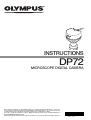
DP72
MICROSCOPE DIGITAL CAMERA
This instruction manual is for the Olympus Microscope Digital Camera Model DP72. To ensure the
safety, obtain optimum performance and familiarize yourself fully with the use of this camera, we
recommend that you study this manual thoroughly before operating the camera.
For image operations including recording, editing and saving, please refer to the Online Manual for
the DP2-TWAIN/DP2-BSW Software.
Retain this instruction manual in an easily accessible place near the work desk for future reference.
AX7741
This device complies with the requirements of both directive 2004/108/EC concerning electromagnetic
compatibility and directive 2006/95/EC concerning low voltage.
In accordance with European Directive 2002/96/EC on Waste Electrical and Electronic Equipment,
this symbol indicates that the product must not be disposed of as unsorted municipal waste, but
should be collected separately.
Refer to your local Olympus distributor in EU for return and/or collection systems available in your
country.
NOTE: This equipment has been tested and found to comply with the limits for a Class A digital device,
pursuant to Part 15 of the FCC Rules. These limits are designed to provide reasonable protection
against harmful interference when the equipment is operated in a commercial environment. This
equipment generates, uses, and can radiate radio frequency energy and, if not installed and used in
accordance with the instruction manual, may cause harmful interference to radio communications.
Operation of this equipment in a residential area is likely to cause harmful interference in which case
the user will be required to correct the interference at his own expense.
FCC WARNING: Changes or modifications not expressly approved by the party responsible for compliance
could void the user’s authority to operate the equipment.
DP72
CONTENTS
IMPORTANT
— Be sure to read this chapter for safe use of the equipment. —
1
SYSTEM CHART
2
NOMENCLATURE
3
HARDWARE INSTALLATION
4
1-6
7,8
9,10
11-15
1
Installing the Low-Profile Bracket .............................................................................................................................. 11
2
Installing the PCIe Interface Board .......................................................................................................................... 11
3
Installing the Camera Head ............................................................................................................................................... 13
4
Connecting the Cables ............................................................................................................................................................. 14
DP2-TWAIN SOFTWARE INSTALLATION
16-22
1. Windows R Vista
....................................................................................................................................................................... 16-19
2. Windows R XP
..................................................................................................................................................................... 20-22
5
IMAGE RECORDING PROCEDURE
23
6
DISPLAYED WINDOWS
24
7
EXTERNAL TRIGGERING
25,26
8
SPECIFICATIONS
27-29
9
TROUBLESHOOTING GUIDE
30,31
10 SOFTWARE UNINSTALLATION
32
PROPER SELECTION OF THE POWER SUPPLY CORD .................................................................... 33,34
IMPORTANT
The DP72 microscope digital camera is designed to be connected to a camera adapter mounted on an
Olympus UIS2/UIS series of optical microscope (not applicable to the LB series) for use in recording of
microscopic magnified images at high speed (about 2.5 seconds) and highest resolution while maintaining
high picture quality and high color reproduction. The DP72 incorporates a variety of functions for supporting
image recording under optimum conditions.
When the DP72 microscope digital camera is used with a camera adapter or a microscope from other
manufacturer than Olympus, the optical performance may not be manifested fully.
SAFETY PRECAUTIONS
CAUTION
Never connect or disconnect the interface cable while the standby switch
Otherwise, malfunction may result.
of the computer is set to ON.
1. Before connecting or disconnecting the interface cable, make sure that the standby switch of the computer is set to
OFF.
When connecting the interface cable, push in the connector all the way and ensure that the connector will not slip out
before setting the standby switch to ON.
Do not move the computer or apply an impact to it while it is powered ON.
2. The cords and interface cables are vulnerable to bend or twist. Do not apply excessive force to them.
3. To prevent the microscope from toppling down, avoid using microscope attachments that may make the total height of
the microscope above 1 meter when they are attached.
4. When installing the PCIe interface board, be sure to hold it by the edge. Never touch the board surface directly, as this will
lead to malfunction.
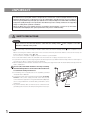
The area (IC) of the PCIe interface board very hot during
and immediately after use of the camera. Be careful never
to touch them during and after use.
5. For handling of the computer, refer to the separately provided
“Computer User’s Manual.”
6. Connect the power cord correctly and ensure that the grounding
terminal of the power supply and wall outlet are properly
connected. If the equipment is not grounded/earthed, Olympus
can no longer warrant the electrical safety performance of the
equipment.
7. Lay out the interface cable so that it does not contact the heatgenerating section such as the lamp housing of the microscope.
1
Hot part
DP72
Computer and Software
The computer data may be destroyed by an unexpected event. Be sure to keep the backup of the data.
1. Olympus will not assume any liabilities for any damage incurred due to the use or non-usability of this system, including
compensation for the lost data.
2. The computer used with this system should set up and run Microsoft Windows XP Professional, Vista Business or
Ultimate.
For the OS in the computer, the user is requested to create a backup and retain it carefully. (Olympus does not support the
matters related to the OS including its backup.)
For details on the computer and Microscope Windows XP or Vista refer to their respective manuals.
3. Olympus guarantees the quality of this product in the factory shipment condition.
Olympus will not assume any liabilities for the operation errors and functional faults incurred due to the alteration of the
environmental setup (including BIOS change), installation of other software or addition of hardware to the computer by the
user.
4. When the HDD free space reduces, the data processing speed may slow extremely or errors may occur frequently. To
prevent this, delete unnecessary data files frequently. For how to delete data files, refer to the manuals for Microsoft
Windows XP or Vista.
5. Never attempt to delete or rename the folders and files installed by the provided installer software. Otherwise, the software
may get unable to be started up.
6. Do not open the enclosure of the computer and touch the power supply or the circuit board's heat generating section
right after use as it may burn your hand. Wait until the internal temperature drops sufficiently.
7. Sharp edges inside the computer may cut your fingers, so take extra care.
8. Use a computer that complies with the safety standards of your country.
2
1
Conformity of the System
Restrictions in Use
1. The applicable camera adapter is the U-TV0.5XC-3, U-TV0.63XC, MVX-TV0.63XC or the combination U-TV1X-2 + U-CMAD3.
The U-TV0.5XC should not be used because it deteriorates the image flatness.
A camera adapter with a magnification below 0.5X cannot be used because part of image will be cut off.
2. When the DP72 is connected to the rear port of the U-DPT or U-MPH, the peripheral part of the recorded image may be
deteriorated due to the optical performance of the U-DPT or U-MPH.
3. When the U-TV0.5XC-2 or U-TV0.5XC-3 is used, using two or more intermediate attachments* may obscure or cut off the
peripheral part of the field of view or may make flare noticeable.
* Example of two intermediate attachments with BX microscope: Vertical illuminator + Intermediate attachment with a
length equivalent to the U-CA
4. Under fluorescent ring illumination or other AC-driven illumination such as a phase control light intensity adjusting
illumination system, the following phenomena may be observed when the light intensity is increased and exposure time
is decreased:
· Flickering of the displayed image.
· Instability in exposure.
· Hatching patterns in pixel shift recording (4140 x 3096 or 2070 x 1548 pixels).
However, provided that the brightness can be adjusted using the light intensity control knob or ND filters, the above
phenomena may be attenuated by adjusting the brightness so that the exposure time exceeds 1/50 sec.
For details on the microscope models using AC-driven illumination, contact Olympus.
5. Non-Olympus microscopes and commercially available C-mount lenses can be used provided that they match a CCD
with a size of no less than 2/3 inch and the lens projection length from the C-mount body attaching section is no more
than 6 mm. However, problems due to optical adaptability, such as shading, may be observed.
6. When the specimen has a low contrast (near transparent) or high reflectance (mirror status) and the aperture iris diaphragm
is stopped down near the smallest aperture, spot flare may be noticeable.
7. When the edge of a non-transmitting object is observed under the STM6 transmitted illumination, flare may be noticeable
due to the difference in brightness between the transmitted sections (over-exposure) and non-transmitting section (underexposure). To reduce the flare, set a lower exposure using the exposure correction function or setting the exposure
manually.
8. When a low-power objective (below 4X) is used, the peripheral part of the field of view may be obscured. In this case, use
an ultralow-magnification condenser (U-ULC-2).
9. When the U-CFU is used, it is required to set the exposure to a longer period than 1/30 sec. using the manual exposure
mode and control the brightness by engaging or disengaging ND filters.
10. Red, horizontal flare due to surface reflections of the area outside the CCD’s effective image pickup area may sometimes
be observed on the upper part of the image under the following conditions.
· During brightfield observation of a specimen with a large difference in brightness, particularly when the bright part
of the specimen comes on the upper part of the image.
· When the Aperture iris diaphragm is stopped down to the minimum aperture.
11. When a specimen with high reflectivity is observed with reflected light brightfield observation through the eyepiece/
camera light path of a trinocular tube using a 0.5X camera adapter such as the U-TV0.5XC or U-TV0.5X, the image in the
area outside the CCD’s effective image pickup area may b observed as vague ghosts in the peripheral area of the visual
field of eyepiece.
12. Flare may be produced during reflected light darkfield observation under overexposure To reduce the flare, use the
exposure correction function or reduce the exposure with manual exposure control.
13. During recording with image shifting (4140 x 3096 or 2070 x 1548 pixels), the image may be disturbed if the specimen is
moved.
14. If the camera or microscope is vibrated during recording of a 4140 x 3096 or 2070 x 1548 pixel image, the image will be
disturbed. Note that the factors causing vibrations include operation of the keyboard or mouse on the same desktop
where the microscope and camera are installed.
Operating Environment
Temperature: 10 to 35°C. Humidity: 20% to 85% (without condensation).
See page 29 for details.
Recommended Monitor Specifications
· A monitor with the 1280 x 1024 or larger full-color display capability.
· An Adobe RGB compatible monitor, provided that the camera head is used in the Adobe RGB mode.
3
DP72
Recommended Computer Specifications -- Desktop Computer -1. Computer requirements
PC/AT compatible
CPU
Intel Pentium 4, 620 (2.8 GHz or greater).
Intel Core2 Duo 1,8 GHz or greater [Core2 Duo E6400, 2.13 GHz or greater recommended]
Chipset
Intel 945 or later
RAM
DDR2/DDR3, 512 MB or more. [In the case of Windows Vista, 1GB or more recommended]
[PC2-4200 or greater, dual-channel DDR2, 1 GB or greater recommended]
HDD
Free space 500 MB or more
Graphic
PCI Express X16 VGA card with 1280 x 1024 or more and 32-bit color capability.
On-board graphic also acceptable.
Extension slot
PCI Express Rev. 1.0a or later.
Half-size or low-profile PCIe board compatible (106.7 mm x 174.6 mm)
OS
Windows Vista Business/Ultimate.
Windows XP Professional SP2 or later. (Not compatible with x64 Edition.)
Language: English or Japanese.
Power
250 W or more. (With CE marking)
* There needs to be the FDD power cable, HDD(4-pin) power cable or SATA power cable which is not
occupied.
2. CPU
We do not guarantee operation if the computer uses a CPU other than or incompatible with Pentium 4 or uses a non-Intel
chipset.
3. HDD free space
The HDD free space refers to the space that does not cause a special problem when the system is installed or run. The
space required for saving an image file in the HDD is slightly more than 4 MB with a 1360 x 1024-pixel (24-bit) noncompressed image and slightly more than 38 MB with a 4140 x 3096-pixel (24-bit) non-compressed image. In consequence,
the HDD should also provide a considerably large space for saving these image files.
When saving movies in the HDD stack, the space required for saving a movie is about 20 MB (max.) per second. The
movie recording time is limited according to the HDD free space.
4. RAM
If a RAM other than a PC2700 or greater, dual-channel DDR/DDR2 RAM is used, the full-size live frame rate may drop.
5. Monitor
Us an Adobe RGB compatible monitor when using the camera head in the Adobe RGB mode.
Optimum color reproduction is not available if the sRGB/Adobe RGB setting of the camera head does not match the
setting of the monitor.
6. Sequential connection of PCIe units
Up to two PCIe units including the DP72 and a PCI interface board of the DP71/DP70/DP30BW or FV1000 (FV10-ASW-V1.5
or later) can be connected in series. Series connection of the FV300/FV500 is not possible.
However, their simultaneous operation is not available so it is required to select either PCI interface operation.
7. Power supply
The PCIe interface board should be powered by connecting the FDD power supply connector from the ATX power supply
in the computer.
If your computer does not have an available FDD power cable or the FDD power cable is too short, use the provided
HDD(4-pin) to FDD power conversion cable for the power supply.
And if your computer does not have an available HDD power cable (4-pin), use the provided SATA-to-HDD(4-pin) power
conversion adapter and HDD(4-pin)-to-FDD power conversion cable for the power supply.
4
Recommended Computer Specifications -- Laptop Computer -1. Computer requirements
PC/AT compatible
CPU
Intel Core2 Duo 1,8 GHz or greater
[Core2 Duo T7300, 2.0 GHz or greater recommended]
Chipset
Intel 945 or later
RAM
DDR2, 512 MB or more. [In the case of Windows Vista, 1GB or more]
[PC2-5300 or greater, dual-channel DDR2 recommended]
HDD
Free space 500 MB or more
Graphic
On-board graphic with 1280 x 1024 or more and 32-bit color capability.
Card slot
ExpressCard/34 or ExpressCard/54
OS
Windows Vista Business/Ultimate.
Windows XP Professional SP2 or later. (Not compatible with x64 Edition.)
Language: English or Japanese.
2. CPU
We do not guarantee operation if the computer uses a CPU other than or incompatible with Core2 Duo or uses a non-Intel
chipset.
3. HDD free space
The HDD free space refers to the space that does not cause a special problem when the system is installed or run. The
space required for saving an image file in the HDD is slightly more than 4 MB with a 1360 x 1024-pixel (24-bit) noncompressed image and slightly more than 38 MB with a 4140 x 3096-pixel (24-bit) non-compressed image. In consequence,
the HDD should also provide a considerably large space for saving these image files.
When saving movies in the HDD stack, the space required for saving a movie is about 20 MB (max.) per second. The
movie recording time is limited according to the HDD free space.
4. RAM
If a RAM other than a PC2700 or greater, dual-channel DDR/DDR2 RAM is used, the full-size live frame rate may drop.
5. Monitor
Us an Adobe RGB compatible monitor when using the camera head in the Adobe RGB mode.
Optimum color reproduction is not available if the sRGB/Adobe RGB setting of the camera head does not match the
setting of the monitor.
6. ExpressCard
The ExpressCard tends to slip out easily from the computer. Be careful so that it does not disconnect in the middle of
operation.
5
DP72
2
Getting Ready
1. The camera head uses precision components. Handle it with care and avoid subjecting it to a sudden or severe impact.
2. The image displayed on the monitor may be affected when it is used near equipment generating strong electromagnetic
waves. This is not a malfunction and will not affect the actual image being recorded. To avoid interference during
operation, keep the system far from any source of electromagnetic waves.
3. When mounting the camera head on a tripod, attach it by using the DP-TRAD tripod adapter, which is separately available.
4. Do not use the camera in areas where it may be subjected to direct sunlight, high temperature and humidity, dust or
vibrations. (For the operating environment conditions, see chapter 8, “SPECIFICATIONS” on page 29.)
5. The camera head needs to be calibrated periodically (every 3 months as reference) for the level variations caused by the
influence of cosmic rays. For the calibration method, refer to the Camera Calibration Wizard in the Online Manual for the
DP2-TWAIN or DP2-BSW software.
3
Maintenance and Storage
1. To clean the lenses and other glass components, simply blow dirt away using a commercially available blower and wipe
gently using a piece of cleaning paper (or clean gauze).
If a lens is stained with fingerprints or oil smudges, wipe it with gauze slightly moistened with commercially available
absolute alcohol.
Since the absolute alcohol is highly flammable, it must be handled carefully. To prevent fire ignition, be sure to
keep it away from open flames or potential sources of electric sparks –– for example, electrical equipment that is
being switched on or off.
Also remember to always use these chemicals only in a well-ventilated room.
2. Parts other than the glass components should be cleaned by wiping with a clean cloth. Do not use organic solvents to
remove major stains. Use a soft cloth slightly moistened with a neutral detergent solution.
3. Do not disassemble any part of the camera as this could result in malfunction or reduced performance.
4. When disposing of this product, check your local regulations and rules and be sure to observe them strictly.
4
Caution
If the equipment is used in a manner not specified by this manual, the safety of the user may be imperiled. In addition, the
equipment may also be damaged. Always use the equipment as outlined in this instruction manual.
The following symbols are used to set off text in this instruction manual.
: Indicates that failure to follow the instructions in the warning could result in bodily harm to the
user and/or damage to equipment (including objects in the vicinity of the equipment).
# : Indicates that failure to follow the instructions could result in damage to equipment.
} : Indicates commentary (for ease of operation and maintenance).
6
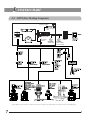
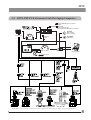
1 SYSTEM CHART
1-1 DP72 (For Desktop Computer)
DP72
SATA-to-HDD(4-pin) power
conversion adapter
HDD-to-FDD
power conversion
cable
DP72
Camera head
PCIe interface board
Low-profile
bracket
DP2-TWAIN
TWAIN Driver
DP2-BSW
Basic Software
(Ver 2.1 or later)
(Note) Microscopes that are not listed in the above may also be applicable. For details, please consult Olympus.
7
DP72
1-2 DP72-PXU PCIe Extension Unit (For Laptop Computer)
SATA-to-HDD(4-pin) power conversion
adapter
HDD-to-FDD
power conversion cable
(Not used when the DP72-PXU is combined.)
DP2-BSW
Basic Software
(Ver. 2.1 or later)
PCIe interface board
DP72
Camera head
Low-profile
bracket
DP2-TWAIN
TWAIN Driver
DP72-PXU PCIe Extension Unit
PCIe x1 cable
PCIe extension box
ExpressCard
Laptop computer
AC adapter
(Note) Microscopes that are not listed in the above may also be applicable. For details, please contact Olympus.
8
NOMENCLATURE
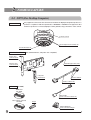
2-1 DP72 (For Desktop Computer)
Camera Head
Any equipment connected to the camera head should be an Olympus-designated product or a
product in compliance with the requirements of IEC60950 or CISPR22/24. If equipment other
than these products is connected, Olympus cannot guarantee any performance of the camera.
Connector (P. 14)
Tripod adapter mount screw (P. 13)
C-mount thread (P. 13)
PCIe Interface Board
(PCI standard half-size, low-profile size compatible)
Trigger cable
connector (P. 15)
Interface cable
connector (P. 15)
External trigger cable (P. 15)
Low-profile
bracket (P. 11)
Release buttons
Interface cable (P. 14)
Software
(CD-ROM)
TWAIN Driver
DP2-TWAIN
HDD-to-FDD
power conversion cable (P. 11)
Basic Software (optional)
DP2-BSW
Dongle
SATA-to-HDD(4-pin)
power conversion adapter
9
DP72
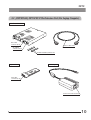
2-2 [OPTIONAL] DP72-PXU PCIe Extension Unit (For Laptop Computer)
PCIe Extension Box
PCIe cable
connector (P. 15)
PCIe x1 cable (P. 15)
AC adapter
connector (P. 15)
Vertical installation plates (P. 12)
With 2 screws
ExpressCard
AC Adapter
PCIe cable
connector (P. 15)
Power cord connector (P. 15)
10
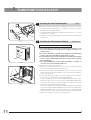
HARDWARE INSTALLATION
1
Installing the Low-Profile Bracket
(Fig. 1)
}If the PCIe extension box and the computer’s extension slot are of the
low-profile bracket specifications, it is required to replace the existing
bracket with the low-profile bracket.
1. Prepare flat-blade and Phillips screwdrivers and remove the “ – ” screws
@ and the “ + ” screw ².
2. Replace the existing bracket with the low-profile bracket ³ and attach
screws @ ².
@
²
³
2
Fig. 1
Installing the PCIe Interface Board
(Figs. 2 & 3)
DP72 (For Desktop Computer) Set (Figs. 2 & 3)
@
Fig. 2
²
³
5
|
6
Fig. 3
11
# Before installing the PCIe interface board in the computer, be sure
to read the instruction manuals for the computer in order not to
damage them.
# Be sure to turn off the computer and peripherals and unplug their
power cords before installing the PCIe interface board.
# To avoid damage due to static electricity, touch an unpainted metallic
surface of the computer with your hand to leak the static electricity
before installation.
# The SATA-to-HDD(4-pin) power conversion adapter is sensitive to
excessive force. Please handle it with care.
1. Open the cover @ of the computer.
2. Remove the clamping screw ³ of the slot cover ² of an unused PCIe
slot on the motherboard and remove the cover.
3. Insert the PCIe interface board | taking care not to touch the board
surface directly by hand, and attach the slot cover using the clamping
screw removed above.
4. Connect the FDD power cable 5 from the computer’s power supply to
the power connector 6 on the PCIe interface board |.
If your computer does not have an available FDD power cable or the
FDD power cable is too short, connect the provided HDD-to-FDD power
conversion cable from the computer’s HDD power cable to the power
connector 6 on the PCIe interface board |.
And if your computer does not have an available HDD(4-pin) power cable,
connect the provided SATA-to-HDD(4-pin) power conversion adapter and
HDD(4-pin)-to-FDD power conversion cable from the computer’s SATA
power cable to the power connector 6 on the PCIe interface board |.
5. Attach the computer cover @ to the original position.
DP72
Optional DP72-PXU (Figs. 4 & 5)
@
@
6
@
5
|
1. Using a Phillips screwdriver, remove the six screws @ clamping the top
cover of the extension box and then remove the cover.
2. Remove the bracket clamping screw ².
3. Connect the PCIe interface board ³ with low-profile bracket to the
connector |.
4. Connect the connector 5 to the PCIe interface board.
5. Attach the clamping screw ² removed above.
6. A thermal conduction sheet 6 is attached on the back of the top cover.
Remove the tapes † and the protective sheet 8 carefully so as not to
displace the thermal conductive sheet (Fig. 5).
7. Place the top cover in the original position and attach the clamping
screws @.
²
³
Fig. 4
8
7
6
Fig. 5
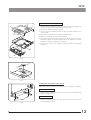
Installing the PCIe Extension Box (Fig. 6)
}The PCIe extension box can be installed either horizontally or vertically.
@
Horizontal Installation
Place the PCIe extension box on the desktop so that the surface with
rubber feet faces down.
Vertical Installation
²
Fig. 6
Attach the provided plates @ to the side panel of the extension box
using provided screws ².
12
3
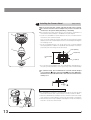
Installing the Camera Head
(Figs. 7 & 8)
The C-mount screw has a sharp edge that should not be touched.
The camera head and camera adapter are precision modules. Be
careful not to drop them during attaching or detaching.
}The following procedure deals with the case using the combination of
the U-TV1X-2 camera adapter + U-CMAD3 C-mount adapter.
1. Screw in the U-CMAD3 C-mount adapter @ into the C-mount thread on
the bottom of the camera head ².
Then, loosen the clamping screw ³ at the bottom of the U-TV1X-2 camera
adapter, screw in the camera adapter into the C-mount adapter and tighten
the clamping screw.
· As the photographed field is as shown below, use a camera adapter
having magnification of 0.5X to 1X. (If a 0.35X camera adapter is used, the
peripheral part of the image will be obscured.)
²
@
0.63X (FN 17.5)
0.5X (FN 22)
³
Field number
22
1X (FN 11)
· If a C-mount camera adapter from other manufacturer than Olympus is
used, the optical performance of the system may not be manifested fully.
Fig. 7
Be careful in using other manufacturer’s C-mount camera adapter
or C-mount lens
having a thread length
over 6 mm. Otherwise,
the threaded section will hit the inside of the camera head and cause
damage to it.
Using a Commercially Available Tripod
6
5
|
Fig. 8
13
}The DP-TRAD tripod adapter is provided with two types of screws (2 each)
and an Allen wrench. Use only the Phillips screws (x 2) with the DP72.
1. Attach the DP-TRAD tripod adapter | to the camera head 5 and clamp
them using the provided Phillips screws (x 2) with a Phillips screwdriver.
2. Attach the tripod to the tripod adapter | and tighten the tripod’s clamping
knob 6 to secure the camera head.
DP72
4
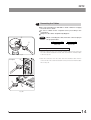
Connecting the Cables
The cords and cables are vulnerable to bend or twist. Do not apply
excessive force to them.
Be sure to switch off the computer before proceeding to the
connections.
Always use the cables designated by Olympus.
NOTE
²
When connecting the cable, insert the connector plug in
the proper direction.
@
Cable side
Device side
Connecting the Interface Cable (Figs. 9 & 10)
Fig. 9
Computer
1. Push the connector @ on one end of the interface cable into the connector
² on the camera head until it clicks, and check that the interface cable
is will not slip out.
2. Push the connector ³ on the other end of the interface cable into the
connector | on the camera head until it clicks, and check that the cable
will not slip out.
|
³
PCIe Extension Box
³
|
Fig. 10
14
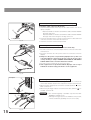
Connecting the ExpressCard and PCIe x1 Cable (Fig. 11)
²
@
To ExpressCard
Fig. 11
# Insert the cable connectors all the way.
1. Insert the ExpressCard all the way into the card insertion slot* of the
laptop computer.
* ExpressCard/34 slot: Hold the card with the surface marked “INSERT”
facing up and insert.
ExpressCard/54 slot: Hold the card with the surface marked “INSERT”
facing up and insert it along the left edge of the slot.
2. Check the orientation of the connector @ of the PCIe x1 cable and insert
it into the connector on the PCIe extension box.
3. Insert the connector ² into the ExpressCard.
Connecting the AC Cable (Fig. 12)
@
²
³
# Insert the cable and power cord connectors all the way.
1. Insert the connector @ of the AC adapter into the connector on the PCIe
extension box.
2. Insert the connector ² of the power cord to the connector on the AC
adapter.
# Always use the power cord provided by Olympus. If no power cord
is provided with the camera head, please select the proper power
cord by referring to chapter “PROPER SELECTION OF THE POWER
SUPPLY CORD” at the end of this instruction manual.
3. Insert the power cord plug ³ into the power outlet.
# If the equipment is not grounded/earthed, Olympus can no longer
warrant the electrical safety performance of the equipment.
Fig. 12
Computer
@
Connecting the External Trigger Cable (Fig. 13)
²
³
|
PCIe Extension Box
@
15
²
Fig. 13
1. Insert the connector @ of the external trigger cable to the connector ²
on the PCIe interface board in the computer or the PCIe extension box.
2. When using the trigger input, connect the red cable (marked “ ” ) to the
BNC connector ³.
3. When using the trigger output, connect the blue cable (marked “ ” ) to
the BNC connector |.
CAUTION
· The external triggering is available only when the DP2BSW Basic Software is run.
· Although the trigger input is not available for the present,
it will be enabled by updating as soon as it is ready.
DP72
DP2-TWAIN SOFTWARE INSTALLATION
}For installation of the DP2-BSW software, refer to the instruction manual provided with it.
Before Installation
(Applicable OS: Windows R Vista/Windows R XP)
· Quit all running applications before installing DP2-TWAIN.
· The software cannot be installed unless the user account is registered as “computer administrator.”
If the user account is registered as a “Restricted account,” change it to the “Computer administrator” account.
(For the user account registration, refer to the instruction manuals for your computer.)
Trademark Information
Windows is a registered trademark of Microsoft Corporation.
All other brand and product names are trademarks or registered trademarks of their respective owners.
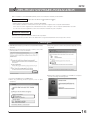
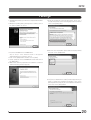
1. Windows R Vista
1. Start Windows Vista. (Log on with the Computer Administrator
account.)
2. When the following window appears in a while, click on the
[Cancel] button to close the window.
3. Insert the CD-ROM in the CD-ROM drive.
4. When the [AutoPlay] window appears, click on [Run
setup.exe].
5. When the [User Account Control] window appears, click on
the [Allow].
6. Wait a while until the preparation for installation completes
and the following window appears.
16
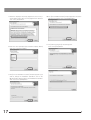
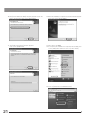
7. Read the displayed Licensing Agreement, check “Yes,, I
accept all the terms of the Licensing Agreement.” and then
click on the [Next] button.
8. Enter the user information (User Name/Company Name)
and click on the [Next] button.
9. The [Choose Destination Location] window appears. If you
want to change the installation destination, click on the
[Browse] button and specify the new installation destination.
Then click on the [Next] button.
17
10. The [Select Additional Tasks] window appears. Check the
task to be used and click on the [Next] button.
11. The [Start Copying Files] window appears.
Click on the [Next] button.
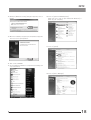
DP72
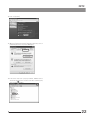
12. When the [Windows Security] dialog box appears, click on
[Install].
16. Click on [System and Maintenance].
Make sure not to click on [Get started with Windows] or
[Back up your computer].
13. When the installation completes, the window below appears.
Then click on the [Finish] button.
17. Click on [System].
14. Take out the CD-ROM
15. To check that the installation is completed successfully, click
on [Control Panel].
18. Click on [Device Manager].
18
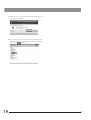
19. When the [User Account Control] dialog box appears, click
on the [Continue] button.
20. If the driver has been properly installed, “MalAd Device”
should be displayed as shown below. After confirming this,
click on the [
] button.
19
DP72
2. Windows R XP
1. Start Windows XP. (Log on with the Computer Administrator
account.)
2. When the following dialog box appears in a while, click on
the [Cancel] button to close it.
3. Insert the CD-ROM in the CD-ROM drive.
Skip to step 7 if the window shown in 6 appears
automatically. If not, continue to step 4.
4. Click on the [Start] button and then click on [Run].
5. Select “setup.exe” in the CD-ROM drive folder and click on
the [OK] button.
6. Wait a while until the preparation for installation completes
and the following window appears.
7. Read the displayed Licensing Agreement, check “Yes,, I
accept all the terms of the Licensing Agreement.” and then
click on the [Next] button.
8. Enter the user information (User Name/Company Name)
and click on the [Next] button.
9. The [Choose Destination Location] window appears. If you
want to change the installation destination, click on the
[Browse] button and specify the new installation destination.
Then click on the [Next] button.
20
10. The [Select Additional Tasks] window appears. Check the
task to be used and click on the [Next] button.
12. When the installation completes, the window below appears.
Then click on the [Finish] button.
11. The [Start Copying Files] window appears.
Click on the [Next] button.
13. Take out the CD-ROM.
14. To check that the installation is completed successfully, click
on the [Start] button and then click on [Control Panel].
15. Click on [Performance and Maintenance].
21
DP72
16. Click on [System].
17. When the [System Properties] dialog box appears, click on
[Hardware] and then on [Device Manager].
18. If the driver has been properly installed, “MalAd Device”
should be displayed as shown below. After confirming this,
click on the [ ] button.
22
IMAGE RECORDING PROCEDURE
(Notes) The encircled numbers indicate the control positions in the windows shown on the next page.
For detailed operating procedures, refer to the instruction manual for the DP2-TRAIN.
*1. “TWAIN-compatible application” means software with TWAIN interface compatibility such as Photoshop*, Microsoft
Office*, etc. (*: Operations of these applications have been confirmed.)
*2. With Photoshop, DP2-TWAIN can be launched by selecting [File]-[Import]-[OLYMPUS DP2-TWAIN2.1].
For how to launch DP2-TWAIN from other TWAIN-compatible application, refer to the manual for the TWAINcompatible application.
*3. For zooming, scrolling and image saving, refer to the manual for the TWAIN-compatible application.
Brightfield Observation
*1
Launch TWAIN-compatible
application.
*1
Launch TWAIN-compatible
application
*2
Launch DP2-TWAIN.
*2
Launch DP2-TWAIN.
Set up the microscope.
Set up the microscope.
@ Set the exposure mode.
@ Set the exposure mode.
Manual
Exposure mode?
Manual
Exposure mode?
² Set the exposure time.
Auto
² Set the exposure time.
SFL Auto
³ Select the area (30%, 1%,
0.1%, full-image).
³ Select the area (30%, 1%,
0.1%, full-image).
Perform framing and focusing.
Perform framing and focusing.
Manual
Exposure mode?
Auto
23
Fluorescence Observation
Manual
Exposure mode?
² Fine-adjust the exposure time.
SFL Auto
² Fine-adjust the exposure time.
| Move the area and correct
exposure.
| Move the area and correct
exposure.
5 Adjust the white balance.
7 Adjust the black balance.
6 Record an image.
6 Record an image.
*3
Perform zooming or scrolling.
*3
Perform zooming or scrolling.
*3
Save the image.
*3
Save the image.
DP72
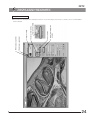
DISPLAYED WINDOWS
Image Record Window
| Area movement/Exposure
correction
³ Area selection
² Exposure time setting
@ Exposure mode setting
6 Image recording
7 Black balance adjustment
5 White balance adjustment
}This window is displayed at the startup and used to record still images and movies. For details, refer to the DP2-TWAIN
Online Manual.
24
EXTERNAL TRIGGERING
}When the DP2-BSW basic software is used, the DP72 can record still images or control a commercially available shutter
based on an external trigger signal.
· The external trigger function is not available with the DP2-TWAIN.
· The trigger input function is for the present unavailable even with the DP2-BSW. It will be made downloadable as soon as
it is ready.
Trigger Input
· The trigger input from external equipment can be used to start still image recording using the DP2-BSW.
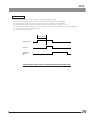
· The trigger input is detected at the edge, and the positive and negative logics can be switched with the DP2-BSW.
· The trigger input is not compatible with random triggering. Due to a time lag of 150 to 600 ms after the trigger input, the
exposure start time cannot be synchronized completely.
For details on the time lag from the trigger input to the start of exposure, see table below.
· The trigger input is a TTL compatible signal.
VIH: 2.0 V (min.). VIL: 0.8 V (max.).
150 to 600 msec.
5 msec. or more
Trigger input
Exposure
Readout &
transfer to
PC
Trigger Input Timing Chart (Positive logic)
Table
Time Lag from Trigger Input to Exposure Start
Time Lag from Trigger Input to Exposure Start (msec.)
Recording Image Size
Min.
Max.
OFF
150
400
ON
210
600
680 x 510
(2 x 2)
OFF
150
350
ON
210
500
340 x 250
(4 x 4)
OFF
150
300
ON
210
450
4140 x 3096
2070 x 1548
1360 x 1024
680 x 512
25
Preview Status at Trigger Input
DP72
Trigger Output
·
·
·
·
·
·
The trigger output can be used to control a commercially available shutter.
The positive and negative logics of the trigger output can be switched with the DP2-BSW.
The trigger output is interlocked with the shutter release/close operations of the DP2-BSW.
The external trigger signal is output by starting still image recording when the shutter is closed.
The time lag from the trigger output to the start of exposure can be set between 0 and 2 sec. on the DP2-BSW.
The trigger output is a TTL compatible signal.
VOH: 2.4 V (min.). VOL: 0.4 V (max.).
Exposure time lag
Trigger output
Exposure
Readout &
transfer to
PC
Trigger Output Timing Chart in Still Image Recording (Positive logic)
26
SPECIFICATIONS
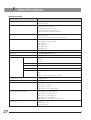
DP72 Specifications
Item
Camera syste
Single-CCD color camera.
Pixel shifting type.
Image pickup device
2/3-inch color CCD.
Total pixels: 1.5 million pixels.
Effective pixels: 1.45 million pixels.
Pixel pitch: 6.45 μm (H) x 6.45 μm (V).
Scanning method: Progressive scanning.
Cooling
Peltier cooling.
Natural air cooling.
CCD temperature: Room temperature - 10°C (max.)
Recorded image sizes
4140 x 3096 (1 x 1, pixel shifting),
2070 x 1548 (1 x 1, pixel shifting),
1360 x 1024 (1 x 1),
680 x 512 (1 x 1),
680 x 510 (2 x 2),
340 x 250 (4 x 4)
Camera mount
C-mount
ISO speed
ISO 200/400/800/1600 equivalent
A/D
12 bits
Exposure control
27
Specifications
Exposure modes
Auto,
SFL Auto,
Manual
AE lock
Available
AE pause
Available
Exposure correction
Correction range: ±2.0 EV. Step: 1/3 EV
Metering area
Full image,
30%,
1%,
0.1%. The metering area is freely movable.
Exposure time
1/44,000 to 60 sec.
Binning
2 x 2, 4 x 4
Movie frame rate**
1360 x 1024 (1 x 1): 15 fps.
680 x 512 (1 x 1): 15 fps.
680 x 510 (2 x 2): 29 fps.
340 x 250 (4 x 4): 57 fps. (Maximum).
Still image recording time**
(From exposure start to display)
4140 x 3096 (1 x 1): Approx.2.5 sec.
2070 x 1536 (1 x 1): Approx.2.0 sec.
1360 x 1024 (1 x 1): Approx.0.7 sec.
680 x 512 (1 x 1): Approx.0.6 sec.
680 x 510 (2 x 2): Approx.0.6 sec.
340 x 250 (4 x 4): Approx.0.5 sec. (Minimum).
Color modes
Color,
standard gray scale,
custom gray scale
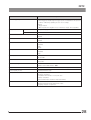
DP72
Item
External triggering*
Image accumulation*
Specifications
Input:
Event trigger input. (Although the trigger input is not available for the present,
it will be enabled by updating as soon as it is ready.)
Output:
Trigger output.
With exposure time lag (0 to 2 sec. in 10 msec. steps). TTL compatible.
Modes
Integral, averaging
Accumulation count
64 frames (max.)
White balance Modes
Area-specified auto,
Manual
Black balance Modes
Area-specified auto,
Manual
Contrast modes
Low,
Standard,
High,
Linear.
Sharpness filter
Low,
Standard,
High.
Color space*
sRGB,
Adobe RGB
Focus indicator
Contrast bar,
Line profile.
Interval recording*
Interval: 1 sec. to 24 h.59 m.59 sec.
Number of shootable frames: 3000
Image file formats
Dependent on the DP2-BSW or TWAIN-compatible application software.
Preview quality modes
Standard, Medium, High.
Computer interface
PCI Express Rev. 1.0a or later.
< Desktop computer >
Compatible with half-size or low-profile size.
< Laptop computer >
ExpressCard/34 (also usable for ExpressCard/54)
Compatible OS
Windows Vista Business/Ultimate
Windows XP Professional (32-bit) SP2 or later.
Language: English or Japanese.
28
Item
Dimensions & weight
Specifications
< DP72 >
Camera head
112( ) x 87.8(H) mm (excluding projections), approx. 1,150 grams
PCIe interface board
181(W) x 121(D) x 21.6(H) mm (excluding projections), approx. 200 grams
Interface cable
Approx. 2.7 meters
External trigger cable
Approx. 0.2 meter
< PCIe Extension Unit >
Operating environment
PCIe extension box
165(W) x 203(D) x 28(H) mm (excluding projections), approx. 800 grams
ExpressCard
34(W) x 100(D) x 11(H) mm (excluding projections), approx. 24.5 grams
AC adapter
60(W) x 110(D) x 34(H) mm (excluding projections), approx. 250 grams
Cord length: Approx. 1.0 meter.
PCIe x1 cable
Approx. 1.7 meter
· Indoor use.
· Altitude: Max. 2000 meters
· Ambient temperature: 10° to 35°C (50° to 95° F)
· Relative humidity: 20% to 85% (without condensation)
· Supply voltage fluctuations; ±10%.
· Pollution degree: 2 (in accordance with IEC60664)
· Installation/Overvoltage category: II (in accordance with IEC60664)
* These items can be set from the DP2-BSW. (Ver 2.1 or later)
** The values of these items are variable depending on the exposure time setting and the computer operating situations.
29
DP72
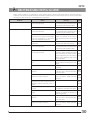
TROUBLESHOOTING GUIDE
Under certain conditions, the performance of the camera may be adversely affected by factors other than defects. If
problems occur, please review the following list and take remedial action as needed. If you cannot solve the problem after
checking the entire list, please contact Olympus for assistance.
Problem
a) The computer will not start up.
b) Live image is not displayed.
c) Still images cannot be recorded.
Cause
e) Picture is too dark.
Page
Turn off the computer and connect
the camera and PCIe interface board
properly using the interface cable.
The software is installed improperly.
Install the software.
The camera and computer are
connected improperly.
Turn off the computer and connect
the camera and PCIe interface board
properly using the interface cable.
14
The microscope illumination is off. The
microscope is not set to the camera light
path. The illumination or specimen
focusing is adjusted improperly.
Turn on the microscope illumination,
adjust the lighting and focusing
correctly, and select the camera light
path.
––
The ISO speed or exposure time is set
improperly.
Set the ISO speed, exposure mode, (Online
exposure time and level properly.
manual)
The camera and computer are
connected improperly.
Turn off the computer and connect
the camera and PCIe interface board
properly using the interface cable.
The DP2-TWAIN or DP2-BSW is
processing recording.
Wait until the recording processing
completes before starting recording
of the next image. In certain cases, it
may be required to press the Cancel
button on the status bar and record
the image again.
Wait until the processing completes
before starting recording of the next
image.
The DP2-BSW is processing file save,
etc.
d) Picture is too bright.
Remedy
The camera and computer are
connected improperly.
14
16-22
8
(Online
manual)
(Online
manual)
The computer memory is insufficient.
Exit from other software before retrying
recording.
Exposure correction is set in the +
direction.
Return the exposure correction value
(Online
to 0 and set the desired exposure
manual)
correction value.
The metering area is set to a dark area
outside the region of interest.
Move the metering area to the area
(Online
where you want to obtain optimum
manual)
exposure.
AE lock, which was set when the
exposure time was longer than the
currently required exposure time, is
active.
Cancel AE lock.
The input highlight level adjustment is
too low.
Reset the current level adjustment (Online
and adjust the optimum level again. manual)
The microscope illumination is too
bright.
Reduce the microscope illumination
intensity or engage an ND filter to
reduce brightness.
Exposure correction is set in the –
direction.
Return the exposure correction value
(Online
to 0 and set the desired exposure
manual)
correction value.
The metering area is set to a bright area
outside the region of interest.
Move the metering area to the area
(Online
where you want to obtain optimum
manual)
exposure.
––
(Online
manual)
––
30
Problem
e) Picture is too dark.
f ) The colors in the picture are
strange.
Remedy
Page
AE lock, which was set when the
exposure time was shorter than the
currently required exposure time, is
active.
Cancel AE lock.
The output highlight level adjustment is
too low.
Reset the current level adjustment (Online
and adjust the optimum level again. manual)
The microscope illumination is too dark.
Increase the microscope illumination
intensity or disengage the existing ND
filter to increase brightness.
(Online
manual)
––
The area selected in white balance
adjustment was improper.
Select a white area as the rectangular (Online
manual)
white balance adjustment area.
The RGB balance is adjusted improperly
in manual white balance adjustment.
Perform manual white balance
adjustment to adjust the RGB color (Online
manual)
balance to obtain optimum colors.
The area selected in black balance
adjustment was improper.
Select a black area as the rectangular (Online
black balance adjustment area.
manual)
The screen color setting of the computer
is incorrect.
Set the computer display color to 24bit color or higher. The recommended
setting is 32-bit color.
––
The microscope is not focused properly
Adjust the focus correctly with the fine
adjustment knob.
––
The aperture iris diaphragm of the
condenser is open too wide.
Close the aperture iris diaphragm a
little.
––
The field iris diaphragm is not set
properly.
Adjust the field iris diaphragm until the
image circumscribes the field of view.
––
Lens components of the microscope are
contaminated or the cover glass on the
front of the camera is stained.
Clean the objective, photography lens,
condenser and/or window lens of the
microscope, or clean the cover glass
on the bottom of the camera head.
6
The microscope and/or camera are
subjected to vibration during recording.
Record images in an environment in
which the microscope and camera
are not vibrated. It is effective to use
an anti-vibration bench.
––
h) The 4140 x 3096 and 2070 x 1548
images are not neat.
The camera is subjected to vibration
during recording.
Record images in an environment in
which the microscope and camera
are not vibrated. It is effective to use
an anti-vibration bench.
––
i ) The DP2-TWAIN or DP2-BSW
window is not displayed correctly
or the menu characters are not
displayed correctly.
The resolution setting of the screen is
incorrect.
Set the resolution setting at 1280 x
1024 or more in the property of the
screen.
––
The large font has been selected for the
font size of the screen.
Select a small font in the property of
the screen.
––
j ) External trigger signal is not
output.
External triggering is not enabled.
Enable external triggering on the DP2- (Online
BSW.
manual)
k) Still image cannot be recorded
using the external trigger input.
External triggering is not enabled.
} DP2-BSW Ver. 2.1 is not compatible
with the trigger input.
Enable external triggering on the DP2(Online
BSW.
manual)
g) The picture is not in focus.
31
Cause
DP72
SOFTWARE UNINSTALLATION
1. Windows R Vista
1. Click on the [Start] button and select [Control Panel].
2. Click on [Uninstall a Program] under [Programs].
3. When the [Uninstall or change a program] window appears, select [OLYMPUS DP2-TWAIN] and click on the [Uninstall]
button.
4. The [User Account control] dialog box appears to ask you “Windows needs your permission to continue”. Click on the
[Continue] button.
5. The [Question] dialog box appears to ask you “Do you really want to uninstall OLYMPUS DP2-TWAIN?”. Click on the [Yes]
button. Uninstalling will start.
6. The [Question] dialog box appears again to ask you “Do you want to retain the application’s uscr specific settings?”. Click
on the [Yes] button to retain the settings. If you do not want to retain the settings, click on the [No] button.
7. When the [Maintenance Complete] dialog box appears, click on the [Finish] button. Now the application is deleted.
2. Windows R XP
1. Click on the [Start] button and select [Control Panel].
2. Click on [Add or Remove Programs].
3. When the [Add or Remove Programs] window appears, select [OLYMPUS DP2-TWAIN] under [Currently installed programs]
and click on the [Remove] button.
4. The [Question] dialog box appears to ask you “Do you really want to uninstall OLYMPUS DP2-TWAIN?”. Click on the [Yes]
button. Uninstalling will start.
5. The [Question] dialog box appears again to ask you “Do you want to retain the application’s user specific settings?”. Click
on the [Yes] button to retain the settings. If you do not want to retain the settings, click on the [No] button.
6. When the [Maintenance Complete] dialog box appears, click on the [Finish] button. Now the application is deleted.
32
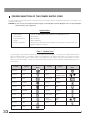
PROPER SELECTION OF THE POWER SUPPLY CORD
If no power supply cord is provided, please select the proper power supply cord for the equipment by referring to “ Specifications ” and
“ Certified Cord ” below:
CAUTION: In case you use a non-approved power supply cord for Olympus products, Olympus can no longer warrant the
electrical safety of the equipment.
Specifications
Voltage Rating
Current Rating
Temperature Rating
Length
Fittings Configuration
125V AC (for 100-120V AC area) or, 250V AC (for 220-240V AC area)
6A minimum
60°C minimum
3.05 m maximum
Grounding type attachment plug cap. Opposite terminates in molded-on IEC configuration appliance coupling.
Table 1 Certified Cord
A power supply cord should be certified by one of the agencies listed in Table 1 , or comprised of cordage marked with an
agency marking per Table 1 or marked per Table 2. The fittings are to be marked with at least one of agencies listed in
Table 1. In case you are unable to buy locally in your country the power supply cord which is approved by one of the
agencies mentioned in Table 1, please use replacements approved by any other equivalent and authorized agencies in
your country.
Country
33
Agency
Certification
Mark
Country
Agency
Argentina
IRAM
Italy
IMQ
Australia
SAA
Japan
JET, JQA , TÜV,
UL-APEX / MITI
Austria
ÖVE
Netherlands
KEMA
Belgium
CEBEC
Norway
NEMKO
Canada
CSA
Spain
AEE
Denmark
DEMKO
Sweden
SEMKO
Finland
FEI
Switzerland
SEV
France
UTE
United
Kingdom
ASTA
BSI
Germany
VDE
U.S.A.
UL
Ireland
NSAI
Certification
Mark
DP72
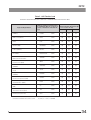
Table 2 HAR Flexible Cord
APPROVAL ORGANIZATIONS AND CORDAGE HARMONIZATION MARKING METHODS
Approval Organization
Printed or Embossed Harmoniza- Alternative Marking Utilizing
tion Marking (May be located on Black-Red-Yellow Thread (Length
jacket or insulation of internal wir- of color section in mm)
ing)
Black
Red
Yellow
Comite Electrotechnique Belge
(CEBEC)
CEBEC
<HAR>
10
30
10
Verband Deutscher Elektrotechniker
(VDE) e.V. Prüfstelle
<VDE>
<HAR>
30
10
10
Union Technique de l´Electricite´
(UTE)
USE
<HAR>
30
10
30
Instituto Italiano del Marchio di
Qualita´ (IMQ)
IEMMEQU
<HAR>
10
30
50
British Approvals Service for Electric
Cables (BASEC)
BASEC
<HAR>
10
10
30
N.V. KEMA
KEMA-KEUR
<HAR>
10
30
30
SEMKO AB Svenska Elektriska
Materielkontrollanstalter
SEMKO
<HAR>
10
10
50
Österreichischer Verband für
Elektrotechnik (ÖVE)
<ÖVE>
<HAR>
30
10
50
Danmarks Elektriske Materialkontroll
(DEMKO)
<DEMKO>
<HAR>
30
10
30
National Standards Authority of Ireland
(NSAI)
<NSAI>
<HAR>
30
30
50
Norges Elektriske Materiellkontroll
(NEMKO)
NEMKO
<HAR>
10
10
70
Asociacion Electrotecnica Y
Electronica Espanola (AEE)
<UNED>
<HAR>
30
10
70
Hellenic Organization for
Standardization (ELOT)
ELOT
<HAR>
30
30
70
Instituto Portages da Qualidade
(IPQ)
np
<HAR>
10
10
90
Schweizerischer Elektro
Technischer Verein (SEV)
SEV
<HAR>
10
30
90
Elektriska Inspektoratet
SETI
<HAR>
10
30
90
Underwriters Laboratories Inc. (UL)
Canadian Standards Association (CSA)
SV, SVT, SJ or SJT, 3 X 18AWG
SV, SVT, SJ or SJT, 3 X 18AWG
34
MEMO
Shinjuku Monolith, 3-1, Nishi Shinjuku 2-chome, Shinjuku-ku, Tokyo, Japan
Postfach 10 49 08, 20034, Hamburg, Germany
3500 Corporate Parkway, P.O. Box 610, Center Valley, PA 18034-0610, U.S.A.
One Corporate Drive, Orangeburg, NY 10962, U.S.A.
491B River Valley Road, #12-01/04 Valley Point Office Tower, Singapore 248373
31 Gilby Road, Mount Waverley, VIC., 3149, Australia
5301 Blue Lagoon Drive, Suite 290 Miami, FL 33126, U.S.A.
Printed in Japan on December 12, 2008 M 020–³