1
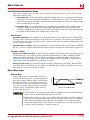
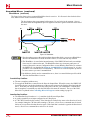
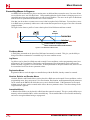
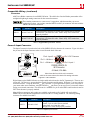
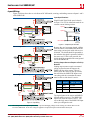
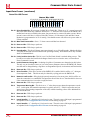
2 MOVE PROFILES Basic Move Types (continued) ± Jog Move (continued) As shown below, a Jog Moves begins at the programmed Starting Speed, accelerates at the programmed rate to the Programmed Speed and continues until a stop condition occurs. If it is a Controlled Stop Condition, the SMD23/4P will decelerate the motor to the starting speed and stop without losing position. If it is an Immediate Stop Condition, the motion stops immediately and the position becomes invalid. It is possible to change the speed of a Jog Move without stopping motion. The Programmed Speed, Acceleration, and Deceleration parameters can be changed during a Jog Move. When the Programmed Speed is changed, the motor will accelerate or decelerate to the new Programmed Speed using the new accelerate/ decelerate parameter values. Figure 2.8 below shows an example of a Jog Move where the speed and acceleration values are changed while the move is in progress. Once the move is initiated with the Programmed Speed greater than the Starting Speed, changing the SPEED Programmed Speed to a value less than the Starting Speed will cause the SMD23/4P to issue an invalid parameter error. The Jog Move will continue to run at the last valid speed. POSITION Change in Parameters Change in Parameters Controlled Stop Condition Figure 2.8 Jog Move Controlled Stop Conditions The Jog Move Command bit is reset to “0”. An inactive-to-active transition on an input configured as a Stop Jog or Registration Move Input. You toggle the Hold Move control bit in the Network Output Data. The use of the Hold Move and Resume Move bits is explained in the Controlling Moves In Progress section starting on page 38. Immediate Stop Conditions The Immediate Stop bit makes a 0 1 transition in the Network Input Data. A inactive-to-active transition on an input configured as an E-Stop Input. A CW/CWW Limit Switch is reached. If the limit that is reached is the same as the direction of travel, for example, hitting the CW limit while running a CW move, a Reset Errors command must be issued before moves are allowed in that direction again. If the limit that is reached is opposite the direction of travel, a Reset Errors command does not have to be issued. Note that it is possible to start a move while a CW or CCW Limit Switch is active as long as the direction of travel is opposite that of the activated Limit Switch. For example, it is possible to start a clockwise Jog Move while the CCW Limit Switch is active. 30 ADVANCED MICRO CONTROLS INC.