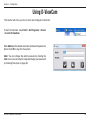
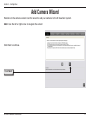
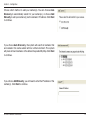
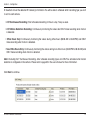
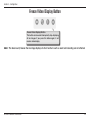
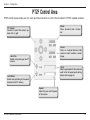
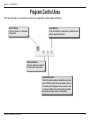
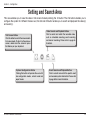
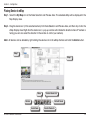
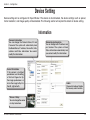
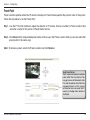
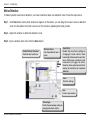
1
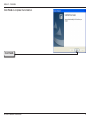
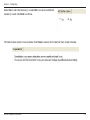
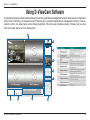
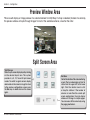
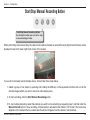
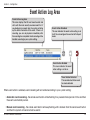
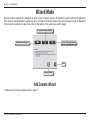
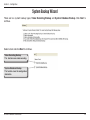
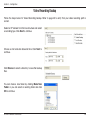
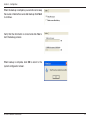
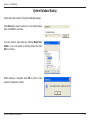
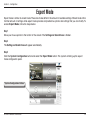
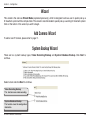
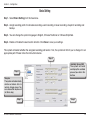
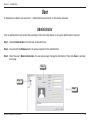
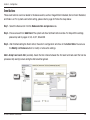
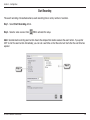
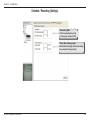
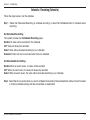
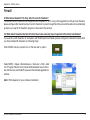
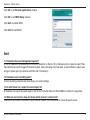
Table of Contents Table of Contents Product Overview......................................................... 4 System Requirements.............................................. 4 Introduction............................................................... 5 Features.................................................................... 5 Installing Your IP Camera.......................................... 6 Software Installation.................................................... 7 Using D-ViewCam....................................................... 10 Add Camera Wizard............................................... 11 Using D-ViewCam Software................................... 15 Main Display Area................................................... 16 System Board Area................................................ 17 Select Device and Map Area.................................. 17 Preview Window Area............................................. 18 Split Screen Area.................................................... 18 Manual Control Area............................................... 19 Snapshot Button............................................... 19 Start/Stop Manual Recording Button................ 20 Start/Stop 2-Way Audio Button......................... 21 Freeze Video Display Button............................. 22 PTZF Control Area................................................. 23 Program Control Area............................................. 24 Setting and Search Area........................................ 25 Event Action Log Area............................................ 26 D-Link D-ViewCam User Manual Configuring D-ViewCam............................................ 27 Wizard Mode.......................................................... 28 Add Camera Wizard.......................................... 28 System Backup Wizard..................................... 29 Quick Recording Settings................................. 33 Expert Mode........................................................... 34 Main Screen Interface....................................... 35 Wizard............................................................... 36 Add Camera Wizard.......................................... 36 System Backup Wizard..................................... 36 System.................................................................... 40 Event Action...................................................... 40 User........................................................................ 48 Administrator..................................................... 48 Normal User...................................................... 49 My Map............................................................. 50 Device Setting......................................................... 53 Information........................................................ 53 Playback...................................................................... 65 Video Search and Playback Management.............. 65 Event Search and Playback Management.............. 68 Frequently Asked Questions..................................... 70 D-Link D-ViewCam Features.................................. 70 D-Link D-ViewCam Operation................................ 72 Table of Contents Contacting Technical Support................................... 78 Warranty...................................................................... 79 Registration................................................................. 84 D-Link D-ViewCam User Manual Section 1 - Product Overview Product Overview System Requirements To ensure your D-ViewCam system can maintain high video monitoring and recording performance, certain minimum system configurations are required. A higher performance system is required especially when the number of IP cameras exceeds 9. * Recording video over a long period of time will consume large amounts of disk space. Make sure that you have enough disk space available if you want to use recording function. You can still complete the installation even if you have less than the suggested free disk space. Note: If a mega pixel camera is used with the D-ViewCam application, the minimum system requirement should be raised to CPU: Intel P-4 3.4GhZ or above with 1GB of memory due to the resources required to process and store large amounts of image data. D-Link D-ViewCam User Manual Section 1 - Product Overview Introduction Thank you for purchasing a D-Link IP camera, which provides state-of-the-art camera technology combined with IP network capabilities. You can build a home or small business surveillance system by using D-Link IP cameras and the latest features offered by the D-ViewCam application software. Features •D-ViewCam can automatically locate and add IP cameras in the local network. •Storage management for recording files. • Single and multiple video stream monitoring (up to 32 video channels). •Two-way audio communication. • Intelligent filter and search capabilities for scheduling recording and/or event recording. D-Link D-ViewCam User Manual Section 1 - Product Overview Installing Your IP Camera Before installing D-ViewCam, please make sure you have installed your D-Link IP camera(s) that will be managed by D-ViewCam. Step 1 Follow the installation procedures that came with your IP camera(s) to complete the camera installation process. Step 2 Verify that you are able to view the video images from the IP camera(s) by accessing the camera’s built-in web configuration page. It is recommended that all IP cameras be installed in the same subnet as your management PC running the D-ViewCam software. Step 3 Please refer to page 11 to add IP camera(s) to the D-ViewCam system. Note: D-ViewCam is optimized for small-scale LAN environment. To protect the system and cameras from attack from the Internet, place D-ViewCam behind a firewall or an IP sharing device. D-Link D-ViewCam User Manual Section 2 - Installation Software Installation Turn on the computer and insert the IP Camera Installation CD into the CD-ROM drive. Below step-by-step instructions will be shown if you are using Windows® XP. However, similar instructions and screens will also be provided for other Windows operating systems. When the autorun screen starts, click Install D-ViewCam. Note: If the Installation Wizard does not start automatically, you can manually start the wizard by double-clicking the setup.exe file from the CD. Select a language and click OK. Click OK Click Next to continue. Click Next D-Link D-ViewCam User Manual Section 2 - Installation Click Next to install the software into the default folder. Otherwise, click Browse to select a folder. Click Next Click Next to start the installation process. Note: The D-ViewCam installation may take several minutes to complete. Click Next D-Link D-ViewCam User Manual Section 2 - Installation Click Finish to complete the installation. Click Finish D-Link D-ViewCam User Manual Section 3 - Configuration Using D-ViewCam This section will show you how to start and configure D-ViewCam. To start D-ViewCam, select Start > All Programs > D-Link > D-Link D-ViewCam. Enter Admin as the default username and leave the password blank. Click OK to log into the system. Note: You can change the admin password by clicking the lock icon or you can skip this step and change your password by following the steps on page 48. D-Link D-ViewCam User Manual 10 Section 3 - Configuration Add Camera Wizard Welcome to the camera wizard. Use this wizard to add your cameras to the D-ViewCam system. Note: Use the left or right arrow to navigate the wizard. Click Next to continue. Click Next D-Link D-ViewCam User Manual 11 Section 3 - Configuration Choose which method to add your camera(s). You can choose Auto Discovery to automatically search for your camera(s), or choose Add Manually to add your camera(s) via the camera’s IP address. Click Next to continue. If you choose Auto Discovery, the system will search all cameras that are located in the same subnet within a LAN environment. The system will place all found cameras at the default map called My Map. Click Next to continue. If you choose Add Manually, you will need to enter the IP address of the camera(s). Click Next to continue. D-Link D-ViewCam User Manual 12 Section 3 - Configuration D-ViewCam shows the detected IP camera(s) information. You will be able to schedule which recording type you wish to set for each camera. • 24/7 Continuous Recording: Start scheduled recording 24 hours a day, 7 days a week. • 24/7 Motion Detection Recording: Continuously monitoring the videos but ONLY make recording when motion is detected. • Office Hours Only: Continuously monitoring the videos during office hours (08:00 AM to 06.00 PM) and ONLY make recording when motion is detected. • Non-Office Hours Only: Continuously monitoring the videos during non-office hours (06:00 PM to 08.00 AM) and ONLY make recording when motion is detected. Note: Excluding 24/7 Continuous Recording, other schedule recording types can ONLY be activated when motion detection is configured on the camera. Please refer to page 55 in the users manual for more information. Click Next to continue. D-Link D-ViewCam User Manual 13 Section 3 - Configuration Select Yes to add other camera(s), or select No if you have no additional camera(s) to add. Click Next to continue. The Add Camera wizard is now complete. Click Close to access the D-ViewCam main screen interface. D-Link D-ViewCam User Manual 14 Section 3 - Configuration Using D-ViewCam Software D-ViewCam software provides advanced security monitoring and device management functions when used in configuration with D-Link IP camera(s). D-ViewCam uses IP technology to provide comprehensive management functions, such as system controls, live video feeds, and archived recordings. The main user interface includes 10 areas and you may refer to the table below for more descriptions. 1 2 3 4 5 6 8 9 D-Link D-ViewCam User Manual 10 7 15 Section 3 - Configuration Main Display Area The main screen interface is where live images from the cameras or e-Map are displayed. For live images, depending on the split-screen configuration, this area can display images from multiple cameras. There is an information bar for each image that can be used to identify a camera and its current status. This bar will not be displayed in high split-screen configuration such as 10, 16 or 32. Event Status This icon will display the event status. Grey indicates no event action setting, Green indicates event action setting is on, and if the icon is flashing red this indicates that an event is detected. Camera Name Your camera name will be displayed here. D-Link D-ViewCam User Manual Video Status This icon displays the status of your video. Gray indicates video is lost, Green is normal, and Red indicates video is recording. Config Click this thumbnail to access the configuration settings of the camera. Remove Click to remove the camera from the display window. 16 Section 3 - Configuration System Board Area This area displays the D-ViewCam logo, system date and time, and version information. Select Device and Map Area This area displays your map and camera(s) in a tree structure. D-Link D-ViewCam User Manual 17 Section 3 - Configuration Preview Window Area This area will display an image preview of a selected camera from My Map. If a map is selected (instead of a camera), this preview window will cycle through images from all of the available cameras, one after the other. Split Screen Area Split Screen Select a split-screen display layout by clicking on the desired layout icon. The system provides 4, 6, 9, 10, 16 and 32 split screen modes. To switch to signal camera display, double click on the camera’s image. To return to the previous configuration screen, press the Esc key or double click on the screen again. D-Link D-ViewCam User Manual Rotation Control the rotation of the video monitoring screen. The live video display will start to rotate from the upper left to the lower right. Click the rotation icon to start or stop the rotation. If the number of cameras is more than the current split screen configuration, the main display window will arrange in multiple pages. You can access all the cameras by using the paging mechanism. 18 Section 3 - Configuration Manual Control Area Snapshot Button Snapshot Button Click this button to capture a selected video image immediately. When a camera is selected and live video image can be seen in the main display or preview area, you can take a snapshot using the snapshot button. When this button is pressed, the system will show a dialogue window with the snapshot image and options as shown below: OSD Button Click this button to change the content of the overlay information and select a text color. Browse Button Click this button to select a folder where the image file will be saved, and then input a file name. Note: You can save the file in a different format by typing the file format after the file name, such as: .png, .gif, .jpg. D-Link D-ViewCam User Manual 19 Section 3 - Configuration Start/Stop Manual Recording Button Start/Stop Manual Recording Button By clicking this button you can start or stop manual recording of video. When performing manual recording, the video window will be marked as red and the recording time information will be displayed in red at the lower right hand corner of the screen. If you want to manually record multiple videos, follow these three steps below. 1. Select a group of live videos by pressing and holding the Ctrl key on the keyboard and then click on all the camera images which you want to record in video display area. 2. To start recording, click the Start Manual Recording button. 3. To stop multiple recording, select the cameras you wish to stop recording by repeating step 1 and then click the Manual Record button to stop recording. All video data is recorded in the QVGA or CIF format. The frame rate depends on the camera that you select and should be configured via the camera’s web interface. D-Link D-ViewCam User Manual 20 Section 3 - Configuration Start/Stop 2-Way Audio Button For camera(s) that support audio, D-ViewCam provides two-way audio features, which enable a user to start an audio conversation with another person near the camera(s). To start an audio conversation, first select a camera and then press the Start/Stop 2-Way Audio button. You can press the button again to stop the function. Note: If the two-way audio mode is on and you select another camera, the audio conversation session will be automatically terminated. Start / Stop 2-Way Audio Button With cameras that support two-way audio, you may select this button to start or stop two-way audio. D-Link D-ViewCam User Manual 21 Section 3 - Configuration Freeze Video Display Button Freeze Video Display Button This button can be used to temporarily stop displaying all live images. If you press this button again, it will resume video display. Note: This feature only freezes the live image display; all other functions such as event and recording are not affected. D-Link D-ViewCam User Manual 22 Section 3 - Configuration PTZF Control Area PTZF control area provides pan, tilt, zoom and focus functions to control the movement of PTZF capable cameras. Zoom Click + to zoom in and - to zoom out. PT Control Controls to point the camera up, down, left, or right. Focus Click + or - to adjust the focus of the camera in order to obtain a clearer image. Auto Pan Enable auto panning on the PT camera. Go to Select a preset point for the camera to point to. For the preset point setting, please refer to page 54. Auto Patrol Enable auto patrolling to the preset location for the PT camera. Speed Adjust the pan and tilt speed of the camera. D-Link D-ViewCam User Manual 23 Section 3 - Configuration Program Control Area This area provides you 4 buttons to control the program or obtain help information. On/Off Button Click this button to shut down D-ViewCam. Help Button Click this button for descriptions, definitions and details about D-ViewCam. Minimize Button Click this button to minimize D-ViewCam to the taskbar. Auto-Hide Button Click this button to enable or disable the auto-hide panel. With the auto-hide button enabled, this will make the panel disappear until you mouse over its location. With the Auto-hide button disabled, the panel will always show on the bottom. D-Link D-ViewCam User Manual 24 Section 3 - Configuration Setting and Search Area This area enables you to view the video in full screen mode by clicking the 1st button. The 2nd button enables you to configure the system in 2 different modes. Last, the 3rd and 4th button enable you to search and playback the video(s) and event(s). Full Screen Button Click this button to switch the video mode to full screen mode. To return to the previous screen, double click the screen or press the Esc key on your keyboard. System Configuration Button Clicking this button will provide the user with two configuration modes, wizard mode and expert mode. D-Link D-ViewCam User Manual Video Search and Playback Button Click to search and watch the recorded video, such as scheduled recording, event recording and manual recording. Please refer to page 65 for details. Event Search and Playback Button Click to search and watch the specific event and recorded system information. Please refer to page 68 for more information. 25 Section 3 - Configuration Event Action Log Area Event Action Log Area This area displays the 20 most recent events and starts with the most recently recorded event first. If you double click an event item, the system will bring up the detail information of the event. If there is a recording, you can do playback immediately after the recording has completed. Event canceling will be handled according to your system setting. Event Action Disabled This icon indicates the event action setting is set to off. You can configure the event on/off in Expert mode. Event Action Enabled This icon indicates the event action setting is set to on. Event Action Detected This icon indicates that an event has been detected. When event action is enabled, event canceling will be handled according to your system setting: • Automatic event canceling - the cancel event button will be flashing for a pre-determined period of time and then the event automatically cancel. • Manual event canceling - the cancel event button will keep flashing until is clicked. Click the cancel event button and then the system will cancel all active events D-Link D-ViewCam User Manual 26 Section 3 - Configuration Configuring D-ViewCam D-ViewCam application is designed in a way that it can be easily set up for simple home and small business surveillance applications. It provides two modes of configuration, wizard mode and expert mode. Wizard mode is designed for basic configuration, including Add Camera, System Backup and Quick Recording Settings. Expert mode is for more advanced use with comprehensive configuration options. The user can switch between these two modes at any time. To configure D-ViewCam, follow the instructions below: Step 1 Move your mouse pointer to the bottom of the screen if the Setting and Search Area is hidden. Step 2 The Setting and Search Area will raise automatically. Step 3 Click the System Configuration button. For Wizard Mode, please refer to page 28. For Expert Mode, please refer to page 34. System Configuration Button D-Link D-ViewCam User Manual 27 Section 3 - Configuration Wizard Mode Wizard mode configuration is designed to allow a user to quickly set up a D-ViewCam system with few simple clicks. This mode is recommended to quickly set up a working D-ViewCam system. You can use expert mode configuration to fine-tune the system at a later time. Click on the button of the wizard you wish to begin. System Backup Wizard Quick Settings Wizard Add Camera Wizard Exit Expert Mode Add Camera Wizard To add a new IP camera, please refer to page 11. D-Link D-ViewCam User Manual 28 Section 3 - Configuration System Backup Wizard There are two system backup types, Video Recording Backup and System Database Backup. Click Next to continue. Select a task and click Next to continue. Video Recording Backup This function saves video recording. System Database Backup This function saves the configuration information. D-Link D-ViewCam User Manual 29 Section 3 - Configuration Video Recording Backup Follow the steps below for Video Recording backup. Refer to page 45 to verify that your video recording path is correct. Select an IP camera from the tree structure and select a recording type. Click Next to continue. Choose a start and end date and time. Click Next to continue. Click Browse to select a directory to save the backup files. You can make a new folder by clicking Make New Folder or you can select an existing folder and click OK to continue. D-Link D-ViewCam User Manual 30 Section 3 - Configuration When the backup is complete, you can choose to keep the source or Delete the source after backup. Click Next to continue. Verify that the information is correct and click Yes to start the backup process. When backup is complete, click OK to return to the system configuration screen. D-Link D-ViewCam User Manual 31 Section 3 - Configuration System Database Backup Follow the steps below for System Database backup. Click Browse to select a directory to save the backup files. Click Next to continue. You can make a new folder by clicking Make New Folder or you can select an existing folder and click OK to continue. When backup is complete, click OK to return to the system configuration screen. D-Link D-ViewCam User Manual 32 Section 3 - Configuration Quick Settings This setting will apply to all cameras. For user convenience, the system provides four different recording methods for user to choose. 24/7 Continuous Recording - This setting will record all IP cameras 24 hours a day and 7 days a week continuously. Note: This recording arrangement will need larger disk space. 24/7 Economic Recording - This setting will record anytime when motion is detected. Note: This setting may consume a large amount of your CPU resources. Office Hours Only - The scheduled recording time is Monday through Friday from 8:00 AM to 6:00 PM and will start recording when motion is detected. Non-Office Hours Only - The scheduled recording time is Monday through Friday from 6:00 PM to 8:00 AM and will start recording when motion is detected. Notes: If these quick settings do not meet your recording schedule, you may set up a custom schedule for each IP camera. Please refer to page 60 for more information. Excluding 24/7 Continuous Recording, other schedule recording types can be activated ONLY when the image motion detection window is created on your cameras. D-Link D-ViewCam User Manual 33 Section 3 - Configuration Expert Mode Expert mode is similar to wizard mode. These two modes differ in the amount of available settings. Wizard mode offers minimal amount of settings while expert mode provides comprehensive options and settings that you can modify. To access Expert Mode, follow the steps below: Step 1 Move your mouse pointer to the bottom of the screen if the Setting and Search Area is hidden. Step 2 The Setting and Search Area will appear automatically. Step 3 Click the System Configuration button and select the Expert Mode button. The system will bring up the expert mode configuration panel. System Configuration Button D-Link D-ViewCam User Manual 34 Section 3 - Configuration Main Screen Interface Expert mode is for more advanced use with comprehensive configuration options. 1 2 3 4 Follow these steps to configure Expert Mode. D-Link D-ViewCam User Manual 35 Section 3 - Configuration Wizard This wizard is the same as Wizard Mode (explained previously), which is designed to allow a user to quickly set up a D-ViewCam system with few simple clicks. This wizard is recommended to quickly set up a working D-ViewCam system. Click on the button of the wizard you wish to begin. Add Camera Wizard To add a new IP camera, please refer to page 11. System Backup Wizard There are two system backup types, Video Recording Backup and System Database Backup. Click Next to continue. Select a task and click Next to continue. Video Recording Backup This function saves video recording. System Database Backup This function saves the configuration information. D-Link D-ViewCam User Manual 36 Section 3 - Configuration Video Recording Backup Follow the steps below for Video Recording backup. Refer to page 45 to verify that your video recording path is correct. Select an IP camera from the tree structure and select a recording type. Click Next to continue. Choose a start and end date and time. Click Next to continue. Click Browse to select a directory to save the backup files. You can make a new folder by clicking Make New Folder or you can select an existing folder and click OK to continue. D-Link D-ViewCam User Manual 37 Section 3 - Configuration When the backup is complete, you can choose to keep the source or Delete the source after backup. Click Next to continue. Verify that the information is correct and click Yes to start the backup process. When backup is complete, click OK to return to the system configuration screen. D-Link D-ViewCam User Manual 38 Section 3 - Configuration System Database Backup Follow the steps below for System Database backup. Click Browse to select a directory to save the backup files. Click Next to continue. You can make a new folder by clicking Make New Folder or you can select an existing folder and click OK to continue. When backup is complete, click OK to return to the system configuration screen. D-Link D-ViewCam User Manual 39 Section 3 - Configuration System In system configuration, you can set the Event Action, Storage Setting, E-mail Server Setting and Database Backup. Event Action Follow the following steps to set event actions for Recording Path Error or Disk Full system events. For device event actions, please refer to page 56. Step 1 Select the Event Action from the Node selection and preview area. Step 2 Choose an event from Add Event. The system will show the Event Action List Table window. For help with the settings, please refer to pages 42, 43, and 44. Step 3 After you have finished setting the event action, the action’s configuration will be displayed on the Action Table. You can use the Modify or Remove button to modify or remove the settings. D-Link D-ViewCam User Manual 40 Section 3 - Configuration Step 2 Step 1 Step 3 D-Link D-ViewCam User Manual 41 Section 3 - Configuration Event Action List Table Change Digital Output State This setting will trigger the devices that connect to the system, such as alarm lights and sirens. When an event occurs, you can change the device status (available for digital output only). Follow the steps below to configure the digital output state. Step 1 Select the action Change Digital Output State and set the digital output. Step 2 Change the output state to on or off. Step 3 Seconds before starting event action means the delayed time before the event action is executed. If you prefer NOT to start the event action immediately, you can set a wait time so that the action will start after the wait time has expired. Click /OK to activate the setting. Step 1 Step 2 Step 3 D-Link D-ViewCam User Manual 42 Section 3 - Configuration Send E-mail This setting will send email to the specified accounts indicating the type of event and attach an image taken while the event occurred. Follow the steps below to configure Send Email. Step 1 Select the action Send Email and enter the email address. Check the Attach image if you want the system to send the image(s) taken from the selected IP camera. Step 2 Seconds before starting event action means the delayed time before the event action is executed. If you prefer NOT to start the event action immediately, you can set a wait time so that the action will start after the wait time has expired. Click /OK to activate this setting. Step 2 Step 1 D-Link D-ViewCam User Manual 43 Section 3 - Configuration Play Sound This setting will play a sound for the specified accounts indicating the type of event when the event occurred. Follow the steps below to configure Play Sound. Step 1 Select the action Play Sound. Step 2 You can select a sound from the drop-down menu or you can select your own sound file by clicking the Browse button and choose a Wave file (.wav). You can test the sound file by clicking the Play Sound button. Step 3 Seconds before starting event action means the delayed time before the event action is executed. If you prefer NOT to start the event action immediately, you can set a wait time so that the action will start after the wait time has expired. Click /OK to activate the setting. Step 2 Step 1 Step 3 D-Link D-ViewCam User Manual 44 Section 3 - Configuration Basic Setting Step 1 - Select Basic Setting from the tree menu. Step 2 - Assign recording paths for schedule recording, event recording, manual recording, snapshot recording and backup. Step 3 - You can change the system language to English, Chinese Traditional or Chinese Simplified. Step 4 - Enable or Disable the event action function. Click Save to save your settings. The system will detect whether the assigned recording path exists. If not, the system will inform you to change it to an appropriate path. Please follow the instructions below. Step 2 Step 1 Available Space (GB) The system will count and display the available space of your disk in this text box. Recycle The system will automatically delete out-dated data to reclaim storage space. You can choose the recycle unit (in GB or days). Step 3 D-Link D-ViewCam User Manual Step 4 45 Section 3 - Configuration Email Server Setting This function is used to configure your email sever settings that will be used to send event notifications. Step 1 - Select Email Server Setting from the tree menu. Step 2 - Input the email server information. Server Name/IP: Input your email server name of your email provider. Example: mail.test.com or an IP address, such as 192.168.1.1. Username: Input your email account username. Password: Input your email account password. Send From: Insert sender email address. Example: [email protected] Message Subject: Insert a subject for your email message. This message will send to your email once an event is detected. Example: An alarm occurs in the kitchen. Step 3 - Click the Test button to test the setting. An email will be sent using the current setting. Then click Save to activate this setup. Step 1 Step 2 Step 3 D-Link D-ViewCam User Manual 46 Section 3 - Configuration Database Backup The database backup function saves all system settings and event log. You can set a time when the system will execute a database backup automatically on daily basis. Follow the steps below. Step 1 - Select Database Backup from the tree menu. Step 2 - You can click Import to restore predefined system settings, or Export to save or backup your current setting for future use. Step 3 - Set a time on daily basis when system will backup the system data using the drop-down menu. Click Save to activate this setup. Step 2 Step 1 Step 3 D-Link D-ViewCam User Manual 47 Section 3 - Configuration User D-ViewCam provides 5 user accounts, 1 administrator account and 4 normal user accounts. Administrator Only an administrator can modify these settings. Follow the steps below to set up an administrator’s account. Step 1 - Select Administrator from the tree structured menu. Step 2 - You can click the Browse button to upload a picture for the administrator. Step 3 - Enter the user’s Basic Information. You can also always change the information. Then click Save to activate this setup. Step 2 Step 1 Step 3 D-Link D-ViewCam User Manual 48 Section 3 - Configuration Normal User The administrator may manage up to 4 normal user accounts. You can modify or remove all these accounts but can not add more than 4 accounts. To modify the user(s) accounts, follow the steps below. Step 1 - Select User1 from the tree structured menu. Step 2 - You can upload a picture for the user. Enter or modify user’s Basic Information, and privilege setting here. A normal user can be administrator if he/ she receives administrator’s privilege. You can adjust this user’s valid time. Then, click Save to activate this setup. Step 2 Step 1 Step 3 D-Link D-ViewCam User Manual 49 Section 3 - Configuration My Map My Map is the default map for the system. You can build your own map(s) by adding it into My Map, and assign it to your device(s). Follow below steps to add a map. Add a Map Step 1 - Click the /Add Map button. Step 2 - Input a map name or browse to locate the desired map filename. Step 3 - Select an image file and click Open. Step 4 - Click /OK to save the setting. The new map will be added to the tree menu on the left. Step 2 Step 3 Step 4 D-Link D-ViewCam User Manual 50 Section 3 - Configuration Modify Map Step 1 - Click the /Add Map button Step 2 - Click Browse to locate the desired image file or input the image filename directly. Step 3 - Select an image file and click Open. Step 4 - Click /OK to save the setting. The modified map will be updated to the tree menu on the left. Step 2 Step 3 Step 4 D-Link D-ViewCam User Manual 51 Section 3 - Configuration Placing Device to eMap Step 1 - Select the My Map icon at the Node Selection and Preview Area. The selected eMap will be displayed in the Map Display area. Step 2 - Drag the device icon (of the selected camera) from Node Selection and Preview Area, and then drop it onto the eMap Display Area. Right click the device icon, a pop-up window will indicate the direction where IP camera is facing (you can also select the direction in the window to control your camera). Note: All devices can be deleted by right clicking the device icon in the eMap interface and click the Delete button. Step 1 Step 2 Move Center Zoom Out Pointer Default Scale Area Zoom D-Link D-ViewCam User Manual Center Zoom In 52 Section 3 - Configuration Device Setting Device setting can be configured in Expert Mode. If the device is disconnected, the device settings such as preset, motion detection, and image quality will be disabled. The following section will explain the details of device setting. Information Camera Information You can change the Camera Name, ID and Password. The system will automatically load the Model Name, IP address, Device Port, Mac address and Status information. You cannot modify this information. Select Orientation If the camera is installed upside down, use the setting of Vertical Flipped to flip the image upside down, or mirror the image to flip it to the left, right or both. Networking Information You can change both IP address and port number. The system will load Status information automatically and you cannot modify this information. Audio Choose to Enable or Disable the two way audio function. Sensor / Relay You can change the sensor or relay name here. D-Link D-ViewCam User Manual 53 Section 3 - Configuration Preset Point Preset Location specifies where the IP camera should point. Preset Name specifies the position name of the pointer. Follow the step below to set the Preset Point. Step 1 - Use the PT Control interface to adjust the direction of IP camera. Choose a number in Preset Location field, and enter a name for this pointer in Preset Name text box. Step 2 - Click Save and the newly added preset name will show up in the Preset Location field (you can also add other preset points in the same way). Note: To remove a preset, select the Preset Location and click Remove. Auto Scan Period The IP camera will auto pan and auto patrol within this time interval. You may get service of Periodically Auto Pan and Periodically Auto Patrol by assigned interval, but this service will stop the alarm service of that IP camera, including Event Action of Go Preset. D-Link D-ViewCam User Manual 54 Section 3 - Configuration Motion Detection To detect specific area motion detection, you have to define at least one detection zone. Follow the steps below. Step 1 - Click New button and a small window will appear on the screen, you can drag the mouse to draw a detection zone. You may define more than one zone on the screen by repeating the same process. Step 2 - Adjust the window to define the detection zone. Step 3 - Input a window name, then click the Save button. Enable Motion Detection Check the box to activate. Sensitivity Modify the sensitivity setting by changing the slider control. Move toward right will increase the sensitivity level, which means a relatively small movement will trigger an action. Move the slider control toward left will reduce the sensitivity for movement detection. Window Name Give the detection zone a name. Save Save the settings. New Create a new window. Percentage Modify the percentage setting by changing the slider control. D-Link D-ViewCam User Manual 55 Section 3 - Configuration Event Actions These event actions are more related to the device events, such as Image Motion Detected, Sensor Alarm Detected, and Video Lost. For system event action setting, please refer to page 40. Follow the steps below. Step 1 - Select the Device Icon from the Node selection and preview area. Step 2 - Choose an event from Add Event. The system will show Set Event Action window. For help with the settings, please may refer to pages 42, 43, 44, 57, 58 and 59. Step 3 - After finished setting the Event Action, the action’s configuration will show on the Action Table. You can use the Modify and Remove buttons to modify or remove the settings. Note: Accept next event after (seconds) means the time interval between the first event and next event that can be processed. Any event(s) occurs during the interval will be ignored. Step 1 Step 2 Step 3 D-Link D-ViewCam User Manual 56 Section 3 - Configuration Event Action List Table Show Live Video Follow the steps below to show live video. Step 1 - Select Show Live Video action. Step 2 - Select a video source. Then, Click /OK to activate this setup. 1. If only one event is triggered, the camera images will be displayed on the 4 split screens and it is arranged starting from up-left to up-right, low-left, and low-right. 2. If multiple events are triggered, live video will be displayed accordingly. If more than 4 cameras are triggered, the live video will be displayed rotational. Note: Seconds before starting event action means the delayed time before execute the event action. If you prefer NOT to start the event action immediately, you can set a wait time so that the action will start after the wait time has expired. Step 1 D-Link D-ViewCam User Manual Step 2 57 Section 3 - Configuration Start Recording The event recording of breached camera; event recording time is set by number of seconds. Step 1 - Select Start Recording Action. Step 2 - Select a video source. Click /OK to activate this setup. Note: Seconds before starting event action means the delayed time before execute the event action. If you prefer NOT to start the event action immediately, you can set a wait time so that the action will start after the wait time has expired. Step 2 Step 1 D-Link D-ViewCam User Manual 58 Section 3 - Configuration Go to Preset Point Turn to the preset location upon the motion triggering. Step 1 - Select Go to Preset Point action. Step 2 - Select from the Preset Point field. When event is detected, the system will turn PT camera to the specified preset location. Then, click /OK to activate this setup. Note: Seconds before starting event action means the delayed time before execute the event action. If you prefer NOT to start the event action immediately, you can set a wait time so that the action will start after the wait time has expired. Step 2 Step 1 D-Link D-ViewCam User Manual 59 Section 3 - Configuration Schedule / Recording (Settings) Recording Rate Set the recording frame rate, in frames per second (FPS). Event Recording Length Define the time length of event recording for pre-event and post-event. D-Link D-ViewCam User Manual 60 Section 3 - Configuration Schedule / Recording (Schedule) Follow the steps below to set the schedule. Step 1 - Select Set Scheduled Recording to schedule recording, or select Set Scheduled Event to schedule event recording. Set Scheduled Recording The system provides four Scheduled Recording types: Disable: No video will be recorded for this schedule. 24/7: Video will always be recorded. Select: Video will be recorded according to your schedule. Economic: Video will only be recorded when motion is detected. Set Scheduled Event Setting Disable: When an event occurs, no video will be recorded. 24/7: When an event occurs, the video will always be recorded. Select: When an event occurs, the video will be recorded according to your schedule. Step 2 - Select the time or period when you want to schedule the recording. The activated block will be colored. To cancel or modify a schedule setting, click the colored block to deactivate it. D-Link D-ViewCam User Manual 61 Section 3 - Configuration Templates Provides a list of available templates for you to choose and apply. You must add/set a template first before apply it to other devices. Add Template You can add and save your setting for the scheduled recording into a template. Apply Template You can select an available template from the drop-down menu and then click Apply. This will save some efforts in scheduling the recording. D-Link D-ViewCam User Manual 62 Section 3 - Configuration Schedule / Recording (Specific Date) Follow the steps below to set a specific date. Step 1 - Select the start date and end date. Step 2 - Put a remark for the specific date. Step 3 - Click Add to add your specific date to the table on the right. Step 4 - If you want to modify the specific date, click a specific date from the table, then modify the date and remarks, and click Modify. Step 5 - Click Import/Export button to load or output the specific date. Step 6 - Select a specific date and click Remove to delete the specific date. Remarks You can put a remark to describe the specific date. Date Select the specific date period. Add Click Add to add a specific date. Export Click Export to save your current setting into a text file for future use or backup. Modify You can modify the specific date by selecting a specific date and click Modify button. Remove Remove the specific date. D-Link D-ViewCam User Manual Import Click Import to import from a text file. 63 Section 3 - Configuration Image Quality Below is a description of the Image Quality screen. Brightness Adjust the brightness between -5 and +5 Contrast Adjust the contrast between -5 and +5. Saturation Adjust the saturation between -5 and +5. Hue Adjust the hue between -5 and +5. D-Link D-ViewCam User Manual Default Click the “Default” button to preset all the setting to default values. 64 Section 3 - Configuration Playback Video Search and Playback Management The Video search and playback button allows you to playback recorded video through the schedule recording, event recording, manual recording, or all. This function also provides additional features for exporting video files into AVI format. The playback speed can be specified with the control bar. Follow the steps below. Step 1 - Select the video type, start and end date. Step 2 -Select the device type, and then click Query. Step 3 - Double click the file you want to playback from the result list. Step 4 - You can backup the video files by clicking the “Backup” button. Step 5 - You can use the buttons in the Playback Control area to playback the video. The system allows you to rewind, fast backward, stop/pause, fast-forward, snapshot an image, and play the video in full screen mode by clicking the Switch to full mode button (you may click the Switch to default mode to go back to video search and playback page.) Step 6 - Click /Close button to return to the main screen. D-Link D-ViewCam User Manual 65 Section 3 - Configuration Step 2 Step 1 Step 3 Step 4 Step 5 Step 6 Pause Play Snapshot Fast Forward Switch to Full Mode Rewind Cue In Cue Out D-Link D-ViewCam User Manual View Result Convert AVI Fast forward 66 Section 3 - Configuration Select Device The system lists all the devices attached on your system. Type of Video The system provides three types of video, schedule recording, event recording and manual recording. List View / Thumbnail View Switch the result list to list view or thumbnail view. Histogram The red mark in the Histogram area helps you quickly locate the moment of motion video if the motion detection is setup. The histogram can be partially enlarged by dragging the mouse to show details. From, To You can assign the system to query particular date. Result List A query result will appear in the spreadsheet. You can assign the system to print out how many records in a page and use the paging button to navigate the page of the spreadsheet. Video File Backup You can backup a video, backup then delete or delete without backup. D-Link D-ViewCam User Manual Playback Control You can use the button in the control area to operate the video. Video Export Export the video files in AVI format. 67 Section 3 - Configuration Event Search and Playback Management The Event search and playback button allows you to select and query both the event(s) and camera(s), and playback the event(s) which has been recorded by the system. This function also provides additional features for you exporting video files in AVI format, and exporting the event log information (Date/Time, Source, Type, Action, Relation Source and Context information) in .txt file. The playback speed can be specified with the playback control bar. Step 1 - Select the event type, start and end date. Step 2 - Select device type, and then click Query. Step 3 - If the result list has a recording file, double click the list, then the system will pop up a video display page and playback the video. Click Close button to return to event search and playback page. Step 4 - You can export the log lists by clicking the Export button. Step 5 - Click /Close button to return to main screen. D-Link D-ViewCam User Manual 68 Section 3 - Configuration Type of Event The system provides several types of device event, and each device has different event action(s). Select Device The system lists all the devices attached on your system. Step 2 Step 1 From, To You can schedule the system to query event. Log List List the unusual event history that had been detected by the system. Step 3 Export Export the event log information in .txt file. Step 4 Step 5 D-Link D-ViewCam User Manual 69 Section 5 - Troubleshooting Frequently Asked Questions D-Link D-ViewCam Features 1. What is the difference between D-Link D-ViewCam and the traditional surveillance system? D-Link D-ViewCam records video in MJPEG and MPEG4 formats, stores high quality image data on computer hard disks, and provides easy query and review of the stored video. Traditional surveillance systems use videotape for storage and review, which is hard to managed, time consuming and the recorded video will degrade over a period of time or usage. 2. Why use the D-Link D-ViewCam Intelligent Solution? D-Link D-ViewCam is the bundled video surveillance system software that provides advanced security monitoring and device management functions to use with D-Link Internet cameras. This software uses IP technology to provide comprehensive management functions such as system controls, live video feeds and archived recordings. 3. We have security guards on duty 24 hours a day, 7 days a week. Do we still need D-Link D-ViewCam? Security guards and camera surveillance systems can complement each other. Your security guards can catch thieves red-handed but not in other circumstances, such as if they are preoccupied with another task. D-Link’s D-ViewCam can always automatically record events for review or to be used as evidence. Your surveillance cameras can connect to any I/O devices, and D-ViewCam can discreetly and timely alert your security guards of inadvertent events, allowing them to react to the situation in an effective manner. 4. What kind of network does D-Link D-ViewCam run on? D-Link D-ViewCam runs on standard TCP/IP networks, such as a local area network (LAN), and over the Internet. If using Internet, a broadband DSL or cable modem connection is recommended to ensure good quality of video image is being transferred over the Internet. D-Link D-ViewCam User Manual 70 Section 5 - Troubleshooting 5. How are multiple camera views displayed on the screen? If you deploy several cameras and they are all displaying video at the same time, you have several options to arrange the display of these videos on your computer screen. One option is to reserve a major part of the screen to display the video from a single camera. Another option is to split the screen to show videos from multiple cameras. To switch the display from one camera to another, you can either manually select a camera, or have the system automatically display videos from all cameras in turn, called auto rotation. 6. Does D-Link D-ViewCam support cameras that have motion detection capability? Yes. If the camera has motion detection function, D-ViewCam will take advantage of that. When the camera does not have motion detection capability, D-ViewCam will perform software motion detection for it, at the cost of system performance. 7. How do I estimate an adequate disk space to store the recorded video? The Disk Space required can be calculated with these two formulas: 1. For MJPEG cameras: Frame Size x Frame per Second x Total Second, or 2. For MPEG4 cameras: Bit rate / 8 x Total second. For example: MJPEG cameras: Recording at medium quality CIF (10 Kbytes/frame) at 30 FPS for a week requires 173G Bytes/ camera MPEG4 cameras: Recording with bit rate at 64kbps (low quality CIF) for a week = 4.6 G Bytes/camera Note: The data revealed here is only for reference. The real recording capacity depends on the view and environment. 8. Do I need a very powerful computer to run D-Link D-ViewCam? Please refer to the System Requirements table on page 4. To monitor more than 16 cameras simultaneously, the quality of the live video display may depend on your hardware specification. Note: If a mega pixel camera is used with the D-ViewCam application, the minimum system requirement should be raised to CPU: Intel P-4 3.4GhZ or above with 1GB of memory due to the resources required to process and store large amounts of image data. D-Link D-ViewCam User Manual 71 Section 5 - Troubleshooting 9. Please describe the privilege-based access of D-Link D-ViewCam. D-Link D-ViewCam uses a simple privilege control scheme to let users access the system and use different functions. A user can have administration privilege or normal user privilege. 10. Windows Vista operation system’s user control feature may interfere with the normal operation of the D-ViewCam application. For Windows Vista users: please go to User Accounts and Family Safety > User Accounts > Turn User Account Control on or off, then uncheck the “Use User Account Control (UAC) to help protect your computer” checkbox. Restart your computer to validate the setting. For additional information of User Account Control, please go to http://www.microsoft.com/windows/products/windowsvista/features/details/useraccountcontrol.mspx. D-Link D-ViewCam User Manual 72 Section 5 - Troubleshooting D-Link D-ViewCam Operation Video Image Configuration 1. How are video images stored? Video images are compressed into MJPEG or MPEG4 format, and then stored on your computer hard disk or a designated network storage device. 2. What frame sizes does D-Link D-ViewCam use? For MJPEG, each frame is approximately 14 to 15KB each. However, it also depends on your camera’s specifications and setting. 3. What should I do when saving image configuration or image quality and the system pops up “Parameter setup error” message? One of the following might cause this problem: 1. Camera is disconnected. 2. Network is unstable. 3. Firewall. If you install D-ViewCam on a PC with firewall software running, the firewall software may reject some Internet packets, which are considered insecure. You need to turn off Internet Security or disable Personal Firewall in order to save image configure/ image quality of your camera. Remember to turn on Internet Security or enable Personal Firewall later to secure your system. 4. Can we change the FPS (frame per second) rate of a camera? FPS is the number of image frames that a camera shoots in a video operation. For MJPEG file, you can set the FPS rate according to your requirement. Note: Not all setting of your camera is available in D-ViewCam. The FPS rate that you set cannot exceed the maximum FPS rate of your camera. For MPEG4 format, you can change bit rate instead of FPS. Please make detail configurations on camera’s web interface. D-Link D-ViewCam User Manual 73 Section 5 - Troubleshooting 5. Which format could my recorded video file covert into? D-Link D-ViewCam can convert the recorded video into AVI format with the available codec in your operating system. Video Display 6. What should I do if there is no video display of the camera after I have just added it to D-ViewCam? Please check to see if you correctly typed in the IP address of the camera. If you changed the default user name and password of the camera, you must input that information in D-ViewCam in Expert mode. The changed value will take effect after you re-login to D-ViewCam. Please refer to page 53 for changing the camera ID and Password. 7. Why isn’t video displayed from the connected camera(s)? The possible root causes: 1. The network is unstable 2. The workload is too heavy for your computer to handle. 8. How do I record video in D-ViewCam? D-Link D-ViewCam provides four different recording methods: 1. Manual recording (capture of video feed at the moment you command the system to). 2. Schedule recording (automatic recording according to the time periods that you set). 3. Event recording (automatic recording according to the event settings). 4. Motion detection recording in scheduled time (In the time periods you set, start recording only when motion is detected. This can make disk usage more economical) D-Link D-ViewCam User Manual 74 Appendix A - Wireless Basics Firewall 9. What about firewalls? Do they affect D-Link D-ViewCam? If you use D-Link D-ViewCam on computers with Windows XP SP2 or any other applications with personal firewalls, please configure the firewall to allow D-Link D-ViewCam to pass through. Most the personal firewalls will automatically prompt you to permit D-ViewCam program to be used in the network. 10. What about firewalls like Nod 32 which has to be manually input to permit D-ViewCam installation? If you use D-Link D-ViewCam on computers with Nod32 personal firewall, please configure the firewall manually after you have installed D-ViewCam as following steps: Click NOD32 antivirus system icon on the task bar to open it. Select IMON > Setup > Miscellaneous > Exclusion > Edit > Add to C:\Program Files\D-Link D-ViewCam\Exes\Admin.exe, Control. exe, Monitor.exe, and VideoProxy.exe to the Exclude applications window. Note: Paths depend on your software installation. D-Link D-ViewCam User Manual 75 Appendix A - Wireless Basics Click OK to exit Exclude applications window. Click OK to exit IMON Setup window. Click Quit to unload IMON. Click Start to load IMON Event 11. How does the event management operate? D-Link D-ViewCam can receive input from Motion Detection or Sensor (DI, or Device Input) to create an event. Then, the event can be used to trigger DO (Device Output), video recording, show live video, e-mail notification, play sound, and go to preset point (on cameras with Pan and Tilt functions). 12. How does event recording work? It starts recording automatically according to your event settings. 13. In what format can I export the event report to? D-ViewCam can export the event report in text format. Note that Microsoft Word 2000 is currently not supported. 14. When an event occurs, how do I know which camera it comes from? Please look at the Event Notification Log in the main screen. The source column shows the event source. D-Link D-ViewCam User Manual 76 Appendix A - Wireless Basics 15. How do I get event notifications? D-Link D-ViewCam sends event messages in different ways, based on the event action setting of a camera. For example, if the event action is Email, the message will be sent by Email. For details, please refer to User’s Manual of D-ViewCam 16. After I’ve changed the time or date of my computer system, the D-Link D-ViewCam event function does not seem to work anymore? Please exit D-ViewCam then reboot your computer after you’ve changed your computer system’s time and date. Then run D-ViewCam again. The event function should go back to normal. Database 17. What’s the purpose of database backup? The configuration data, operating parameters and log data of D-ViewCam are stored in database. D-Link D-ViewCam can backup database periodically and automatically. So, you can restore it if the system is corrupted inadvertently. 18. What is the purpose of database restore function in D-Link D-ViewCam? The database restore function is provided to safeguard your D-ViewCam program database in case if it is corrupted inadvertently. D-ViewCam can backup the database automatically but you have to restore the database manually. For details, please refer to D-ViewCam User’s Manual. Save and Copy to Setting 19. Why do we need to use “Save Setting” and “Copy to” functions in D-Link D-ViewCam? These two functions are designed to let users configure cameras efficiently. Camera configurations such as: Area setting, map file, device ratio, configurations in Camera Setting, Image Alarm Setting, Preset, eMap location and sensor alarm setting can all be saved and copy to another camera. However, please remember to review the settings of the target camera after “copy to” to make sure all settings are correct and work as intended. D-Link D-ViewCam User Manual 77 Appendix A - Wireless Basics Storage Space Setting 20. What will happen when my hard disk or network storage device is running out of space? When your hard disk or network storage device is approaching 90% full, and if you have enabled the Recycle function, the system will automatically start to delete the oldest recorded video on your hard disk or network storage to make space for the new files. To prevent losing recorded video data, please remember to periodically back up your recorded video files and delete the unwanted ones. For details on how to use this function, please refer to page 36. D-Link D-ViewCam User Manual 78 Contacting Technical Support U.S. and Canadian customers can contact D-Link technical support through our web site or by phone. Before you contact technical support, please have the following ready: • Model number of the product • Hardware Revision (located on the label on the bottom of the unit (e.g. rev A1)) • Serial Number (s/n number located on the label on the bottom of the unit). Please check the D-Link support site below for the latest product information including FAQ’s, known issues, and other product-related updates. For customers within the United States: For customers within Canada: Phone Support: (877) 354-6555 Phone Support: (800) 361-5265 Internet Support: http://support.dlink.com Internet Support: http://support.dlink.com Appendix E - Warranty Warranty Subject to the terms and conditions set forth herein, D-Link Systems, Inc. (“D-Link”) provides this Limited Warranty: • Only to the person or entity that originally purchased the product from D-Link or its authorized reseller or distributor, and • Only for products purchased and delivered within the fifty states of the United States, the District of Columbia, U.S. Possessions or Protectorates, U.S. Military Installations, or addresses with an APO or FPO. Limited Warranty: D-Link warrants that the hardware portion of the D-Link product described below (“Hardware”) will be free from material defects in workmanship and materials under normal use from the date of original retail purchase of the product, for the period set forth below (“Warranty Period”), except as otherwise stated herein. • Hardware (excluding power supplies and fans): One (1) year • Power supplies and fans: One (1) year • Spare parts and spare kits: Ninety (90) days The customer’s sole and exclusive remedy and the entire liability of D-Link and its suppliers under this Limited Warranty will be, at D-Link’s option, to repair or replace the defective Hardware during the Warranty Period at no charge to the original owner or to refund the actual purchase price paid. Any repair or replacement will be rendered by D-Link at an Authorized D-Link Service Office. The replacement hardware need not be new or have an identical make, model or part. D-Link may, at its option, replace the defective Hardware or any part thereof with any reconditioned product that D-Link reasonably determines is substantially equivalent (or superior) in all material respects to the defective Hardware. Repaired or replacement hardware will be warranted for the remainder of the original Warranty Period or ninety (90) days, whichever is longer, and is subject to the same limitations and exclusions. If a material defect is incapable of correction, or if D-Link determines that it is not practical to repair or replace the defective Hardware, the actual price paid by the original purchaser for the defective Hardware will be refunded by D-Link upon return to D-Link of the defective Hardware. All Hardware or part thereof that is replaced by D-Link, or for which the purchase price is refunded, shall become the property of D-Link upon replacement or refund. D-Link D-ViewCam User Manual 80 Appendix E - Warranty Limited Software Warranty: D-Link warrants that the software portion of the product (“Software”) will substantially conform to D-Link’s then current functional specifications for the Software, as set forth in the applicable documentation, from the date of original retail purchase of the Software for a period of ninety (90) days (“Software Warranty Period”), provided that the Software is properly installed on approved hardware and operated as contemplated in its documentation. D-Link further warrants that, during the Software Warranty Period, the magnetic media on which D-Link delivers the Software will be free of physical defects. The customer’s sole and exclusive remedy and the entire liability of D-Link and its suppliers under this Limited Warranty will be, at D-Link’s option, to replace the non-conforming Software (or defective media) with software that substantially conforms to D-Link’s functional specifications for the Software or to refund the portion of the actual purchase price paid that is attributable to the Software. Except as otherwise agreed by DLink in writing, the replacement Software is provided only to the original licensee, and is subject to the terms and conditions of the license granted by D-Link for the Software. Replacement Software will be warranted for the remainder of the original Warranty Period and is subject to the same limitations and exclusions. If a material non-conformance is incapable of correction, or if D-Link determines in its sole discretion that it is not practical to replace the non-conforming Software, the price paid by the original licensee for the non-conforming Software will be refunded by D-Link; provided that the non-conforming Software (and all copies thereof) is first returned to D-Link. The license granted respecting any Software for which a refund is given automatically terminates. Non-Applicability of Warranty: The Limited Warranty provided hereunder for Hardware and Software portions of D-Link’s products will not be applied to and does not cover any refurbished product and any product purchased through the inventory clearance or liquidation sale or other sales in which D-Link, the sellers, or the liquidators expressly disclaim their warranty obligation pertaining to the product and in that case, the product is being sold “As-Is” without any warranty whatsoever including, without limitation, the Limited Warranty as described herein, notwithstanding anything stated herein to the contrary. Submitting A Claim: The customer shall return the product to the original purchase point based on its return policy. In case the return policy period has expired and the product is within warranty, the customer shall submit a claim to D-Link as outlined below: • The customer must submit with the product as part of the claim a written description of the Hardware defect or Software nonconformance in sufficient detail to allow DLink to confirm the same, along with proof of purchase of the product (such as a copy of the dated purchase invoice for the product) if the product is not registered. • The customer must obtain a Case ID Number from D-Link Technical Support at 1-877-453-5465, who will attempt to assist the customer in resolving any suspected defects with the product. If the product is considered defective, the customer must obtain a Return Material Authorization (“RMA”) number by completing the RMA form and entering the assigned Case ID Number at https://rma.dlink.com/. D-Link D-ViewCam User Manual 81 Appendix E - Warranty • After an RMA number is issued, the defective product must be packaged securely in the original or other suitable shipping package to ensure that it will not be damaged in transit, and the RMA number must be prominently marked on the outside of the package. Do not include any manuals or accessories in the shipping package. DLink will only replace the defective portion of the product and will not ship back any accessories. • The customer is responsible for all in-bound shipping charges to D-Link. No Cash on Delivery (“COD”) is allowed. Products sent COD will either be rejected by D-Link or become the property of D-Link. Products shall be fully insured by the customer and shipped to D-Link Systems, Inc., 17595 Mt. Herrmann, Fountain Valley, CA 92708. D-Link will not be held responsible for any packages that are lost in transit to D-Link. The repaired or replaced packages will be shipped to the customer via UPS Ground or any common carrier selected by D-Link. Return shipping charges shall be prepaid by D-Link if you use an address in the United States, otherwise we will ship the product to you freight collect. Expedited shipping is available upon request and provided shipping charges are prepaid by the customer. D-Link may reject or return any product that is not packaged and shipped in strict compliance with the foregoing requirements, or for which an RMA number is not visible from the outside of the package. The product owner agrees to pay D-Link’s reasonable handling and return shipping charges for any product that is not packaged and shipped in accordance with the foregoing requirements, or that is determined by D-Link not to be defective or non-conforming. What Is Not Covered: The Limited Warranty provided herein by D-Link does not cover: Products that, in D-Link’s judgment, have been subjected to abuse, accident, alteration, modification, tampering, negligence, misuse, faulty installation, lack of reasonable care, repair or service in any way that is not contemplated in the documentation for the product, or if the model or serial number has been altered, tampered with, defaced or removed; Initial installation, installation and removal of the product for repair, and shipping costs; Operational adjustments covered in the operating manual for the product, and normal maintenance; Damage that occurs in shipment, due to act of God, failures due to power surge, and cosmetic damage; Any hardware, software, firmware or other products or services provided by anyone other than D-Link; and Products that have been purchased from inventory clearance or liquidation sales or other sales in which D-Link, the sellers, or the liquidators expressly disclaim their warranty obligation pertaining to the product. While necessary maintenance or repairs on your Product can be performed by any company, we recommend that you use only an Authorized D-Link Service Office. Improper or incorrectly performed maintenance or repair voids this Limited Warranty. Disclaimer of Other Warranties: EXCEPT FOR THE LIMITED WARRANTY SPECIFIED HEREIN, THE PRODUCT IS PROVIDED “AS-IS” WITHOUT ANY WARRANTY OF ANY KIND WHATSOEVER INCLUDING, WITHOUT LIMITATION, ANY WARRANTY OF MERCHANTABILITY, FITNESS FOR A PARTICULAR PURPOSE AND NONINFRINGEMENT. D-Link D-ViewCam User Manual 82 Appendix E - Warranty IF ANY IMPLIED WARRANTY CANNOT BE DISCLAIMED IN ANY TERRITORY WHERE A PRODUCT IS SOLD, THE DURATION OF SUCH IMPLIED WARRANTY SHALL BE LIMITED TO THE DURATION OF THE APPLICABLE WARRANTY PERIOD SET FORTH ABOVE. EXCEPT AS EXPRESSLY COVERED UNDER THE LIMITED WARRANTY PROVIDED HEREIN, THE ENTIRE RISK AS TO THE QUALITY, SELECTION AND PERFORMANCE OF THE PRODUCT IS WITH THE PURCHASER OF THE PRODUCT. Limitation of Liability: TO THE MAXIMUM EXTENT PERMITTED BY LAW, D-LINK IS NOT LIABLE UNDER ANY CONTRACT, NEGLIGENCE, STRICT LIABILITY OR OTHER LEGAL OR EQUITABLE THEORY FOR ANY LOSS OF USE OF THE PRODUCT, INCONVENIENCE OR DAMAGES OF ANY CHARACTER, WHETHER DIRECT, SPECIAL, INCIDENTAL OR CONSEQUENTIAL (INCLUDING, BUT NOT LIMITED TO, DAMAGES FOR LOSS OF GOODWILL, LOSS OF REVENUE OR PROFIT, WORK STOPPAGE, COMPUTER FAILURE OR MALFUNCTION, FAILURE OF OTHER EQUIPMENT OR COMPUTER PROGRAMS TO WHICH D-LINK’S PRODUCT IS CONNECTED WITH, LOSS OF INFORMATION OR DATA CONTAINED IN, STORED ON, OR INTEGRATED WITH ANY PRODUCT RETURNED TO D-LINK FOR WARRANTY SERVICE) RESULTING FROM THE USE OF THE PRODUCT, RELATING TO WARRANTY SERVICE, OR ARISING OUT OF ANY BREACH OF THIS LIMITED WARRANTY, EVEN IF D-LINK HAS BEEN ADVISED OF THE POSSIBILITY OF SUCH DAMAGES. THE SOLE REMEDY FOR A BREACH OF THE FOREGOING LIMITED WARRANTY IS REPAIR, REPLACEMENT OR REFUND OF THE DEFECTIVE OR NONCONFORMING PRODUCT. THE MAXIMUM LIABILITY OF D-LINK UNDER THIS WARRANTY IS LIMITED TO THE PURCHASE PRICE OF THE PRODUCT COVERED BY THE WARRANTY. THE FOREGOING EXPRESS WRITTEN WARRANTIES AND REMEDIES ARE EXCLUSIVE AND ARE IN LIEU OF ANY OTHER WARRANTIES OR REMEDIES, EXPRESS, IMPLIED OR STATUTORY. Governing Law: This Limited Warranty shall be governed by the laws of the State of California. Some states do not allow exclusion or limitation of incidental or consequential damages, or limitations on how long an implied warranty lasts, so the foregoing limitations and exclusions may not apply. This Limited Warranty provides specific legal rights and you may also have other rights which vary from state to state. Trademarks: D-Link is a registered trademark of D-Link Systems, Inc. Other trademarks or registered trademarks are the property of their respective owners. Copyright Statement: No part of this publication or documentation accompanying this product may be reproduced in any form or by any means or used to make any derivative such as translation, transformation, or adaptation without permission from D-Link Corporation/D-Link Systems, Inc., as stipulated by the United States Copyright Act of 1976 and any amendments thereto. Contents are subject to change without prior notice. Copyright 2008 by D-Link Corporation/D-Link Systems, Inc. All rights reserved. D-Link D-ViewCam User Manual 83 Appendix E - Warranty CE Mark Warning: This is a Class B product. In a domestic environment, this product may cause radio interference, in which case the user may be required to take adequate measures. FCC Statement: This equipment has been tested and found to comply with the limits for a Class B digital device, pursuant to part 15 of the FCC Rules. These limits are designed to provide reasonable protection against harmful interference in a residential installation. This equipment generates, uses, and can radiate radio frequency energy and, if not installed and used in accordance with the instructions, may cause harmful interference to radio communication. However, there is no guarantee that interference will not occur in a particular installation. If this equipment does cause harmful interference to radio or television reception, which can be determined by turning the equipment off and on, the user is encouraged to try to correct the interference by one or more of the following measures: • Reorient or relocate the receiving antenna. • Increase the separation between the equipment and receiver. • Connect the equipment into an outlet on a circuit different from that to which the receiver is connected. • Consult the dealer or an experienced radio/TV technician for help. For detailed warranty information applicable to products purchased outside the United States, please contact the corresponding local D-Link office. D-Link D-ViewCam User Manual 84 Registration Product registration is entirely voluntary and failure to complete or return this form will not diminish your warranty rights. Version 1.0 March 5, 2008 D-Link D-ViewCam User Manual 85