1
ACS 1000
Aerosol
Conditioning System
User Manual
Version: 1.0
January 2013
www.ecotech.com
Front Matter
ACS 1000 User Manual 1.0
This page is intentionally blank
Page | 2
ACS 1000 User Manual 1.0
Front Matter
Manufacturer’s statement
Thank you for selecting the Ecotech ACS 1000 Aerosol Conditioning System.
The ACS 1000 is the next generation of equipment from Ecotech designed and
manufactured for the sampling and analysis of Aerosols and Particulates in the
atmosphere.
This User Manual provides a complete product description as well as detailed
instructions for installation operation, calibration, and maintenance of the ACS 1000.
Reference should also be made to the relevant local standards, which should be used
in conjunction with this manual. Some relevant standards are listed in the
References section of this manual.
If, after reading this manual you have any questions or you are still unsure or unclear
on any part of the ACS 1000 then please do not hesitate to contact Ecotech or your
local Ecotech distributor.
Ecotech also welcomes any improvements that you feel would make this a more
useable and helpful product then please send your suggestions to us here at
Ecotech.
Please help the environment and recycle the pages of
this manual when finished using it.
Notice
The information contained in this manual is subject to change without notice.
Ecotech reserves the right to make changes to equipment construction, design,
specifications and /or procedures without notice.
Copyright © 2013. All rights reserved. Reproduction of this manual, in any form, is prohibited
without the written consent of Ecotech Pty Ltd.
Page | 3
Front Matter
ACS 1000 User Manual 1.0
WARNING
Hazardous voltages exist within parts of this instrument. Do not open any part of the
Power Supply. Ensure the power cord, plugs and sockets are maintained in a safe
working condition.
Safety requirements
•
•
•
To reduce the risk of personal injury caused by electrical shock, follow all
safety notices and warnings in this documentation.
If the equipment is used for purposes not specified by Ecotech, the protection
provided by this equipment may be impaired.
Replacement of any part should only be carried out by qualified personnel,
using only parts specified by Ecotech as these parts meet stringent Ecotech
quality assurance standards. Always disconnect power source before removing
or replacing any components.
Warranty
This product has been manufactured in an ISO 9001/ISO 14000 facility with care and
attention to quality.
The product is subject to a 12-month warranty on parts and labor from date of
shipment (the warranty period). The warranty period commences when the product
is shipped from the factory. Consumable items are not covered by this warranty.
Each instrument is subjected to a vigorous testing procedure prior to dispatch.
Page | 4
ACS 1000 User Manual 1.0
Front Matter
Service & repairs
Our qualified and experienced technicians are available to provide fast and friendly
service five days a week, Monday to Friday. You can speak to a real person regarding
any questions you have about your instrument and we will respond within 48 hours.
Service Guidelines
In the first instance, please call or email us if you are experiencing any problems or
issues with your unit.
Contact our Service Response Centre via email on [email protected] or call
+61 (03) 9730 7848
If we cannot resolve the problem through technical support, please email the
following information:
Name and phone number
Company name
Shipping address
Quantity of items being returned
Model number/s or a description of each item
Serial number/s of each item (if applicable)
A description of the problem. For example, if a factory repair is needed, or the
reason you are returning the equipment (eg, sales return, warranty return, etc)
• Original sales order or invoice number related to the equipment.
When you email us we will assign a Return Material Authorization (RMA) number to
your shipment and initiate the necessary paperwork to process your equipment
within 48 hours.
•
•
•
•
•
•
•
Please include this RMA number when you return equipment, preferably both inside
and outside the shipping container. This will ensure you receive prompt service.
Page | 5
Front Matter
ACS 1000 User Manual 1.0
Claims for Damaged Shipments and
Shipping Discrepancies
Damaged shipments
• Inspect all instruments thoroughly on receipt. Check materials in the
container(s) against the enclosed packing list. If the contents are damaged
and/or the instrument fails to operate properly, notify the carrier and Ecotech
immediately.
•
The following documents are necessary to support claims:
Original freight bill and bill lading
Original invoice or photocopy of original invoice
Copy of packing list
Photographs of damaged equipment and container
Contact you freight forwarder for insurance claims
Retain packing material for insurance inspection
You may want to keep a copy of these documents for your records also.
Refer to the instrument name, model number, serial number, sales order number,
and your purchase order number on all claims. Upon receipt of a claim, we will
advice you of the disposition of your equipment for repair or replacement.
Shipping Discrepancies
Check all containers against the packing list immediately on receipt. If a shortage or
other discrepancy is found, notify the carrier and Ecotech immediately. We will not
be responsible for shortages against the packing list unless they are reported
promptly (within 7 days).
Contact Details
Head Office
1492 Ferntree Gully Road, Knoxfield VIC Australia 3180
Phone: +61 (0) 3 9730 7800 Fax: +61 (0) 3 9730 7899
Email: [email protected]
Service: [email protected]
www.ecotech.com
Page | 6
ACS 1000 User Manual 1.0
Front Matter
Design and Safety Specifications
The ACS 1000 is designed to meet the following EMC directives and Standards.
Council Directive of 15 December 2004 on the approximation of the laws of
Member States relating to electromagnetic compatibility (2004/108/EC)
The following standard was applied:
EN 61326-1:2006
Electrical Equipment for measurement, control
and laboratory use – EMC Requirements – Part
1: General requirements.
•
Immunity Requirements EN61326-1
IEC-61000-4-2 Electrostatic discharge immunity
IEC-61000-4-3 Radiated RF immunity
IEC-61000-4-4 Electrical fast transient burst immunity
IEC-61000-4-5 Surge immunity
IEC-61000-4-6 Conducted RF Immunity
IEC-61000-4-11
Voltage dips and interruption immunity
•
Electromagnetic compatibility EN61326-1
CISPR-11
Radiated RF emission measurements
CISPR-11
Mains Terminal RF emission measurements
IEC-61000-3-3 Mains Terminal voltage fluctuation
measurements
IEC-61000-3-2 Power Frequency harmonic measurements
Council Directive of 12 December 2006 on the harmonization of the laws of
Member States relating to electrical equipment designed for use within
certain voltage limits (2006/95/EC)
The following standard was applied:
EN 61010-1:2001
Safety requirements for electrical equipment,
for measurement control and laboratory use –
Part 1: General requirements
•
For protection against:
Electric shock or burn
Mechanical HAZARDS
Excessive temperature
Spread of fire from the equipment
Effects of radiation, including laser sources and sonic and
ultrasonic pressure
Page | 7
Front Matter
ACS 1000 User Manual 1.0
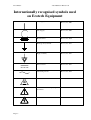
Internationally recognised symbols used
on Ecotech Equipment
On (Supply)
Page | 8
IEC 417, No. 5007
Off (Supply)
IEC 417, No. 5008
Electrical fuse
IEC 417, No. 5016
Earth (ground) terminal
IEC 417, No. 5017
Equipotentiality
IEC 417, No. 5021
Direct current
IEC 417, No. 5031
Alternating current
IEC 417, No. 5032
Caution, hot surface
IEC 417, No. 5041
Caution, refer to accompanying
documents
ISO 3864, No. B.3.1
Caution, risk of electric shock
ISO 3864, No. B.3.6
ACS 1000 User Manual 1.0
Front Matter
Manual Revision History
Manual PN:
M010047
Current Revision:
1.0
Date released:
January 2013
Description:
User Manual for the Aerosol Conditioning System
This manual is the full user manual for the ACS 1000. This manual contains all relevant information on
theory, specifications, installation, operation, maintenance and calibration. Any information that cannot
be found within this manual can be found by contacting Ecotech:
Edition
Date
Summary
Pages
1.0
January 2013
Initial Product Release
All
1.1
Page | 9
Front Matter
ACS 1000 User Manual 1.0
Table of Contents
1
INTRODUCTION ........................................................................................................................13
1.1
DESCRIPTION ...........................................................................................................................13
1.2
SPECIFICATIONS ......................................................................................................................14
1.2.1
Sample Transport ...........................................................................................................14
1.2.2
Humidification Control...................................................................................................14
1.2.3
Drying Control ...............................................................................................................14
1.2.4
Module Sensors (Humidifier, Dryer, Extender)..............................................................14
1.2.5
Inlet Sensors ...................................................................................................................15
1.2.6
Power..............................................................................................................................15
1.2.7
Operating Conditions .....................................................................................................15
1.2.8
Interface..........................................................................................................................15
1.2.9
Physical dimension .........................................................................................................16
1.2.10 Other...............................................................................................................................16
1.3
NOMENCLATURE .....................................................................................................................16
1.4
BACKGROUND/ THEORY ..........................................................................................................18
1.4.1
Humidification Theory....................................................................................................18
1.4.2
Drying Theory.................................................................................................................18
1.5
INSTRUMENT DESCRIPTION ......................................................................................................19
1.5.1
ACS 1000 Rack ...............................................................................................................20
1.5.2
Instrument Tray (optional) .............................................................................................20
1.5.3
Sample Inlet Assembly ....................................................................................................20
1.5.4
Flow Splitter ...................................................................................................................21
1.5.5
Conditioning Modules ....................................................................................................21
Humidifier Module ..................................................................................................................................... 22
Dryer Module ............................................................................................................................................. 23
Extender Module ........................................................................................................................................ 24
1.5.6
1.5.7
1.5.8
1.5.9
1.5.10
1.5.11
1.5.12
2
Calibration & Bypass Valves..........................................................................................24
Flow Control...................................................................................................................25
Dry Air Source (optional) ..............................................................................................25
Sample Pump .................................................................................................................25
Water Reserve.................................................................................................................25
Controller, Interface and Power Supply.........................................................................26
Running the ACS with a Nephelometer...........................................................................26
INSTALLATION .........................................................................................................................28
2.1
INITIAL INSPECTION.................................................................................................................29
2.1.1
Packaging .......................................................................................................................29
2.1.2
Items Received ................................................................................................................29
2.2
SITE SELECTION ......................................................................................................................30
2.3
ACS1000 RACK ASSEMBLY ....................................................................................................30
2.3.1
Adjustable feet ................................................................................................................30
2.3.2
Middle rack section.........................................................................................................31
2.3.3
Top rack section..............................................................................................................32
2.3.4
Flow Splitter ...................................................................................................................32
2.4
MODULE INSTALLATION..........................................................................................................33
2.4.1
Shelf Adjustment .............................................................................................................33
2.4.2
Module placement...........................................................................................................34
2.5
TUBING CONNECTIONS ............................................................................................................36
2.5.1
Humidifier Module..........................................................................................................36
2.5.2
Dryer Module .................................................................................................................37
2.5.3
System Connections ........................................................................................................38
2.6
ELECTRICAL CONNECTIONS ....................................................................................................41
Page | 10
ACS 1000 User Manual 1.0
2.6.1
2.6.1
2.6.2
Front Matter
Module connections ........................................................................................................41
Inlet Assembly Connections ............................................................................................41
Communications connections .........................................................................................41
Front USB................................................................................................................................................... 42
RS232 #1 .................................................................................................................................................... 42
RS232 #2 (Multidrop)................................................................................................................................. 42
USB ............................................................................................................................................................ 42
TCP/IP ........................................................................................................................................................ 42
External IO ................................................................................................................................................. 42
RS232 Instrument ....................................................................................................................................... 42
Bluetooth .................................................................................................................................................... 42
2.6.3
Mains Power connections...............................................................................................42
2.7
TRANSPORTING/STORAGE .......................................................................................................43
3
OPERATION................................................................................................................................45
3.1
GENERAL OPERATIONAL INFORMATION...................................................................................45
3.2
MODES OF OPERATION ............................................................................................................46
3.2.1
IDLE ...............................................................................................................................46
3.2.2
MANUAL ........................................................................................................................47
3.2.3
SEQUENCE....................................................................................................................47
3.3
MAIN DISPLAY ........................................................................................................................47
3.4
MODE BUTTON ........................................................................................................................48
3.5
MENU BUTTON ........................................................................................................................49
3.5.1
Main Menu......................................................................................................................49
3.5.2
General Settings Menu ...................................................................................................49
3.5.3
Configuration Files Menu...............................................................................................50
3.5.4
Serial Communications Menu.........................................................................................50
3.5.5
Network Adaptor Menu...................................................................................................51
3.5.6
Status Menu ....................................................................................................................51
3.5.7
Data Logging Menu........................................................................................................52
3.5.8
Sequencing Menu............................................................................................................53
3.5.9
Define Points Menu ........................................................................................................53
3.5.10 Define Sequences Menu..................................................................................................53
3.5.11 Hardware Menu..............................................................................................................54
3.5.12 Module Menu..................................................................................................................55
3.5.13 {Location} (Humidifier)..................................................................................................55
3.5.14 {Location} (Dryer)..........................................................................................................56
3.5.15 {Location} (Extender).....................................................................................................56
3.5.16 Flow Menu......................................................................................................................56
3.5.17 System Parameters Menu ...............................................................................................56
3.5.18 ACS Calibration Menu ...................................................................................................57
4
COMMUNICATIONS .................................................................................................................58
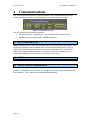
4.1
4.2
4.3
RS232 COMMUNICATION ........................................................................................................58
USB COMMUNICATION ...........................................................................................................58
TCP/IP NETWORK COMMUNICATION ......................................................................................58
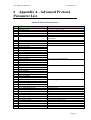
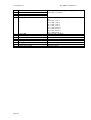
5
APPENDIX A - ADVANCED PROTOCOL PARAMETER LIST .........................................61
6
APPENDIX B – MODBUS PROTOCOL...................................................................................63
Page | 11
Front Matter
ACS 1000 User Manual 1.0
List of Figures
Figure 1: ACS 1000. Setup for scattering enhancement measurement...................................................19
Figure 2: Humidifier module. .................................................................................................................22
Figure 3: Dryer module. .........................................................................................................................23
Figure 4: Extender module. ....................................................................................................................24
Figure 5: Calibration and bypass valves. ................................................................................................25
Figure 6: Controller and user interface. ..................................................................................................26
Figure 7 Removing the feet from the lower section of the ACS rack.....................................................30
Figure 8 Thread depth of feet. ................................................................................................................31
Figure 9 Positioning the ACS rack on the instrument rack. ...................................................................31
Figure 10 Securing the ACS rack to the instrument rack. ......................................................................32
Figure 11 Attaching the top ACS rack section. ......................................................................................32
Figure 12 Installing the isokinetic flow splitter. .....................................................................................33
Figure 13 Secured isokinetic flow splitter. .............................................................................................33
Figure 14 Adjusting the shelves. ............................................................................................................34
Figure 15 Module Placement..................................................................................................................35
Figure 16 Inserting fasteners ..................................................................................................................35
Figure 17 Humidifier port mounting plate..............................................................................................37
Figure 18 Humidifier Hydraulic Schematic............................................................................................37
Figure 19 Purge Air Connection to Dryer ..............................................................................................38
Figure 20 Pneumatic Port Connections ..................................................................................................38
Figure 21 Ball Valve; sample inlet & bypass connections .....................................................................39
Figure 22 Bypass DFU in position .........................................................................................................39
Figure 23 Calibration 2 connection ........................................................................................................40
Figure 24 Pneumatic Schematic ACS1000.............................................................................................40
Figure 25 Power and control cables........................................................................................................41
Figure 26: communications ports and power supply ..............................................................................43
Figure 27 ACS front panel......................................................................................................................45
Figure 28 Main screen ............................................................................................................................47
Figure 29 Communication ports .............................................................................................................58
Page | 12
ACS 1000 User Manual 1.0
1
Introduction
Introduction
1.1 Description
The hygroscopic properties of aerosols are an important parameter to assess in
order to accurately model the effect of aerosols on the earth’s radiative balance. By
exposing the aerosol to different relative humidity, Ecotech’s Aerosol Conditioning
System (ACS 1000) enables these properties to be easily measured by a wide range
of instruments.
The system provides simultaneous
control of humid and dry sample
channels, allowing comparison of
real-time measurement by two
parallel instruments. The system can
be used with a wide range of aerosol
monitoring instruments to
determine the effects of humidity on
aerosols. For instance, while one
instrument measures the ambient air
at a consistent low relative humidity
of less than 40%, the other
instrument can measure the same
sample, which has been passed
through a Humidifier, to accurately
vary the sample’s relative humidity
from 40% to 90%, over a user
definable interval. By comparing the
measurements of the two
instruments, the hygroscopic
properties of the aerosol can be
determined.
In a simplified version of the system
the sample can also be simply dried
thanks to a modular design.
Page | 13
Introduction
ACS 1000 User Manual 1.0
1.2 Specifications
1.2.1 Sample Transport
Flow Rate:
• Controllable from 1 to 10 l/min in each channel
Inlet Diameter:
• 12mm to 41mm adaptor for connection through Ball Valve
Outlet Diameter:
• 41mm to 10mm adaptor for connection to instruments
Module Diameter:
• 41mm
Flow Splitter Diameter:
• 41mm
Sample residence time:
• up to 30 seconds at 1 l/min through each Module.
Sample Transport Conductivity:
•
<1.0 Ohm from Inlet to outlet.
1.2.2 Humidification Control
Range:
• 10% above ambient. 40% - 90%. (Dependant on flow)
Repeatability:
• ±0.1% (one STDEV)
• Accuracy±0.35%
Rise and Fall Time:
•
<20 minutes, (Dependant on flow)
1.2.3 Drying Control
Range:
•
From 90% to 40%. ( Dependant on flow and due point of purge air)
1.2.4 Module Sensor (Humidifier, Dryer, Extender)
Temperature sensor range:
• -40 to +60°C.
Temperature sensor accuracy:
• ±0.1°C
RH Sensor range:
•
0–100% RH.
Page | 14
ACS 1000 User Manual 1.0
Introduction
RH Sensor accuracy:
•
±0.8% RH (10–90% RH)
1.2.5 Inlet Sensors
Temperature sensor range:
• -20 to +80°C.
Temperature sensor accuracy:
• ±0.1°C
RH Sensor range:
• 0–100% RH.
RH Sensor accuracy:
•
±0.8% RH (10–90% RH).
1.2.6 Power
Mains Operating Voltage range:
• 100-250 VAC 50-60Hz.
Power Consumption:
•
•
130VA MAX. (includes one Humidifier module)
Additional 90VA for additional Humidifiers.
1.2.7 Operating Conditions
Ambient Temperature Range:
• 0 ºC to 40 ºC
Operating Altitude:
•
3000m above sea level. (Contact Supplier if higher altitudes required)
1.2.8 Interface
User Interface:
• Backlit LCD, Three LED Status Indication, and silicone keypad.
• 2 x RS232 ports
• USB
• TCIP
Interface to External Instruments (such as Aurora Nephelometers):
• 2 x RS232 ports.
• 8 Digital inputs and outputs.
• 8 Analog inputs.
Data Storage:
•
•
USB Memory Stick for configuration file and data.
Calibration parameters specific to each Module are stored on the Modules.
Page | 15
Introduction
ACS 1000 User Manual 1.0
1.2.9 Physical dimension
Rack dimensions:
Rack Length (front to rear):
Instrument Tray installed:
• Rack Width:
Instrument Tray installed:
• Rack Height:
Instrument Tray installed:
Weight:
•
•
•
•
•
•
•
ACS1000 Standard
Instrument Tray installed:
Humidifier installed:
Dryer installed:
Extender installed:
Flow Splitter installed:
625 mm (24.6 inches)
880 mm (34.6 inches)
580 mm (22.8 inches)
580 mm (22.8 inches)
1915 mm (75.4 inches)
2365 mm (93.1 inches)
62.3kg (in two sections)
Add 19.7kg
Add 6.6 kg
Add 5.5 kg
Add 4.1 kg
Add 2.8 kg
1.2.10 Other
Features:
•
•
•
•
•
Fully automatic and programmable RH set point and flow.
High precision temperature and RH measurements.
Easily re-configurable system by swapping Humidifier and Dryer locations.
Automatic recognition of Module configurations
Can be interfaced to all types of Aerosol monitoring equipment.
1.3 Nomenclature
Channel:
The transport path which the aerosol sample travels within the
ACS1000. Either Left Channel or Right Channel.
Exhaust:
Defined as the aerosol sample after passing through the
ACS1000 and Instruments installed.
ID and OD:
Measurements of tubing. ID is the internal diameter of tubing,
OD is the outer diameter.
Module Location:
The four specific locations where the Modules can be installed.
Top Left (TL), Top Right (TR), Bottom Left (BL) and Bottom
Right (BR).
Module Type:
The four types of conditioning modules used in the ACS 1000.
Humidifier, Dryer, Extender and Ball Valve.
Point:
A point is used to save a certain configuration of the system
i.e. the different modules status RH set point and flow set
point allowing the firmware to recall it at any given time
through the use of a sequence.
Page | 16
ACS 1000 User Manual 1.0
Introduction
Purge Air:
Defined as particle free, dry Air used in the outer section of the
dryer.
Sample:
Defined as the aerosol sample taken from outside the
ACS1000 and passes through the inside of the Modules
installed.
Sequence:
Collection of points that run for a certain amount of time in
order to control the flow and RH of the sample automatically
and without assistance.
Span:
A gas sample of known composition such as Carbon Dioxide
used to calibrate/check the upper range of certain instruments
connected to the ACS 1000.
Zero:
Zero calibration uses particle free air to calibrate/check the
lower range of certain instruments connected to the ACS 1000.
Page | 17
Introduction
ACS 1000 User Manual 1.0
1.4 Background/ Theory
A common feature of tropospheric aerosol particles is their ability to absorb water
vapour, thereby leading to the effects of deliquescence, crystallisation, hysteresis
and the existence of metastable droplets. These features, whose state is often
represented as a function of relative humidity (RH), are important to the ability of
the aerosol particles to scatter light and for the ability of the aerosol particles to act
as cloud condensation nuclei. Quantifying optical properties of aerosols and their
lifetime in the atmosphere is important for determining atmospheric visibility and
reducing uncertainties in estimating radiative forcing of those aerosols.
The ability to measure aerosols properties as a function of RH is therefore highly
desirable. As an example, the obtained growth curves of relative scattering versus
humidity can then be parameterised and fed into regional and global models that
contain physically-based representations of aerosols.
The ACS 1000 provides simultaneous (and programmable) control of humid and dry
sample channels, allowing comparison of real-time measurement by two parallel
instruments. In addition, the ACS 1000 is capable of automatically running a
programmed sequence of points, each defining the RH sample and the running time.
This feature allows the user to obtain a fully automated measure of the aerosol
properties as a function of RH.
The ACS 1000 can be used with a wide range of aerosol monitoring instruments to
determine the effects of humidity on aerosols. For instance, while one instrument
measures the ambient air at a consistent low relative humidity of less than 40%, the
other instrument can measure the same sample, which has been passed through the
humidifier module, to accurately vary the sample’s relative humidity from 40% to
90% over a user definable interval. By comparing the measurements of the two
instruments, the hygroscopic properties of the aerosol can be determined.
1.4.1 Humidification Theory
The humidifier Module works by passing sample air through the inside of a Gore-Tex
membrane while the outside of the membrane is saturated with heated Milli-Q
water. Heaters are used to vary the temperature of the water. As the water
temperature increases, the amount of water vapour transferred through the GoreTex membrane to the inside increases, allowing the humidity of the sample air to be
directly controlled. The long length of the Humidifier Module allows time for the
aerosol particle to take up water before exiting the system.
1.4.2 Drying Theory
The Dryer Module works by passing sample air through the inside of a permeation
dryer which utilises a Nafion permeable membrane. The dryer works by allowing
water vapour to transfer from the inside of the Nafion membrane, to the outside,
removing it from the sample air. The purge air on the outside of the Nafion
membrane must have a very low dew point and should be constantly renewed.
Page | 18
ACS 1000 User Manual 1.0
Introduction
1.5 Instrument description
The ACS1000 can be used with a wide range of aerosol monitoring instruments to
determine the effects of humidity on aerosols. The ACS is particularly useful when
combined with a pair of Ecotech’s Aurora nephelometers, because it can directly
communicate and log information from them.
It is also designed to be used in conjunction with many other types of aerosol
instrumentation.
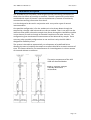
One possible configuration is for the ambient air to be drawn down through the
sample inlet, through a ball valve and into a Dryer module. Then it can pass into the
isokinetic flow splitter where the sample then passes through the Humidifier module
in one channel, as well as through an Extender module on the other channel. This
configuration gives simultaneous measurement of the Wet and Dry sample. There
are many other possible configurations to use and that is why the ACS 1000 is
designed for flexibility of use.
The system is also able to automatically run a Sequence of predefined Points
allowing the user to humidify the sample at a certain RH and for a certain amount of
time. This feature allow for the measurement of a humidogramm in a short amount
of time and without surveillance.
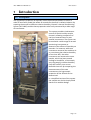
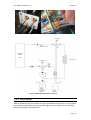
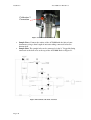
The major components of the ACS
1000 are described below.
Figure 1: ACS 1000. Setup for
scattering enhancement
measurement.
Page | 19
Introduction
ACS 1000 User Manual 1.0
1.5.1 ACS 1000 Rack
All the components to the ACS 1000 are mounted in an Aluminium extruded rack.
The shelves and front and side panels can be easily moved. The top half of the rack
can also be removed simply by lifting it up, for easy transportation.
1.5.2 Instrument Tray (optional)
The Instrument tray is located at the bottom of the ACS rack and is used to house the
instruments being connected to the ACS 1000. It can be detached from main ACS
rack also for transportation by removing the four bolts on the underside of the ACS
rack. The height of the shelf in the instrument tray is also adjustable.
1.5.3 Sample Inlet Assembly
The Sample Inlet assembly contains a motorised ball valve, sample inlet temperature
and RH sensor as well as provision to connect an external ambient temperature and
RH sensor. The inlet can be connected to an existing sample manifold or to an
external size selective inlet such as TSP, PM 1, PM 2.5 or PM10. The connection to
the sample inlet assembly is by means of a ½” swage lock fitting.
•
Motorised Ball Valve: When in the normally open position, this valve
provides an uninterrupted path for the sample air to pass through to the ACS.
During bypass or calibration mode, the valve is closed and the air from the
sample inlet is diverted directly through to the flow control maintaining a
constant flow at the sample inlet. This configuration enables the ACS 1000 to
Page | 20
ACS 1000 User Manual 1.0
Introduction
be connected to other common sample manifolds. When an automatic
calibration is performed, the other instruments will not be interfered with by
the calibration gas or changes in flow.
1.5.4 Flow Splitter
The flow splitter is isokinetically designed so that the aerosols are evenly divided into
two channels from the inlet with minimal loss of particles. Identical flows are
required in each channel for this to occur.
1.5.5 Conditioning Modules
The ACS 1000 has provisions for up to Four Conditioning Modules. Each module has
the same physical dimensions so that they can be interchanged and re configured in
the system depending on the user’s requirements. When the electrical connections
are made, the ACS 1000 will automatically identify which module is installed in which
location and appropriately control that module accordingly.
The four specific locations where the Modules can be installed are:
• Top Left (TL),
• Top Right (TR),
• Bottom Left (BL) and
• Bottom Right (BR).
The type and number of modules you received entirely depends on your application.
Any module can be added to the system afterwards if required. The following section
will describe all the modules available in Ecotech.
Page | 21
Introduction
ACS 1000 User Manual 1.0
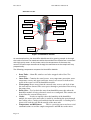
Humidifier Module
Cooling valve
Outer tube
Water level sensor
Interface box
Cooling fan
Drain valve
Water pump
Water filter
Inner tube
Temp and
RH sensor
Figure 2: Humidifier module.
As mentioned earlier, the Humidifier Module works by passing sample air through
the inside of a Gore-Tex membrane while the outside of the membrane is saturated
with high purity water. As the heater varies the temperature of the water the
amount of water vapor transferred through the membrane to the sample will vary
proportionally.
The following components compose the Humidifier Module:
•
•
•
•
•
•
Inner Tube: 41mm ID, stainless steel tube wrapped with a Gore-Tex
membrane.
Outer Tube: Contains the water heaters, over temperature protection, water
temperature sensor, and upper and lower water level sensors to indicate the
status of the water level in the humidifier module.
Water pump: Draws water from the external water reserve and feeds it into
the outer tube on demand. The water passes through a particulate filter to keep
the pump clean.
Drain valve: Used to drain the water from humidifier outer tube when the
humidifier module is being relocated, stored or re configured. The contents are
drained into the external drain reserve.
Cooler:
In order to rapidly reduce the humidity of the humidifier
module, the water in the outer tube is cooled by circulating the water through
the Cooling valve, Cooling coil and back into the outer tube. A Cooling fan is
also used to cool the coil and the outside of the outer tube.
Temperature and RH Sensor:
This is a precision sensor and uses serial
communications to send the sample temperature and RH data to the micro
Page | 22
ACS 1000 User Manual 1.0
•
Introduction
controller. Digital communications reduce errors and noise inherent in analog
systems.
Interface Box:
Provides provision for the connection of the various
sensors and controls associated with the humidifier module. It also provides a
visual indication of the power and module operating status.
Dryer Module
Outer tube
Interface box
Purge air
Inner tube
Temperature
And RH sensor
Figure 3: Dryer module.
The Dryer Module is constructed of a permeable Nafion membrane which allows
water vapor to transfer from the inside of the membrane, to the outside. Dry,
particle free purge air flows on the outside of the membrane to remove the water
vapor.
The following components make up the Dryer Module:
•
•
•
•
Inner Tube: 41mm ID, stainless steel tube wrapped with a Nafion
membrane.
Outer Tube: Contains the open volume for the Purge Air to pass over the
outside of the Nafion membrane.
Temperature and RH Sensor:
This is a precision sensor and uses serial
communications to send the sample temperature and RH data to the micro
controller. Digital communications reduce errors and noise inherent in analog
systems.
Interface Box:
Provides provision for the connection of the various
sensors and controls associated with the dryer module. It also provides a visual
indication of the power and module operating status.
Page | 23
Introduction
ACS 1000 User Manual 1.0
Extender Module
Inner tube
Interface box
Temperature
and RH sensor
Figure 4: Extender module.
The Extender Module is used to provide an equivalent aerosol particles loss between
various parts of the ACS 1000. As it is the same size as the humidifier and dryer
modules. It can be easily moved to reconfigure the system.
The following components make up the Extender Module:
•
•
•
Inner Tube: 41mm ID, stainless steel tube.
Temperature and RH Sensor:
This is a precision sensor and uses serial
communications to send the sample temperature and RH data to the micro
controller. Digital communications reduce errors and noise inherent in analog
systems.
Interface Box:
Provides provision for the connection of the temperature
and RH sensor. It also provides a visual indication of the power and module
operating status.
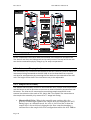
1.5.6 Calibration & Bypass Valves
There are various valves installed to allow the instruments connected to the system
to perform regular checks and calibrations. These can be performed without the
sample inlet being removed from an existing common manifold if used.
Page | 24
ACS 1000 User Manual 1.0
Introduction
Figure 5: Calibration and bypass valves.
1.5.7 Flow Control
The ACS 1000 contains up to four mass flow controllers (MFC). These are
electronically regulated by the micro controller. With the MFCS installed, the user is
able to set the desired flow from the flow control menu or within each point in the
sequence menu.
These MFCs are used for:
•
•
•
•
Left channel sample flow control. (0-10 lpm)
Right channel sample flow control. (0-10 lpm)
Purge flow control. (0-10 lpm) for supply of purge air to the Dryer.
Purge flow control Auxiliary. (0-10 lpm) for supply of purge air to another
Dryer if required.
The total flow at the sample inlet will be the sum of the Left and Right channel
sample flow controllers.
1.5.8 Dry Air Source (optional)
In order for the dryer to operate correctly, a source of clean (particle free) dry air is
required. The dry air should be <10% RH. The flow rate required should be
equivalent to that of the sample flow. As many installations have dry air on site,
Ecotech can provide an optional dry air source with regenerative scrubbers to
provide long lasting maintenance free operation.
1.5.9 Sample Pump
An external sample pump is required to provide sufficient flow through the two flow
controllers. Typically this will be a 240VAC or 110VAC type pump. The size of the
pump will depend on what inlet and flow options are required.
1.5.10 Water Reserve
There are three water reserves in the ACS.
Humidifier Reserve: Is located in the outer tube of the humidifier and allows the
water to permeate in to sample inner tube through the Gor-Tex membrane. .
Page | 25
Introduction
ACS 1000 User Manual 1.0
Charging Reserve: Is located outside the ACS rack and directly feeds the
Humidifier reserve via the water pump. It is larger in volume so that it can be easily
changed or re filled without interrupting the operation of the ACS. The level sensors
in the Humidifier reserve trigger the water pump to keep this reserve topped up.
Should the system run out of water, an alarm is activated and the humidifier will shut
down.
Drain Reserve:
Is also located outside the ACS rack and is used as a catchment
for water overflowing or being drained from the Humidifier reserve.
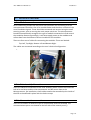
1.5.11 Controller, Interface and Power Supply
Figure 6: Controller and user interface.
The ACS is driven by a powerful industrial grade microcontroller which controls all
facets of operation and communication. The backlit interactive keypad and display
allow the operator to set key parameters for operation of the ACS, such as: RH set
points, state intervals, flows and other parameters used to setup a sequence. The
operator will also be able to read back key parameters such as temperatures and
humidity. All the electronics are powered from an auto ranging power supply so it
can be operated in most environments. On board data storage by means of a
removable USB memory stick, will allow most parameters to be simultaneously
logged for many years.
1.5.12 Running the ACS with a Nephelometer.
In case the ACS was purchased in order to measure the scattering enhancement due
to water uptake, two instruments will be running side by side (as explained in
Section 1.5). We will here refer to the instrument sampling after the humidifier as
the “Wet Nephelometer” while the other instrument, sampling after the extender
will be referred to as the “Dry Nephelometer”. The Wet and Dry Nephelometer can
be either an Aurora 1000, 3000 or 4000. There may be additional components for
Page | 26
ACS 1000 User Manual 1.0
Introduction
cooling, flow control and communications. This may be an existing instrument which
the operator already has, or it can be purchased as an option. Please refer to the
Aurora user manual to setup the nephelometers properly before turning on the ACS
1000.
There are also provisions to connect other alternative instruments used for aerosol
measurement to the Aerosol Sample Conditioning System (such as other
Nephelometer, a differential mobility analyser).
Page | 27
Installation
ACS 1000 User Manual 1.0
Installation
2
The correct installation of the ACS1000 is very important to ensure that the system
operates correctly and reliably. Please read the following sections carefully before
proceeding further.
•
•
•
•
•
•
•
Initial inspection
Site Selection
ACS Rack Assembly
Module Installation
Tubing Connections
Electrical Connections
Operation
2.1.1 If the ACS 1000 has to be relocated and transported to another
site, please follow the instruction under section 2.7.3 Mains Power
connections
Once the previous steps have been followed and ONLY after this, the system can be
powered on.
Warning: The following points MUST be followed;
incorrect setup and activation of this system may
cause damage and will void warranty
•
•
A three pin power plug (with ground) MUST be used with an earthed power
socket (3 pin)
Connect the power plug into the mains power point and turn the power switch
on .
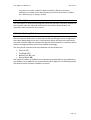
Figure 26: communications ports and power supply
Transporting/Storage.
Page | 28
ACS 1000 User Manual 1.0
Installation
2.2 Initial Inspection
2.2.1 Packaging
The packaging in which the ACS1000 is transported in is specifically designed to
minimize the effects of shock and vibration during transportation. Ecotech
recommends that the packaging be kept if there is a likelihood that the instrument is
going to be relocated. For this purpose, it is also important to keep the any caps and
plugs installed in the pneumatic connections for transport.
All packaging materials are recyclable.
2.2.2 Items Received
With the delivery of the ACS1000, you will have received the following:
ACS1000 Base Unit - E010010
•
•
•
ACS Rack – Lower rack section (with control interface and cabling attached)
ACS Rack – Upper rack section
Instrument Tray (optional)
Humidifier Assembly - E010012
• Humidifier Module
• Drain Reserve
• Charging Reserve
• Port Mounting Plate
Dryer Assembly - E010011
• Dryer Module
Extender Assembly - E010013
• Extender Module
Flow Splitter Assembly - E010014
• Flow Splitter
• Mounting Collars
Miscellaneous
• Sample Pump
• Tubing, Pneumatic and Hydraulic
• Module screws and o-rings
• Spares
• Software CD
• Serial Cable
• User Manual
• Power Cord
*Power cord received depends on the power supply of the country (120V or 240V).
Page | 29
Installation
ACS 1000 User Manual 1.0
Please check that all these items have been delivered
undamaged. If any item appears damaged, please
contact your supplier BEFORE turning the system
on.
2.3 Site Selection
The ACS1000 is designed to be used in an environment with minimal dust, moisture
and variation in temperature. It is not to be used outdoors. If possible, avoid
installing the ACS1000 close to air conditioning or heating ducts as this may produce
large variations in temperature throughout the system.
2.4 ACS1000 Rack Assembly
The ACS 1000 rack can be supplied in three sections. The lowest section is the
optional Instrument Tray, on top of it sits the Middle rack section containing the
control interface. The Top section sits directly above this section. These need to be
assembled together before operation can begin.
2.4.1 Adjustable feet
Four adjustable feet are supplied with the ACS1000 rack. These must be installed on
the lowest most section. If the optional Instrument tray is supplied with the system,
then the feet will come already installed in this section. If not, then they will be
installed in the Middle section.
The adjustable feet can be moved as follows:
•
•
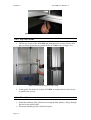
Carefully turn the lower rack section over and unscrew the adjustable feet. (see
Figure 7)
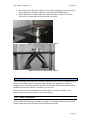
Screw the removed feet into the instrument rack, ensuring that the feet are all
screwed in far enough and to the same height; the tread should be visible
through the hole drilled in the aluminium section (see Figure 8)
Figure 7 Removing the feet from the lower section of the ACS rack.
Page | 30
ACS 1000 User Manual 1.0
Installation
Figure 8 Thread depth of feet.
2.4.2 Middle rack section
Position the Instrument Tray in the final position of where you want the ACS1000 to
be installed. (See Figure 9). If you are not using the optional instrument tray,
position the Middle or now lower section of the ACS1000 rack (with feet attached) in
that position.
Figure 9 Positioning the ACS rack on the instrument rack.
•
•
•
Place the middle section of the ACS1000 rack on the instrument tray.
Ensure the holes drilled in the instrument tray line up with the threaded holes
in the bottom of the middle section from which the feet were removed.
Insert the four M8 socket head cap screws up through the instrument rack and
into the middle ACS1000 rack as shown in Figure 10. Tighten securely.
Page | 31
Installation
ACS 1000 User Manual 1.0
Figure 10 Securing the ACS rack to the instrument rack.
2.4.3 Top rack section
•
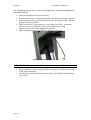
Lift the top section of the ACS1000 rack onto the lower section. Ensure all 4
pins are inserted into the top section of the ACS1000 rack (see Figure 11).
Figure 11 Attaching the top ACS rack section.
•
At this point, check the level of the ACS1000, and adjust the feet if necessary
to stabilise the system.
2.4.4 Flow Splitter
•
•
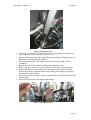
Install the isokinetic flow splitter by inserting the flow splitter’s flange through
the hole in the middle shelf.
Insert two mounting collars to hold it in place.
Page | 32
ACS 1000 User Manual 1.0
•
•
Installation
The properly installed flow splitter hangs from the middle shelf and is able to
move laterally to facilitate alignment of the other ACS1000 modules.
Depending on the configuration, the middle shelf may need to be raised or
lowered to accommodate the other modules installed.
Figure 12 Installing the isokinetic flow splitter.
Figure 13 Secured isokinetic flow splitter.
2.5 Module Installation
The ACS 1000 can have up to four modules installed. They can be any combination of
either a Humidifier, Dryer or Extender. Depending on the application, different
configurations of modules and flow splitter are required. The relative position of the
modules and the flow splitter are totally up to the user.
Each module can only be attached to the flow splitter, another module, or the
sample inlet assembly (see Figure 1 for more details.).
2.5.1 Shelf Adjustment
There are three shelves in the ACS1000 rack which can be easily adjusted. Lower
shelf contains the ACS outlet connection flanges. The middle shelf contains the flow
splitter and the top shelf contains the sample inlet assembly.
Page | 33
Installation
ACS 1000 User Manual 1.0
The ACS1000 can be set up in a variety of configurations, and easily changed when
required as follows:
•
•
•
•
•
•
Adjust the heights of the lower shelf first.
If the Instrument tray is installed, then adjust this shelf to its lowest position.
If the instrument tray is not installed , then adjust this shelf to 100 – 150 mm
up from its lowest position.
Adjust the shelves by loosening the screws under each shelf – but do not
remove the screws completely as they can be difficult to realign.
Slide the shelf to the desired height and re-tighten.
Slight readjustment may be required to make the shelf level.
Figure 14 Adjusting the shelves.
2.5.2 Module placement
•
•
Ensure that there is one O-ring installed in the upper face of the lower flange
of the outlet connection.
Carefully place the module on top of the flange and align the four mounting
screw holes.
Page | 34
ACS 1000 User Manual 1.0
Installation
Figure 15 Module Placement
•
•
•
•
•
•
•
•
Also make sure that the electrical connectors on the module control box are
facing out to the side of the rack for easy access.
All the ACS modules have the thicker flange containing the Temperature and
RH sensor at the bottom of the module.
Insert the four fasteners and lightly tighten them until the entire ACS is
assembled.
Repeat the same for the module installed on the opposite side.
Ensure that there are two O-rings installed in the top faces module flanges.
If the next module to be installed is the flow splitter, then gently slide the
middle shelf down so that the bottom of the flow splitter flange just touches
the top of the module flange.
Twist the top module flange to align it with the holes in the bottom of the flow
splitter flange.
Insert the four fasteners and lightly tighten them.
Figure 16 Inserting fasteners
Page | 35
Installation
•
•
•
ACS 1000 User Manual 1.0
Now place another module above the flow splitter by following the same
procedure above.
Always make sure that the o-rings are installed and that the shelf is adjusted
correctly.
Once the modules are in position, firmly tighten all the fasteners on each
flange.
2.6 Tubing Connections
The ACS 1000 relies on several pneumatic and hydraulic connections in order to
function correctly. The type and the number of connections required is however
dependant on the type of modules installed.
The following section will describe all the various connections available and explain
under which conditions they should be used.
Note that there are no tubing connections for the Extender module.
2.6.1 Humidifier Module
The ACS 1000 Humidifier Module requires a water supply in order to humidify the
sample. The water reserve must be filled up with Milli-Q water prior to using the
system.
All the tubing connections to the Humidifier Module are hydraulic, or for the
transport of a liquids such as water. These connections are predominately made of
clear tubing.
•
•
•
•
•
•
•
There are four connections to be made:
DRAIN A, DRAIN B, DRAIN C all connect to the drain reserve.
The SUPPLY line connects to the charging reserve.
Connect the tubing from the charging reserve and the drain reserve bottles to
the humidifier port mounting plate (See Figure 17).
Adjust the humidifier mounting plate so that all the ports sit below the height
of the internal reservoir (outer tube) of the Humidifier module.
Connect the tubing from the Humidifier module to the internal side of the
humidifier port mounting plate (See Figure 17).
Before filling the charging reserve bottle, rinse it 3 times with Milli-Q water.
This minimises the possibility of the humidifier becoming contaminated,
hence reducing its efficiency.
Page | 36
ACS 1000 User Manual 1.0
Installation
Figure 17 Humidifier port mounting plate.
Figure 18 Humidifier Hydraulic Schematic.
2.6.2 Dryer Module
The ACS 1000 Dryer Module requires an external supply of particle free, dry air in
order to efficiently dry the sample. As many installations have dry air on site, Ecotech
can provide an optional dry air source with regenerative scrubbers to provide long
lasting maintenance free operation.
Page | 37
Installation
ACS 1000 User Manual 1.0
The purge air supply should be constantly flowing at a flow rate similar to that of the
sample flow rate.
•
•
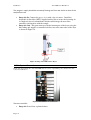
Purge Air In: Connect the purge air in with a dry air source. Install the
disposable in-line filter (DFU) supplied on this line to ensure the incoming air
is completely free of contaminants which would damage the mass flow
controllers and interfere with the sample.
Purge Air Out: This port connects with the bottom port of the dryer using the
blue tubing and supplies a controlled air flow rate to the outer tube of the dryer
as shown in Figure 19.
Figure 19 Purge Air Connection to Dryer
2.6.3 System Connections
On the bottom left hand side of the ACS1000, there is a series of pneumatic port connection for flow
control and calibration.
Figure 20 Pneumatic Port Connections
These are used for:
•
Purge Air In and Out, explained above.
Page | 38
ACS 1000 User Manual 1.0
•
•
•
Installation
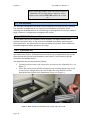
Exhaust: Connect the exhaust port to the pump or other external vacuum
source.
Sample Left & Right: Connect the sample left and sample right to the
exhaust ports of the measuring instruments being used. Both these lines have
a DFU installed and the ACS1000 should not be run without them.
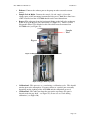
Bypass: This tube runs from the horizontal fitting on the ball valve at the top
of the ACS to the Bypass port connection (see Figure 21). There is a DFU
(Disposable Filter Unit) attached to this line which must be mounted on
ACS1000 rack (see Figure 22).
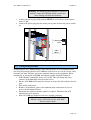
Sample
Inlet
Bypass
Figure 21 Ball Valve; sample inlet & bypass connections
Figure 22 Bypass DFU in position
•
•
Calibration 1: This port acts as a vent during a calibration cycle. This should
remain open to the atmosphere. You may choose to vent this port externally
depending on the sighting of the ACS1000 and the calibration gas used.
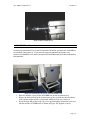
Calibration 2: This tube runs from the port on the top flange (the port is
located under the top shelf – see Figure 23). It too acts as a vent during
calibration. (see Figure 20).
Page | 39
Installation
ACS 1000 User Manual 1.0
Calibration 2
Connection
Figure 23 Calibration 2 connection
•
•
Sample Lines: Connect the outlets of the ACS1000 with the inlet of your
instruments using a short length of antistatic tubing connected below the
bottom shelf.
Sample Inlet: The sample inlet can be connected via the ½” Swagelok fitting
connected to the ball valve at the top of the ACS1000. Refer to Figure 21.
Figure 24 Pneumatic Schematic ACS1000
Page | 40
ACS 1000 User Manual 1.0
Installation
2.7 Electrical Connections
2.7.1 Module connections
Each conditioning module has two electrical connectors for connecting it to the
microprocessor controller. One is for module Power and the other contains all the
control and data signals. These should be connected and secured using the small
securing screws, prior to turning the main power switch on. The microprocessor
board will automatically recognise the type of module connected to it and control
that modules features accordingly. It will also supply power to the modules and
collect data from the different sensors installed on the modules.
There are four sets of cables for connecting the modules. These are labeled:
Top Left, Top Right, Bottom Left and Bottom Right.
The cables are connected according to the user’s desired configuration.
1.
Figure 25 Power and control cables.
2.7.1 Inlet Assembly Connections
There are identical connections to the inlet assembly which control the motorized
ball valve and also send the inlet temperature and RH sensor data to the
Microprocessor. On installation, these cables need to be extended up the inside of
the ACS rack and fixed in place with the Velcro straps.
2.7.2 Communications connections
There are a number of different ways to communicate with the ACS1000. The
communications ports are situated on the left side of the control panel ()
Page | 41
Installation
ACS 1000 User Manual 1.0
Front USB
The front USB connection just located at the top of the control panel has a
connection for the USB memory stick to be installed. This memory stick is used to
store logged data, configuration files and sequence and point information.
It must be installed prior to operation.
RS232 #1
RS232 Connection to an external data logger or control software (such as Ecotech
WinAQMS) with an RS232 cable.
RS232 #2 (Multidrop)
RS232 Connection to an external data logger (such as Ecotech WinAQMS) with an
RS232 cable. Has Multidrop facilities.
Note: when using daisy chain formations ensure
each analyser is given a unique instrument ID.
USB
Connect USB cable to a computer and run either the ACS downloader program or
WinAQMS.
TCP/IP
Plug in network cable .
Use ACS downloader program to access the ACS and download data over an internet
connection. Available with future firmware releases.
External IO
This port is used to send/receive analog and digital signals.
Contains 8 digital inputs, 8 digital outputs. Available with future firmware releases.
RS232 Instrument
Dedicated serial connection for Aurora Nephelometer operation and control.
Available with future firmware releases.
Bluetooth
Connection is enabled from through the “ACS Remote” application.
Use “ACS Remote” Application to access instrument and download data (supplied on
utilities CD). Available with future firmware releases.
2.7.3 Mains Power connections
Once the previous steps have been followed and ONLY after this, the system can be
powered on.
Page | 42
ACS 1000 User Manual 1.0
Installation
Warning: The following points MUST be followed;
incorrect setup and activation of this system may
cause damage and will void warranty
•
•
A three pin power plug (with ground) MUST be used with an earthed power
socket (3 pin)
Connect the power plug into the mains power point and turn the power switch
on .
Figure 26: communications ports and power supply
2.8 Transporting/Storage
Transporting the ACS 1000 should be done with great care. It is recommended that
you keep the packaging that the ACS 1000 was delivered in so it can be used to safely
transport it to other locations and ensure minimal damage to the equipment. When
transporting or storing the ACS1000, the following points should be followed:
• In the Module , humidifier menu, select drain. This will dump and water
contents of the humidifier into the drain reserve.
• Put the ACS 1000 in Idle mode for an hour to ensure that all residual water has
gone.
• Turn of the main power.
• Remove all pneumatic, power and communication connections in reverse
order to that mentioned above.
• Dismantle the modules and flow splitter if required. Dismantle the ACS
aluminium rack if required.
• Place ACS1000 and modules back in its original packaging .
Note: Do not transport the ACS Conditioning
Modules whilst still installed in the ACS Rack.
Always remove them.
Page | 43
Installation
Page | 44
ACS 1000 User Manual 1.0
ACS 1000 User Manual 1.0
3
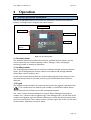
Operation
Operation
3.1 General operational information
The ACS is operated with the use of four sets of buttons. These are the selection
buttons, scrolling buttons, keypad, and status buttons.
Backlit Display
Status lights
Scrolling buttons
Keypad
Selection
buttons
Figure 27 ACS front panel
1: Selection buttons
The selection buttons will perform the function specified directly above it on the
screen. Generally this involves opening a menu, editing a value, accepting or
canceling an edit, or starting an operation.
2: Scrolling buttons
The scrolling buttons allow users to scroll up and down through menus or selection
boxes. The scrolling buttons are also used to scroll side to side through editable
fields (dates, times, numbers, etc.).
On the main screen these buttons are used for adjusting the screen contrast. Press
and hold the up button to increase contrast; press and hold the down button to
decrease.
3: Keypad
The keypad contains numbers 0-9, decimal point/minus key ( ) and a space/plus key
(
). The number keys are used to input numbers; in those cases where letters
can be entered, the number keys act like a telephone keypad.
The + and – button functions depend on context. When editing a floating point
number, the – button inserts a negative sign if the editing cursor is at the start of the
number and negative signs are allowed. Otherwise it moves the decimal place to the
current cursor location. The + button inserts a positive sign if the cursor is at the start
of the number; otherwise it enters a space.
Page | 45
Operation
ACS 1000 User Manual 1.0
For non-floating point numbers, these keys usually increment or decrement the
current value by 1. When editing the month field of a date, the + and – keys change
the month.
In some cases the keypad can be used to enter letters as well as numbers, like a
telephone keypad. Every time you press a number key, it cycles through its choices.
The up/down arrow keys scroll through all the numbers and the entire alphabet.
•
1 = 1 or space
•
2 = 2, A, B, C, a, b, c
•
3 = 3, D, E, F, d, e, f
•
4 = 4, G, H, I, g, h, i
•
5 = 5, J, K, L, j, k, l
•
6 = 6, M, N, O, m, n, o
•
7 = 7, P, Q, R, S, p, q, r, s
•
8 = 8, T, U, V, t, u, v
•
9 = 9, W, X, Y, Z, w, x, y, z
•
0 = 0 or space
4: Instrument status lights
Located in the top left corner, these lights indicate the status of the instrument as a
whole.
•
A red light indicated that the instrument has a major failure and is not
functioning
•
An yellow light indicates there is a minor problem with the instrument, but
instrument may still take measurements reliably
•
A green light indicates that the instrument is working and there are no
problems
In the case of a yellow or red light press the associated button to see a list of errors
or warnings.
The green status button will cancel any open edit box or menu and return to the
main display.
3.2 Modes of Operation
There are three basic states for the ACS.
3.2.1 IDLE
In Idle mode the ACS takes no actions, although readings will still be displayed and
recorded. All pumps and heaters are turned off; however, flow operates normally.
Page | 46
ACS 1000 User Manual 1.0
Operation
3.2.2 MANUAL
In Manual mode the ACS attempts to maintain a specified humidity. Changing the set
point for a module will cause heaters and/or cooling fans to operate according to
instrument control algorithms. In addition the water levels will be maintained in all
humidifier modules.
3.2.3 SEQUENCE
In Sequence mode the ACS changes the set points according to a predefined script. It
is just like running the system in Manual mode, except you don’t have to type in new
set points every hour.
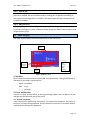
3.3 Main Display
The main display shows the current operation of the instrument.
Modules
status
Sequence
currently
running
Mode
menu
Name of the
point
currently
Running
(point
number)
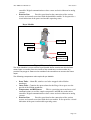
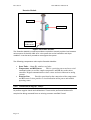
Figure 28 Main screen
1: Modules
Each installed module shows its current RH and temperature. The type of module is
indicated by the letters inside the box:
HUM humidifier
DRY
[
dryer
]
extender
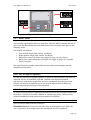
2: Error notification
If there is a major system failure, a warning message appears here in addition to the
red light on the left-hand side of the panel.
3: Current sequence
If the instrument is performing a sequence, the name of the sequence, the name of
the point currently being executed, and the amount of time left (in minutes) before
moving to the next point is displayed.
Page | 47
Operation
ACS 1000 User Manual 1.0
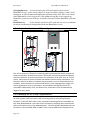
4: Mode button
This button controls the current state of the instrument.
5: Menu button
This button opens the menu system.
6: Time and Date
The Time and Date are displayed in between the menu buttons at the bottom of the
screen.
7: USB detection
A USB symbol will be displayed in the bottom right corner when the USB memory
stick is plugged in (behind front panel). If the USB symbol is not shown the USB
memory stick should be reattached. Underneath the USB symbols arrows may be
displayed which indicates data transfer. The USB memory stick must not be removed
whilst this is happening. To safely remove the USB memory stick, navigate to the
main menu and use the “Safely Remove USB Stick” function.
3.4 Mode button
The mode button allows you to control the state of the instrument.
Idle
Enter IDLE mode. The ACS performs no actions.
Manual
Enter MANUAL mode. The ACS maintains the specified RH for each module.
Point
Load a defined set of parameters (RH set point, flow set point, etc.) and then enter
MANUAL mode. This is useful for quickly setting a collection of parameters to a predefined state.
You can name and define points from the Sequencing menu.
Sequence
Enter Sequence mode and initiate a sequence. This will load a series of defined
points at specified times.
You can name and define sequences from the Sequencing menu.
Note that if you manually change a set point in the middle of a sequence, that set
point will hold only until the next point is loaded by the sequence.
While in Sequence mode, the button will present additional options, as discussed
below.
Pause|Resume
The pause command will stop the point timer from counting down. The resume
command will start it again. This is useful if you wish to pause a sequence in the
middle (for instance, to adjust some external input and then wait for the flow to
stabilize) without having to restart the sequence from the beginning.
Skip
The skip command immediately moves to the next point in the sequence.
Page | 48
ACS 1000 User Manual 1.0
Operation
Rewind
The rewind command immediately restarts the previous point.
Restore
The restore command restarts the current point from the beginning.
3.5 Menu button
This button opens the menus for the ACS.
Menus follow some general rules. On the left hand side is a name; on the right hand
side is a value or a right-pointing triangle that will open another menu. The up and
down buttons will scroll through long menus; scrolling off the top will take you to the
bottom of the menu, and vice versa.
If a value can be edited, it will be displayed in a bold font. Some values may only
editable when certain conditions are met.
3.5.1 Main Menu
This top level menu presents all the other menus for the ACS, and one important
function.
General Settings Menu
Configures display and communication parameters.
Status Menu
Shows the operational status of important system elements.
Data Logging Menu
Select which parameters should be saved on the USB stick.
Sequence Menu
Define points and sequences.
Hardware Menu
Enter the set points for RH or flow control.
ACS Calibration Menu
Enter the calibration values for ACS readings.
Safely Remove USB Stick
This feature must be activated before removing the USB memory to safely remove
the USB stick. Failure to do this may cause corruption to the data on the memory
stick.
3.5.2 General Settings Menu
Date
Sets and displays the current date.
Time
Sets and displays the current time.
Page | 49
Operation
ACS 1000 User Manual 1.0
Backlight
Select how long the instrument backlight will stay on after any use of the keypad (30
secs, 1 min, 2 mins, 5 mins, 10 mins, 30 min, 1 hr, Always On, or Always Off).
Character 0 has Slash
Display the zero character with a slash to differentiate it from a capital O.
Temperature Units
Select the units that temperature will be displayed in (ºC, ºF, ºK).
Configuration Files Menu
Load and save configuration files (general and calibration settings).
Serial Communications Menu
Configure the serial communications options.
Network Adaptor Menu
Configure the serial communications options.
System Restart
Activating this will reboot the microprocessor. Hold down the “+” key while the
instrument is rebooting to enter the Bootloader (for loading new firmware).
3.5.3 Configuration Files Menu
Load Auto-Backup Config.
Load the automatically saved configuration file. This file is saved every 24 hours, at
midnight.
Load Configuration
Load a previously saved configuration file.
Save Configuration
Save a saved configuration file. You may choose a name from 00..99.
Save Parameter List
Saves the current state of all the parameters available for logging in a text file. You
may choose a name from 00..99.
3.5.4 Serial Communications Menu
Serial ID
The ID of the analyser when Multidrop RS232 communications is used. This defaults
to 0, but can be changed if multiple instruments are on the same RS232 cable.
Service port (RS232#1)
The following settings apply to the Service serial port.
Baudrate
Set the Baud rate for this serial channel (4800, 9600, 14400, 19200, 38400, 125000,
250000, 500000).
Protocol
Set the protocol used for this serial channel (Advanced, Modbus).
Page | 50
ACS 1000 User Manual 1.0
Operation
Multidrop port (RS232#2)
The following settings apply to the Multidrop serial port.
Baudrate
Set the Baud rate for this serial channel (4800, 9600, 14400, 19200, 38400, 125000,
250000, 500000).
Protocol
Set the protocol used for this serial channel (Advanced, Modbus).
3.5.5 Network Adaptor Menu
The Network Adaptor Menu allows the user to view or set the I.P. address, Netmask
and Gateway if the optional network port is installed.
Due to a limitation of the network port hardware, the IP address can only be read or
set after a full power cycle. Thus, it is necessary to manually cycle power, with a
delay of 2-3 seconds before turning the instrument back on.
Start-up Mode
The following modes are available:
Normal
In this mode nothing is done with the network port during boot-up. It is assumed to
be configured correctly or unused.
Read IP
This mode interrogates the network port for its IP address. The menu will display this
address after boot-up.
Set IP
You may enter an IP address, Netmask, and Gateway address (following the usual
rules for formatting these addresses). Please note that at this time the ACS does not
validate the correctness of these entries.
When you cycle power, the ACS will first instruct the network port on its new
address; it will then switch to Read IP mode and read back the address it just set so
that you may verify it in the menu.
Set DHCP
This sets the network port into DHCP mode, effectively setting its IP address to 0 and
allowing the network to assign the ACS an IP address.
3.5.6 Status Menu
The Status menu presents a list of the current Pass/Fail status of the main
components.
Event Log
Review the history of events and errors. Select a month to review; the most recent
events are reported first.
Each event is preceded with a letter indicating its severity:
E
Error
Page | 51
Operation
ACS 1000 User Manual 1.0
W
Warning
S
Status update
Module Status
Each module is listed with the appropriate states (Water statuses only apply to
humidifiers).
Temp/RH Probe
Failure means the Rotronics probe is not reporting.
Water Level Sensor
Failure means the bottom water sensor is dry but the top one is wet (an impossible
condition).
Water Charging
Failure means the top water sensor did not detect water within an acceptable
amount of time. This may indicate the module is leaking.
Water Filling
Failure means the bottom water sensor did not detect water within an acceptable
amount of time. This may indicate a problem with the water pump.
+5V Supply, +12V Supply, +Analog Supply, -Analog Supply
Failure means the voltage is not within tolerance.
3.5.7 Data Logging Menu
The data logging menu allows you to select up to 12 parameters that will be saved to
the USB stick and can be downloaded remotely.
Data Log Interval
Set the interval that measurement data will be logged at, from 1 second to 24 hours
or Disabled, meaning no data is logged the USB memory stick.
Data Log Setup –Numeric
Select the parameters by entering their parameter number.
Data Log setup –Text
Select the parameters by choosing them from a list of names.
Select the blank line to indicate the end of the list.
+/- Keys
These keys delete or insert a parameter in the list.
The list of parameters must be contiguous. Thus, when you delete a logging
parameter, any parameters below it will be moved up. The ‘–‘ key will delete the
currently highlighted parameter; the + key will insert a new parameter at that
location, moving the others down.
The end of the list will be the first parameter that is set to number 0 (or the blank
line in the text setup menu), or the 12th parameter.
Page | 52
ACS 1000 User Manual 1.0
Operation
3.5.8 Sequencing Menu
Mode
This field has the same function as the Mode button on the main screen.
Define Points
Opens the point menu.
Define Sequence
Opens the sequences menu.
Reset to default
Resets all the points and sequences to their default values. This is only useful if you
want to start over with a blank slate.
3.5.9 Define Points Menu
The contents of this menu will depend on what modules and flow block elements
you have installed.
Point
Select the point you want to define (0..31).
Name
Enter a six-character name for the point. Enter letters using the numeric keypad as a
telephone keypad.
Copy from…
Select another point and copy its data to this one (except for the name). This allows
you to quickly duplicate points that only have one or two small differences.
TL|TR|BL|BR RH
Enter the set point for each installed humidifier.
Flow Sample Left|Sample Right|Purge Air|Purge Aux
Enter the desired flow for each installed mass flow controller.
Flow Heater
Enter the temperature set point for the flow block heater.
3.5.10 Define Sequences Menu
Point
Select the sequence you want to define (0..15).
Name
Enter a six-character name for the point. Enter letters using the numeric keypad as a
telephone keypad.
Copy from…
Select another sequence and copy its data to this one (except for the name). This
allows you to quickly duplicate sequences that only have one or two small
differences.
Page | 53
Operation
ACS 1000 User Manual 1.0
State 0..15
Select either a point or another sequence to load. As you define states, new ones will
appear.
Sequences can be nested up to four deep; that is, a sequence can call another
sequence, which can call another one. Sequences may not call themselves or call
sequences that call themselves; such recursion will generate an error and put the
system in IDLE mode when you try to run the sequence.
You may also select Idle, Manual, or Repeat as a state.
Idle
This terminates the sequence and returns control the calling sequence. If this was
the top sequence, then the instrument goes into IDLE mode.
Manual
This terminates the sequence and returns control the calling sequence. If this was
the top sequence, then the instrument goes into MANUAL mode; that is, it continues
to maintain the last point loaded.
Repeat
This starts the sequence over again at the beginning. The only way to stop the
sequence is to select IDLE or MANUAL from the mode button.
Time | Repeats
For points, enter the amount of time (in minutes) you wish to remain in that point
before moving to the next s.
For sequences, enter the number of times you wish to call the named sequence
before moving to the next state.
3.5.11 Hardware Menu
Module Menu
Open the module menu.
Flow Menu
Open the flow control menu.
System Parameters Menu
Open the general systems parameters menu.
Instrument
A field displaying the instrument model number.
Ecotech Year ID
A field displaying the instrument’s year of manufacture.
Ecotech Part ID
A field displaying the instrument’s manufacturing id.
Serial No.
A field displaying the PCB serial number.
Board Revision
A field displaying the PCB board version.
Page | 54
ACS 1000 User Manual 1.0
Operation
Firmware Ver.
This field displays the firmware version.
3.5.12 Module Menu
Each field in this menu points to a different installed module. The modules are
identified by location and type.
Locations:
Top Left
Top Right
Bottom Left
Bottom Right
Types:
Humidifier
Dryer
Extender
3.5.13 {Location} (Humidifier)
Sample RH, Sample Temp
The relative humidity and temperature of the sample air in the module.
Setpoint RH
The target humidity for the sample air.
Duty Cycle
This field shows the amount of time the heater is turned on for each second. If your
duty cycle consistently shows 1000, this implies the ACS is struggling to reach the
desired humidity.
Humidifer Temp
The temperature of the humidifier (not the sample air).
Water Status
The current state of the water pump.
Idle
The ACS is in IDLE mode
Full
The humidifier is full
Filling
The humidifier was empty and is now filling
Charging
The humidifier is topping off the water level
Cooling
The fan is on in an attempt to rapidly lower RH
Draining
The water is being drained out
Disabled
The module is out of service until the ACS is restarted
Page | 55
Operation
ACS 1000 User Manual 1.0
Drain
This command will put the ACS into IDLE mode and open the drain valve for the
module. Use this when you want to prepare the ACS for being dismantled or
reconfigured.
3.5.14 {Location} (Dryer)
Sample RH, Sample Temp
The relative humidity and temperature of the sample air in the module.
3.5.15 {Location} (Extender)
Sample RH, Sample Temp
The relative humidity and temperature of the sample air in the module.
3.5.16 Flow Menu
Flow Mode
Change the state of the valves for external calibration. There are three flow modes:
Sample
Normal operation
Bypass
All flow bypasses the ACS
Calibration
All flow is diverted around the ACS
Sample Left, Sample Right, Purge Air, Purge Aux
For each possible flow component, the following appear:
Setpoint
The target flow for the mass controller.
Flow
The current flow.
Flow Heater
If a flow block heater is installed, the following appear:
Temperature
The temperature of the flow block.
Setpoint
The target temperature for the flow block.
Duty Cycle
This field shows the amount of time the flow heater is turned on for each second.
3.5.17 System Parameters Menu
Various system readings.
Ambient RH, Ambient Temp
The ambient RH and temperature.
Inlet RH, Inlet Temp
The RH and temperature at the inlet.
Page | 56
ACS 1000 User Manual 1.0
Operation
Flow Temp
The flow block temperature.
5V Supply
+5 volt (microprocessor) power supply.
12V Supply
+12 volt (primary) power supply.
-Analog Supply
-5 volt power supply.
+Analog supply
+12 volt power supply.
3.5.18 ACS Calibration Menu
User calibration values. The values are presented in the format below; in addition,
each module has its own menu of values which are presented in the same format.
{Name}
The current reading of the indicated value.
Offset
The offset added to the raw voltage reading after it is multiplied.
Multiplier
The raw voltage reading is multiplied by this number
Raw
The raw voltage reading.
Page | 57
Communications
ACS 1000 User Manual 1.0
Communications
4
The ACS has several methods of communication. Each communication method is
used in specific situations for data download, instrument control or both.
Figure 29 Communication ports
The ACS supports the following protocols:
•
Advanced protocol (Appendix A - Advanced Protocol Parameter List)
•
ModBus protocol (Appendix B – ModBus Protocol)
4.1 RS232 Communication
RS232 communication is the most versatile way to access data from instrument. Port
#1 directly interfaces with the RS232 port. Port #2 supports Multi-drop; that is, a
daisy chain configuration of multiple instruments connected via the same RS232
cable. Verify that the Multidrop ID is set to either 0 (for direct connection) or a
unique value different than the other instruments in the chain.
4.2 USB Communication
This port is a faster version of the Serial port, using a USB connection.
4.3 TCP/IP Network Communication
This port is best used for remote access and real-time access to instruments when a
network is available to connect with. To configure the network port requires setting
the IP address. This is done via the Network Adaptor Menu.
Page | 58
ACS 1000 User Manual 1.0
Communications
Page | 59
Communications
Page | 60
ACS 1000 User Manual 1.0
ACS 1000 User Manual 1.0
Communications
Appendix A - Advanced Protocol
Parameter List
5
Advanced Protocol Parameter List
#
0
1
2
3
4
5
Description
None
Temperature units
Pressure units
Instrument Status
Flow mode
Instrument mode
6
7
8
9
10
11
12
13
14
15
16
17
18
19
20
21
22
23
24
25
26
27
28
29
30
31
32
33
34
35
36
37
38
39
40
41
42
43
44
45
Sequence
Point
Time remaining
Module type (TL)
Module type (TR)
Module type (BL)
Module type (BR)
Humidifier setpoint (TL)
Humidifier setpoint (TR)
Humidifier setpoint (BL)
Humidifier setpoint (BR)
Duty Cycle (TL)
Duty Cycle (TR)
Duty Cycle (BL)
Duty Cycle (BR)
Sample RH (TL)
Sample RH (TR)
Sample RH (BL)
Sample RH (BR)
Sample Temp (TL)
Sample Temp (TR)
Sample Temp (BL)
Sample Temp (BR)
Humidifier Temp (TL)
Humidifier Temp (TR)
Humidifier Temp (BL)
Humidifier Temp (BR)
Flow Sample Left setpoint
Flow Sample Right setpoint
Flow Sample Purge air setpoint
Flow Sample Purge aux setpoint
Flow Sample Left
Flow Sample Right
Flow Sample Purge air
Flow Sample Purge aux
Flow Heater setpoint
Flow Heater Duty Cycle
Flow Temp
Inlet RH
Inlet Temp
Notes
Invalid parameter number
0 = "ºC", 1 = "ºF", 2 = "ºK",
0 = "torr", 1 = "psi", 2 = "mbar", 3 = "atm", 4 = "kPa"
TBD
0 = SAMPLE, 1 = BYPASS, 2 = CALIBRATION
0 = IDLE, 1 = MANUAL, 2= UNDEFINED, 3 =
SEQUENCE
Current sequence (0..15)
Current point (0..31)
Number of minutes left for this point
0 = Invalid, 1 = Humidifier, 2 = Dryer, 3 = Extender
Setpoint for relative humidity
Duty cycle for module humidifier
Sample relative humidity
Sample temperature
Humidifier temperature
Set point for flow
Set point for flow
Set point for flow
Set point for flow
Current flow (in lpm)
Current flow (in lpm)
Current flow (in lpm)
Current flow (in lpm)
Setpoint for flow block heater
Duty cycle for flow block heater
Flow block temperature
Inlet relative humidity
Inlet temperature
Page | 61
Communications
46
47
48
49
50
Waterpump State (TL)
Waterpump State (TR)
Waterpump State (BL)
Waterpump State (BR)
Waterpump sensors
51
52
53
54
55
56
57
58
Ambient RH
Ambient Temp
Ambient Pressure
Motherboard Temp
12V Supply
5V Supply
Negative analog supply
Positive analog supply
Page | 62
ACS 1000 User Manual 1.0
0 = Idle, 1 = Full, 2 = Filling, 3 = Charging, 4 = Cooling, 5
= Draining, 6 = Disabled
An 8-bit unsigned word. From right to left, 0 = wet and 1 =
dry:
Bit 0 = TL overflow
Bit 1 = TR overflow
Bit 2 = BL overflow
Bit 3 = BR overflow
Bit 4 = TL underflow
Bit 5 = TR underflow
Bit 6 = BL underflow
Bit 7 = BR underflow
Ambient relative humidity
Ambient temperature
Ambient pressure
Temperature of the PCB board
Measured voltage
Measured voltage
Measured voltage
Measured voltage
ACS 1000 User Manual 1.0
6
Communications
Appendix B – ModBus Protocol
The ACS supports a limited Modbus implementation.
The only function codes supported are 3 (Read holding register) and 16 (Write
multiple registers).
The ACS expects 8 data bits, 1 stop bit, and no parity. The baud rate is specified by
the Serial Communications menu.
Read Holding Register
You must specify a slave address for Serial requests (but not for TCP requests). This
value is the ACS’s Multidrop ID.
Read requests specify which Advanced Protocol IEEE value they want to read as the
starting reference (indexed from 0). Refer the appendix on the Advanced Protocol to
see what values are available and what index to specify for them.
You may read from 2 to 124 registers. Note that you must read an even number of
registers, because the return data is always 4 bytes (a float).
The value will be returned as a big-endian 32-bit IEEE floating point value.
Write Multiple Registers
You must specify a slave address for Serial requests (but not for TCP requests). This
value is the ACS’s Multidrop ID.
The start reference is the same as for reading.
Only 2 registers may be written at a time; that is, a single IEEE value.
Page | 63