1
GTS’ User’s Manual
Exemys
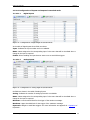
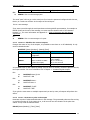
Parameter
Name
Number
Time
Pass
Description
Values
Name assigned in the GTS From 1 to 10 characters
Configurator
Output number
From 1 to n (Number of output
for its model)
Duration of the pulse in
From 1 to 60 seconds
seconds
Password (optional)
Configured password
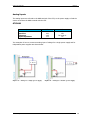
It is possible to act on the output placing only the name or the number, if both are placed it will
act by the output number. For more information see chapter 3 –Digital Outputs In Standard ModeEx1.
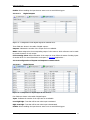
→
←
PULSE Reset(4) 10 pass
Pulse in output 4 of 10 seconds
→
←
PULSE Reset 10 pass
Pulse in output Reset of 10 seconds
→
←
PULSE 4 10 pass
Pulse in output 4 of 10 seconds
Ex2.
Ex3.
If you place the same name to multiple outputs, and it acts by name; all outputs will perform the
action.
Report Messages
These messages are generated asynchronically by the GTS to report certain events and will be
sent to the configured receipt phone numbers.
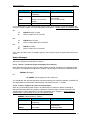
4.1.19 SERIAL – Sends messages entering by the serial port
When data enter through the serial port and a packet is formed according to the packing criteria,
it is sent to the configured receipt phone numbers. This message is only sent in Standard mode.
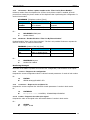
SERIAL {Message}
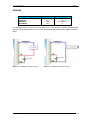
Ex.:
← SERIAL Test message from the serial port
You should take into account that those characters entering the serial port that are not ASCII will
be transformed to its equivalent representation in decimals with the <> format.
4.1.20 AINPUT – Reports the status of analog alarms
When any of the analog inputs enters in an alarm status or leaves the status a message is
generated informing about the situation. Maximum, minimum limits, hysteresis and name are
configured by the GTS Configurator, for more information see in chapter 3 –Analog Inputs in
stander mode-. This message is only sent in Standard mode.
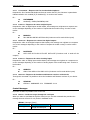
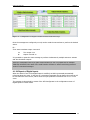
AINPUT {Name(Number)} {Status}
Parameter
Name
Number
Status
www.exemys.com
Description
Values
Name assigned in the GTS From 0 to 10 characters
Configurator
Input number
From 1 to n (Number of inputs
for its mod el)
Alarm status
MAXIMUM ALARM
Rev. 2.3.0 – Dic 2011
31