1
Raptor User Manual
7
Introduction
The latest Raptor HD decks use a single 3.5-inch fixed internal 4TB hard drive, which can hold
over 200 hours of high quality HD material. The Raptor records .avi files using a highly efficient
Motion-JPEG codec that has a variable quality setting, balancing picture quality and recording
time to best suit the job requirements.
All Raptor HD decks are designed to be operated primarily with an attached VGA monitor and
USB keyboard & mouse, but run-and-gun operation is possible using the front panel controls.
Raptor decks are designed around a robust and reliable platform running Windows 7 Embedded;
the system has a boot-up time of about 90 seconds. We recommend that the Raptor be powered
from a UPS (uninterruptable power supply), if using the factory-supplied AC to DC power
supply. This can help prevent sudden reboots, since power can be interrupted frequently in a
hectic production environment.
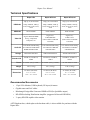
The Raptor HD Quad runs from AC power and requires up to 180 watts, while the HD+ and
Dual run from 10–16VDC. These decks draw up to 120 watts during normal use.