1
4. Setting up the Etec 4 Port 11g Wireless ADSL2/2+ Router
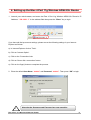
1. Launch your web browser, and enter the Etec 4 Port 11g Wireless ADSL2/2+ Router’s IP
Address: “192.168.1.1” in the address field then press the “Enter” key to login.
If you have old dial-up account settings, please correct the following settings in your Internet
Explorer as follows:
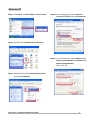
a). In Internet Explorer click on 'Tools'.
b). Click on 'Internet Option'.
c). Click on the 'Connections' tab.
d). Click on 'Never dial a connection' button.
e). Click on the 'Apply' button to complete the process.
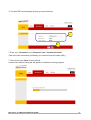
2. Enter the default User Name: “admin” and Password: “admin”. Then press “OK” to login.
!
Note that the Username and Password are case sensitive.
Etec 4 Port 11g Wireless ADSL2/2+ Router
10