1
2.
Launch your web browser, and enter the Google Website Address: “www.google.com” in
the address field then press “Enter”.
3.
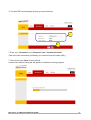
The following Google website index page will display on your screen. This shows your ADSL
connection is correctly set and access to the Internet is now available.
NOTE: For more detailed information regarding settings and connections, please refer to the “User
Manual” on the CD provided.
Telephone Support for Internet Access ONLY is available during office hours from Mon-Fri
10am –5pm on 08712-461234. If you are successfully connected to the Internet and have a support
or firmware* query please email [email protected].
* No firmware upgrade should be attempted without first contacting Etec at the above email address.
Any such firmware upgrade attempt without first contacting Etec will invalidate the warranty.
Etec 4 Port 11g Wireless ADSL2/2+ Router
17