1
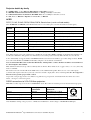
Projector details by family
For ASK/Proxima, see also InFocus, Eiki, Christie and Proxima projectors.
For Eiki EIP-200/1000/1600/2500/3000/3500/4500, see Sharp, else Sanyo for all others.
For Christie DS30, PLUS-26, PLUS-26, MATRIX-1500, else see Sanyo for all others covered.
For 3M, Acer, see Hitachi or Optoma. For Viewsonic: see Hitachi
ACER
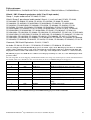
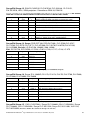
PD727, P1165, P1265, P5270, P5280, P5370, Generic Acer (use for unlisted models)
(for ACER 755C see Hitachi) (Acer PD523 deleted at rev 2.78. Order prior version from archive if needed again.)
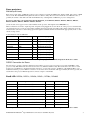
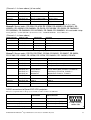
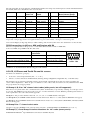
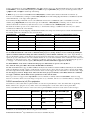
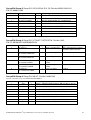
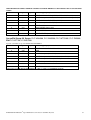
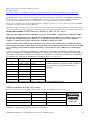
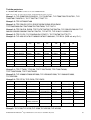
T460
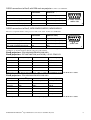
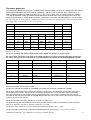
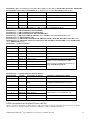
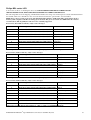
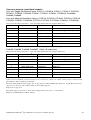
Channel
TX code
Input name in manual
Function as identified on screen
1
* 0 IR 015<0Dh>
D-SUB RGB 1
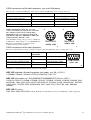
(Pic. of 15-pin connector) D-SUB
2
* 0 IR 016<0Dh>
DSUB2 RGB or Digital RGB on DVI
(Pic. of DVI connector), DVI (some only)
3
* 0 IR 019<0Dh>
Composite Video
(Pic. of RCA) Composite
4
* 0 IR 018<0Dh>
S-video
(Pic. of DIN 4) S-video
5
* 0 IR 020<0Dh>
DVI-D/Component
(Pic. of DVI connector) Component
6
* 0 IR 017<0Dh>
YPbPr for D-sub
(Pic. of 15-pin connector) Component
7
* 0 IR 028<0Dh>
Analog RGB for DVI Port
(Pic. of DVI connector), DVI
8
* 0 IR 050<0Dh>
HDMI via adaptor cable
(Pic. of HDMI connector), DVI
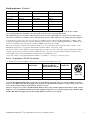
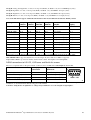
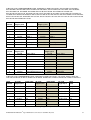
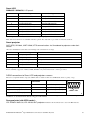
Don’t forget to set all unused T460 channels to “Skip” to jump over blank/unused inputs.
Note: There appears to be some confusion as to whether the second analog RGB is available on the DVI socket with the code
we allocate to Channel 2. The generic Acer manual says it is, but the projector tested by JED, a P1265, does not allow it.
Some of this family do support wireless and HDMI channels, but we have been unable to get control strings for these. HDMI
does work on the P1265 via a HDMI to DVI cable, using the code we allocate to Channel 8.
Note: You must turn ON source lock in the third menu, “Management” so that a channel can still be selected if there is
no current input to that channel.
Mute and Freeze functions are provided so all keyboards work fine. These functions are “toggle” mode, so no “two yellow key
mute” is available.
The audio level control works OK via the T460 remote to the small internal speaker. There are one or two audio inputs
(common audio input for all sources), but only some have an audio output jack to drive external speakers/PA. It is suggested a
T461 be used to provide proper audio control.
Aspect ratio set-up is supported for 4:3 small, 4:3 reg and 16:9 reg. Aspect ratio is included in the Acer units. Use source
names: “Set reg 4:3” and “Set reg 16:9”.
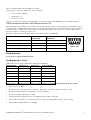
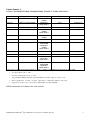
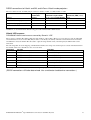
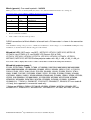
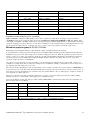
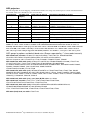
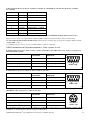
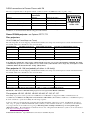
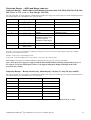
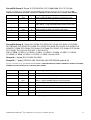
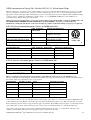
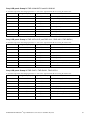
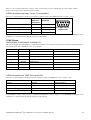
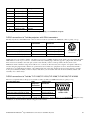
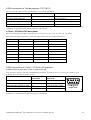
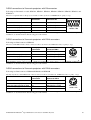
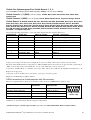
RS232 connections to 3-Pin DIN Acer projectors.
Mini-DIN 3 socket on projector. Coms at: 9600 DP8N1 (Note: Rev 2.80 + is needed as previous releases had wrong speed.)
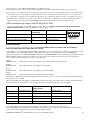
Function/Direction
T460 “projector”
Connection
Acer Serial Port
Connector
Ground
Ground
Mini-DIN 3 pin 3 (Gnd)
Data from T460 to projector
Tx
Mini-DIN 3 pin 2 (RXD)
Reply data from projector to T460
Rx
Mini-DIN 3 pin 1 (TXD)
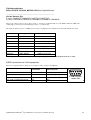
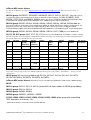
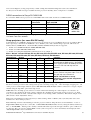
1
2
3
Mini-DIN 3
solder side
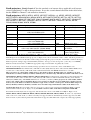
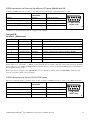
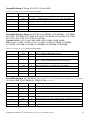
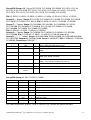
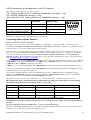
After installation wiring of any projector to a T460, use a multimeter to check voltages on BOTH TX and RX pins.
T460/461/T462 Manual 9th Sept 2015 Part B 3.84 release © Jed Micro Pty Ltd
2