1
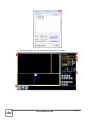
MAIN Input Panel
1
This window displays the inputs Size and position on the desired output monitor.
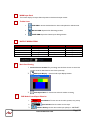
Toolbar Icons
2
3
1.
CPU ICON- retrieves the data from the device and updates the software state.
2.
RS-232 ICON- Opens the RS-232 settings window.
3.
SAVE ICON-Opens the Custom Layout Setting Window
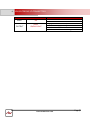
OUTPUT RESOLUTION
SUPPORTED MODE
HDTV 1080p
VESA
VESA
VESA
VESA
RESOLUTION
1920x1080@60Hz (SDI)
1680x1050@60Hz
1600x1200 @ 60Hz
1440x900 @ 60Hz
1366x768 @ 60Hz
SUPPORTED MODE
VESA
VESA
VESA
HDTV 720p
VESA
RESOLUTION
1280x1024 @ 60Hz
1280x960 @ 60Hz
1280x768 @ 60Hz
1280x720 @ 60Hz (SDI)
1024x768 @ 60Hz
Main Panel Setting
4
1. Control Percent 10-100%-This percentage control allows the user to control the
window size of the Main Panel to view all the inputs easily.
5
2.
PAP Layout Display – opens the PAP Layout Display Window
3.
Lock Aspect Ratio- Fix the size ratio when the window is resizing.
PAP Mode Control/Input Selection
2.
Main Window: The user can set the visible, position, size, polarity
and default layout.
Input Selection: Set the window to what input.
3.
Window Polarity: Set the main window layer polarity in “PAP Mode”.
1.
www.avenview.com
Page|12