1
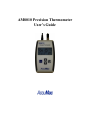
AM8010 Precision Thermometer User’s Guide
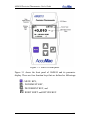
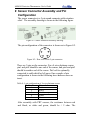
The top panel of AM8010 is shown in Figure 3-2. There are three
interfaces: “SENSOR”,“USB or EXT POWER” and power
switch “OFF/ON”.
Figure 3-2: AM8010 Top Panel.
A foldable tilt foot support is mounted on the back of AM8010. It
helps user to put the meter in a stable position with a display angle.
There is a battery cover on the back side of AM8010 Precision
Thermometer. Two AAA size batteries are used to power the meter.
A sliding switch besides the battery holder can be seen when the
battery cover is opened. This switch is used for calibration only.
Warnings: Inappropriate setting change to this switch can cause loss
of calibration data. Instructions of using this switch are shown in
4.1.
7/33