1
246
USING ADOBE CONNECT 9
Administering Adobe Connect
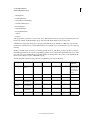
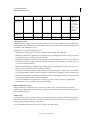
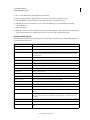
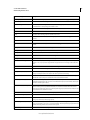
Members of the Authors group can perform all of the following actions if they have Publish permissions on the
specified folder:
• View content and content folders.
• Publish and update content.
• Send e-mail messages containing links that send a notification to the author as soon as the recipient accesses the link.
Training Managers group
Members of the Training Managers group are users who are responsible for organizing and coordinating training.
If you assign a user to this group, Adobe Connect creates a folder for this user in the User folder of the Training library.
(The shortcut My Training points to this folder.) By default, a training manager can manage only their folder in the
User Training folder.
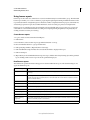
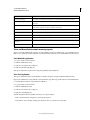
A training manager can perform the following actions:
• Manage their own user folder in the Training library, performing all file-management functions, as well as create
and manage courses and curriculums, enroll users, send notifications to enrollers, and set up reminders.
• Have access to folders in the Content library.
• View training reports for the courses or curriculums that they created.
Virtual Classroom group
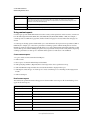
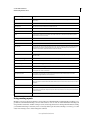
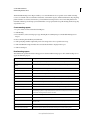
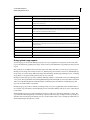
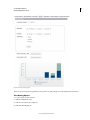
Members of this new group can create virtual classrooms with a capacity of up to 200 participants in the My Trainings
section. The group members also have access to the Event Management section.
• All Training Manager permissions
• Access to Content and Training tabs
• My Content and My Training folders, with manage permissions
• Content dashboard
• Shared Training, with manage permissions
• Training Catalog, with manage permissions
• Users and Groups (Training tab)
• Training dashboard
• Can see reports inside specific training
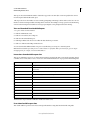
• Reports tab with permissions to Content, Course, Curriculum, Virtual Classrooms, Learner, and Saved Queries
sections.
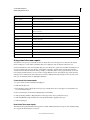
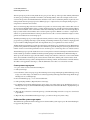
• All Event Manager permissions
• My Events tab, with manage permissions
• Shared Events, with manage permissions
• Event dashboard
• Can see reports inside specific event
• Can view Event Catalog (Can edit Event Catalog if also a member of Event Administrators group)
• Ability to create his own event and email templates (Cannot edit shared templates unless also a member of Event
Administrators group)
Last updated 8/28/2015