1
93.070
Product data sheet
Accessories
Software
Type
Description
GZS100F599
CASE Tools CD, latest version (CASE TPC, CASE HWC, CASE Sun, novaNet292 SW ...)
7001064001
User manual, German
Connecting cables
Type
Description
0367862001
Automation station to modu250: 1.5 m
0367862002
Automation station to modu250: 2.9 m
0367862003
Automation station to modu250: 6.0 m
General information
Type
Description
0374494001
Stylus set for modu250
0374509001
Connector, 3-pin, packaged
0374515001
Set to extend degree of protection, IP 65 (incl. seal, 0374680001)
0374680001
Seal, single (for set 0374515001)
Additional information
Fitting instructions
P100002332
Declaration on materials and the environment
MD 93.070
Description of operation
The modu250 touch-panel is used for the graphical display, navigation and operation of the automation station (AS) and its plants on site.
Intended use
This product is only suitable for the purpose intended by the manufacturer, as described in the “Description of operation” section.
All related product documents must also be adhered to. Changing or converting the product is not admissible.
Engineering notes
Fitting and power supply
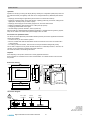
The touch-panel is mounted on a top-hat rail or directly on the front of a control cabinet.
The power supply with 85…240 V AC is connected via a pluggable connection terminal with an earth
conductor. Connection may only be performed when the system is disconnected from the electrical
supply.
When commissioning the device, you must remove the protective film on the front, otherwise the
readability of the display and the touch function may be negatively affected.
The communication wiring must be carried out correctly and in accordance with standards
EN 50174-1, -2 and -3. Communication wires must be kept separate from other live wires.
Data line
Through direct connection to the novaNet network (RJ-11 socket), it is possible to access all connected ASs.
The number of communicating AS stations per touch-panel must not be greater than 100.
Every touch-panel in the novaNet network requires a unique address between 31744 and 31799
(comparable with PC subscribers); the factory setting is 31999.
If the touch-panel is connected directly to the moduFlex universal controller via point-to-point module
0374448001, the max. admissible cable length is 6 m.
Special standards such as IEC/EN 61508, IEC/EN 61511, IEC/EN 61131-1 and -2 were not taken into
account. Local requirements regarding installation, usage, access, access rights, accident prevention,
safety, dismantling and disposal must be taken into account. Furthermore, the installation standards
EN 50178, 50310, 50110, 50274, 61140 and similar must be observed.
LED indicators
Above the display of the touch-panel there are LEDs displaying the following information:
• The middle LED flashes green if the power supply is correct.
• The LED on the outer left flashes red when an alarm is active in an opened application.
2/3
3.1
Right of amendment reserved © 2015 Fr. Sauter AG