1
Connecting the Velocity Matrix to the Micromanometer
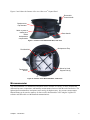
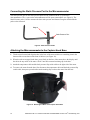
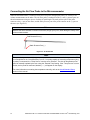
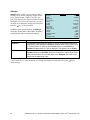
The positive port (+) is located on the side of the Velocity Matrix that is opposite the handle assembly.
The positive port (+) on the Velocity Matrix will be connected to the (+) port on the micromanometer,
and the negative port (–) on the Velocity Matrix is connected to the (–) port on the micromanometer.
Standoffs can be screwed together to make different lengths and are used to maintain a fixed and level
orientation away from a filter. The standoffs are attached to the positive (+) side of the velocity matrix.
The handle assembly is attached to the downstream or negative (–) side in the center of the velocity
matrix (see Figure 11).
Standoffs
Positive Port (+)
Negative Port (–)
Handle
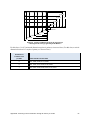
Figure 11: Velocity Matrix
Note
The Velocity Matrix needs a valid temperature to perform the standard or actual velocity correction.
This is accomplished in the ―Actual/Std Setup‖ menu. If no probe capable of measuring temperature
(plug in probe) is connected, the―Temp Source‖ must be set to ―Entered‖. The air temperature must
then be manually inputted by the user using the ―Entered Temp‖setting. If the ―Temp Source‖ is set to
Probe, and no probe is connected, dashes (------) will appear on the display.
For more information on entering the temperature manually, refer to the Actual/Standard Setup
section of this manual.
Chapter 2: Unpacking and Setting Up
13