1
3.2 M ASKS
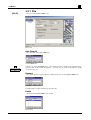
Of LS Combination… evaluates the LS Combination selected from the drop down list box.
Of automatic generated combinations… first creates nominal load combinations, calculates these in RSTAB and then evaluates the results. Since the partial safety factors are not
taken into account in the automatically generated combinations the most unfavorable combination might not be found in every case. However in many situations it will be the only
way to reduce the immense number of theoretically possible LS Combinations.
Comments: Detailed notes can be entered here.
3.2.2 Mask 1.2 Combination Criteria
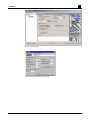
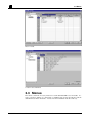
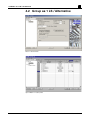
In this mask, decide which and how the load systems from RSTAB should be combined.
The basic idea behind RSCOMBI is that it is possible to make any conceivable combination
of individual load systems. To keep the amount of data to a minimum you can make refinements. At the beginning you will find all Load Systems in a list including the LS No,
Load System Description and the Load System Type. The Load System Type is a criterion
for the possible LS Groups or LS Combinations. Permanent Load Systems (self weight,
dead load) will be always included with a fixed partial safety factor in the resulting combinations or groups. Variable Load Systems (snow, wind, live loads) may or may not be included. If only one variable load system is included there is a higher partial safety factor. If
there are two or more variable loads included the partial safety factor is lower. Both factors
may be defined in the code settings in mask 1.1. Exceptional Load Systems (earthquake)
are assigned with a particular fixed safety factor and at the same time the safety factor of
the other load systems in the combination or group are reduced to 1.0. Relieving permanent
load systems use a fixed factor as determined in the Code in mask 1.1. Relieving variable
load systems actually create two load groups or load combinations: a) one with the safety
factor 0.9x [factor set in the Code] and b) one with the safety factor 0.9x [factor set in the
Code] but permanent loads only with factor 1.0. All other load systems are generated in the
normal way. Imperfection loads also have a fixed safety factor as stated in the Code in
mask 1.1. More complicated combination features may be set up in the Advanced dialog of
the Edit Code dialog in mask 1.1.
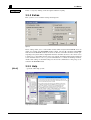
In the Group column use the as 1 LS sub column to determine which load systems should
always occur together. To do this just enter an unique and identical text or number in this
sub column for all the desired load systems. This feature helps you to link two load systems
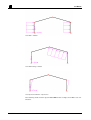
and at the end they are practically treated as one load system. Use the Alternative sub column to mark the load systems that cannot occur at the same time. A typical example for this
is wind from left and wind from right – they obviously cannot occur at the same time in different directions.
6
RSCOMBI FOR WINDOWS © 2001 BY ING.-SOFTWARE DLUBAL GMBH