1
ET series hardware manual
www.epordo.com
Chapter 8 Door locking function settings
8.1、Access control function summary
The door lock function setting is the time and right setting to unlock the door for the registered users. Settings for each user include
3 different time interval settings and a group setting. The relationship between time intervals is “or”. There are also 3 time intervals
to be set within group settings. Similarly the 3 time intervals are in “or” relation but the relationship between the group and the time
interval within it is “and”.
Simply, if the registered user is to be placed at unlock position: firstly, the group that the user is in must be in unlocking configuration.
(also can be in the same configuration as the other groups but all of them must be together to unlock the door). Secondly, the present
time must be within any of the unlocking period and the group he/she is in should be also at the unlocking period. The system makes
the newly registered users as the first group in default. So the newly registered users are at unlocking position. If there are no users
in the group configuration setting, the user can only record attendance, but not unlock the door.
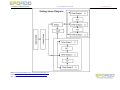
8.2、Access control confirmation flow
MSN: [email protected] / [email protected]
E-mail: [email protected] / [email protected]
Tel: +86 755 8341 8779/ 8825 7909