1
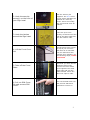
2. Undo the security
screw(s) on the front of
your Sign head.
3. Undo the latches
around the Sign head.
4. Lift the Front Cover
Lid.
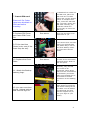
5. Take off the Cover
Plate.
6. Pull out SIM Cover
Pin and remove SIM
Cover.
Use the Security bit
supplied. The blue arrow
on the photo indicates the
position of a security
screw. There are usually
two screws that must be
undone.
There are up to nine
security screws around the
side of the Sign head that
you will need to undo.
Lift the Front Cover Lid as
far up as you can lift it
and then let it rest back.
The two side struts will
hold the lid in position. For
the following steps, watch
your head!
Now that you have access
inside the Sign head,
remove the Cover Plate.
Pinch together the small
black clips and pull the
Plate forward. There are
about six clips to undo.
Pull out the SIM Cover Pin
and pull the SIM Cover
upwards to remove it.
3