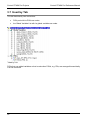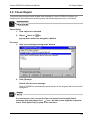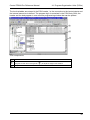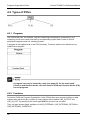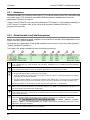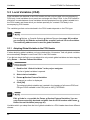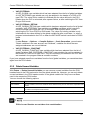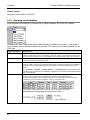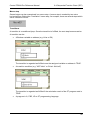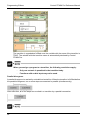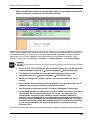
1
Control FPWIN Pro V5.2 Reference Manual Control FPWIN Pro V5.2 Reference Manual Programming Software Panasonic Electric Works Europe AG ACGM0142V4.1END 1/2006 BEFORE BEGINNING Liability and Copyright for the Hardware This manual and everything described in it are copyrighted. You may not copy this manual, in whole or part, without written consent of Panasonic Electric Works Europe AG (PEWEU). PEWEU pursues a policy of continuous improvement of the design and performance of its products, therefore, we reserve the right to change the manual/product without notice. In no event will PEWEU be liable for direct, special, incidental, or consequential damage resulting from any defect in the product or its documentation, even if advised of the possibility of such damages. We invite your comments on this manual. Please email us at: [email protected]. Please direct support matters and technical questions to your local Panasonic representative. LIMITED WARRANTY If physical defects caused by distribution are found, PEWEU will replace/repair the product free of charge. Exceptions include: • When physical defects are due to different usage/treatment of the product other than described in the manual. • When physical defects are due to defective equipment other than the distributed product. • When physical defects are due to modifications/repairs by someone other than PEWEU. • When physical defects are due to natural disasters. © MS-DOS and Windows are registered trademarks of Microsoft Corporation. © IBM Personal Computer AT is registered trademark of the International Business Machines Corporation. Important Symbols One or more of the following symbols may be used in this manual: Warning. The warning triangle indicates especially important safety instructions. If they are not adhered to, the results could be: • fatal or critical injury and/or • significant damage to instruments or their contents, e.g. data Contains important additional information. Contains an illustrative example of the previous text section. Indicates that a step-by-step procedure follows. Indicates where you can find additional information on the subject at hand. Indicates that you should proceed with caution. Summarizes key points in a concise manner. Provides helpful keyboard shortcuts. Provides brief explanation of a function, e.g. why or when you should use it. next page Indicates that the text will be continued on the next page. The manual uses the following conventions to indicate elements from the user interface or the keyboard: "Data Field" Data field entries and option names are rendered in quotation marks. [Button] Buttons are indicated by square brackets. <Key> Keys are indicated by pointed brackets Control FPWIN Pro Reference Manual Table of Contents Table of Contents 1. 2. 3. Installation and First Steps................................................... 1 1.1 Installing and Starting ................................................................................ 2 1.2 First Steps and Helpful Files...................................................................... 3 User Interface......................................................................... 5 2.1 Start Dialog ................................................................................................ 6 2.2 Main Window ............................................................................................. 7 2.3 Project Navigator ....................................................................................... 8 2.4 Programming Window ............................................................................. 10 2.5 Status Bar ................................................................................................ 12 Control FPWIN Pro Projects ............................................... 15 3.1 What Does a Project Consist of?............................................................. 16 3.1.1 PLC .......................................................................................................... 17 3.1.1.1 Setting System Registers................................................................ 17 3.1.1.2 Configuring Inputs/Outputs for Modular PLCs ................................ 18 3.1.1.3 Configuring Remote I/Os for Modular PLCs ................................... 20 3.1.1.4 Program Code................................................................................. 21 3.1.2 Libraries.................................................................................................... 21 3.1.3 Tasks........................................................................................................ 21 3.1.4 DUTs ........................................................................................................ 21 3.1.5 Global Variables....................................................................................... 22 3.1.6 POUs........................................................................................................ 22 v Table of Contents 3.2 3.3 Projects Created in FPWIN Pro................................................................23 3.2.1 Create New Project ..................................................................................23 3.2.2 Open Project from the PLC ......................................................................23 3.2.3 Restore a Backed-up Project ...................................................................24 3.2.4 Open an Existing Project..........................................................................24 Processing Projects..................................................................................25 3.3.1 Backup Project .........................................................................................25 3.3.2 Restore Project.........................................................................................25 3.4 Edit Objects ..............................................................................................26 3.5 Passwords and Security Levels ...............................................................27 3.5.1 4. vi Access to Protected Objects ....................................................................27 3.6 Calltree Tab..............................................................................................29 3.7 Used by Tab .............................................................................................30 3.8 Check Objekt............................................................................................31 Program Organisation Units .............................................. 33 4.1 Program Organisation Units (POUs) ........................................................34 4.2 Types of POUs .........................................................................................36 4.3 5. Control FPWIN Pro Reference Manual 4.2.1 Programs ..................................................................................................36 4.2.2 Functions ..................................................................................................36 4.2.3 Function Blocks ........................................................................................37 Create a New POU...................................................................................39 Variables .............................................................................. 41 5.1 Variables ..................................................................................................42 5.2 Global Variables .......................................................................................43 5.2.1 Addresses.................................................................................................44 5.2.2 Global Variable List (Field Descriptions) ..................................................44 Control FPWIN Pro Reference Manual 5.3 6. 7. 8. Table of Contents Local Variables (VAR) ............................................................................. 46 5.3.1 Adopting Global Variables in the POU Header ........................................ 46 5.3.2 Delete Unused Variables ......................................................................... 47 5.3.3 Declaring Local Variables ........................................................................ 48 5.3.4 Assigning Variables in the Program......................................................... 51 5.4 Changing Variables ................................................................................. 53 5.5 Export Variables ...................................................................................... 54 5.6 Import Variables....................................................................................... 56 5.7 ARRAY and Data Unit Type .................................................................... 58 5.8 Cross-Reference Lists ............................................................................. 59 5.9 Recipe Editor ........................................................................................... 60 Tasks..................................................................................... 61 6.1 Introduction to Tasks ............................................................................... 62 6.2 Assigning a Program to a Task................................................................ 63 6.3 Second task for FP10SH/120k and FP2SH 120k .................................... 66 Networks............................................................................... 69 7.1 Introduction to Networks .......................................................................... 70 7.2 Network List ............................................................................................. 71 7.3 Defining Lables and Titles ....................................................................... 72 7.4 Deactivate or Activate Network................................................................ 73 Programming Editors .......................................................... 75 8.1 LD and FBD Editors................................................................................. 76 8.1.1 Connecting Objects.................................................................................. 77 vii Control FPWIN Pro Reference Manual Table of Contents 8.2 8.3 8.1.1.1 Useful Hints .....................................................................................78 8.1.1.2 Command Buttons in the Tool Bar ..................................................78 8.1.1.3 Pop-up Menu...................................................................................79 8.1.1.4 Programming Example....................................................................79 8.1.1.5 Enable Input and Enable Output .....................................................79 8.1.1.6 Editing Programming Symbols........................................................80 8.1.1.7 Check a LD or a FBD Program .......................................................81 Structured Text Editor (ST) ......................................................................82 8.2.1 Expressions..............................................................................................82 8.2.2 Operands..................................................................................................83 8.2.3 Operators..................................................................................................83 8.2.4 Instructions ...............................................................................................84 8.2.5 Comments ................................................................................................86 8.2.6 Checking your Program............................................................................86 8.2.7 Insertion Shortcuts ...................................................................................87 8.2.7.1 OP/FUN/FB Selection .....................................................................87 8.2.7.2 Insert Operands...............................................................................88 8.2.8 Particularities of ST Editor........................................................................88 8.2.9 Programming Example.............................................................................90 IL Editor ....................................................................................................91 8.3.1 8.4 9. Sequential Function Chart (SFC) .............................................................93 Downloading Projects to the PLC...................................... 99 9.1 Before You Download Your Program to the PLC ...................................100 9.2 PLC Type ...............................................................................................101 9.3 Address Ranges.....................................................................................102 9.4 Compiling a Project ................................................................................105 9.4.1 9.5 viii Checking your Program............................................................................92 Compile Incrementally............................................................................105 Check Memory Area Assignment...........................................................107 Control FPWIN Pro Reference Manual 9.6 Table of Contents Communication Parameters .................................................................. 109 9.6.1 PLC Network Connection....................................................................... 109 9.7 Online Mode .......................................................................................... 110 9.8 Security Settings.................................................................................... 111 9.9 Downloading a Project........................................................................... 113 9.9.1 Downloading Changes in Run Mode ..................................................... 113 9.9.2 Program Changes in Run Mode while Online........................................ 114 9.9.3 Upload Program Code and PLC Configuration...................................... 116 9.9.4 Clear Program and Reset System Registers ......................................... 117 9.9.5 Verify Program Code and Systemregister ............................................. 117 9.9.6 PLC Configuration.................................................................................. 117 9.9.7 Change PLC Mode................................................................................. 118 9.10 How the Compiler Works ....................................................................... 119 9.10.1 Priority when Processing Networks in a POU........................................ 119 9.10.2 Processing Order in LD and FBD Networks .......................................... 119 9.10.3 Subdividing Networks............................................................................. 120 9.10.4 Managing Variables in the Compiler ...................................................... 121 9.10.5 Managing Jumps in the Compiler........................................................... 122 9.10.6 Managing FUN/FB in the Compiler ........................................................ 122 9.10.7 Implemented FUN/FB ............................................................................ 122 9.10.8 User-Defined Functions ......................................................................... 123 9.10.9 User-Defined Function Blocks, FB Indexing .......................................... 124 9.10.9.1 Function Block Instances in Holding Areas................................... 125 9.10.10 Processing Interrupt Programs.......................................................... 126 9.10.10.1 Protecting the Index Registers in Interrupt Programs................... 127 10. Debugging .......................................................................... 129 10.1 Introduction to Debugging...................................................................... 130 10.2 Step Mode ............................................................................................. 131 10.3 Breakpoint Mode.................................................................................... 132 ix Table of Contents Control FPWIN Pro Reference Manual 10.4 Breakpoints ............................................................................................134 10.4.1 Breakpoints in the IL/ST Editor ..............................................................134 10.4.2 Breakpoints in the LD Editor...................................................................135 10.4.3 Breakpoints in the FBD Editor ................................................................135 10.4.4 Breakpoints in the SFC Editor ................................................................136 11. Monitoring.......................................................................... 137 11.1 Monitoring while Online ..........................................................................138 12. Additional Memory ............................................................ 139 12.1 IC Card, EEPROM, EPROM ..................................................................140 13. Exporting and Importing................................................... 141 13.1 Introduction to Exporting and Importing .................................................142 13.2 Introduction to Reusability Level ............................................................143 13.3 Exporting/Importing Projects ..................................................................144 13.4 Exporting/Importing Objects ...................................................................146 13.5 Exporting/Importing Program Code........................................................148 14. Keyboard Assignment ...................................................... 149 14.1 Shortcuts ................................................................................................150 x Control FPWIN Pro Reference Manual Table of Contents 15. Glossary ............................................................................. 153 16. Index ................................................................................... 159 xi Chapter 1 Installation and First Steps Installation and First Steps Control FPWIN Pro Reference Manual 1.1 Installing and Starting Before installing Control FPWIN Pro, check whether your PC meets the following requirements: • Pentium processor or compatible • 128 MB RAM or more • CD-ROM drive • Hard disk with at least 100 MB free disk space • VGA monitor or compatible monitor • Mouse • Serial COM interface to connect your PLC Furthermore, Windows 95, 98, NT V4.0, 2000, ME or XP should be in place before you start installing FPWIN Pro. • To install under Windows 2000 or XP, you need administrator rights on your computer. • We assume that you are an experienced user of Microsoft Windows. 1. Start Windows 2. Insert the Control FPWIN Pro CD into the CD-ROM drive A browser showing the contents of the CD is automatically started. 3. Select a language 4. Choose “Install software” Carefully read the information displayed on the screen and follow the instructions. To start Control FPWIN Pro: 5. Programs → Panasonic MEW Control → FPWIN Pro 5 → FPWIN Pro 5 2 Control FPWIN Pro Reference Manual 1.2 First Steps and Helpful Files 1.2 First Steps and Helpful Files A “First Steps” PowerPoint tutorial of Control FPWIN Pro is included on the CD. You can run the tutorial or install it. If you installed it, activate the First Steps program via the Programs → Panasonic MEW Control → FPWIN Pro 5 → FPWIN Pro 5 submenu. For your convenience, the following files are also included on the CD and found under “Helpful Files”: • IEC61131_3_basics.pdf, for an introduction to the IEC61131–3 standard. • PDF file of the First Steps tutorial for easy printing. For best results, select “Print as image” when printing. • A link to our website to download manuals. 3 Chapter 2 User Interface User Interface Control FPWIN Pro Reference Manual 2.1 Start Dialog When you open FPWIN Pro, the following window appears: In the Start dialog you can perform the following actions: Select to create a new project in which you can enter programs, functions and function blocks. You may also create an empty project. Select comment memory of the PLC. to open a project that has been saved in the Select to open a project that has been packed. if you wish to open a project on your computer or Select network. To open a project recently opened, double-click on the name desired in the project list. To open a project not listed here, double-click on Search additional projects. You can change the number of projects listed under Extras → Options → Program Options → General. 6 Control FPWIN Pro Reference Manual 2.2 Main Window 2.2 Main Window To facilitate programming, the graphical user interface of FPWIN Pro consists of the following components: Components of the user interface Project Navigator Menu Bar Tool Bar Programming Window including header and body within one frame Status Bar You can position the components anywhere on your screen. To move a component, drag its title bar. Many commands from the tool bar and the menus are also available in pop-up menus, which open when you click on the right mouse button. Pop-up menus are available in the project navigator, in the programming editors (except SFC), in the sampling trace window, and in the recipe editor. 7 User Interface Control FPWIN Pro Reference Manual 2.3 Project Navigator The clear graphic representation of the project hierarchy in the navigator provides an overview even for very complex projects. All objects of the project can be easily accessed by double-clicking on the respective object. Use Window → Navigator on or off or click show/hide the navigator window. to Project navigator There are three different tabs at your disposal: • Project • Calltree (see page 29) • Used by (see page 30) You can configure each of the tabs by using the pop-up menu (right mouse button within the navigator) and select display to display additional information in the project navigator on the respective objects. Displaying the declaration of a symbol or reference of an object Using the pop-up menu from the navigator or the programming editors, you can quickly display the declaration of a variable or the reference of a POU. FPWIN Pro opens the editor containing the declaration or reference and highlights the symbol. 8 Control FPWIN Pro Reference Manual 2.3 Project Navigator 1. Select the variable/POU in the navigator or in the programming editor and click the right mouse button 2. Select either Go To Definition or Go To Reference from the pop-up menu 3. Press <F3> if desired to go to the next reference See the online help (keyword “Navigator”) for further information on these options. Select Sorting Criteria if you want to define the order in which objects are displayed in the project navigator. Sorting takes place from top to bottom. Project navigator with extended information 9 User Interface Control FPWIN Pro Reference Manual 2.4 Programming Window In the programming window you enter your programs in the selected programming editor. The programming window is divided into individual networks. Each network contains one program step. The programming window is displayed when you open the program with a double-click. A network information area is next to each network on the left side of the programming window. Programming window Network Info Area Set Network Height In the network info area you can adjust the network height using the mouse: 1. Position the cursor on the horizontal line The cursor turns into a double arrow. 2. Hold mouse button down and move the cursor to the desired position 3. Release mouse button The position at which you release the mouse button defines the new network height. Optimize the height of a network: 1. Select the network by clicking into the network info area Use <ctrl> and/or <shift> for multiple selection. 2. Tools → Optimize Network Height 10 Control FPWIN Pro Reference Manual 2.4 Programming Window The network will be adapted to the height that is needed. To enter a network before or after the current network, activate the following icons: Network before Network after You can also insert a new network at the top or bottom of the program or before or after the current network via Edit → New Network → Top/Before/After/Bottom. 11 User Interface Control FPWIN Pro Reference Manual 2.5 Status Bar The status line is found at the bottom of your screen. In the status line you will find information about your PLC type, communication parameters, the time, and other status reports. Status line PLC Type Editor Info Clock Online Mode Communication Parameters You can customize the status line in the "Status bar" dialog box. 1. Double-click the status line not within an active field 2. Select the item to be added beneath “Possible Fields” 3. Click 4. Select the item to be removed beneath “Displayed Fields” 5. Click 6. Click [OK] 12 Control FPWIN Pro Reference Manual 2.5 Status Bar After you have set up the status bar, watch the tool tips for the double-click functions within active fields. It is also possible to reset the status bar to the default settings by selecting [Defaults]. 13 Chapter 3 Control FPWIN Pro Projects Control FPWIN Pro Projects Control FPWIN Pro Reference Manual 3.1 What Does a Project Consist of? In Control FPWIN Pro a control task is referred to as a project. A project consists of all the objects which are listed in the project navigator. When you set up a project, the following objects will first appear: Navigator with objects Objects with sub-points or pools are marked by a plus sign ( ). By double-clicking on the name of the object, you can open a pool, e.g. the Library pool: Open Library pool A minus sign ( 16 ) means that the respective sub-points are already displayed. Control FPWIN Pro Reference Manual 3.1 What Does a Project Consist of? 3.1.1 PLC Under PLC you can set system registers as well as configure inputs/outputs and decentralized inputs/outputs of the PLC. 3.1.1.1 Setting System Registers System registers are memory areas reserved for setting hold and non-hold areas for timers, counters, flags and data registers. In the system registers you can also define parameters for PLC interfaces as to how they should react when errors occur. • The size of the memory depends on the PLC type used. The sum of all memory sizes for system registers, user program and machine program may not be larger than the entire PLC memory. • The 2 highest data registers (4 in PLCs with a second task (see page 66)) are at the user’s disposal, since they are always in the hold area and used by the compiler. 1. Double-click "PLC" 2. Double-click "System Registers" 17 Control FPWIN Pro Projects Control FPWIN Pro Reference Manual A list with all system registers will be displayed. The number indicated in parentheses is identical to the system register number. In "Memory Size (0-3)", you define the memory sizes for machine programs, for example. You will find a list with all system registers and the memory size of your PLC in your hardware description. 3. Double-click desired set of system registers 4. Enter your settings 3.1.1.2 Configuring Inputs/Outputs for Modular PLCs Each module on the backplane has to be configured, i.e. entered into the address list. There are two options available: • Loading configuration in online mode from the PLC • Entering I/O maps for each slot manually Loading configuration in online mode from the PLC 1. Online → Online Mode or The PLC must be installed for this procedure. 2. Online → PLC Configuration 3. Select the configuration to be uploaded 4. Click [Upload from PLC] 18 Control FPWIN Pro Reference Manual 3.1 What Does a Project Consist of? The Configuration saved in the PLC is transferred to Control FPWIN Pro. Modules inserted in the meantime are not recognized automatically. or: Click on [Register I/0 Maps] If the PLC is in RUN mode, the question appears if the PLC should be switched into PROG mode. If the PLC is in PROG mode, the PLC reconfigures the hardware configuration and stores it in Control FPWIN Pro, i.e. modules inserted in the meantime are recognized. Entering I/O Maps for Each Slot Manually 1. Double-click "PLC" in the project navigator 2. Double-click "I/O Maps" A dialog box appears with a schematic of the backplane with the slots on which the modules can be mounted. 3. Define the complete number of slots in "Number of Slots" Vacant slots are indicated with 3 asterisks (***) and are displayed gray. 4. [Define] 5. Select desired module type 6. [OK] 19 Control FPWIN Pro Projects Control FPWIN Pro Reference Manual 7. Proceed until all modules are entered 8. Click [OK] in the "Master I/O Map Configuration" window You can save the I/O configuration with the project, compile it and transfer it into the PLC or, if you are in online mode, transfer the I/O configuration directly into the PLC with Online → PLC Configuration (see page 117). 3.1.1.3 Configuring Remote I/Os for Modular PLCs Each slave must be configured, i.e. entered in the address list. There are two options for all other PLCs: • Loading configuration in online mode from the PLC (see page 20) • Entering I/O maps in the master I/O map configurating list, described here: 1. Double-click "PLC Config" in the project navigator 2. Double-click "Remote I/O Map" 3. Click Master (Master 1, Master 2 ...) The number of slots is displayed for each slave. If there is a slave, the text "Used" is displayed under "Base". 4. Enter "Base" in number of words (0 to 127) 5. Click desired slave 6. [Configure] A dialog box appears with a schematic of the backplane with the slots on which the modules can be mounted. 7. Set the total number of slots under "Number of Slots" 20 Control FPWIN Pro Reference Manual 3.1 What Does a Project Consist of? Free slots are marked with three asterisks ("***") and are gray in color. 8. [Define] 9. Select desired module type 10. [OK] 11. Repeat steps 8. to 10. until all modules are entered 12. Click [OK] in the "Slave I/O Map Configuration" window 13. [OK] You can save the I/O configuration with the project, compile it and transfer it into the PLC or, if you are in online mode, transfer the I/O configuration directly into the PLC with Online → PLC Configuration (see page 117). 3.1.1.4 Program Code By double-clicking on Program Code in the project navigator, your program will be shown in basic code. The code is entered as soon as you download your program to the PLC or upload a program from the PLC (see page 116). 3.1.2 Libraries By double-clicking Libraries, you can open the list containing all of the libraries available. In the libraries, you will find functions and function blocks that will save you a lot of programming work. Detailed information on how to use libraries and how to create your own library is provided in the online help. 3.1.3 Tasks Each program is assigned to a task (see page 62). In a task, you specify how the program is to be executed, e.g. cyclically, event triggered or time triggered. Only PRG-type POUs can be assigned to a task. The tasks are located under Tasks (Task pool) in the project navigator. 3.1.4 DUTs With a Data Unit Type (DUT) you can define a data unit type that is composed of other data types. A DUT is first defined under DUTs in the navigator and then processed like the standard data types (BOOL, INT, etc.) in the list of global variables or the POU header. 21 Control FPWIN Pro Projects Control FPWIN Pro Reference Manual A DUT cannot be used as a variable of another DUT; ARRAYs of DUTs are not possible. 3.1.5 Global Variables Global variables are symbolic names which are assigned to the inputs and outputs. They are global in the sense that they can be accessed by all POUs (PRG, FB). For further information, see Global Variables (see page 43) 3.1.6 POUs The object POUs (POU pool) is a list containing all of the Program Organisation Units (see page 36) you program. Objects which have not yet been compiled or have been changed since last being compiled are marked by an asterisk (*) in the project navigator. Open POU pool Objects not yet compiled 22 Control FPWIN Pro Reference Manual 3.2 Projects Created in FPWIN Pro 3.2 Projects Created in FPWIN Pro 3.2.1 Create New Project With the help of the Wizard, you can create a new project using Control FPWIN Pro. You may enter any project path and provide the project with a name of your choice. See also the Power Point presentation "First Steps". The wizard appears immediately upon starting Control FPWIN Pro, or with Project → New ... The wizard offers you a second possibility for creating projects. When you activate the Advanced Dialog box in the lower, left-hand corner, you can define several programs, functions or function blocks. These are automatically entered in the program when it is created. See the online help (keyword “Wizard”) for further information on using the wizard. 3.2.2 Open Project from the PLC You can upload a project that has been stored (e.g. via Online → Save Project in the PLC) in a PLC to Control FPWIN Pro, and then open it. If you select Project → Open Project from the PLC or select this option in the project wizard (see page 6), an empty project will be created in the path chosen. Then an attempt will be made to establish a connection to the PLC. If this is successful, the program code and project information will be uploaded, if present. Project information includes: the contents of all editors, the PLC configuration, compiler options, and the contents of user libraries. If user libraries are present, they will likewise appear in the project directory. You can only open a project in the PLC if it has a configuration memory (see hardware manual). The following PLCs can support a configuration memory option: PLC FP-X Card necessary? Type of card: no FP-Sigma no FP2 yes FP2SH no FP10SH yes Expansion Memory Unit: FP2-EM1, FP2-EM2 or FP2-EM3 ROM Operation Board: AFP6208 If you are using a different PLC type, the program code instead of the project information will be uploaded to your PC. Then the program code will be converted to a ladder diagram (compare with the import of FPWIN-GR files). 23 Control FPWIN Pro Projects Control FPWIN Pro Reference Manual 1. Project → Open Project from the PLC or select this option in the project wizard. The New Project window appears. 2. Enter or select path 3. Click [Select] If you receive a message that the program code and the code in the PLC are different, confirm with [OK]. This error message appears when the project in the PLC was compiled incrementally. 3.2.3 Restore a Backed-up Project Using this option of the wizard, you can open a project you saved with Extras → Backup Project (see page 25). Select the data base format you used for the backup, locate the path and select the file name. Click [Open] to restore the selected project. 3.2.4 Open an Existing Project You can open an existing project via Project → Open, or select a project from the list of recently opened projects. This list of recently opened projects appears when you start Control FPWIN Pro, but also appears at the bottom of the menu item “Project”. If you open a project that was created with a previous version of Control FPWIN Pro, you will receive a message about converting the project (for further information, see online help, “Upgrade information”). You can change the number of recently opened projects listed under Extras → Options → Program Options → General, “Number of recent projects on project menu”. 24 Control FPWIN Pro Reference Manual 3.3 Processing Projects 3.3 Processing Projects When you have set up a project, you can work on this project, i.e. you can do the following: • Open • Close • Save or Save as • Create backup • Restore saved data When you use open, close, save or save as, the procedure is similar to standard Windows commands. 3.3.1 Backup Project Extras → Backup Project projects enables you to create a backup for your project in two different compressed formats. In the PCD format (packed data base format) the entire data base of the project is saved. In the PCE format (packed export format) only the project data without libraries are saved. • The project data is packed while the backup is created. • Backups created with Extras → Backup Project can only be reopened with Extras → Restore Project. 3.3.2 Restore Project Extras → Restore Project enables you to unpack and restore a project that was saved before with Extras → Backup Project in the packed data base format (*.PCD) or in the packed export format (*.PCE). 25 Control FPWIN Pro Projects Control FPWIN Pro Reference Manual 3.4 Edit Objects All of the objects contained in the project navigator can be edited using the “Object” and “Edit” sub-menus. With the “Object” menu, you can influence the external features of an object, i.e. you can do the following, for example: • Open • Rename • Add a comment • Check for syntax errors • Print out and • Import and export You can also display: • Object properties • Object calltrees and “Used by” lists With the “Edit” menu, you can edit the contents of an object as well as create new objects. 26 Control FPWIN Pro Reference Manual 3.5 Passwords and Security Levels 3.5 Passwords and Security Levels In order to control access to individual objects in your project, you can assign a security level to each object. Define a password for each security level beforehand. Only those who know the password to the respective security level can change the object in question. 1. Project → Change Passwords 2. Compose a password for each security level When you define a password for the first time, you enter your passwords one after another for each security level under "New Password" and "Reenter Password", and click [Change] each time. The system will confirm the change of a password. 3. Select the object in the navigator you wish to protect access to 4. Object → Properties Only security levels which have already been defined may be entered in the Properties dialog. 5. Click the desired security level and activate "Allow Read Access for Lower Levels" if necessary Access control is activated after rebooting the computer. 3.5.1 Access to Protected Objects Project → Change Security Level allows you to access an object protected by a password. • For objects with higher security levels than that of the project, you may not change the security level. 27 Control FPWIN Pro Projects • Control FPWIN Pro Reference Manual If you only have access to the lower security level of the project, you may read objects with higher security levels if "Allow Read Access for Lower Levels" has been defined under Object → Properties for each respective object. 1. Click the object in the project navigator 2. Project → Change Security Level 3. Click security level and enter the password 4. [OK] You have now regained access to the object and can change it if necessary. Access control remains even after the change has been made. You do not need to redefine it. 28 Control FPWIN Pro Reference Manual 3.6 Calltree Tab 3.6 Calltree Tab This tab only displays the root entries, tasks or POUs that are not assigned to a task. The called POUs and the used global variables are displayed hierarchically in a tree structure. The Calltree shows you whether functions or function blocks were used in a program and how dependent they are on each other: Calltree • The calltree is only displayed if you have placed a check mark in the "Display objects in the Project view" dialog box. • For further information on the calltree settings such as displaying the global variables, see "Display objects in the calltree". 29 Control FPWIN Pro Projects Control FPWIN Pro Reference Manual 3.7 Used by Tab This tab has exactly two root entries: • POU pool with its POUs as nodes • the Global Variable List with its global variables as nodes. "Used by" list POUs that use global variables or that invoke other POUs, e.g. FBs, are arranged hierarchically in a tree structure. 30 Control FPWIN Pro Reference Manual 3.8 Check Objekt 3.8 Check Objekt You should have programs and variable lists checked by Control FPWIN Pro before you compile them. We recommend checking each individual component once it is finished. Check Object 1. Click object to be checked or 2. Object → Check or pop-up menu (within the navigator) → Check Find error 1. Click error message/warning in the window 2. Click [Show] or Double-click the error message. Control FPWIN Pro automatically opens the part of the program with the error and highlights it. If several errors occur, correct the first error listed in the Compile/Check messages first and repeat Object → Check. All other errors might be sequential errors. Click [Next Error] to jump to the next error. 31 Chapter 4 Program Organisation Units Program Organisation Units Control FPWIN Pro Reference Manual 4.1 Program Organisation Units (POUs) Program Organisation Units, or POUs for short, are components of a Control FPWIN Pro program. They contain the PLC control program. In comparison to conventional programming, a Control FPWIN Pro program is not a program that loads sub–programs, but consists itself of several sub-programs. Each sub-program is complete in itself and performs a specific task. Depending on which task is concerned, the corresponding type of POU is selected. We differentiate between three different types of POUs (program classes): • Program (see page 36) (PRG) • Function (see page 36) (FUN) • Function Block (see page 37) (FB) Each POU, regardless of what type it is, is divided into a POU header and a POU body, both appear in the common programming window. The two parts (header and body) come from the IEC philosophy which maintains that variables should be declared in a list, whereby these declarations (symbolic names) are used in the program instead of physical addresses. The advantage of this is that the compiler takes care of address administration and that you only have to make address changes in the POU header once (as long as you have defined a variable which is assigned to an address). The programs remain unchanged. While all variables with an input/output address or a PLC address can be entered in the list of global variables and can be used in the entire project (all POUs), only local variables are declared in the POU header. Local variables are variables which are only used in the accompanying POU body. The body contains the program logic which can be written in several programming languages: 34 • ladder diagram (LD) or function block diagram (FBD) (see page 76) • structured text (ST) (see page 82) • instruction list (IL) (see page 91) • sequential function chart (SFC) (see page 93) Control FPWIN Pro Reference Manual 4.1 Program Organisation Units (POUs) The local variables are entered in the POU header, i.e. the connection to the inputs/outputs and the internal memories is defined. The program logic is contained in the POU body. Both, the header and the body appear in one common programming window that can be splitted. POU components Header of the POU Drag this bar with the mouse (pointer ) to adjust the height of the window. Body of the POU 35 Program Organisation Units Control FPWIN Pro Reference Manual 4.2 Types of POUs 4.2.1 Programs The control task can, for example, concern measuring a temperature, processing it (e.g. comparing it with a set value) and issuing corresponding output data in order to control peripheral equipment such as a heating system. A program is the highest level in the POU hierarchy. Functions and function blocks can be called from a program. A program can only be loaded by a task (see page 62). On the other hand, functions and function blocks can call functions (FUN) and function blocks (FB), but not programs. 4.2.2 Functions Functions (FUN) are Program Organisation Units (POUs) that upon execution deliver a data element as a result and any number of output values of the classes VAR_OUTPUT and VAR_IN_OUT. By specifying the result type VOID the function has no result. They can also access global variables via VAR_EXTERNAL, VAR_EXTERNAL_RETAIN or VAR_EXTERNAL_CONSTANT. 36 Control FPWIN Pro Reference Manual 4.2 Types of POUs Functions do not contain any internal status information, i.e. calling a function with the same input values for the classes VAR_INPUT and VAR_IN_OUT will always yield the same result and the same output values for the classes VAR_OUTPUT and VAR_IN_OUT. FPWINPro provides two types of functions: 1. Functions of the system libraries - FP Library - FP Pulsed Library - FP Tool Library - IEC Standard Library 2. User functions (see page 123) You can also write your own user functions and insert them into your own User Library. Then you can use these functions in all projects in which this user library is installed. Functions can be written in four programming languages: - ladder diagram (LD) or function block diagram (FBD) (see page 76) - structured text (see page 82) (ST) - instruction list (see page 91) (IL) • Functions cannot be assigned to a task as they can only be loaded by a program or function block. • A function cannot be called recursively. • The maximum of 5 nested function calls, e.g. Fun1 (Fun2 (Fun3 (Fun4 (Fun5 (x))))) may not be exceeded. • User functions do not require a variable to store the result of the function or at the outputs. Exception: In the program editors ST and IL when calling a function without formal parameters. • When calling a function with formal parameters in the ST editor, the following conditions apply: - The order of the parameters is not important. - With user functions with EN / ENO, the EN input can be omitted; in this case the input will be initialized with TRUE. 4.2.3 Function Blocks Function Blocks (FB) are small programs. In contrast to Functions, Function blocks have their own memory area in which values can be stored. Depending on the value stored, which can be added to, subtracted from, etc., the same input values provide different results. You can use the same FB as often as you like in your PRG. For this reason, each time you load a FB, a copy is 37 Program Organisation Units Control FPWIN Pro Reference Manual created. Give this copy (instance) a name so its values are neither overwritten nor processed by a FB of the same type. FPWINPro provides two types of function blocks: 1. Function blocks of the system libraries - Standard Function Blocks - Basic FP Function Blocks 2. User Function Blocks (see page 124) 3. These FBs can be written in four programming languages: - ladder diagram (LD) or function block diagram (FBD) (see page 76) - structured text (see page 82) (ST) - instruction list (see page 91) (IL) If you call up the FB "E_TON" (timer with input delay) of the IEC Standard Library for the first time, e.g. to switch on a motor with delay, this FB could have the name "E_Del_Motor". The next time you call up this FB you give it a different name, e.g. "E_Del_Heater", etc. 38 • Do NOT assign a FB to a task, for a FB can be called up by a program or a function only. • A function block cannot be called recursively. • The maximum of 5 nested function calls, e.g. Fun1 (Fun2 (Fun3 (Fun4 (Fun5 (x))))) may not be exceeded. • Altogether you may define up to 40 input and output variables per FB. Control FPWIN Pro Reference Manual 4.3 Create a New POU 4.3 Create a New POU The procedure for creating a POU for a PRG, FUN or FB is similar but not the same. 1. Edit → New → POU or The dialog box "New POU (Project)" is displayed. When creating a POU with the wizard (advanced dialog), the dialog's name is "NEW POU [Insert]" or "NEW POU [Change]". 2. Select "Program", "Function" or "Function Block" 3. Proceed carefully, selecting the choices offered by the successive dialogs 39 Chapter 5 Variables Variables Control FPWIN Pro Reference Manual 5.1 Variables Variables are symbolic names for inputs, outputs and memory areas within the PLC. These symbolic names are used in the program instead of physical addresses. A distinction is made between global (see page 43) and local (see page 46) variables: • Global variables are a direct connection to the outside world, i.e. they represent inputs and outputs for the process. Other variables are used for IOP or visualization. Global variables are declared in the Global Variable List. • Local variables are place holders for intermediate results that the system saves in a location of your choice. They are declared in the POU header of the respective POU. Variables which have been declared once can be changed, assigned directly in the program to the input/output etc. or assign them to groups of variables, e.g. ARRAYs or data unit types. For complex control procedures, you can also create recipes. To help you maintain on overview, the cross–reference list enables you to list all variable declarations and their constraints. 42 Control FPWIN Pro Reference Manual 5.2 Global Variables 5.2 Global Variables Global variables are symbolic names. They are declared in the Global Variable List which can be accessed from the project navigator. Via the global variables, the PLC sets up the connection to the outside world. The following variables must be declared in the global variable list: • Variables which are assigned to inputs and outputs, e.g. X0, Y0 of the PLC • Variables which need to be assigned to a certain address, e.g. DT0 to enable communication with an operator device, for example • Variables which nee to be accessible from other POUs (via VAR_EXTERNAL) Do not assign addresses to global variables unless you have to! The compiler automatically assigns addresses after the power has been turned on. This prevents errors caused by duplicate outputs and ensures that the addresses are automatically updatd ahen the PLC type is changed. For further information, we would like to familiarize you with address formats in the online help under the keyword "addresses". Three classes of global variables are available: • VAR_GLOBAL - The value of the global variable can be changed by the PLC program whereever it is used. It is initialized with the value defined in the global variable list when the PLC is re-booted, after a power failure, or after switching the PLC from PROG to RUN mode. • VAR_GLOBAL_RETAIN - Variables of this type are holding variables, which keep their current buffered value when the PLC is re-booted, after a power failure, or after switching the PLC from PROG to RUN mode. The value of a holding variable is only initialized with the value defined in the global variable list after a cold start, i.e. when a program is downloaded to the PLC or when the INITIALIZE switch is activated in PROG mode. Note: If under Extras → Options → Compile Options → Code Generation, you activated "Retain variables in the user area are not initialized", holding variables for which the user assigned addresses are not reinitialized. • VAR_GLOBAL_CONSTANT - The value of the global variable cannot be changed by the PLC program. These variables do not occupy an address in the PLC and are inserted in the program code as constant numbers. 43 Variables Control FPWIN Pro Reference Manual 5.2.1 Addresses Addresses enable you to specify which input ("I") or internal memory area ("M") should be read and which output ("Q") should be controlled. Both word and bit addresses are used for addressing Panasonic controllers. Under Control FPWIN Pro you can enter addresses in FP format (i.e. the hardware address) or in IEC format. For details, refer to the online help (keyword "Address Definition") or programming manuals. 5.2.2 Global Variable List (Field Descriptions) Before you begin declaring global variables, we would like to provide a brief explanation of the fields in the list of global variables. An example for a declaration of the global variables can be found in the online help (keyword "Global Variables Declaration"). The fields in the global variable list have the following meaning: Class is the variable class, e.g. VAR_GLOBAL, VAR_GLOBAL_CONSTANT, etc., for details see Global Variables (see page 43) Identifier is the symbolic name that is used in the program. Identifiers may not start with a number! FP Address and IEC Address is the physical address which is assigned to the variable. • Enter an address only for the inputs and outputs of the PLC or when a specific data register is necessary. Otherwise, do not enter an address. • It does not matter whether you enter the FP address or IEC address first – the second one is automatically displayed when you jump to the next field. If you do not enter an address, the compiler will assign one. Detailed information on these address formats can be found under IEC ⇔ FP addresses. Type When you have entered an address, a preselected data type (e.g. "BOOL” for inputs/outputs) will appear. You can select another type from the list of data types. Initial is the starting value which is assigned to the variable whenever your PLC is started. You can change these values when necessary. Autoextern inserts the global variable automatically into the headers of all POUs to be created later. Activate the under Extras → Options → Program checkbox Options → Editors → Declaration Editors, the variable is also inserted automatically in all POUs currently displayed in the project navigator. Comment Fill in for a more detailed description of the variables. 44 Control FPWIN Pro Reference Manual 5.2 Global Variables • Identifiers may not start with a number. • FP addresses (X0, Y1, etc.) are fixed terms and may not be used as identifiers. 45 Control FPWIN Pro Reference Manual Variables 5.3 Local Variables (VAR) Local variables are declared in the POU header and can only be used in the accompanying POU body. Local variables do not permit an exchange with other POUs. In the POU header a distinction is made between those variables which are adopted from the global variable list in the POU header and those which you declare specially for a certain POU body in the accompanying POU header. The variable type that can be declared in the POU header depends on the POU type. Extras → Options → Compile Options → Address Ranges (see page 102) enables you to specify the address area which the compiler reserves for local variables. The remaining address area is used for global variables. 5.3.1 Adopting Global Variables in the POU Header If when declaring global variables you have checked the “Autoextern” field, all global variables are automatically adopted in each new POU in the POU header. If you did not check the field, you can adopt all or only certain global variables at a later stage by using Extras → Declare External Variables. 1. Double-click “Global Variables” in the project navigator The list of global variables is opened. 2. Select desired variables 3. Extras → Declare External Variables A request to confirm is displayed. 4. Click [OK] The selected global variables are inserted in the headers of all current PRG and FB-type POUs available in the POU pool as VAR_EXTERNAL. Edit → Undo is not possible for Extras → Declare External Variables. You can only remove externally declared variables from the POU headers with Extras → Delete Unused Variables (see page 47). Variables which you adopt from the list of global variables in a POU header have three different classes: 46 Control FPWIN Pro Reference Manual 5.3 Local Variables (VAR) • VAR_EXTERNAL A VAR_GLOBAL type variable which has been adopted from the list of global variables. A VAR_EXTERNAL type variable can only be adopted in the header of a PRG or FB type POU. The value of this variable is initialized with the value defined in the POU header when the PLC is re-booted, after a power failure, or after switching the PLC from Prog to RUN mode. • VAR_EXTERNAL_RETAIN A VAR_GLOBAL_RETAIN type variable which has been adopted from the list of global variables. VAR_EXTERNAL type variables are holding variables, which keep their current buffered value when the PLC is re-booted, after a power failure, or after switching the PLC from PROG to RUN mode. The value of a holding variable is only initialized with the value defined in the global variable list after a cold start, i.e. when a program is downloaded to the PLC or when the INITIALIZE switch is activated in PROG mode. Note: If under Extras → Options → Compile Options → Code Generation, you activated “Retain variables in the user area are not initialized”, variables for which the user assigned addresses are not reinitialized. • VAR_EXTERNAL_CONSTANT A VAR_GLOBAL_CONSTANT type variable which has been adopted from the list of global variables. VAR_EXTERNAL_CONSTANT type variables can only be adopted in the header of a PRG or FB type POU. They do not occupy an address in the PLC and are inserted in the program code as constant numbers. If you have adopted superfluous variables from the list of global variables, you can delete them again from the POU header. 5.3.2 Delete Unused Variables With Extras → Delete Unused Variables you can remove unused variables from the POU headers listed in the POU pool and/or from the global variable list. However, you can only delete unused variables in the POU headers and/or in the global variable list if they have not been used in the respective POU bodies. You can choose the following options: Delete Explanation local variables All local variables of the POU headers will be deleted if they are not used in the respective POU bodies. external variables All variables that are declared as external variables of the POU headers will be deleted if they are not used in the respective POU bodies. global variables All variables from the global variable list will be deleted if they are not used in any POU headers. POUs in user libraries are not taken into consideration. 47 Control FPWIN Pro Reference Manual Variables Default setting: Deletion of all variables in all POUs. 5.3.3 Declaring Local Variables Local variables are declared in a similar way to global variables, but in the POU header: Addresses for local variables are always automatically provided by the system. In the case of local variables, seven different classes are provided. The class you can select depends on the POU type. Type of Variable Explanation VAR Variable which you can declare for each POU type, e.g. to save intermediate results. The values of VAR remain from one invocation to the next. VAR is only placed at the initial value once you have switched the PLC from PROG mode into RUN mode or after a power failure. VAR_CONSTANT Like VAR but contains a constant. VAR_CONSTANT does not occupy any addresses, but the constant is inserted in the program code. VAR_RETAIN Like VAR but holding, i.e. the value of the variable remains even in the event of a power failure. VAR_RETAIN is only set at the initial value after a PLC cold boot, provided you downloaded a program into the controller beforehand and switched the PLC from PROG mode to RUN mode. If under Extras → Options → Compile Options → Code Generation, you activated “Retain variables in the user area are not initialized”, variables for which the user assigned addresses are not reinitialized. VAR_INPUT Input variable used for transferring parameters. The POU invocated transfers a value to a function or a function block (not a PRG). Input variables must be declared in the accompanying header of the function/function block. You can read the value of an input variable but you cannot set it (exception: “Forcing”, see online help). The output is implicitly part of the function and is not declared in the header. Program Code in the POU Body of the function "fun_deac" 48 Control FPWIN Pro Reference Manual 5.3 Local Variables (VAR) Type of Variable Explanation VAR_OUTPUT Output variable which you can only use in function blocks. VAR_OUTPUT are only set at the initial value once you have switched the PLC from PROG mode to RUN mode or after a power failure. Please note the following: • - It can be placed in the function block in which the output variable has been declared; other POUs can only read the output variables. • - Compared to function blocks, functions always have only one output which has the exact same name as the function itself, e.g. fun_deac. The data type is determined when the function is created or via Object → Properties. VAR_OUTPUT_ RETAIN Like VAR_OUTPUT but holding, i.e. the value of the variable is retained even after a power failure. VAR_OUTPUT_RETAIN is only set as the initial value after a PLC cold boot, provided you have downloaded a program to the controller beforehand and switched the PLC from PROG mode to RUN mode. If under Extras → Options → Compile Options → Code Generation, you activated “Retain variables in the user area are not initialized”, variables for which the user assigned addresses are not reinitialized. VAR_IN_OUT With Input/Output variables (VAR_IN_OUT), the current parameters are copied to the formal parameters before the jump into the function program; after the return jump they are copied from the formal parameters back to the current parameters. In the function program formal parameters can be read and written. Declare local variables in the POU header as follows. • Identifiers may not begin with a number. • FP addresses (X0, Y1 etc.) are fixed terms and may not be used as identifiers for global or local variables. 1. Double-click POU name in the project navigator 2. Click “Class” field in header 3. Click variable class <Tab> 4. Enter identifier <Tab> When you declare an FB entity, select the desired function block here. 49 Control FPWIN Pro Reference Manual Variables 5. Click in the “Type” field 6. Select desired data type under “Type Class” 7. Select library 8. Click desired data type under “Type” When you declare an FB entity, select the desired function block here. 9. Click [OK] <Tab> The default initial value for the selected data type is displayed automatically. You can overwrite it if required. 10. <Tab> 11. Enter comment <Enter> 12. <Shift> + <Enter> A new declaration line is created after the current line if it is the last line in the POU header. Tip: In the FBD and LD editor you can also declare local variables directly in the POU body if you have activated the check box "Declare new identifiers" under Extras → Options → Program Options → Editors → LD/FBD Editors. In this case, the "Variable Selection (Mode NewVar)" dialog box is automatically opened as soon as you enter the name of a variable not yet declared in the POU header in the POU body and press <Enter>. You can then declare the variable immediately. 50 Control FPWIN Pro Reference Manual 5.3 Local Variables (VAR) 5.3.4 Assigning Variables in the Program After declaring variables in the list of global variables or in the POU header, you can assign them in the PLC program with the aid of the “Variable Selection” dialog box. In the following procedure, it is assumed that the POU body is already displayed in the programming window. 1. LD and FB: Click name box IL: Position cursor in the operand column 2. Click , press <F2>, or click "Variable Selection" from the pop-up menu 3. Click declaration location under “Library” The variable can be declared in the header of the current POU “<Header>”, in the global variable list “<Global Variables>” or in a user library (if available). By clicking “<ALL>”, all of these declaration locations are searched through. 4. Select type class Here you can classify the data types which are then displayed in the “Type” selection field: Simple Types (INT, WORD etc.), Data Unit Types or Function Blocks. 5. Select data type In the “Type” selection field, specify the data type for which the available variables are displayed. If under “Library” “<Global Variables>”, for example, you have selected “Simple Types” as type class and “Array” as type, all variables of data type 51 Control FPWIN Pro Reference Manual Variables array will be displayed under “Variable” that are declared in the global variable list. 6. Click desired variable The parameters of the selected variables are displayed under “Details”. 7. Double-click selected variable or [Insert -> Body] The selected variable is inserted at the current position in the POU body. If you have selected a global variable, it will automatically be copied into the header of the current POU if it is not already there. Tip: When inserting variables into the PLC program you can also use global variables that are not yet in the POU header. 1. In the Variable Selection dialog box, select "Global Variables" under "Library" 2. In the right column, select the global variable you wish to insert 3. Click [Insert -> Body] The selected variable is also automatically copied into the header of the current POU. [More >>] enables you to extend the "Variable Selection" dialog box so that you can change variables and declare new ones. 52 Control FPWIN Pro Reference Manual 5.4 Changing Variables 5.4 Changing Variables Variable parameters such as name, type, etc. are changed for global variables in the list of global variables and in the respective POU headers for local variables. You can specify that all changes to variables are adopted in the POU header and body for the current project. Or accept the changes via Extras → Update Variables, in which you can accept or reject the update for each POU header and body individually. From the POU body, you can change certain parameters of global and local variables directly via the “Variable Selection” window. For detailed information on updating variables, refer to the online help (keyword "Update all POE headers and bodies"). 53 Variables Control FPWIN Pro Reference Manual 5.5 Export Variables Using Extras → Export CSV File you create a text file in the CSV (Comma Separated Values) format. This means that the individual entries are separated by commas ‘,’ or semicolons ‘;’. You can choose the separator under Extras → Options → Program Options → CSV Export. With these text data, information about variables in external programs, e.g. process visualization, can later be imported. 1. Extras → Export CSV-file 2. Select drive in which the CSV-file is to be saved 3. Enter file name 4. Select file type (CSV-Export Project or CSV-Export general) 5. [OK] If you chose CSV-Export Project, a text file is created that contains all variables in Control FPWin Pro with their name and address. In addition, general information about the project is exported, e.g. project name, compiler time and the Control FPWin Pro version. Each variable includes the following entries in the text data: Class, Name, IEC Address, FP Address, Type, Initial, Comment. If you select CSV-Export general the following options are available on the opening dialog: [Assign] By clicking on Assign, the highlighted entry from the left column will be assigned to the highlighted entry in the right column and be shown in parentheses. Several entries in the right column can be highlighted. If an entry is highlighted in the right column, it also appears in the field below. You can edit it there. In this way you can give Field x a meaningful name. [Remove] By clicking on Remove, the highlighted entry in the right column is removed. "Unassigned" appears in parentheses. [Save export configuration] Saves the export configuration to a file. [Load export configuration] Loads the export configuration from a file. Export column title If this box is checked, a header is written into the CSV file. Separated by the separator character, this header contains the entries Field 1, Field 2 or the names you assigned them. Export array elements as single variables Activate this checkbox to list all elements of the array in the export file. 54 Control FPWIN Pro Reference Manual 5.5 Export Variables [Export] Starts the export process [Cancel] Closes the dialog without exporting. In order to have access to data unit types or arrays, which are not supported directly, their individual elements are exported as variables to the CSV file. 55 Variables Control FPWIN Pro Reference Manual 5.6 Import Variables Using Extras → Import CSV File you can import variables from a text file to the Global Variable List. The text data has to be in CSV (Comma Separated Values) format. This means that the individual entries are separated by commas ‘,’ or semicolons ‘;’. (The separator can be set under Extras → Options → Program Options → CSV Export). 1. Extras → Import CSV-file 2. Select drive in which the CSV-file is stored 3. Enter file name 4. Select file type (CSV-Import Project or CSV-Import general) 5. [OK] If you have selected CSV-Import Project, the CSV file must have been created via Extras → Export CSV File. All global variables in the CSV file will be imported into the Global Variable List. If you chose CSV-Import general, you can import any CSV files not created with Control FPWin Pro. The dialog "CSV Import general" appears and the following options are available: Import from line The import process is started, beginning with this line. The line chosen is shown in the list above. [Assign] By clicking on Assign, the highlighted entry from the left column will be assigned to the highlighted entry in the right column and be shown in parentheses. Several entries in the right column can be highlighted. [Remove] By clicking on Remove, the highlighted entry in the right column is removed. "Unassigned" appears in parentheses. Separating character From this group you select the separating character that will separate the individual columns of the CSV file to be imported. [Save import configuration] Saves the import configuration to a file. [Load import configuration] Loads the import configuration column from a file. 56 Control FPWIN Pro Reference Manual 5.6 Import Variables [Import] Starts the import process from the line given in "Import from Line". [Cancel] Closes the dialog without importing. 57 Variables Control FPWIN Pro Reference Manual 5.7 ARRAY and Data Unit Type ARRAYs An array is a group of variables which all have the same elementary data type and that are grouped together, one after the other, in a continuous data block. This variable group itself is a variable and must hence be declared for this reason. In the program you can either use the whole array or individual array elements. An array cannot be used as a variable by another array. Data types valid for arrays are: • BOOL • INT • DINT • REAL • WORD • DWORD • TIME • STRING Arrays can be 1, 2 or 3-dimensional. In each dimension, an array can have several fields. Data Unit Type A Data Unit Type (DUT) is a group of variables composed of several different elementary data types (BOOL, WORD etc.). These groups are used when tables are edited, such as for the bit sample edition in the F164_SPD0 command (FP1, FP-M) of the FP Library (see online help). You can use the bit sample edition of this command for regulating the speed of a motor via a speed governor, for example. Define a DUT in the DUT pool first. Then you can use the DUT in the “Type” field of the global variable list or of a POU header similarly to the integer, BOOL etc. data types. In the program you can then use either the whole DUT or individual variables of the DUT. A DUT cannot be used as a variable by another DUT. For details on working with ARRAYs or DUTs, please refer to the online help or programming manuals. 58 Control FPWIN Pro Reference Manual 5.8 Cross-Reference Lists 5.8 Cross-Reference Lists In FPWIN Pro you can obtain a good overview of all variables used, their parameters, declarations, dependencies and references by using a cross-reference list. Via a dialog box with various search and filter criteria, you can specify the cross-references to be sought more accurately and have all declarations and POU bodies in which they appear directly displayed. The cross-reference list is created from cross-reference objects (*.SCT)--which are first created separately for each POU tested--from the list of global variables (GVL) and from each data unit type (DUT). These cross-reference objects are then linked by the system to create a cross-reference file (*.SCX). • Cross-reference objects for the cross-reference list are only created if you have checked the objects (POU, GVL, DUT) or the whole project with Object → Check and activated the option to generate cross-reference objects during the check/compile process under Extras → Options → Program Options → Cross-Reference. During each check of an object, the accompanying cross-reference object is updated. • By checking “Link cross-reference objects to cross-reference list”, you can have the cross-reference list created automatically while compiling the program. As this makes the compilation procedure longer, we do not recommend this procedure. For details on cross-reference lists, search criteria, wild cards etc., please refer to the online help (keyword "Cross-Reference"). 59 Variables Control FPWIN Pro Reference Manual 5.9 Recipe Editor If, for example, you wish to use your PLC program to control a reaction chamber for chemical substances that has supply and drain valves, heating elements and mixers, etc., it can be very helpful to summarize the control variables of these components for a certain substance in a recipe. With Monitor → Recipe Editor → Open Recipe Editor you can compose a data record containing all variables necessary for a certain recipe. In other words, you can enter and change variables or assign new values to the variables. Then the recipe can be saved in a file (*.rez) and be transferred directly into the PLC with Monitor → Recipe Editor → Download Recipe if you are in online mode. Monitor → Recipe Editor → enables you to upload the current variable values of a recipe in online mode. For details on working with recipes, please refer to the online help (keyword "Recipe Editor"). 60 Chapter 6 Tasks Control FPWIN Pro Reference Manual Tasks 6.1 Introduction to Tasks Tasks come first in the project hierarchy. They control all PRG-type (program) POUs. Tasks are located in the Task pool in the project navigator: Open Task Pool FPWIN Pro offers three kinds of execution control: cyclical (Programs) means that the program will be always processed completely and then repeated, etc. Example: A liquid is continually pumped out of a container and the liquid’s temperature is measured. event-driven (Interrupt) means that the program will be called when a certain event occurs. Example: If the temperature in the container is lower than the minimum, the PRG "heating" is called. time-driven (Timer Interrupt) means that the program is called in regular intervals. Example: The program "synchronize" is called every ten minutes. Each POU of the type PRG has to be compiled and assigned to a task first, i.e. it has to be entered into Tasks of the navigator. Otherwise it will not be processed. You may assign one or several POUs to a task. If you assign several POUs, they will be processed according to their input sequence. During compilation, the programs are treated as one single program and are downloaded into the PLC. You can deactivate/activate a program within a task for code generation by highlighting the program and selecting Deactivate/Activate from the pop-up menu or via the menu Edit. 62 Control FPWIN Pro Reference Manual 6.2 Assigning a Program to a Task 6.2 Assigning a Program to a Task Programs are automatically assigned to a task when you create a project or afterwards via the task list, as illustrated below. In this example, the program is to be controlled cyclically and is therefore assigned to the "program" task. 1. Double-click "Tasks" in the project navigator 2. Click into the field under "POU name" 3. Click to scroll for the selection 4. [OK] If you have created several programs, it is possible to assign them to one task. All assigned programs will then be controlled by this single task. 5. <Tab> 6. Enter comment <Enter> 7. Object → Save 8. Object → Close • SFC programs (SFC POUs) must always be entered one after the other in the Task_Pool. No other POU types are allowed between them. 63 Control FPWIN Pro Reference Manual Tasks • You can deactivate/activate a program within a task for code generation by highlighting the program (or click on the POU number) and selecting Deactivate/Activate from the pop-up menu or via the menu Edit. You can view each task definition with Object → Properties or <Alt>+<Enter>. Task information Event This field displays the assigned event or TRUE with cyclic processing. The event is directly linked to the task. Interval For time-driven tasks, this field displays the interval after which the POU is reloaded. You can change the interval by clicking the interval field and entering a time. The interval must be entered in IEC format: e.g.: T#10s 64 Control FPWIN Pro Reference Manual 6.2 Assigning a Program to a Task Priority Under FPWIN Pro, the priority for all tasks is firmly set at the value 31 and cannot be changed. Interrupt tasks are processed in the order displayed in the Task pool, i.e. Interrupt 0 has a higher priority than Interrupt 1, etc. 65 Control FPWIN Pro Reference Manual Tasks 6.3 Second task for FP10SH/120k and FP2SH 120k For the FP2SH 120k and the FP10SH 120k the program memory is divided into two tasks. Each task can perform a maximum of 60K programming steps. If a POU is entered for the first task, the compiler enters the program code created into the first 60K of the program memory automatically. If a POU is entered for the second task, the compiler enters the program code created into the second 60K of the program memory automatically. There are two Program Code Editors, one for each program memory, in the project navigator ((Program Code and Program Code_2). The initialization of variables that are used in programs (POU) always takes place in the first task. The tasks are executed in turn by the PLC (Task 1, Task 2, Task 1, Task 2, ...). The system resources, e.g. labels, data registers or file registers are used by both tasks and are administered centrally. 66 • Programs that are entered under Tasks → Program 1 and the Interrupt routine (Interrupt 0 - 23 and Timer Interrupt) are assigned to the first task. • Programs entered under Tasks → Program 2 are assigned to the second task. • Programs written in Funtion Sequential Chart can only be used in the first task. Control FPWIN Pro Reference Manual 6.3 Second task for FP10SH/120k and FP2SH 120k • If a function is used in various POUs and is not assigned to a task, the program code of the function is duplicated, i.e. the function’s program code is assigned to both the first and second task. • Even if under Extras → Options → Compile Options → Code generation the checkbox "Indicate User Function Blocks" is activated, the function block is duplicated if the function block is used by POUs in both tasks. 67 Chapter 7 Networks Control FPWIN Pro Reference Manual Networks 7.1 Introduction to Networks Networks are sections of programs containing a complete subtask. They are created in all editors in the same way. Networks consist of two columns. The left-hand column contains the network information area and the right-hand column contains the programming window. The network information area contains serial network numbers. You can enter a label here. Enter the program in the programming window. The illustration shows two networks with the labels "start" and "stop". Labels in an IL network Network info area with consecutive network number Label (e.g. start) and title (e.g. start motor) Programming window All networks together comprise one POU. In a POU, you can insert networks, delete them, deactivate or activate them, add labels and comments. After creating networks, you can have a list of them drawn up with Tools → Network list (see page 71). 70 • No labels may be defined in Sequential Function Chart in action networks. • To avoid generating superfluous program code, do not assign labels if you do not require a jump destination. Control FPWIN Pro Reference Manual 7.2 Network List 7.2 Network List 1. Double-click the chosen POU in the Navigator 2. Tools → Network List In this example, 2 networks are listed with the start and stop labels and their titles (comments). On the right side of the network list dialog box there are several keys used for editing the network in many different ways. Always select the network prior to editing it. It is up to you to select one network or several consecutive or non-consecutive networks. 71 Control FPWIN Pro Reference Manual Networks 7.3 Defining Lables and Titles You can define a label for a network (see page 70) in order to jump from one program point to a particular network, for example. • To avoid generating superfluous program code, do not assign labels if you do not require a jump destination. • No labels may be defined in action networks of SFC editor nor in ST editors. • Labels must always end with a colon, otherwise the compiler will register a programming error. When defining a label you may also enter a title (comment) for the network at the same time. The following procedure also applies to the editing of network labels or titles. In the network list: 1. Select the network 2. Click [Edit] The following dialog box appears: 3. Enter label and/or title If no label is needed, you may enter a title only. 4. Click [OK] In the network info area: 1. Double-click the network info window The dialog box "Network Header" appears: 2. Enter name and/or title 3. Click [OK] 72 Control FPWIN Pro Reference Manual 7.4 Deactivate or Activate Network 7.4 Deactivate or Activate Network For code generation, the network selected can be activated or deactivated. The network’s status is indicated in the network information area or network list by a "X" (crossed out). Network list: 1. Select network (multiple selection is possible) 2. [Deactivate] In the programming window: 1. Select network (multiple selection is possible) 2. Edit → Deactivate/Activate or or Deactivate/Activate in the pop-up menu Move mouse cursor in the network info area to use the pop-up menu. 73 Chapter 8 Programming Editors Programming Editors Control FPWIN Pro Reference Manual 8.1 LD and FBD Editors In the Ladder Diagram (LD) and Function Block Diagram (FBD) editors, programs are presented graphically. The LD editor can portray everything the FBD can, but in addition the LD: • can incorporate Boolean variables in the form of contacts and coils • has a power rail that connects all networks and to which contacts, etc. are connected within networks. LD symbols include: contacts, coils, input variables, output variables, jumps and backward jumps. An FBD program consists of blocks, jumps, input variables and output variables. LD program, which includes a power rail and Boolean contac Network info area with network number Power rail Network with Boolean contacts Comment field Programming window FBD program Network info area with network number 76 Control FPWIN Pro Reference Manual 8.1 LD and FBD Editors Comment field Programming window Each POU body consists of one or more networks. The network info area is displayed on the left. Here you can find the network number, labels and statuses, e.g. for breakpoints (debug), network selection and error messages. The program is displayed in the right of the programming window. Comments can be inserted using the symbol. You may place up to 160 elements within a network. An element is anything that can be created on screen, including lines. For this reason, when creating lines, please draw them as long as possible using one stroke. If you compose lines from several pieces, each piece counts as an element. 8.1.1 Connecting Objects The LD and FBD contain two editing modes: selection mode (cursor = arrow) and interconnect mode (cursor = pen). In selection mode, you can select programming symbols, e.g. contacts, and position or edit them in the programming window. In interconnect mode, you can draw the lines that connect the programming symbols to each other. The selection mode is the default mode. You can change to the interconnect mode via: • Edit → Draw Line, the "Draw Line" command is checked if active • click • select the "Draw Line" command in the pop-up menu (right mouse button) in the tool bar, or Press <ESC> or double-click on an empty space within the programming window to leave the interconnect mode. Programming symbols that do not have any connection points cannot be selected in interconnect mode. Logical elements, input and output variables, jumps and backward jumps can also be positioned in interconnect mode. Time-saver features of the grafical editors: • When inserting functions, function blocks and operators in the POU body, these programming symbols are automatically equipped with empty input/output variables and name boxes ("?") if "Add input/output variables automatically" is activated under Extras → Options → Program Options → Editors → LD/FBD Editor. • Press and hold <Shift> while connecting programming symbols, the connecting line is automatically calculated. • Press and hold <Shift> while moving elements that are already connected, e.g. a coil, the connection lines automatically shift when the element is moved. • When copying programming symbols (contacts, functions etc.) with Edit → Copy/Paste or the corresponding command buttons, the accompanying connecting lines are also 77 Programming Editors Control FPWIN Pro Reference Manual copied. If you copy a programming symbol by selecting it and keeping <Ctrl> pressed while dragging it to the new position, the programming symbol and all of its accompanying connection lines is duplicated and automatically equipped with contacts. 8.1.1.1 Useful Hints The following hints facilitate programming and save programming time: • Press <Strg> + <a> to select all networks within one POE • Use <Tab> to jump within one network from a editing field, e.g. variable name to another. Jump backwards with <Shift> + <Tab>. • Tools → Minimize Network enables you to optimize the height of the network. • Double-click on an empty space within the programming window to change from the interconnect mode to select mode and vice versa. • Press <ESC> to leave the interconnect mode. 8.1.1.2 Command Buttons in the Tool Bar When you open an LD or FBD body, the following buttons appear in the tool bar: Icon Description Inserts a new network before the selected network. Inserts a new network after the selected network. Deactivates/activates the selected network. Deactivated networks are treated like comments and are therefore not compiled. Switches between interconnect mode (Draw Line) and selection mode. Opens the “Variable Selection” dialog box if a name box for an input/output variable is selected. Opens the “OP/FUN/FB Selection” dialog box from which you can select operators, functions or function blocks and insert them in the programming window with a left-click at the desired position. Inserts a name box for an variable in the programming window. Left-click at the desired position. Inserts a jump. Inserts a backward jump (return). Inserts a comment. Changes the vertical distance. Changes the horizontal distance. In addition, LD includes the following symbols in the tool bar: Inserts a contact in the programming window. Left-click at the desired position. 78 Control FPWIN Pro Reference Manual Icon 8.1 LD and FBD Editors Description Inserts a coil in the programming window. Left-click at the desired position. 8.1.1.3 Pop-up Menu When you click the right mouse button anywhere in the programming window, a pop-up menu opens. This menu contains many useful commands. A list of the last operators, functions or function blocks used appears in the bottom part of the pop-up menu. For all of the functions, function blocks or operators inserted in the POU body, you can have the corresponding help page displayed by selecting the desired programming symbol and pressing <F1>. 8.1.1.4 Programming Example For programming examples, please refer to the online help. 8.1.1.5 Enable Input and Enable Output In FBD and LD you can program for conditions by using EN/ENO functions and function blocks. EN stands for enable input, ENO for enable output. All IEC functions and function blocks are available both with and without EN and ENO. The E_MOVE function does and the MOVE function does not have an EN/ENO, for example. If you require an enable input (EN) and an enable output (ENO): Insert the EN/ENO instruction by selecting [Insert with EN/ENO] from the OP/FUN/FB selection in the LD, FBD and IL editors. To facilitate reusing the Enable (E_) instruction, it will then appear as such under "Recently used" in the pop-up menu. EN and ENO are Boolean variables. When EN is set (TRUE), the function or function block is processed. When the function or function block has been successfully executed, the corresponding ENO is set to TRUE. At the ENO output of a FUN/FB, you can connect the EN input to the next POU, which is then only processed when the output ENO of the first POU is set to TRUE. EN/ENO in a ladder diagram EN/ENO in a function block diagram User-defined functions (see page 123) and function blocks (see page 124) can be created with or without EN/ENO input and output. You can choose between the following possibilities: 79 Programming Editors Control FPWIN Pro Reference Manual • when creating a new POU (Edit → New → POU or EN/ENO contacts" • at a later time with Object → Properties... ) and selecting the option "With The ENO output can be explicitly set in the body during programming: • If you do not explicitly set the ENO output within the body of the user-defined function or function block, it will have the same value as the EN input. • If you set the ENO output within the body of the user-defined function or function block to FALSE, the values of the output variables will not be transmitted to the outputs. Set EN to TRUE prior to processing the POU. Once the POU has been successfully processed, the corresponding ENO is set to TRUE. If ENO is not set, an error might have occurred. 8.1.1.6 Editing Programming Symbols In the Ladder Diagram and Function Block Diagram editors you can edit the programming symbols in your program in selection mode as follows: • select and deselect • cut/copy and paste • shift (with and without connection lines) • change distance between programming symbols • enter/change variable names • extend functions and operators • negate contacts, define edges, set and reset • define graphic macros For the description of these features and their use, please refer to the online help. 80 Control FPWIN Pro Reference Manual 8.1 LD and FBD Editors 8.1.1.7 Check a LD or a FBD Program You can check your program any time with Object → Check or . The entire program defined up to that point is checked for syntax errors as well as for declaration errors (e.g. whether a variable is used that has not yet been declared). Each error is listed individually in the error list. Selection of any error in the error list by double-clicking causes the error to be displayed in the POU body in the color defined for errors. If applicable, please click on the displayed error and then [Show]. The program containing the error will be displayed on your screen and the error will be highlighted. Always fix the first error first and then repeat Object → Check. Subsequent errors may be sequential errors. 81 Control FPWIN Pro Reference Manual Programming Editors 8.2 Structured Text Editor (ST) Structured Text is a text-based editor exempt from normal syntax. ST allows you to write complex programs and control structures using an optimized programming language. It is available for all PLCs and requires no more resources, e.g. steps, labels or calls, than other editors while doing comparable programming. IF Send THEN (* Copy characters of the variable SendString to the SendBuffer[1] *) (* SendBuffer[0] will be used by F144_TRNS. The number of bytes not yet transmitted is stored in SendBuffer[0] at each transmission *) F10_BKMV( s1_Start:= Adr_Of_VarOffs( SendString, StringHeaderSize), s2_End:= AdrLast_Of_Var( SendString), d_Start:= SendBuffer[1]); (* Send the information of the SendBuffer *) F144_TRNS( s_Start:= SendBuffer[0], n_Control:= LEN(SendString)); END_IF; 8.2.1 Expressions Expressions link the Operands (see page 83) of Operators (see page 83) based on their rank. When their rank is the same, processing proceeds from left to right. With the values A:=1.0; B:=2.0; C:=3.0; and D:=4.0; for X:=A+B-C*SQRT(D); the result is -3. By inserting parentheses, the processing order can be changed, e.g. for X:=A+(B-C)*SQRT(D); the result is -1. Boolean expressions are always fully processed: IF a<100 AND UserFun1(a) THEN a:=a+1; END_IF; In this case, UserFun1 is also processed if a>=100. When you wish to avoid processing UserFun1 for whatever reason, e.g. it’s too time-consuming, or when a>=100 an operation error occurs, or because the memory area will be overwritten, you can write, for example: IF a<100 THEN IF UserFun1(a) THEN 82 8.2 Structured Text Editor (ST) Control FPWIN Pro Reference Manual a:=a+1; END_IF; END_IF; Expressions can also indicate elements of an array: X:=Array1[i+2]; 8.2.2 Operands The operands you can use in the ST editor are: Name Type Example Literal Numerical String 49 or 3,14159 'This is a text' Time T#8d_3h_23m Individual variable Var1 Variable Element of an Array (see page 58) Array1[5] Element of a DUT (see page 21) Function Dut1.Var1 Element of an Array or a DUT Dut1.Array1[i+5] Call function Fun1(a,b,c) These operands can be linked via Operators (see page 83). The combination of Operators in connection with Operands are called Expressions (see page 82). 8.2.3 Operators The operators you can use in the ST editor are: Operator Description Precedence ( ) Parentheses, Call up function highest - Negation NOT Complement ** Raise to a power * Multiplication / Division MOD Modulo (remainder) + Addition - Subtraction >,<,>=,<= Comparison = Equal <> Not equal &, AND Boolean AND XOR Boolean exclusive OR OR Boolean OR lowest Operators can link Operands (see page 83). The combination of Operators in connection with Operands are called Expressions (see page 82). 83 Control FPWIN Pro Reference Manual Programming Editors 8.2.4 Instructions The ST editor’s instructions are: • the assignment instruction := • the specification instructions IF, CASE • the repeating instructions FOR, WHILE, REPEAT along with the quit instruction EXIT • the return instruction RETURN Keyword Description := Assignment Example a:=87;b:=b+1;c:=SIN(x); Calling functions Y:=SIN(x); Y:=LIMIT(MN:=0,IN:=X, MX:=100); Explanation The value on the right is assigned to the identifier on the left Function’s argument in shorthand Function arguments with formal parameters Note: The order does not matter for arguments with formal parameters. With user functions, the EN input and output can be omitted. Omitted EN will be interpreted as TRUE. Y:=LIMIT(0, X, 100); Function arguments without formal parameters Note: The order matters for arguments without formal parameters. The case of letters is not significant. Calling FBs TON1( IN:= Start1, PT:=T#300ms , Q=> End1 , EV=> EV_1 ); Ton1(IN:=Start1, PT:=T#300ms); End1:=Ton1.Q; Ev1:=Ton1.EV; Function block arguments with formal parameters Note: The order does not matter for arguments with formal parameters. Function block arguments without formal parameters Note: The order matters for arguments without formal parameters. The case of letters is not significant. 84 8.2 Structured Text Editor (ST) Control FPWIN Pro Reference Manual Keyword Description Example Explanation Ton1.IN:=Start1; Unlimited use of formal parameters in program called Ton1.PT:=T#300ms; Ton1(); IF Ton1.Q THEN .... END_IF; IF Conditional divergence IF a>=0 AND a<=10 THEN b:=0; Divergence depends upon the Boolean value of the expression ELSIF a>=100 THEN b:=1; ELSE b:=2; END_IF; CASE Multiple selection CASE a Multiple selection depending on the variable OF 0: b:=0; b:=1; 1,2: 3,4,10...20: 100..110: ELSE b:=2; b:=3; b:=4; END_CASE; FOR Loop instruction FOR i:=0 TO 100 DO SUM:=SUM + a[i] END_FOR; FOR i:=0 TO 100 BY 10 DO IF a[i]>=100 THEN EXIT; END_IF; Defined number of loops with preset step width 1 or with user-defined step width Note: Do not use the value of the control variable (i in this example) after the loop is finished because different values have been assigned to it. END_FOR; 85 Control FPWIN Pro Reference Manual Programming Editors Keyword Description Example WHILE Loop instruction i:=0; WHILE i<=100 AND a[i]<100 DO Explanation Loop processing while checking the loop condition before the loop i:=i+10; END_WHILE; REPEAT Loop instruction i:=0; REPEAT Loop processing while checking the loop condition after the loop i:=i+10; UNTIL i>100 OR a[i]>=100 END_REPEAT; EXIT Quit instruction EXIT; Non-conditional exiting of the loop RETURN Return jump RETURN; The program returns to the called POU 8.2.5 Comments You can enter comments anywhere you like in the ST editor. Comments are enclosed by parentheses with asterisks '(*' and '*)' and are not nested. They can extend over several lines. (* this is a comment on two lines *) Invalid comment because there is no ending *) (* this is an invalid comment Nested comments, e.g. (* Level 1 (* Level 2 .... *) *) are allowed but not usual according to IEC 1131-3. These comments cause an error depending on the compiler settings. See Extras → Options → Compile Options → Additional Errors. 8.2.6 Checking your Program The procedure for checking the program is the same as that for LD/FBD. Therefore, please see check LD/FBD program (see page 81). 86 Control FPWIN Pro Reference Manual 8.2 Structured Text Editor (ST) 8.2.7 Insertion Shortcuts The following insertion shortcuts will save you time programming: Insertion template for OP/FUN/FB: 1. Enter the instruction into the programming window, e.g. SHL 2. Press <Strg> + <F1> With a function. e.g. SHL, the following could appear: SHL( IN:= ?ANY_BIT? , N:= ?ANY_BIT? ); 3. Highlight the data types between the questionsmarks, e.g. by double-clicking 4. Enter operands For help, you can also place the cursor on the name of a function or a function block and then press <F1>. Insertion template for specification or repeating instructions: For the instructions IF, CASE, FOR, WHILE, REPEAT, EXIT, RETURN, an insertion template is at your disposal. This will ease your working with the ST editor. 1. Place the cursor on or directly behind the instruction, e.g. IF 2. Press <Ctrl> + <F1> With the instruction IF, the following could appear: IF ?BOOL? THEN ELSIF ?BOOL? THEN ELSE END_IF; 3. Highlight the parameter between the questionmarks, e.g. by double-clicking 4. Enter the desired parameter 8.2.7.1 OP/FUN/FB Selection You can enter the name of an operator or a function (see Insert operand (see page 88)) directly in the editor. A function block is entered by the name of its instance in the dialog variable selection. 1. Click or Tools → OP/FUN/FB Selection or 87 Programming Editors Control FPWIN Pro Reference Manual <Shift> + <F2> The dialog box OP/FUN/FB Selection is opened. 2. Choose OP, FUN or FB 3. Insert with [Insert -> Body] or by double-clicking in the editor 4. Create parameter list with the insertion template or Enter parameters directly into the editor 8.2.7.2 Insert Operands You can enter the name of the variable (see page 83) or instances of function blocks (see page 37) as text into the editor or use the Variable Selection dialog box. 1. Click in the programming window 2. Click on or Tools → Variable Selection or <F2> The dialog box Variable Selection opens. 3. Select variable 4. Insert with [Insert -> Body] or by double-clicking in the editor For instances of function blocks: Create parameter list with the insertion template or enter parameters directly into the editor. 8.2.8 Particularities of ST Editor Please note the following when using the ST editor. 88 • There are no EN/ENO functions and function blocks from the IEC Standard Library within the ST editor. • For Boolean constants, TRUE and FALSE as well as the Boolean zero (0) and one (1) can be used. • The FP library’s F and the FP Pulsed Library's P instructions’ EN input contacts and ENO output contacts play no role. Rather, this functionality is determined by using a specification instruction. 8.2 Structured Text Editor (ST) Control FPWIN Pro Reference Manual Example: • IF start THEN F10_BKMV( s1_Start:= source_Array[1], s2_End:= source_Array[3], d_Start=> target_Array[0]); END_IF; The address functions of the FP Tool Library do not distinguish between input and output functions, i.e. in the ST editor, only one of them exists. Functions of the ST editor Corresponding functions in the FP Tool Library Adr_Of_Var Adr_Of_Var_I Adr_Of_Var_O AdrLast_Of_Var AdrLast_Of_Var_I AdrLast_Of_Var_O Adr_Of_VarOffs Adr_Of_VarOffs_I Adr_Of_VarOffs_O AdrDT_Of_Offs AdrDT_Of_Offs_I AdrDT_Of_Offs_O AdrFL_Of_Offs AdrFL_Of_Offs_I AdrFL_Of_Offs_O • When debugging an IF or CASE control structure, the program code within the control structure will run even if the control condition is not true. However, the individual commands will not be executed. • Do not use the value of the control variable after the loop is finished because different values have been assigned to it. • Programming loops with many steps may extend the scan time of the PLC. Increase the settings (system register 30) or try to divide the program into several cycles. • The data type of a Boolean or numeric literal can be specified by adding a type prefix to the literal, consisting of the name of an elementary data type and the '#' sign. For example INT#2 or REAL-3.2. To identify literals, some competitor programming systems require typed literals. For this reason, FPWIN Pro also supports typed literals. Because internally the compiler of FPWIN Pro automatically assigns a the right type to literals, it is not required to explicitly type literals as described above. • The case of letters is not significant in - identifiers (for instance, the identifiers abcd, ABCD, and aBCd are interpreted identically) and - keywords (for instance, the keywords "FOR" and "for" are syntactically equivalent). When compiling code with earlier versions of Control FPWIN Pro, please remember that these versions are case-sensitive. 89 Programming Editors Control FPWIN Pro Reference Manual 8.2.9 Programming Example For programming examples, please refer to the online help. 90 Control FPWIN Pro Reference Manual 8.3 IL Editor 8.3 IL Editor The instruction list editor is a text-based, non-syntaxed editor. Here you enter IL commands in accordance with the IEC-61131 standard, which are listed under "Standard Operators" in the online help, or in accordance with the basic instruction set. Instruction list (IL) with three networks Comments Operands Operators Each POU body consists of one or more networks. In the left of the network info area, the labels (Start:, Stop:) and statuses, e.g. for breakpoints, network selection and error messages, are displayed. The program is displayed on the right in the programming window. It is subdivided into three columns: Operators, Operands and Comments. The comments are restricted by brackets and asterisks (* *). Comments can be several lines long and positioned anywhere in the programming window. Empty lines in the body are permissible. Each body can contain 60kB maximum of ASCII source texts. An IL network (see page 70) must always start with a load operation (LD). Linking results are filed in the bit memory. They are lost, however, when transferred from one network to another. • Each result which you require at a later stage should be buffered (variable) before another network is processed. • Please do not create overly large networks as this makes searching for errors and following labels a very time-consuming task. Take advantage of structured programming. For additional information and examples on working with the IL editor, please refer to the online help (keyword "Instruction List Editor"). 91 Programming Editors Control FPWIN Pro Reference Manual 8.3.1 Checking your Program The procedure for checking the program is the same as that for LD/FBD. Therefore, please see check LD/FBD program (see page 81). 92 Control FPWIN Pro Reference Manual 8.4 Sequential Function Chart (SFC) 8.4 Sequential Function Chart (SFC) In the sequential function chart you can portray complex programs clearly. The entire task is subdivided into part-tasks and the sequence portrayed step by step. Example: SFC program Initial step Transition Step Divergence Convergence Final step The following symbols are used: 93 Programming Editors Control FPWIN Pro Reference Manual Step A step is a part-task, e.g. switch on motor. When you switch the PLC from PROG to RUN mode, the initial step is the first step to be activated. The steps are processed one after the other. Once the final step has been processed, the initial step is reactivated etc. You can assign one or more actions to each step. If you do not assign an action to a step, the step has a wait function until the subsequent transition is fulfilled. Actions are entered under Actions in the project navigator and can be Boolean variables or programs in LD, ST, IL or FBD. They can be assigned to one or more steps. Whenever a step is active, the actions assigned to it are executed. Action Create a new action in the navigator: 1. Select the POE or the respective Action pool of the SFC program 2. Edit → New → Action or 3. Choose a name and the programming editor 4. [OK] Select the step you wish to associate with an action and click window "Action Association". to open the respective In action networks, no labels (see page 72) may be defined. lets you monitor the status of a step flag. The name of this Monitor → Monitor Header or flag is composed of the name of the step plus the extension .X, e.g. Step1.X. 94 Control FPWIN Pro Reference Manual 8.4 Sequential Function Chart (SFC) Macro step Several steps can be summarized in a macro step. A macro step is marked by two extra horizontal lines. Behind the "Ventilation" macro step, for example, there are several steps which serve ventilation control. Transitions A transition is a conditional jump. Once the transition is fulfilled, the next step becomes active. A transition can be: • A Boolean variable or address (e.g. bVar or R0) The transition is regarded as fulfilled once the assigned variable or address is TRUE. • A transition condition (e.g. "NOT bVar" or "bVar1 & bVar2") The transition is regarded as fulfilled if the calculation result of the ST program code is TRUE. • A program in IL, FBD, LD or ST programming language 95 Programming Editors Control FPWIN Pro Reference Manual The transition is regarded as fulfilled once the variable with the name of the transition is TRUE. The variable with the transition name is automatically declared by Control FPWIN Pro. When you assign a program to a transition, the following restrictions apply: - Only one network is permitted in the transition body. Functions with enable input may not be used. Parallel divergence A parallel divergence is marked by a double horizontal line. When the transition is fulfilled before the parallel divergence, two or more steps are executed in parallel (simultaneously). After execution, all of the steps are reunited in a transition by a parallel connection. 96 Control FPWIN Pro Reference Manual 8.4 Sequential Function Chart (SFC) The transition after a parallel convergence only takes effect once all of the previous steps have been processed. Alternative divergence An alternative divergence is marked by a horizontal line. Depending on which transition is fulfilled (GoToWords or GoToDoubles), the accompanying divergence is executed. When both transitions are fulfilled at the same time, the execution priority of left to right applies, i.e. in the following divergence, only the step to GoToWords is executed. No matter which step is executed, both steps are reunited with the following symbol: When programming with the SFC editor, not only the POEs but all actions and transitions for entering an SFC program are displayed in the navigator under Actions. For further information on the most important steps, see online help under keyword "Edit an SFC". 97 Chapter 9 Downloading Projects to the PLC Downloading Projects to the PLC Control FPWIN Pro Reference Manual 9.1 Before You Download Your Program to the PLC Once you have programmed your PLC program, you can download it to the PLC in order to try it out. But before you download the program, do the following: 1. Set the PLC type 2. Set the compiler options, e.g. address ranges 3. Compile the project 4. Etc. In this chapter, you will learn how to proceed step by step. 100 Control FPWIN Pro Reference Manual 9.2 PLC Type 9.2 PLC Type Online → PLC Type enables you to select the PLC type. Please note that you can only change the PLC type in offline Mode. • When you select [Default], the compile options are reset to the default values. Variables from the list of global variables that were in the hold area might now be in the non-hold area. For this reason, you should adapt the compiler options and hold/non-hold areas after changing the PLC. Under Extras → Options → Compile Options → Code Generation, you can set the compiler to retain these variables. • Furthermore, all system registers are reinitialized and the default values are loaded when you change the PLC type. 101 Downloading Projects to the PLC Control FPWIN Pro Reference Manual 9.3 Address Ranges The compiler must designate a memory area to each variable which has not been directly assigned to a physical address. With Extras → Options → Compile Options → Address Ranges you can define the memory areas which are hold or non-hold and for these you can define the memory areas which are reserved for the system (compiler) and for the user. Adjust the memory areas by moving the sliders or by double-clicking on the sliders. The memory areas include: • Relay words (WR), • Data registers (DT) and • File (FL) registers (depending on the PLC type used). With [Maximize system areas according to the global variables], you provide maximum address areas to the system (compiler) automatically.The user area (area which is defined by variables entered by the user) is restricted to the areas which were allocated by global variables with explicit addresses. Do not use explicit addresses in the editor's bodies, because they will be unaccounted for if the you have pressed [Maximize system areas according to the global variables]. For example, if you use R110 and R200 directly in the body, WR11 and WR20 would not be taken into consideration. 102 Control FPWIN Pro Reference Manual 9.3 Address Ranges WR11 and WR20 are taken into consideration when you use global variables with explicit addresses as shown in the following example: Values in the non-hold area are lost in the event of a power cut or when switching from RUN to PROG mode; values in the hold area are retained. They are not initialized until the program is downloaded to the PLC. The values in the user area are not initialized if you did not place a check mark in the "Retain variables in the user area are not initialized" check box in the "Options" dialog field under Extras → Options → Compile Options → Code Generation. • For FP2, FP3, FP-C and FP5 the size of the file register (FL) can be set in the Project Navigator under PLC → System Registers → Memory Size (0-3). • The address from which the areas are self-holding can be set in the navigator under PLC → System Registers → Hold OnOff (5-18). • When you change the compiler options, you must recompile the entire project. • Each variable which did not receive an address in the global variable list is automatically assigned a memory area by the compiler. • Not all memory areas apply for all PLC types (highlighted in light gray). • In the global variable list addresses for all PLC inputs and outputs (X,Y) must be provided. For all internal data areas (DT, R, etc.) the addresses are automatically assigned by the compiler unless a hardware address is entered. It is recommended to have all addresses assigned by the compiler to ensure that all addresses are automatically updated when the PLC type is changed. Addresses should be designated only if it is absolutely necessary, e.g. to assign addresses for higher ranking devices (operator devices, terminals, etc.). The following table shows where the compiler allocates variables of a given class and data type: 103 Control FPWIN Pro Reference Manual Downloading Projects to the PLC Class Data type Memory Area VAR, VAR_GLOBAL BOOL Relay words WR, non-hold VAR_RETAIN, VAR_GLOBAL_RETAIN BOOL Relay words WR, hold VAR, VAR_GLOBAL INT, DINT, WORD, DWORD, TIME, REAL, STRING Data register DT, File register FL, non-hold VAR_RETAIN, VAR_GLOBAL_RETAIN INT, DINT, WORD, DWORD, TIME, REAL, STRING Data register DT, File register FL, hold The compiler also automatically creates labels which are required for loops. The number of labels for the system (compiler) can be specified using Extras → Options → Compile Options → Labels. You can activate the standard settings for your compiler if you click on [Default]. 104 9.4 Compiling a Project Control FPWIN Pro Reference Manual 9.4 Compiling a Project Each program must be compiled before it can be downloaded. With Project → Compile All the entire project is compiled. During this process, each POU is once again checked for syntax errors and translated into the machine language. 1. Project → Compile All or or <Ctrl>+<Shift>+<A> If no errors arise while compiling, you can download the compiled project using Online → Download Program Code and PLC Configuration. Only POUs of the type Program (PRG) that are entered under Tasks are compiled. 9.4.1 Compile Incrementally All objects marked with an asterisk (*) in the project navigator have not been compiled since last being changed. Project → Compile Incrementally compiles these objects only. 1. Project → Compile Incrementally or or <Ctrl>+<Shift>+<I> 105 Downloading Projects to the PLC Control FPWIN Pro Reference Manual If no errors arise, you can download the compiled project using → Download Program Code and PLC Configuration. 106 • If you use the function Compile Incrementally several times in a row the memory assignment of the PLC might be fragmented. We therefore recommend that you use the function Compile All (see page 105) in regular intervals. With Compile All any fragmented memory assignment will be restored. • A POU is an incremental unit. When part of a POU is changed, the entire POU is recompiled. In order to keep the complexity of commissioning to a minimum, we would recommend distributing the whole program among as many POUs as possible (structured programming). • Only the POUs of the type Program (PRG) which are entered under Tasks are compiled. Control FPWIN Pro Reference Manual 9.5 Check Memory Area Assignment 9.5 Check Memory Area Assignment Project → Used Memory enables you to display how much memory is available and how much of it is used. • Sequential Steps (SSTP) are available in the Sequential Function Chart (SFC) only. You can obtain a display of available steps and those already used. • Instruction SUB is the memory for user-defined function blocks (FB) and functions (FUN). • The number of available relays and registers depends on your PLC type and PLC configuration. When you click [Show Details] you will receive a detailed description of the point you have clicked in the window shown above. 107 Downloading Projects to the PLC Control FPWIN Pro Reference Manual Inputs/Outputs, Relays, Link Relays, Timers, Counters, Registers, Instructions In the top left you can enter the word address to be displayed. In the bottom part of the dialog box, the symbols are explained which show whether a relay is reserved for the user or the system and whether it is being used or not. Memory areas for inputs/outputs, relays and link relays The display differs depending on which memory type you have clicked under “Used Memory”. 108 Control FPWIN Pro Reference Manual 9.6 Communication Parameters 9.6 Communication Parameters Check the communication parameters before downloading a program. FPWIN Pro can communicate with your PLC directly via: • RS232C • Modem • Ethernet You can also connect to a PLC network. The settings to be made depend on the PLC type and on the kind of connection. FPWIN Pro automatically searches for the suitable parameters, unless you have deactivated this feature. Please also refer to the corresponding hardware manuals. Select Online → Communication Parameters, choose the network type and proceed logically. Note the following when using a modem connection: • To connect directly to the modem from the “Communication Setting” dialog box, click [Connect]. Please note that in this case, the modem is NOT . disconnected with Online → Online Mode or To disconnect the modem you must go offline and then click [Disconnect] in the “Communication Setting” dialog box. • Add “Modem connect” to the status bar (see page 12) of FPWIN Pro to monitor your modem connection. Note the following when using a Ethernet connection: When using an ET-LAN unit, make sure you have read the “ET-LAN SYSTEM Technical Manual” before setting the communication parameters. 9.6.1 PLC Network Connection The parameters for a connection to a PLC network such as MEWNET-H, MEWNET-P, MEWNET-W, or C-NET are set in the “Network Setting” dialog box. You need to specify which one of the PLCs on the network you want to access from the computer. You can also access a PLC on a multi-layer network. Select Online → Network Parameters and proceed logically. 109 Downloading Projects to the PLC Control FPWIN Pro Reference Manual 9.7 Online Mode With Online → Online Mode or <Shift> + <Esc> or , you can switch between online and offline mode. The status line (see page 12) indicates whether online or offline mode is switched on (if status was set up correctly). The symbol is highlighted if you are online. As soon as you change from offline mode to online mode, the software checks whether the PLC type set in the project is the same as the PLC connected. If this is not the case, you will be requested to adopt the PLC type connected. If you cancel this procedure, Control FPWIN Pro remains in offline mode. If you update the PLC, you also have to adjust the PLC configuration. Otherwise FPWIN Pro will not switch into online mode, but will rather ask you to configure your PLC accordingly. 110 Control FPWIN Pro Reference Manual 9.8 Security Settings 9.8 Security Settings Online → Security Settings displays the current security settings and enables you to protect the access to the PLC. Depending on the PLC type, password protection and PLC program upload protection can be set. Security settings dialogs for PLCs (upload protection dialog on the right, e.g. for FP-X) Status information The status information shows the accessibility condition of the PLC as either password protected or accessible. Password retry count (for FP-X only) The password retry count displays how many tries you have to enter the correct password. If you enter an incorrect password 3 times in a row, you have to switch the PLC power OFF and ON again. Then you get 3 new tries to enter the correct password. Upload protection (for FP-X only) If the current PLC type offers upload protection functionality (e.g. FP-X), the check box “Enable upload protection” enables or disables the upload protection. If activated, no uploads can be made from the PLC. Once upload protection has been activated, the complete program code, comments and password settings will be erased if the function is turned off. 111 Downloading Projects to the PLC Control FPWIN Pro Reference Manual Password function Here you can set a new password or change an existing one. If you have forgotten the password and you are not logged in, when you press [Clear] not only the password is deleted but also the program and other parameters in the PLC. ATTENTION! The procedure may take a very long time. Set password Enter a new password in the “Enter new password” field and again in the “Repeat new password” field. Click [Change] to set the password. Change password To change the password, enter a new password in the field “Enter new password” as described above. To change the existing password, the user must be logged onto the PLC (see below) or must specify the old password in the field “Enter old password”. Click [Change] to change the password. Clear password To delete the existing password, press [Clear] or change the password (see above) to an empty password. PLC access In this section you can log onto or log off the PLC. Login To log onto the PLC, enter the current password in the field “Enter password” and click [Login]. The section “Status” now shows the new password state. Logout If a password is set and the user is already logged onto the PLC, the PLC can be protected by clicking [Logout]. In this case, neither uploading nor downloading is possible. 112 9.9 Downloading a Project Control FPWIN Pro Reference Manual 9.9 Downloading a Project Once you have created and compiled your program, you can download it. 1. If RUN mode is active: Online → Change PLC Mode to PROG mode to switch between PROG mode and RUN mode. Click 2. Online → Download Program Code and PLC Configuration or 3. Online → Change PLC Mode to RUN mode If your PLC supports the configuration memory option (see hardware manual), you can download not only the program code, but the entire project via Online → Save Project in the PLC. Project information includes the contents of all editors, the PLC configuration, the compiler options and the content of the user libraries. The following PLCs support this configuration memory option: PLC Card necessary? FP SIGMA no FP2 yes FP2SH no FP10SH yes Type of card Expansion Memory Unit: FP2-EM1, FP2-EM2 or FP2-EM3 ROM Operation Board: AFP6208 9.9.1 Downloading Changes in Run Mode Attention! When downloading changes with connected periphery, programming errors may present a danger for both users and machinery. You can download small program changes into the controller in the online mode without having to switch to PROG mode, with the following restrictions: 113 Downloading Projects to the PLC Control FPWIN Pro Reference Manual • The variables in the global variable list, the DUT and the POU Headers may not have been edited, added to, or deleted. • Only a program or function may have been changed. Function blocks cannot be changed online. • A program can be added, but not removed. • The PLC configuration may not have been changed. • If the PLC remains in RUN mode, only an instruction may be changed or inserted. 1. Set offline mode 2. Make program change 3. Set online mode 4. Online → Download Program Code Changes or The program is compiled and then downloaded. After a successful change, you will receive a message to this effect. • In the case of FP1 and FP-M prior to Version 3.0, Online → Download Program Code Changes is only available in PROG mode; for all other PLC types, this command is available in both PROG and RUN mode. • Make small changes or spread out the changes in small bits, since only small contiguous program packages can be downloaded to the PLC while in RUN mode (max. 128 steps compiled, contiguous code; for the FP-X: 512 steps). • The FP-X offers the possibility to download the complete program code in run mode if the size of code changes exceeds 512 steps. • The offline PLC configuration must be the same as the online configuration. If this is not the case, you will receive an error message. 9.9.2 Program Changes in Run Mode while Online Attention! When downloading changes with connected periphery, programming errors may present a danger for both users and machinery. 114 9.9 Downloading a Project Control FPWIN Pro Reference Manual With Online → Online Edit Mode or you change the mode so that you can make changes in the body of your PLC program. In order to do this, the correct project opened in the project Navigator has to be loaded on the PLC (Online → Download Program Code and PLC Configuration). After you have made the desired changes, select Online → Download Program Code Changes (see page 113) or click . • With the PLC types FP1 and FP-M, you can only make changes in Online programs while in PROG mode. With all other PLC types, you can do this in PROG or RUN mode. • Make small changes or spread out the changes in small bits, since only small contiguous program packages can be downloaded to the PLC while in Online mode (max. 128 steps compiled contiguous code; for the FP-X: 512 steps). • The FP-X offers the possibility to download the complete program code in run mode if the size of code changes exceeds 512 steps. • New variables cannot be declared in Online mode. In this case, define a dummy variable while in Offline mode. You can use this to enter addresses directly into the body at any time. 1. Online → Online Mode or 2. Open the body of the program you wish to change The program has to already be loaded on the PLC. 3. Online → Online Edit Mode or 4. Make changes in the body 5. Online → Download Program Code Changes or click Changes are automatically compiled and downloaded to the PLC. 115 Downloading Projects to the PLC Control FPWIN Pro Reference Manual 9.9.3 Upload Program Code and PLC Configuration Use this option only in an emergency if you no longer have a source program available. The program is displayed on screen in the basic instruction set and not in your IL, ST, LD, FBD or SFC program. The entire program’s documentation (e.g. variable names) is lost when uploaded from the PLC. FPWIN Pro offers two options: • upload the program code and the PLC configuration • upload the program code and the PLC configuration and create an FPWIN Pro project. Upload Program Code You can upload your program from the PLC into a project, view it on the screen, or change it. However, only compiled Masushita code can be uploaded, which are then placed under "Program Code" in the project navigator. You can observe the uploaded program in monitor mode and check it for errors, if necessary. In any case, save the program, e.g. on external disk, before changing it with Object → Export Program Code. In an emergency, you can fall back on the untouched program. Upload Program Code and Create PLC Program An FPWIN Pro project will be created and the program code will be uploaded and converted into an LD program (see also import of FPWIN GR files). So you can change programs that are not created with FPWIN Pro or that do not contain any project information. Use these possibilities only in an emergency, e.g. in case the source program has been deleted by accident. If you want to upload an entire project from the PLC to the PC, use the command Project → Open Project from the PLC. However, only certain PLCs can utilize this command. 1. Create or open project 2. Online → Online mode or 3. Online → Upload Program Code and PLC Configuration or 116 Control FPWIN Pro Reference Manual 9.9 Downloading a Project 4. Double-click "Program Code" in the project navigator If you are familiar with the Program Code Editor (see page 21), you can monitor and debug the uploaded program. Then it can be compiled and downloaded to the PLC. The modified program must be checked, compiled and transferred into the PLC using Object → Download Program Code and PLC Configuration. 1. Online → Online mode or 2. Open Program Code Editor (double-click on "Program Code" in the project navigator) 3. Object → Download Program Code and PLC Configuration or Program code is downloaded to the PLC. 9.9.4 Clear Program and Reset System Registers With Online → Clear Program and Reset System Registers, you erase the current program in the PLC and return the PLC’s system registers to their original, factory default settings. • It is not necessary to erase an old program before writing a new program in the PLC. • The factory settings of the PLC differ from the standard settings of the system registers in FPWIN Pro. The PLC’s program and system register settings are overwritten by those of the FPWIN Pro Program. 9.9.5 Verify Program Code and Systemregister Online → Verify Program Code and Systemregisters enables you to compare the project on your PC with the one in the PLC. The program is uploaded from the PLC to the PC and compared with the compiled project in the PC byte for byte. You receive notification of the result in a screen message. 9.9.6 PLC Configuration With Online → PLC Configuration you can load the PLC configuration (system registers, I/O addresses, remote I/O addresses) from the PLC to your PC (upload I/O maps or system 117 Downloading Projects to the PLC Control FPWIN Pro Reference Manual registers from PLC) or vice-versa (download I/O maps to the PLC). You can also reset the PLC configuration with FPWIN Pro to their default settings (Defaults −> Project). In order to load the PLC configuration, you must be in online mode. 9.9.7 Change PLC Mode Online → Change PLC Mode or enables you to switch back and forth between the RUN and PROG PLC modes if the PLC operating type selection switch is at REMOTE. In PROG mode, you can download the program into the PLC memory; in RUN mode, the program is run in the PLC. If you added the field "online mode" to the status bar (see page 12) you also can double-click this field to switch between the two modes. 118 Control FPWIN Pro Reference Manual 9.10 How the Compiler Works 9.10 How the Compiler Works The following sections provide information as to the order in which the compiler processes networks and how program elements, jumps, variables and functions are dealt with. This information can help you to avoid programming errors. 9.10.1 Priority when Processing Networks in a POU If you have programmed several networks in a POU (instruction list, ladder diagram, function block diagram), they will be processed one by one from top to bottom as illustrated below: Network processing order If the status of an input or output changes within a PLC cycle at a position which has already been executed, this status modification will only be detected during the following cycle. The execution of commands within a network from left to right has 1st priority, from the top to the bottom 2nd priority. The next section provides information as to the order in which the compiler evaluates and processes the elements within a network programmed with ladder diagram or function block diagram. 9.10.2 Processing Order in LD and FBD Networks When processing networks in the LD or FBD editor, the following evaluation order applies: 1. The compiler starts at the top left at the power rail. If the elements are directly connected to the power rail, the current is conducted through all of these elements. If there are no directly connected elements, the compiler starts with all inputs. Control FPWIN Pro deals with inputs as though they were ready for processing. 2. Then the compiler looks for the element at the highest level which it can evaluate. If there are two elements on the same level (line), it processes the left element first. If the element is an output or the cue for a function or function block, the compiler creates the corresponding code. Temporary variables can be inserted from the compiler in order to buffer the signal or stack it. 119 Downloading Projects to the PLC Control FPWIN Pro Reference Manual 3. In the case of the element from the second step (interim result), the compiler conducts the output current to all elements directly connected to it. Then it evaluates the next element. Finally, it returns to the second step until all elements are evaluated or no element is available for the evaluation. 4. The processing procedure is interrupted or ended. You will find program examples for the processing order in FPWIN Pro in the online help (keyword “Processing Order in LD and FBD Networks”). 9.10.3 Subdividing Networks We recommend placing each program string in its own network. This has the following advantages: • Networks are small and easy to see • You can find errors faster, e.g. by deactivating networks (see page 73) • Unintentional use of "late assignment (see page 121)" when accessing variables is avoided. The top part of the illustration contains two strings in a network. When compiling or checking, you will receive a warning message in such a case. Practical subdivision of networks However FPWIN Pro deals with Network 1 the same way as the two strings arranged behind each other, as illustrated in the bottom part of the diagram. 120 Control FPWIN Pro Reference Manual 9.10 How the Compiler Works 9.10.4 Managing Variables in the Compiler If the value of a variable or address is read within a network, the compiler always uses the value which the variable or address had when the compiler started processing the network. Please note that unintentional programming errors often arise when the value of a variable or an address is changed and then read. Example 1: The value of var_1 is changed from -45 to -40. But in the var_1 variable of the E_SUB function, the value -45 is used which the variable had when the compiler entered the network This is termed a “late assignment”. The result after processing the network: var_1 = -50. This is as a result of temporary variables which are introduced internally in the Control FPWIN Pro program code. At the end of a network and before each jump, the variables are assigned the values of these temporary variables. Example 2: Here the program is divided among two networks. The result from network 1 for var_1 = -40 is used by E_SUB in network 2. The value after processing in network 2 is var_1 = -45 121 Downloading Projects to the PLC Control FPWIN Pro Reference Manual 9.10.5 Managing Jumps in the Compiler Regardless of where you position a jump in the network, it will only be executed at the end of the network. 9.10.6 Managing FUN/FB in the Compiler In managing functions (FUN) and function blocks (FB), Control FPWIN Pro distinguishes between those which are already implemented (Basic FP and IEC) and those which are user-defined. For user-defined function blocks, you can activate the option “Indexed function block instances” under Extras → Options → Compile Options → Code Generation for some controllers and with which program code can be saved, particularly when these function blocks are used frequently, but which also increases the PLC cycle time. 9.10.7 Implemented FUN/FB The implemented functions (FUN) and function blocks (FB) include IEC operators, functions and function blocks from the IEC Standard Library and FP Tool Library, as well as the F and P commands from the FP Library and FP Pulsed Library. For these, the compiler creates an inline code, i.e. the instructions (assembler code) of the respective function are integrated and executed directly at the cue point. In the following example, we have used FP addresses in order to facilitate verification of the assembler code created from them. As the program becomes more complicated when FP addresses are used, we recommend using variables with meaningful names. The IEC operator ADD is loaded in the ladder diagram: The following assembler code is created for the PLC: ST R0 OT R1 ST R9010 F22 122 (*PLUS_S*) 9.10 How the Compiler Works Control FPWIN Pro Reference Manual DT0 DT1 DT2 ST R2 AND R3 OT R4 if (TRUE) DT2=DT0+DT1 9.10.8 User-Defined Functions For the functions (see page 36) created by the user in the project or user library, a subprogram is created in the compiled program. Each time it is loaded, the input parameters of the classes VAR_INPUT and VAR_IN_OUT are transferred first. Then the corresponding subprogram is jumped into. Finally the output parameters of the classes VAR_OUTPUT and VAR_IN_OUT are read again. The number of subprograms or functions you may define depends on the type of controller. For a user-defined function, only one subprogram is created. It can then be loaded from various points. In the following example, we have used FP addresses in order to facilitate verification of the assembler code created from them. Because the program becomes more complicated when FP addresses are used, we recommend using variables with meaningful names for normal use. The user-defined function UserAdd is loaded in the ladder diagram: It has the following contents: For the PLC, the following assembler code is created: ST F0 Transfer input parameters R9010 (*MV*) DT0 R9010 always = TRUE DT0 -> UserAdd.In1 123 Control FPWIN Pro Reference Manual Downloading Projects to the PLC DT550 F0 (*MV*) CALL ST F0 DT1 -> UserAdd.In2 DT1 DT551 0 R9010 UserAdd subprogram cue Reload output parameters (*MV*) DT552 DT2 ... ED SUB ST F22 UserAdd -> DT2 End of the main program UserAdd subprogram 0 R9010 (*PLUS_S*) DT550 DT551 DT552 if (TRUE) UserAdd=UserAdd.In1 + UserAdd.In2 RET backward jump to main program 9.10.9 User-Defined Function Blocks, FB Indexing For the functions created by the user in the project or user library, a subprogram is created in the compiled program. Each time it is loaded, the input parameters of the classes VAR_INPUT and VAR_IN_OUT are transferred first. Then the corresponding subprogram is jumped into. Finally the output parameters of the classes VAR_OUTPUT and VAR_IN_OUT are read again. The number of subprograms or function blocks you may define depends on the type of controller. Function blocks are equipped with a “memory”, i.e. each entity of this function block is assigned a data area and a subprogram when loaded. With some controllers, you can activate the option “Indexed function block instances” under Extras → Options → Compile Options → Code Generation. All entities of a function block then use the same subprogram. Via the index register, the data area valid for the respective entity is accessed. This implementation helps save a lot of useful space in the program memory, especially when the same user-defined function blocks are frequently used. However, accessing the data areas via index registers may prolong the cycle time. • With FB indexing, some basic functions do not work correctly when they are called up several times within a cycle. You will receive an error message with the following commands: - Counters: F118, F166, F167, F168 - Shift instructions: SR, F119 124 Control FPWIN Pro Reference Manual 9.10 How the Compiler Works 9.10.9.1 Function Block Instances in Holding Areas Instances of function blocks can be assigned to holding areas, i.e. all conditions for the function block’s variables remain intact after a power failure. In this case, the variables have to be entered under the class VAR_RETAIN or VAR_EXTERNAL_RETAIN in the POU header. For VAR_EXTERNAL_RETAIN, the FB instance must have been declared in the global variable list as VAR_GLOBAL_RETAIN. If the class VAR_RETAIN or VAR_EXTERNAL_RETAIN is used for the instance, the compiler assigns addresses from the holding area to the non-holding variables of the classes VAR, VAR_INPUT, VAR_OUTPUT or VAR_IN_OUT, which are only initialized after downloading the program. Sub-instances of the class VAR are treated like sub-instances of the class VAR_RETAIN. The adresses for other variables or sub-instances of the classes VAR_RETAIN, VAR_OUTPUT_RETAIN, VAR_EXTERNAL, or VAR_EXTERNAL_RETAIN are assigned as for instances of the class VAR or VAR_EXTERNAL. The values of the variables of the classes VAR_CONSTANT and VAR_EXTERNAL_CONSTANT are entered as constant values in the program code. If the class VAR or VAR_EXTERNAL is used for an instance, the declaration of the variables or sub-instances in the function block determines whether they are holding (VAR_RETAIN) or not (VAR). POU Header for the Program 'Prog' A program ‘Prog’ accesses the function block ‘FB1’ twice: POU Header of the function block ‘FB1’ The POU Header of the function block ‘FB1’ has the following entries. Function block ‘FB1’ also draws upon two instances of function block ‘FB2’. 125 Downloading Projects to the PLC Control FPWIN Pro Reference Manual POU Header of the function block ‘FB2’ The POU Header of the function block ‘FB2’ has the following entries. Memory distribution for the Program 'Prog': 9.10.10 Processing Interrupt Programs Interrupt programs interrupt the processing of the main program’s programs in the task list “Programs”. 126 Control FPWIN Pro Reference Manual 9.10 How the Compiler Works • If several interrupt requests occur simultaneously, they are executed in the order of priority from the lowest to the highest number. • If further interrupt requests occur while an interrupt program is being processed, the interrupt program with the highest priority, i.e. with the smallest number, will be processed after the interrupt program being processed is finished. In other words, interrupt programs cannot interact with each other. 9.10.10.1 Protecting the Index Registers in Interrupt Programs The compiler’s job is to ensure that index registers that are used in interrupt programs, functions or function blocks are not overwritten. For this reason the following code is generated for PLCs (index register in interrupt: program code, programmer’s comments on the right): PLCs with index register banks (FP2SH and FP10SH) INT0 ST R9010 F411_CHGB K1 Index register bank set to 1 ST R9010 F0_MV DT458, I5 Actual program code F0_MV K5, I5DT455 ST R9010 F412_POPB Index register band reset PLCs without index register banks INT 0 ST R9010 F0_MV I5, DT461 Protecting the current content ST R9010 F0_MV DT458, I5 Actual program code F0_MV K5, I5DT455 ST R9010 F0_MV DT461, I5 IRET Rewriting the current content 127 Chapter 10 Debugging Control FPWIN Pro Reference Manual Debugging 10.1 Introduction to Debugging When you change your program and wish to download these changes with connected periphery, programming errors may present a danger for both users and machinery. With Panasonic controllers (except FP-e, FP-Sigma, FP0, FP-X, FP1, and FP-M), you can process your program step by step in TEST mode. The controllers must be in test run mode. Switch your PLC’s mode selection switch to TEST (see hardware description), the operating type selection switch to REMOTE and, if necessary, enter RUN mode using Online → Change PLC Mode. When debugging, you can select between step mode and breakpoint mode. The next sections describe how to proceed. When debugging, you can simulate the program flow (i.e. you have not connected any outputs) or you can activate the outputs using Debug → Test Flags → Output Enable. The PLC must be in test prog mode for this. 130 Control FPWIN Pro Reference Manual 10.2 Step Mode 10.2 Step Mode If you choose the step mode to test your program you can observe the effect of each individual step on the registers, and, if applicable, find possible errors. From a function block or a user-defined function you may branch to the subroutine and process it step by step. Depending on the programming language, step mode is executed as follows: IL: A command line is processed. ST: A command line is processed. LD: A network is processed. FBD: A network is processed. SFC: A selected program step is processed. The POUs entered in the task are loaded automatically and processed in step mode. In the procedure, we assume that you have already downloaded your project into the PLC. 1. Set PLC into PROG Mode 2. Debug → Test Flags → Step Mode 3. Switch mode selection switch to TEST 4. Online → Change PLC Mode (Test run mode) or 5. Debug → Step Into or <F11> or If you diverge into the sub-program after reaching a function block or a user-defined function and wish to process it in steps. When the end of the FB/FUN is reached, the loaded program is continued. 6. Debug → Step Over or <F10> or If the PLC is to process the FB or FUN but not yet in step mode. Always use step mode when you are sure that the FB or FUN is okay. 7. Continue step mode with <F11> or <F10> 131 Control FPWIN Pro Reference Manual Debugging 10.3 Breakpoint Mode When you change your program and wish to download these changes with connected periphery, programming errors may present a danger for both users and machinery. With Control FPWIN Pro you can set several breakpoints in your program and then process the program from one breakpoint to another. The PLC must be in test mode. • Specify the colors for set and active breakpoints using Extras → Options → Program Options → Editors → Format. Select an editor and open the "Format" menu. Choose a color for set and active breakpoints. • The POUs entered in the task are loaded automatically and processed from breakpoint to breakpoint. In the procedure, we assume that you have already downloaded your project into the PLC. Inserting a breakpoint and testing the program 1. Switch PLC to Prog mode 2. Debug → Test Flags → Break Valid 3. Select line in IL/ST or network in LD/FBD 4. Debug → Insert/Remove Breakpoint or The line at which the breakpoint was set is highlighted in the default breakpoint color. 5. Repeat the last two steps until all of the breakpoints are set 6. Online → Change PLC Mode (RUN mode) or 7. Debug → Continue or <F5> <F5> enables you to process the program from one breakpoint to another. Removing a breakpoint 1. Switch PLC to Prog mode 2. Select breakpoint 132 Control FPWIN Pro Reference Manual 10.3 Breakpoint Mode 3. Debug → Insert/Remove Breakpoint or The line is no longer highlighted. With Debug → Breakpoints you can view the breakpoints set in the current project, insert or erase breakpoints. Use Debug → Test Flags → Output Enable to send the results of the links to the outputs. Please ensure that the control for these settings must be in TEST PROG mode. 133 Control FPWIN Pro Reference Manual Debugging 10.4 Breakpoints With Debug → Breakpoints or insert or erase them. you can view the breakpoints set in the current project, or The fields in the dialog box mean the following: Task no function Call Path (POU) Breakpoint in programs: Enter program name Breakpoint in functions: Enter function name Breakpoint in function blocks: Program name, function block instance name e.g. program name.FB instance name 1.FB instance name 2 if a function block has to access another function block: Editor Position Enter Network number. The first network has the number 1. Break condition no function Number of Passes no function Breakpoints Shows the current breakpoints that are set. 10.4.1 Breakpoints in the IL/ST Editor You can set a breakpoint in any program line as long as your IL/ST program was correctly compiled and downloaded to the PLC. Please note that due to the code optimization of the compilers, it is not possible to set breakpoints in some IL/ST lines. 134 Control FPWIN Pro Reference Manual 10.4 Breakpoints In the following illustration, the breakpoint is in the first network, 2nd line. Breakpoint in an IL 10.4.2 Breakpoints in the LD Editor You can insert as many breakpoints in the ladder diagram editor as you wish. In the following illustration, the breakpoint was set in the second network and highlighted in the breakpoint color. Breakpoint in a LD 10.4.3 Breakpoints in the FBD Editor You can insert as many breakpoints in the function block diagram editor as you wish. Breakpoint in a FBD 135 Debugging Control FPWIN Pro Reference Manual In the above illustration a breakpoint is set in the first network and is highlighted in the breakpoint color in the network info area. 10.4.4 Breakpoints in the SFC Editor A breakpoint can be set on a step within an SFC program which has been successfully compiled and downloaded. Breakpoint in a SFC In the above illustration a breakpoint was set on the first step after the initializing step (color background). In the SFC program, the breakpoint is only processed when the program has also reached this stage. If the program part in which the breakpoint was set is not processed, the breakpoint is not reached either. 136 Chapter 11 Monitoring Control FPWIN Pro Reference Manual Monitoring 11.1 Monitoring while Online Once you have downloaded your compiled program, there are several ways to monitor the program while it is running. In monitor mode, you can change the values of the variables, view the changes in values and even set some variable values (force). For this purpose, you can monitor: Item to be monitored Icon values the header entry values sampling traces You can also check the following statuses and assignments: • PLC status • link status • network status • statuses of special internal relays • statuses of special data registers and the • shared memory assignment Monitoring can only be carried out in online mode (see page 110). For details and procedures on these monitoring operations, please refer to the online help. 138 Chapter 12 Additional Memory Additional Memory Control FPWIN Pro Reference Manual 12.1 IC Card, EEPROM, EPROM IC Card IC Cards can be used for additional memory in several PLC types. With the IC Memory Card Manager you can format, write, read and clear IC Cards under FPWIN Pro. FPWIN Pro supports IC Cards for SRAM and F-EEPROM. Depending of the type of IC card inserted into the PLC, certain functions (e.g. formatting) are locked out in the IC Card Manager dialog box. EEPROM A program can be exchanged directly between the RAM of a Matsushita PLC and an EEPROM (plug-in EEPROM or EEPROM card available as an option, depending on the PLC type used). EPROM A compiled program can be saved on a hard drive or a floppy disk in FP Hex format, in Motorola Hex format or in Intel Hex format and loaded in an EPROM using EPROM software. Using EPROM software, the Motorola Hex and Intel Hex formats can be loaded in an EPROM which can be plugged into the PLC as a program memory facility. With the exception of FP0 (10k), FP-Σ, FP-M (0.9k), FP1 C14 (0.9k) and FP10/FP10S, all Panasonic PLC types can use an EPROM for saving programs. When plugging in an EPROM, ensure that the PLC write-protect switch is at “Access enabled” (see hardware description) and the EPROM card is not write-protected when writing. 140 Chapter 13 Exporting and Importing Exporting and Importing Control FPWIN Pro Reference Manual 13.1 Introduction to Exporting and Importing Control FPWIN Pro enables you to export or import projects either completely or in part (e.g. list of global variables). When exporting, an ASCII file compatible with Control FPWIN Pro is created, which you can also use for importing at a later stage. 142 • Exporting projects is a good way to save data, especially for saving space. The ASCII file can be saved on floppy disk. • Before installing an Control FPWIN Pro upgrade/update, we recommend exporting all existing projects with the old version and importing them into the new version once it has been installed. This ensures that you are working with the current data base. Control FPWIN Pro Reference Manual 13.2 Introduction to Reusability Level 13.2 Introduction to Reusability Level Reusability focusses on the reusability of user-derived Functions (see page 36) and Function Blocks (see page 37) across certified Program Support Environments (PSE). This is guaranteed for commonly supported data types and the functionality as long as they are supported by both PSEs. For supplier-dependent functions and function blocks, no equivalent is guaranteed on the receiving side, i.e. they will not work on the other system. For example, on one supplier's system a Function Block is created in Structured Text (see page 82) (ST), which is intended to be used later on a different system from a different supplier. As a prerequisite, both systems must be certified for the PLCopen Reusability Level and the data types and commands used must be supported by both systems. Concerning data types, if one system supports TIME, for example, and the other does not, one cannot reuse the Function Block. In other words, the user has to check which data types are supported. If these requirements are fulfilled, one can exchange Function Blocks between systems in ASCII format. The following illustration shows the principle of exchanging function blocks, in which the neutral language Structured Text (ST) is the key. The format of the import/export consits of two types of files: • POU files (*.st) that contain one or more POUs of the ST editor. A POU can be specified as a function, as a function block or as program. • Type files (*.typ) that contain declarations, e.g. DUT declarations. 143 Exporting and Importing Control FPWIN Pro Reference Manual 13.3 Exporting/Importing Projects You can export a complete project as an ASCII file, e.g. to back it up on a floppy disk. Exporting a project: 1. Project → Export Project 2. Select drive and directory into which the file is to be saved 3. Select the file type Possible file types are: FPWIN Pro (*.asc), Reusability Level POU files or Type files (*.st, *.typ). 4. Enter file name 5. Click [Save] If the file name already exists, a question appears. Click [Yes] to overwrite the file name, [No] to discontinue export. • The file type “Reusability Level: POU files (*.st)” is available for POUs only that are created with the ST editor. • The file type “ Reusability Level: Type files (*.typ)” is available only if data unit types are created under "DUTs" in the project navigator. Importing a project: The following files can be imported with the function "Import Project": • FPWIN Pro (*.asc) • FPWIN GR project files (*.fp) • NPST GR files (*.spg) • Reusability Level POU files (*.st) • Reusability Level Type files (*.typ) 1. Project → Import Project 144 Control FPWIN Pro Reference Manual 13.3 Exporting/Importing Projects Before using this function you have to create an empty project using Project → New or an existing project has to be opened with Project → Open. 2. Select directory of file that is to be imported 3. Select file type you want to import 4. Click file name from the list Use <Shift> or/and <Ctrl> for multi-selection of files. 5. [Open] The project of the selected file will be imported into the current project of FPWIN Pro. Clicking [Cancel] will cancel the import procedure. For details on importing NPST GR or FPWIN GR projects see the online help (keyword “NPST GR file” or “FPWIN GR file”). Examples of FPWIN GR file import 145 Exporting and Importing Control FPWIN Pro Reference Manual 13.4 Exporting/Importing Objects Objects such as POUs, global variable lists, tasks etc. can be exported. Thus, you can save certain program parts on a floppy disk/hard drive, for example, and continue using them in another project. Exporting Objects: 1. Click the object you wish to export in the project navigator Use <Shift> or <Ctrl> for multi-selection of files. Do not open the object, or the menu "Export Object" will not be active. 2. Object → Export Object 3. Select directory where the file is (files are) to be saved 4. Select the file type Possible file types are FPWIN Pro (*.asc) files. When importing DUTs or global variables, also the file types *.st and *.type are available. 5. Enter file names in which the components are to be saved 6. [Save] With Object → Export Object you can export any or all objects to a Control FPWIN Pro compatible file. • The file type “Reusability Level: POU files (*.st)” is available for POUs only that are created with the ST editor. • The file type “ Reusability Level: Type files (*.typ)” is available only if data unit types are created under "DUTs" in the project navigator. Importing objects: Objects such as POUs, global variable lists, and tasks can be imported. You can save certain program parts on a floppy disk/hard drive to use later in a different project, for example. Object → Import Object enables you to import individual objects from a completely exported project. The following files can be imported with the function "Import Object": 146 • FPWIN Pro files (*.asc) • FPWIN GR project files (*.fp) • NPST GR files (*.spg) • Reusability Level POU files (*.st) Control FPWIN Pro Reference Manual • 13.4 Exporting/Importing Objects Reusability Level Type files (*.typ) 1. Select the object (objects) in the project navigator, e.g. POUs and/or Tasks Only objects according to the selection in the project navigator are imported. Use <Shift> and/or <Ctrl> for multiple selection. 2. Object → Import Object 3. Select drive and path of the file that is to be imported 4. Click file name Use <Shift> and/or <Ctrl> for multiple selection. 5. Click [OK] The information from the file selected will be imported into the current project of FPWIN Pro and will be displayed within the project navigator under the respective objects. A system message will be displayed as soon as you have successfully completed the import procedure. 147 Exporting and Importing Control FPWIN Pro Reference Manual 13.5 Exporting/Importing Program Code With Object → Export Program Code you can save the compiled program code in the Program Code Editor to a file. 1. Double-click "Program Code" in the project navigator 2. Object → Export Program Code 3. Enter file name *.asc and select a drive/path 4. Click [Save] to save file With Object → Import Program Code you can upload a compiled program code of a file. 148 1. Double-click on "Program Code" in the project navigator 2. Object → Import Program Code 3. Select file *.asc 4. Click [Open] to load file Chapter 14 Keyboard Assignment Control FPWIN Pro Reference Manual Keyboard Assignment 14.1 Shortcuts Key <Shift> <Ctrl> <Alt> <1>Navigator on/off <underlined character> Activate menu <a>Select all <c>Copy <Shift>+ <Ctrl> <0> Activate navigator <f>Find <h>Replace <k>Edit breakpoints <n>New project <o>Open project <p>Print <q>Print preview <s>Save <v>Insert <x>Cut <y>Redo <z>Undo <Esc> Discard changes in edit box and close field Online mode <Tab> Next field Previous field Next line Last field of previous line Insert line at the end <Space> Change windows Insert line at the beginning Open field or text entry if field open <Return> Close field or IL: new line in <Enter> same network Open system menu Next field of same Insert carriage Object properties Previous network column return in comment Next network <Back-sp Delete selected ace> characters Close network Redo Undo Delete character left of cursor Paste <Ins> <Del> Delete selected characters Copy Cut selected characters Delete character right of cursor <Pos 1> 150 Beginning of line Select characters from cursor position to beginning of line Beginning of text Select characters from cursor position to beginning of text 14.1 Shortcuts Control FPWIN Pro Reference Manual Key <Shift> <Ctrl> Select characters from cursor position to end of line End of text <End> End of line <PgUp> Page up Page left <PgDn> Page down Page right <↑> Line up <↓> Line down <Alt> <Shift>+ <Ctrl> Select characters from cursor position to end of text Open Class/Type selection <←> Character left Field left <→> Character right Field right <-> Show sub-items <+> Hide sub-items F1 Open help topic F2 Open variable/ function/ function block selection Select character right of cursor position IL: insert insertion template in operator column Close current window in FPWIN Pro F4 F5 Select character left of cursor position Exit Control FPWIN Pro Continue debugging Change to next window in FPWIN Pro F6 F9 Insert/delete breakpoints F10 Step over (Debugging) F11 Step into (Debugging) Change to previous window in FPWIN Pro 151 Keyboard Assignment 152 Control FPWIN Pro Reference Manual Chapter 15 Glossary Glossary Control FPWIN Pro Reference Manual Accumulator The accumulator stores intermediate results of an IL instruction. The result of each operation is stored immediately after it is processed. Input conditions for subsequent operations are not necessary: further processing is based on the current value of the accumulator. The accumulator’s content is lost when the following network is processed. Therefore, store its value in a variable if you require it later on in another network. Action Assignment An action combines one sequence (created with the SFC editor) with parts of the logic which are executed when a specific step is active. An action contains parts of the over-all logic. An action can be assigned to multiple steps and can be coded in FBD, LD, IL or ST. Action Pool The action pool appears below the POU in the project navigator when a program is created using SFC. All actions programmed for this POU are located here. Array An array is a number of variables all of which have the same data type. This combination represents a variable itself, and therefore it is declared. Compile When a project is compiled, Control FPWIN Pro translates it into machine language so that the PLC can read it. Data Type In Control FPWIN Pro a difference is made between elementary and user-defined data types. Elementary data types include: BOOL, INT, DINT, WORD, DWORD, REAL, TIME and STRING. Declaration A declaration is the definition of variables for global or local use. DUT With a Data Unit Type (DUT) you can define a data unit type that is composed of other data types. A DUT is first defined in the DUT pool and then processed like the standard data types (BOOL, INT, etc.) in the list of global variables or the POU header. DUT Pool The DUT pool is located in the project navigator and contains all Data Unit Types (DUTs). Data Unit Types are user-defined. F-Instructions F-Instructions are instructions from the basic Instruction Set. They are executed whenever the EN input has a value of TRUE. 154 Control FPWIN Pro Reference Manual Glossary Function Functions are used within the definition of the user logic whenever a routine is needed, which, when executed, yields exactly one result. Since Functions do not access any internal memory, every invocation of one Function with identical input parameters always results in an identical value: the Function result. As soon as a Function has been declared it can be accessed from any other Program Organisation Unit of the User Logic. Function Block Function Blocks define both the algorithm and the data declaration of a part of the User Logic. Due to this definition the logic can be considered a class. Not the Function Block itself is invoked but several instances of this Function Block can be created, which then can be used separately. Each instance possesses its private copy of the data declaration memory, which provide the necessary data information for executing the Function Block’s functionality. The private data declaration memory of a Function Block Instance persists from one invocation of this instance to the next one. This internal memory allows for the implementation of incremental functionality by using Function Blocks. As a consequence, several invocations of one Function Block Instance with the same input variables do not necessarily yield the same results. In contrast to Functions, Function Blocks permit defining not only one but a set of output variables representing the Function Block results. Instances of Function Blocks can be declared locally for use within one POU. Declaring the instance of a Function Block within a POU defines the scope of this instance at the same time. Function Block Diagram (FBD) FBD is a graphical language for programming connective logic. The individual Program Organisation Unit’s Variables are connected with the inputs and outputs of function boxes. The connection represents a data flow between variables and inputs/outputs of function boxes. A Function Block Diagram program is internally structured in Networks. A Function Block Diagram network is defined by a connected graph of function boxes. Function Block Instance An object of the Function Block class owns its private copy of the Function Block’s data declaration memory. This private data area is linked to the Function Block algorithm for this particular instance. Global Variable A global variable is assigned a physical address in the global variable list. From there it can be accessed by all POUs. Identifier The identifier is the symbolic name of a variable. Input Variable Input variables provide functions and function blocks with the values they need for calculation. 155 Glossary Control FPWIN Pro Reference Manual Instruction List (IL) IL is a low level textual language which provides capabilities for effective PLC programming. It is based on individual instructions which define one operation per instruction. Besides the variables listed explicitly as arguments for an operation, the actual value of the accumulator is used as an additional implicit argument. The result of an operation is also stored here after the execution of the appropriate instruction, thus providing a link between a preceding instruction and one that follows. An Instruction List program is internally structured as an assembly of networks. Ladder Diagram (LD) LD a graphical language for programming connective logic. Similar to the Function Block Diagram’s capabilities, the individual POU’s variables are connected at the inputs and outputs of function boxes. In addition Boolean connections can be drawn by using coils and contacts. This connection represents a Boolean signal flow. A Ladder Diagram program is internally structured in networks. A Ladder Diagram network is defined by a connected graph of functions boxes linked with the left-hand power rail. Library Pool Four libraries come with Control FPWIN Pro. For more information, see online help. Local Variable A local variable is only valid for the POU in whose header it is declared. Logic The complete PLC program defined by the user for solving the automation problem. The user logic is structured in Program Organisation Units. Machine Program Machine programs can be used with the FP2, FP3 and FP5 only. One of these PLC types has to be selected with Online " PLC Type, otherwise the component Machine_Program will not be displayed in the Project Navigator. Panasonic Electric Works Europe AG optionally offers machine programs which take over certain partial tasks which facilitate programming. At this point in time a PID controller is available. Network Networks belong to a POU body and contain the logic (program). Network List A network list provides you with a better overview of your program. Open the network list when the POU body is active via Tools → Network List. 156 Control FPWIN Pro Reference Manual Glossary Object In Control FPWIN Pro, all components listed in the project navigator are objects. Online Online means that the PC and the PLC are communicating with each other. You can also program while online. Caution! When online, you must program with extreme caution because programming errors/changes could injure men or damage machinery! Output Variable Functions and function blocks write their results into output variables. P-Instructions P-Instructions are instructions from the Basic FP Instruction Set that work exactly like the F-Instructions except that they are only executed at a rising edge. Program A program is similar to a Function Block with one implicit Function Block Instance. The differences between Programs and Function Blocks are: • Programs are only allowed on top of a POU invocation hierarchy (i.e. a program may not be invoked from another POU) • Directly represented variables can be used for defining a Program Program Organisation Unit (POU) POUs are used for structuring the complete user logic. Individual Units may invoke other ones, however a recursive POU structure is not allowed. POUs are either defined as standard by default or user specific depending on the specific automation problem to be solved by the User Logic. Control FPWIN Pro differentiates between the POU Header, which contains the declared variables, and the Body, which contains the POU’s algorithm. Due to different requirements for the solution of a sub-problem, different types of POUs are provided. The different POU types are Functions, Function Blocks and Programs. Project The project occupies the highest level in the hierarchy of Control FPWIN Pro. It includes everything the PLC carry out what is required. Project Navigator The project navigator provides structure for the project and contains all objects belonging to the project: libraries, PLC configuration, the Task pool, POUs, etc. 157 Glossary Control FPWIN Pro Reference Manual Sequential Function Chart (SFC) The SFC consists of the basic elements steps and transitions. While steps represent a specific state during the execution of a POU, a transition allows for the definition of the conditions for changing from one state to the next state. Using either parallel or alternative branches you can complement several types of SFC sequences. Specific connective logic program code can be associated to the steps via actions by using the appropriate languages FBD, LD and IL. Task defines the moment (and other execution parameters) of program execution. A POU of type program contains the logic, i.e. it defines what has to be done. The association of a program to a task defines the moment of the logic’s execution. Structured Text a text-based editor exempt from normal syntax. ST is a high-level language allowing you to write complex programs and control structures. It is available for all PLCs and requires no more resources, e.g. steps, labels or calls, than other editors while doing comparable programming. Variable A variable is a symbolic name that links an input or output to an internal memory area of the PLC. Variables can be either global or local. 158 Index A Access to Protected Objects ..................27 Accumulator..........................................154 Action Assignment ................................154 Action Pool............................................154 Additional Memory ................................139 Address Ranges ...................................102 Addresses...............................................44 Adopting Global Variables in the POU Header ................................................46 Adr_Of_Var.............................................88 Array .....................................................154 ARRAY ...................................................58 ARRAY and Data Unit Type ...................58 Assigning a Program to a Task ..............63 Assigning Variables in the Program .......51 B Backup Project........................................25 BEFORE BEGINNING............................... i Before You Download Your Program to the PLC ...................................................100 Breakpoint Mode...................................132 Breakpoints...........................................134 Breakpoints in the FBD Editor ..............135 Breakpoints in the IL/ST Editor.............134 Breakpoints in the LD Editor.................135 Breakpoints in the SFC Editor ..............136 C Calltree Tab ............................................29 Navigator ...........................................29 Change PLC Mode ...............................118 Changing Variables ................................53 Check................................................31, 81 Check a LD or a FBD Program...............81 Check Memory Area Assignment .........107 Check Objekt ..........................................31 Checking your Program ....................86, 92 Clear Program and Reset System Registers ...........................................117 Comma Separated Variables .................56 Command Buttons in the Tool Bar .........78 Comments ..............................................86 Communication Parameters .................109 Compile.................................................154 Compile Incrementally ..........................105 Compiling a Project...............................105 Configuring Inputs/Outputs for Modular PLCs ...................................................18 Configuring Remote I/Os for Modular PLCs ............................................................20 Connecting Objects ................................77 Control FPWIN Pro Projects...................15 Create a New POU .................................39 Create New Project.................................23 Cross Reference.....................................59 Cross-Reference Lists ............................59 CSV ........................................................56 Import.................................................56 D Data Type .............................................154 Deactivate or Activate Network ..............73 Debug Menu .........................................130 Debugging ............................................129 Declaration............................................154 Declaring Local Variables.......................48 Defining Lables and Titles ......................72 Delete Unused Variables........................47 Downloading a Project..........................113 Downloading Changes in Run Mode ....113 Downloading Projects to the PLC...........99 DUT ......................................................154 DUT (Data Unit Type) .............................21 DUT Pool ..............................................154 DUTs.......................................................21 E Edit Network ...........................................72 Edit Objects ............................................26 Editing Programming Symbols ...............80 Editors.........................................82, 91, 93 Structured Text ..................................82 EN/ENO in Ladder Diagram ...................79 Enable Input and Enable Output ............79 Export Variables .....................................54 Exporting and Importing .......................141 Exporting/Importing Objects .................146 Exporting/Importing Program Code ......148 Exporting/Importing Projects ................144 Expressions ............................................82 F F-Instructions ........................................154 First Steps and Helpful Files.....................3 159 Control FPWIN Pro Reference Manual Index Function ................................................155 Function Block ......................................155 Function Block Diagram (FBD) .............155 Function Block Instance........................155 Function Block Instances in Holding Areas ..........................................................125 Function Blocks.......................................37 Functions ................................................36 Libraries ..................................................21 Library Pool...........................................156 Local Variable .......................................156 Local Variables (VAR) ............................46 Logic .....................................................156 Login .....................................................111 Logout ...................................................111 M G Global Variable .....................................155 Global Variable List (Field Descriptions) 44 Global Variables................................22, 43 Glossary................................................153 H How the Compiler Works ......................119 I IC Card, EEPROM, EPROM.................140 Identifier ................................................155 IL Editor...................................................91 Implemented FUN/FB ...........................122 Import CSV-file........................................56 Import Variables......................................56 Important Symbols ................................... iii Independent chains within a network....120 Input Variable........................................155 Insert Breakpoint...................................132 Insert Operands ......................................88 Insertion Shortcuts ..................................87 Installation and First Steps .......................1 Installing and Starting ...............................2 Instruction List (IL) ................................156 Instruction List Editor ..............................91 Instructions..............................................84 Introduction to Debugging.....................130 Introduction to Exporting and Importing142 Introduction to Networks .........................70 Introduction to Reusability Level...........143 Introduction to Tasks ..............................62 K Keyboard Assignment...........................149 L Ladder Diagram (LD) ............................156 LD and FBD Editors ................................76 160 Machine Program .................................156 Main Window ............................................7 Managing FUN/FB in the Compiler.......122 Managing Jumps in the Compiler .........122 Managing Variables in the Compiler.....121 Monitor Menu ........................................138 Monitoring .............................................137 Monitoring while Online ........................138 N Network.................................................156 Network List ..............................70, 71, 156 Networks ...........................................69, 70 O Object....................................................157 Online....................................................157 Online Mode..........................................110 Online-Change Mode............................114 OP/FUN/FB Selection.............................87 Open an Existing Project ........................24 Open Project from the PLC.....................23 Operands ................................................83 Operators ................................................83 Output Variable .....................................157 P Particularities of ST Editor ......................88 Password ..............................................111 Passwords and Security Levels..............27 P-Instructions ........................................157 PLC .........................................................17 Object of navigator.............................17 PLC Configuration.................................117 PLC Network Connection .....................109 PLC Password ......................................111 PLC Type ..............................................101 Pop-up Menu ..........................................79 POUs ......................................................22 Priority when Processing Networks in a Index Control FPWIN Pro Reference Manual POU ..................................................119 Processing Interrupt Programs.............127 Processing Order in LD and FBD Networks ..........................................................119 Processing Projects ................................25 Program ................................................157 Program Changes in Run Mode while Online................................................114 Program Code ........................................21 Program Organisation Unit (POU)........157 Program Organisation Units ...................33 Program Organisation Units (POUs) ......34 Programming Editors ..............................75 Programming Example .....................79, 90 Programming Window ............................10 Programs ................................................36 Project...................................................157 Project Backup........................................25 Project Navigator ..............................8, 157 Project Overview and Objects ................16 Projects Created in FPWIN Pro..............23 Protecting the Index Registers in Interrupt Programs...........................................127 R Recipe Editor ..........................................60 Record of Changes...............................162 Remove Breakpoint ..............................132 Restore a Backed-up Project..................24 Restore Project .......................................25 S Second task for FP10SH/120k and FP2SH 120k ....................................................66 Security Settings...................................111 Select Networks......................................70 Sequential Function Chart (SFC) ...93, 158 Sequential Function Chart Editor............93 Set Password........................................111 Setting System Registers .......................17 Shortcuts...............................................150 Shortcuts within Programming Editors .150 ST Editor.................................................82 ST instructions ........................................84 Start Dialog ...............................................6 Status Bar ...............................................12 Step Into ...............................................131 Step Mode ............................................131 Step Over..............................................131 Structured Text ...............................82, 158 Structured Text Editor (ST).....................82 Subdividing Networks ...........................120 T Task ......................................................158 Tasks ................................................21, 61 Types of POUs .......................................36 U Upload Program Code and PLC Configuration.....................................116 Used by Tab ...........................................30 Navigator ...........................................30 Useful Hints ............................................78 User Interface ...........................................5 User-defined function blocks ................124 User-Defined Function Blocks, FB Indexing ..........................................................124 User-defined functions..........................123 User-Defined Functions........................123 V VAR_CONSTANT...................................46 VAR_EXTERNAL ...................................46 VAR_EXTERNAL_CONSTANT .............46 VAR_EXTERNAL_RETAIN ....................46 VAR_GLOBAL ........................................43 VAR_GLOBAL_EXTERNAL...................43 VAR_GLOBAL_RETAIN.........................43 VAR_IN_OUT .........................................46 VAR_INPUT............................................46 VAR_OUTPUT........................................46 VAR_OUTPUT_RETAIN ........................46 VAR_RETAIN .........................................46 Variable.................................................158 Variables...........................................41, 42 Verify Program Code and Systemregister ..........................................................117 W What Does a Project Consist of?............16 Wizard.......................................................6 161 Record of Changes Manual No. Date ACGM0142END V1.0 JUNE 2000 ACGM0142END V2.0 AUG. 2001 Description of Changes Update for release of Control FPWIN Pro V4.0. See the section "What is new" in the online help. ACGM0142END V2.1 SEPT. 2001 Minor modifications and improvements integrated ACGM0142V3.0EN Dez. 2003 Update for release of Control FPWIN Pro V5. See the section "New in this version" in the online help. ACGM0142V4.0END July 2005 Update for release of Control FPWIN Pro V5.1 and new PLC type FP-X. Security settings new. See also the section "New in this version" in the online help. ACGM0142V4.1END January 2006 No changes in content. GLOBAL NETWORK North America Europe Asia Pacific China Japan Europe H Headquarters Panasonic Electric Works Europe AG Rudolf-Diesel-Ring 2, 83607 Holzkirchen, Germany, Tel. (08024) 648-0, Fax (08024) 648-111, www.panasonic-electric-works.com H Austria Panasonic Electric Works Austria GmbH Josef Madersperger Straße 2, A-2362 Biedermannsdorf, Austria, Tel. (02236) 26846, Fax (02236) 46133, www.panasonic-electric-works.at H Benelux Panasonic Electric Works Sales Western Europe B. V. De Rijn 4, (Postbus 211), 5684 PJ Best, (5680 AE Best), Netherlands, Tel. (0499) 37 27 27, Fax (0499) 37 21 85, www.panasonic-electric-works.nl H Czech Republic Panasonic Electric Works Czech s.r.o Prumyslová 1, 34815 Planá, Tel. (0374) 79 99 90, Fax (0374) 79 99 99, www.panasonic-electric-works.cz H France Panasonic Electric Works Sales Western Europe B. V. French Branch Office B.P. 44, F-91371 Verrières le Buisson CEDEX, France, Tél. 01 60 13 57 57, Fax 01 60 13 57 58, www.panasonic-electric-works.fr H Germany Panasonic Electric Works Deutschland GmbH Rudolf-Diesel-Ring 2, 83607 Holzkirchen, Germany, Tel. (08024) 648-0, Fax (08024) 648-555, www.panasonic-electric-works.de H Ireland Panasonic Electric Works UK Ltd. Irish Branch Office Dublin, Republic of Ireland, Tel. (01) 4600969, Fax (01) 4601131, www.panasonic-electric-works.ie H Italy Panasonic Electric Works Italia s.r.l. Via del Commercio 3-5 (Z.I. Ferlina), I-37012 Bussolengo (VR), Italy, Tel. (045) 675 27 11, Fax (045) 6 70 04 44, www.panasonic-electric-works.it H Nordic Countries Panasonic Electric Works Nordic AB Sjöängsvägen 10, 19272 Sollentuna, Sweden, Tel. (+46) 8 59 47 66 80, Fax (+46) 8 59 47 66 90, www.panasonic-electric-works.se H Portugal Panasonic Electric Works Portugal España S.A. Portuguese Branch Office Avda Adelino Amaro da Costa 728 R/C J, 2750-277 Cascais, Portugal, Tel. (351) 21 481 25 20, Fax (351) 21 481 25 29, www.panasonic-electric-works.es H Spain Panasonic Electric Works España S.A. Parque Empresarial Barajas, San Severo, 20, 28042 Madrid, Spain, Tel. (91) 329 38 75, Fax (91) 329 29 76, www.panasonic-electric-works.es H Switzerland Panasonic Electric Works Schweiz AG Grundstrasse 8, CH-6343 Rotkreuz, Switzerland, Tel. (041) 799 70 50, Fax (041) 799 70 55, www.panasonic-electric-works.ch H UK Panasonic Electric Works UK Ltd. Sunrise Parkway, Linford Wood East, Milton Keynes, MK14 6LF, England, Tel. (01908) 231 555, Fax (01908) 231 599, www.panasonic-electric-works.co.uk North & South America H USA PEW Corporation of America Head Office USA 629 Central Avenue, New Providence, N.J. 07974, USA, Tel. 1-908-464-3550, Fax 1-908-464-8513 Asia H China Panasonic Electric Works (China) Co., Ltd. 2013, Beijing Fortune, Building 5, Dong San Huan Bei Lu, Chaoyang District, Beijing, China, Tel. 86-10-6590-8646, Fax 86-10-6590-8647 H Hong Kong Panasonic Electric Works (Hong Kong) Co., Ltd. Rm1601, 16/F, Tower 2, The Gateway, 25 Canton Road, Tsimshatsui, Kowloon, Hong Kong, Tel. (852) 2956-3118, Fax (852) 2956-0398 H Japan Matsushita Electric Works, Ltd. 1048 Kadoma, Kadoma-shi, Osaka 571-8686, Japan, Tel. 06-6908-1050, Fax 06-6908-5781, www.mew.co.jp/e-acg/ H Singapore Panasonic Electric Works Asia Pacific Pte. Ltd. 101 Thomson Road, #25-03/05, United Square, Singapore 307591,Tel. (65) 6255-5473, Fax (65) 6253-5689 COPYRIGHT E 2006 All Rights Reserved Specifications are subject to change without notice. ARCT1F0000ABC V1.x 12/99 Printed in Europe