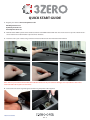
1
If you would like to exit the Menu screen at any time press and hold the MUTE/MENU button for approximately 2 seconds. If no
buttons are pressed for a period of five seconds the unit will automatically exit the Menu and return to your chosen standby display.
3. Adjusting the Volume
The 3Zero has an adjustable volume for controlling the loudness of the audible alert. To increase the volume simply use the UP/
DOWN button in the centre of the unit. Press the front of the button to lower the volume or press the back of the button to increase
it.
4. MUTE/MENU Button
This button has two functions. The Mute function is used to to temporarily MUTE an alert. When the button is pressed and held for
two seconds it allows you access to the Menu for further configuration of your unit.
5. Select and changing road type.
CITY Mode
In CITY mode the 3Zero will ignore any alert generated via GPS that is actually located on a motorway and is in range of your device
but not an immediate threat to you, as you are not actually travelling on that section of road.
Laser alerts remain unaffected when selecting this mode.
MOTORWAY Mode
In Motorway mode the 3Zero will ignore any alert generated via GPS that is not actually on a motorway and is within range of your
device but not an immediate threat to you as you are not actually travelling on that section of road. If your speed drops below
20mph the device will sound an audible alert and the message ‘Road Ch?’ will be shown on the display to remind you that you may
no longer be travelling on a section of motorway and may need to change the mode to ‘CITY’ or ‘ALL’. Laser alerts remain unaffected
when selecting this mode.
ALL Mode
In ALL mode the 3Zero will detect all alerts generated via GPS that are within the selected range of the unit. If you were travelling
on a section of motorway for instance it would mean that the unit could alert to locations situated on an ‘A’ road that are near to the
motorway. As it is not on the road you are travelling however, it is not a threat and you might prefer to select the ‘Mway’ setting so
that the unit would ignore unwanted alerts located via GPS. Laser alerts remain unaffected when selecting this mode.
PLEASE NOTE: Whilst in CITY mode the device will not detect any locations located on a motorway. When the unit is in Motorway
mode the unit will not detect any locations located on ‘A’ roads so you need to remember to change modes when leaving an ‘M’
type road.
6. Cancel Button
If during an alert you decide that you would like to cancel it simply press and hold the MUTE/MENU button. The display will
automatically return to the Standby screen and the device will be ready to alert you to the next GPS coordinate or laser source.
7. Alert Pattern
Fixed Speed Safety Cameras
As you approach a fixed speed safety camera the unit will begin to emit a voice alert or your chosen audible alert (either a Soft or
Hard ‘beep’) at a preset alert distance. At the same time the display will indicate the distance remaining in 50 metre increments to
that location.
Return to contents
UK • 15