1
EXAMPLE: CONFIGURING ILO ON A HP PROLIANT GEN8
2.
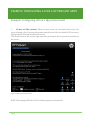
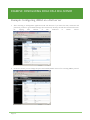
Start Intelligent Provisioning (pressing F10). Wait while Intelligent Provisioning
loads. The Intelligent Provisioning preferences screen appears.
SETTING PREFERENCES
The Set Preferences screen displays automatically the first time Intelligent Provisioning
runs on aserver. You can change preferences later by clicking Perform Maintenance, and
then clicking Intelligent Provisioning Preferences.
1. Choose a language: Choose your interface language and keyboard language.
Figure 4 Intelligent Provisioning preferences
Page 6