1
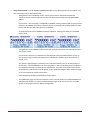
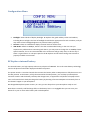
Configuration Menu Backlight: Several levels of display backlight. RF Explorer has good visibility indoor and outdoor, including direct sunlight. The level of backlight should be the appropriate for each condition, and you may want to limit backlight brightness to preserve battery capacity. Contrast: There are 10 different display contrast levels to choose from. USB Bauds: Default is 500Kbps, which is also the recommended setting. In the rare case you experience a problem when connecting with the PC, you may want to change this to 2400bps slower speed. However, this is not recommended as the connection will go really slow, so do this only if there is a good reason to. The port speed in the RF Explorer and PC Client settings must match to properly establish a connection. RF Explorer internal battery The internal battery is a high capacity Lithium-ion polymer of 1000mAh. This is the same battery technology used in cell phones and modern laptops and tablet computers. The power switch is a true hard switch that connects the battery when in ON position or fully disconnect it in the OFF position. As the battery is fully disconnected in the OFF position, you can keep your RF Explorer stored for months and the battery will keep the charge intact, as opposed to cell phones or laptops which uses a soft switch which slowly discharge the battery by drawing a few microamperes continuously from it. This doesn't happen in your RF Explorer. We designed RF Explorer power circuitry in a way you can always have your RF Explorer ready to use! Note there is actually a self-discharge effect in the battery but it is so negligible that you can store your device for a year or more and a battery will not be depleted. RF Explorer User Manual page 19