1
Operating the AutoDAB-GO
1.
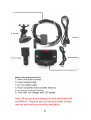
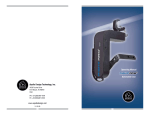
Mount the AutoDAB-GO on the dashboard using the
provided suction cup holder.
2.
Connect one end of the USB power supply cable to the
Micro USB socket on AutoDAB-GO and the other end to
the dual USB car charger. Plug the dual USB car charger
into the car 12V power socket.
3.
Connect the supplied antenna to the antenna socket.
4.
Turn on the power with the POWER SWITCH and the
display will show ‘AutoDAB, Digital Radio on the Move’.
Use MODE button to select DAB mode.
5.
For first time use, you need to scan all the local DAB+
channels by pressing and holding TX/SCAN button for 3
seconds to activate Auto Scan. All available DAB+ radio
channels will be scanned and saved until another Auto
Scan is performed. During scanning, a percentage bar
will be shown on the display to indicate the progress and
the total number of channels available will be displayed.
6.
Once scanning is complete, you can select any DAB+
radio channel via the Tuning Knob.
6