1
Basic Operation
Basic Operation
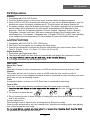
Power on/off
1. Connect to the power supply with a power code and an adaptor.
2. -To turn on the TV
Press POWER button on the TV or remote control.
-To turn off the TV
Press POWER button on the TV or remote control.
Input Source select
SOURCE
Press INPUT button on the TV set or remote control to display the
input source menu, and use CH+/- button on the TV set or ∧/∨ button
on remote control to select the input source, press OK button on the
remote control to enter.
Note: Before you select the input source, make sure the
connections are prepared.
Signs on the screen
Mute
DTV
ATV
AV
SCART
YPBPR
PC
HDMI
DVD
No signal
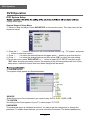
Basic OSD Menu operation
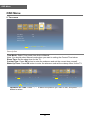
Press MENU button to display the OSD menu as below:
Main menu: VIDEO AUDIO TV SETUP TIME OTHERS
Brightness
50
Picture Mode
Custom
Contrast
50
Color Temp
Normal
Saturation
50
NR
Sharpness
50
MPEG NR
Low
Cinema Mode
Low
Medium
Move ENTER Select Exit Exit
Submenu
(Video menu
for example)
Hint---you should operate
the OSD menu according
to the hint.
∨
∧
∨
∧
Use
/
button to select the main menu, and press ∨ button to enter the submenu.
In the submenu, use ∧ / ∨ / / button to select the function item, press OK button to enter
the adjust/setup menu.
* (Press MENU button to return to the upper menu.)
* (Press EXIT button to exit the menu display.)
Note1: Only when you input the suitable signal, the relevant items can be activated
Note2: Please operating the OSD menu according to hint on the bottom of the banner.
8