1
The colors are now more in balance. The image may also be improved by
adjusting the black and gray points (gamma correction) of the level adjustment
layers. Because this image uses only three datasets, the image can be vastly
improved by using the additional M33 datasets. These should be imported,
rescaled and colorized in the same manner. Finally, there are many additional
tools that are available in Photoshop (e.g., the ‘curves’ tool) that enable the
layers to be manipulated more precisely. For simplicity these methods and
tools are not discussed here.
As always, this is an excellent time to save the image.
Fine Tuning the Image
The image is mostly done, but there are still several steps necessary to complete
the image. One issue that has not yet been addressed is the alignment of the
image layers. Because these images were taken with the same telescope and
camera, and on the same night one after another, the images are already very
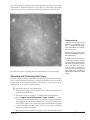
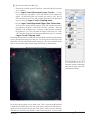
closely aligned. However, if you zoom in on the image (say, to 500%, as shown
on the right) you will notice that the stars are not perfectly aligned. To align
the images use the ‘move tool’ to shift each image layer so that they are aligned
with one another. (Note: Shifting the adjustment layers will have no effect):
Zooming into the image to 500%
shows that the stars are not
aligned. Use the ‘move tool’ in
Photoshop to align the image
layers.
ì Select the Ha layer by clicking on it. Choose the ‘move tool’ and use
the arrow keys to shift the layer until it is well aligned with the B-band
layer. Now select the V-band layer and shift it as well so that it is aligned
with the other two.
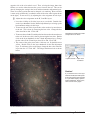
Zooming will also reveal that there are numerous dots and small streaks in the
image. These are caused by cosmic rays that hit the CCD detector during each
exposure. They are therefore in different locations in each filter image and
therefore have a color that matches that filter; e.g., cosmic rays in the V-band
image look green. In the case of this image, nearly all of the cosmic rays are in
the V-band image.
These ‘cosmic ray’ specs and scratches can be fixed in a variety of ways in
Photoshop. A simple option is to use one of the noise filters; e.g., the ‘dust and
scratches’ filter. These can remove the cosmic rays, but they also blur the image.
A more effective but time-consuming method is to use the cloning stamp and
healing brush tools to remove the cosmic rays one by one. The user’s manual
for Photoshop explains how these tools are used.
Rev 4/1/08
Image Tutorial 12