1
Characteristics (continued)
3
HMI software and Web servers
3
Vijeo Designer configuration software
Characteristics of Vijeo Designer applications (continued)
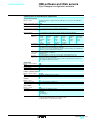
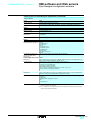
Screen capture
Format
Resolution
Ranges supported
Video window included
Storage
Format
XBT GT terminals
(XBT GT2 and higher)
Magelis Compact iPC
industrial PCs
Transfer
Printing
From XBT GT
terminal (XBT GT2 and higher)
From Magelis Smart iPC and
Compact iPC HMI edition
industrial PCs
JPEG
Display resolution
XBT GT terminals (XBT GT2 and higher),
Magelis Smart iPC HMI edition and Magelis Compact iPC HMI edition industrial PCs
Yes
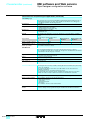
JPEG
On Compact Flash card
On Compact Flash card
On hard disk
Via Data Manager, on terminal or iPC equipped with an Ethernet link
Via USB port (1) or Ethernet port, with a compatible printer (2):
v PCL5
- HP Officejet Pro
- HP LaserJet
v PCL3
- HP Deskjet series
- HP Business InkJet
- HP Officejet Pro
- HP LaserJet
- HP Photosmart series
v ASCII
With any printer equipped with a suitable driver for Windows
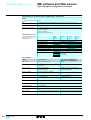
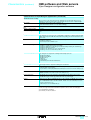
Internet Explorer browser object
Management
Possible functions
Pages created in Vijeo Designer 4.5 for Magelis Smart and Compact iPCs (HMI edition) can
feature a Microsoft Internet Explorer browser object.
Display, in all or part of the Vijeo Designer 4.5 screen page, of:
- HTML format pages: e.g., websites, pages from Microsoft Office Word, Excel and Powerpoint
documents saved in HTML format
- Documents in Adobe pdf format
- Macromedia Flash presentations
- Video sequence (streaming) originating from a video server on IP
- Any other Active X featuring a USB port
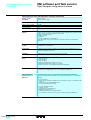
Schneider Electric applications
Management
Possible functions
Pages created with Vijeo Designer 4.5 for Magelis Compact iPC can run Schneider Electric
software in a window that is independent of the Windows system.
It is also possible to run frequently-used application software as and when required, e.g.,:
- Unity Pro
- Twido Suite
- Advantys STB configuration software
- PL7
- PowerSuite, etc.
(1) A printer can be connected to the USB port of XBT GT terminals (XBT GT2 and higher) as
long as the printer connection is serial or parallel. A serial-to-USB or parallel-to-USB
conversion cable is also required.
(2) For a complete list of Hewlett Packard and other manufacturer printers supported, please
consult your Regional Sales Office.
36349-EN_Ver5.1.fm/7