1
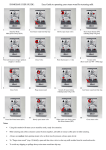
Windows 2000 Windows XP Windows Vista, Win CE, Win 7,Win 8 Linux(Debian-3.1, Redhat-9.0 Ubuntu-8.10 Fedora-7.0 tested) Android OS (With standard USB interface) Specification Dimension: 151*59*12.5mm Weight: 100g Operation Temperature Range: -10℃ to +55℃ Battery Type: Polymer Lithium-ion Battery Standby Time: 500-700 hours Transmission power: maximum +4dBM Charging Voltage: 4.2V - 5.05V Charging Current: < 350mA Sleep Mode Current: < 1mA Installation and Operation Open the packing and remove the product Remove the receiver from the main unit flank chamber, and insert the receiver into terminal standard USB port Turn on the device and wait for the connection to be done Begin to use your wireless keyboard Note: USB charging cable can be used to charge the battery by connecting to the computer, etc. Turn on/off the Backlit LED (Only for A/B versions) Two Modes: Software Control and Manual Control When the wireless connection is successful, the backlit LED will be automatically on 3 seconds, then off, to save