1
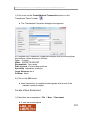
Health One Version 7.1 User Manual. Copyright 2011Helix Health Ltd Editing A Character: Place the mouse cursor to the left of the character to be selected, hold down the mouse key and drag the mouse cursor over the character required. Now release the mouse key. A Word Place the mouse cursor over the middle of the word required and click twice quickly. Alternatively, drag the mouse cursor over the entire word as described for character selection. A Line Move your mouse cursor to the left of the line required until it becomes a right facing arrow. Now drag downwards for one line. A Paragraph Same as for the line but keep dragging down until the paragraph is selected. Any Amount Click once to place the insert cursor at the beginning of the selection. Use the scroll bar if necessary to view the end point of the selection. Hold down SHIFT and click once on the end point. All Text Select the menu sequence: Edit / Select All Changing the Appearance of Text. The Character: First select the character(s) to be altered, as described on the previous page. Now select the button required on the Formatting Toolbar. Alternatively: Select the menu sequence: Format / Font and change the settings as required. The Paragraph Position the insert cursor anywhere inside the paragraph to altered. Now select the change required on the Formatting Toolbar or, alternatively select the menu sequence: Format / Paragraph. To practice these techniques: 173