1
Do it yourself email migration: user manual for First Class to Outlook migration
Do it yourself email migration
U S E R M A N UA L F O R F I R S T CL A S S T O O U T LO O K M I G R AT I O N
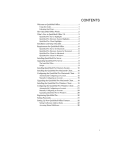
Contents
DOCUMENT VERSION ......................................................................................................... 2
INTRODUCTION................................................................................................................... 2
WHAT WILL BE MIGRATED? ................................................................................................. 3
Do-it-yourself migration of your own mail, calendar and contacts ................................................ 3
Special First Class accounts and special features handled separately ......................................... 3
What goes to Outlook? ........................................................................................................................... 3
What doesn’t go to Outlook?................................................................................................................. 4
If not to Outlook, where else? ................................................................................................................ 4
GETTING OUTLOOK TO WORK ........................................................................................... 6
Installing Microsoft Office 2010 with Outlook ................................................................................... 6
Access your mailbox using Outlook....................................................................................................... 7
Making Outlook default mail program ................................................................................................ 9
Access your mailbox through OWA webmail .................................................................................. 10
Access your mailbox using your mobile device ............................................................................... 10
MIGRATING EMAIL MESSAGES FROM FIRST CLASS TO OUTLOOK .................................. 11
About the procedure ............................................................................................................................. 11
Preparing for the first migration run.................................................................................................. 11
Transferring the First Class Inbox folder to Outlook ...................................................................... 13
Transferring other First Class folders to Outlook ............................................................................ 15
Transferring First Class Sent items to Outlook ................................................................................. 15
Saving unmovable messages by exporting them to H: drive ....................................................... 16
MIGRATING THE CALENDAR ............................................................................................ 17
About the procedure ............................................................................................................................. 17
Exporting First Class the calendar and importing it into Outlook ................................................ 17
MIGRATING YOUR CONTACTS FOLDER (FIRST CLASS ADDRESSBOOK) ........................ 21
About the procedure ............................................................................................................................. 21
Transferring individual addresses from First Class to Outlook ..................................................... 21
Exporting the mailing lists from First Class ....................................................................................... 23
END NOTE ......................................................................................................................... 24
© ILIAD. Contact ILIAD if you need assistance: [email protected], Ext. 456.
Page 1