1
BTM44X – Firmware Upgrade
Application Note
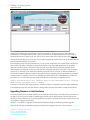
Change the COM port as per the setting in the PC for the dev kit, specify the protocol and COM port
parameters for ‘Start With’ and ‘Exit With’, select the filename in the appropriate text box (which may be
automatically selected if there is only one .dfu file in the same folder as the utility) and then click Upgrade.
The whole process takes up to 5 minutes. On successful upgrade the module will be left in the state specified
by the parameters labelled as ‘Exit With’
If the upgrade process was previously aborted, i.e. via a power interruption, the module starts in BCSP boot
loader mode. The utility is designed to detect for that state if the ‘Start With’ parameters do not yield a
response from the module. It will check for BCSP mode and if that results in a positive detection it will
download the new firmware. It may try to exit with the parameters specified in ‘Exit With’. That final phase
may fail. If so, manually try to detect the module by trying MP and AT modes at 115200 and 9600 baud.
The firmware upgrade utility can operate in automatic mode by supplying relevant parameters as command
line arguments. For example, if the kit is on COM34, the new firmware file is called NewFirmware.dfu and
the module is in AT mode but must exit in MP mode, then the command line arguments will be
COM=34 "DFU=NewFirmware.dfu" PROTs=AT BAUDs=115200 PARs=NONE STOPs=1 PROTe=MP
BAUDe=115200 PARe=NONE STOPe=1 UPGRADE
If the utility is launched with these arguments, it starts and exits on completion without further intervention.
If the upgrade process fails, a log file (which is always) offers full trace information to diagnose the failure.
Upgrading firmware on Host Hardware
In real world applications the UART interface of the BTM44x module will be most likely directly connected to
the UART port of a host CPU which is managing the module and the UART signals of the module are not
exposed to allow a Windows PC to use the Btm44xConfig utility to upgrade the firmware. In this scenario it is
not possible to upgrade the firmware.
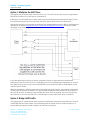
However, it is possible to augment the host/module hardware design to expedite a firmware upgrade.
There are several options available and they are described in subsequent sections of this document.
Americas: +1-800-492-2320 Option 3
Europe: +44-1628-858-940
Hong Kong: +852 2923 0610
www.lairdtech.com/wireless
2
Laird Technologies