1
Final Assembly
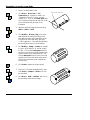
1. Zoom in on the isometric view.
2. Click Select > Select > Solid and then click
on the connector screw.
3. Right click, click Move, click on the Center
point snap icon and click on the circle at the top
of the screw connector as the pick up point.
Click on the Center point snap icon and click
on circle at the bottom of the screw body as the
put down point.
4. Click Draw > Solid > Add and click on the
main body.
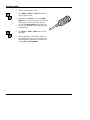
5. Save the drawing as CNTSCREW unless you
are running Test Drive in which case you can
make a temporary snapshot of your working by
clicking File > Save Snapshot.
6 / Boolean Solids Tutorial
CADMAX User's Manual